Flask REST API Tutorial: Build a RESTful Service with Python
Hey! If you have wanted to build a web API but had no idea where to start, you are in the right place. Today, we’re going to dive into building your very first Flask REST API with Python. It’s an amazing skill for any developer. We will create a simple service. Then we’ll see it work in action!
What We Are Building: Your First Flask REST API
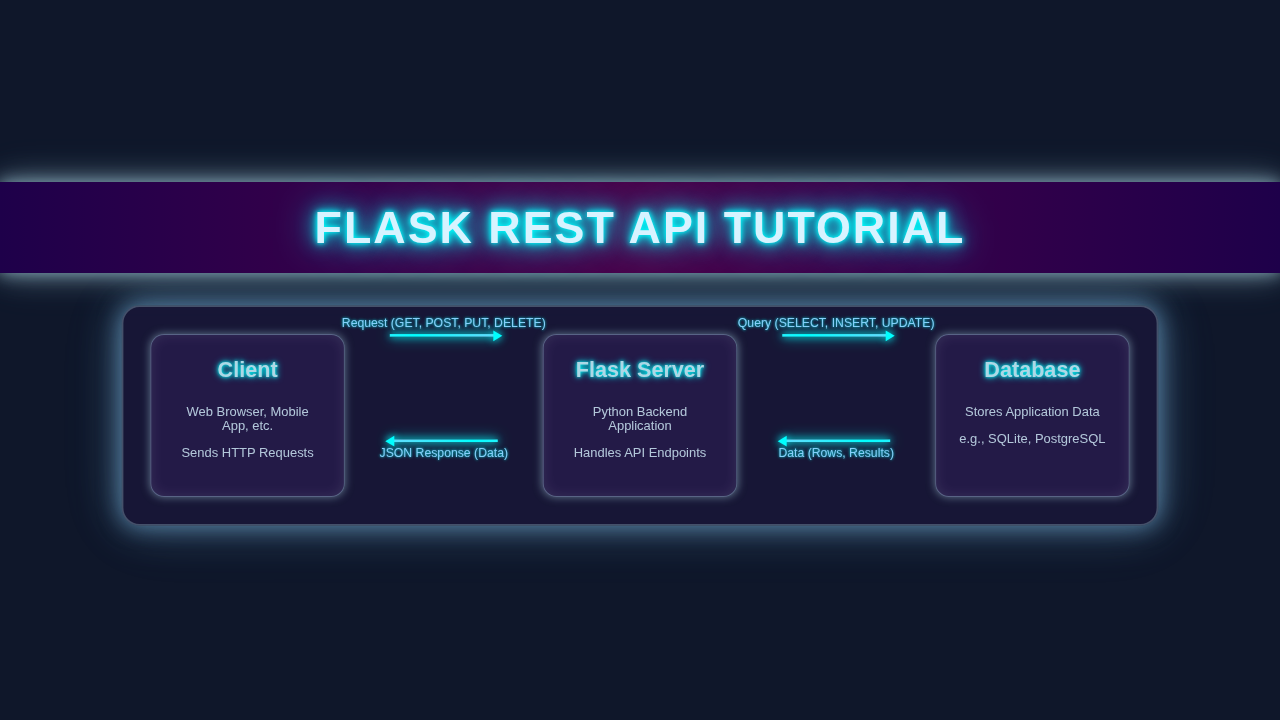
Imagine a digital notebook for your daily tasks. That’s what we’re creating! We will build a simple “To-Do List” backend. This backend will let you add, view, update, and delete tasks. It’s a fundamental set of operations. We call these CRUD operations (Create, Read, Update, Delete). Our API will expose specific HTTP methods for each action. This project is a perfect entry point. It truly shows the power of a Flask REST API.
Pro Tip: REST stands for Representational State Transfer. It’s an architectural style. REST helps networked applications communicate. APIs designed with REST are called RESTful APIs. They are super common!
HTML Structure: Our Simple Frontend
While our focus is the backend API, we need a way to see it work. We’ll craft a super basic HTML page. This page will have a form to add new tasks. It will also display our task list. It helps us visualize our API’s responses. Don’t worry, it’s very minimal!
CSS Styling: Making It Look Good (Enough)
Our little frontend client needs some basic styling. This CSS will make it presentable. It helps improve readability for our tasks. Plus, it makes interacting with the form a bit nicer. We are just adding a few rules. This ensures it doesn’t look completely plain.
JavaScript: The API Connector
This is where the magic happens on the frontend! Our JavaScript code will talk to our Flask REST API. It will send data and receive responses. We’ll use the built-in fetch() API for these network requests. It’s how our web page will interact with the backend tasks. You will see tasks appear and disappear dynamically.
app.py
# app.py
from flask import Flask, jsonify, request, abort

app = Flask(__name__)

# In-memory "database" for demonstration purposes
# In a real application, this would be a persistent database (SQL, NoSQL, etc.)
tasks = [
    {
        'id': 1,
        'title': 'Learn Flask',
        'description': 'Study Flask documentation and tutorials.',
        'done': False
    },
    {
        'id': 2,
        'title': 'Build REST API',
        'description': 'Develop a simple REST API using Flask.',
        'done': False
    }
]

# A simple counter for generating new task IDs
next_task_id = 3

# --- API Endpoints ---

@app.route('/tasks', methods=['GET'])
def get_tasks():
    """
    Retrieves all tasks.
    Returns a JSON array of task objects.
    """
    return jsonify({'tasks': tasks})

@app.route('/tasks/<int:task_id>', methods=['GET'])
def get_task(task_id):
    """
    Retrieves a single task by its ID.
    Returns a JSON object of the task if found, otherwise returns 404.
    """
    task = [task for task in tasks if task['id'] == task_id]
    if not task:
        abort(404, description=f"Task with ID {task_id} not found.")
    return jsonify({'task': task[0]})

@app.route('/tasks', methods=['POST'])
def create_task():
    """
    Creates a new task.
    Expects JSON input with 'title' and optional 'description'.
    Returns the newly created task with status 201 (Created).
    """
    if not request.json or not 'title' in request.json:
        # If no JSON or 'title' is missing, it's a bad request
        abort(400, description="Missing 'title' in request body.")

    global next_task_id
    new_task = {
        'id': next_task_id,
        'title': request.json['title'],
        'description': request.json.get('description', ""), # Description is optional
        'done': False
    }
    tasks.append(new_task);
    next_task_id += 1 # Increment for next task
    return jsonify({'task': new_task}), 201 # 201 Created status code

@app.route('/tasks/<int:task_id>', methods=['PUT'])
def update_task(task_id):
    """
    Updates an existing task by its ID.
    Expects JSON input with fields to update (title, description, done).
    Returns the updated task.
    """
    task_list = [task for task in tasks if task['id'] == task_id]
    if not task_list:
        abort(404, description=f"Task with ID {task_id} not found.")
    task = task_list[0]

    # Validate request data
    if not request.json:
        abort(400, description="Request must contain JSON data.")
    if 'title' in request.json and not isinstance(request.json['title'], str):
        abort(400, description="Title must be a string.")
    if 'description' in request.json and not isinstance(request.json['description'], str):
        abort(400, description="Description must be a string.")
    if 'done' in request.json and not isinstance(request.json['done'], bool):
        abort(400, description="Done must be a boolean.")

    # Update fields if present in the request
    task['title'] = request.json.get('title', task['title'])
    task['description'] = request.json.get('description', task['description'])
    task['done'] = request.json.get('done', task['done'])

    return jsonify({'task': task})

@app.route('/tasks/<int:task_id>', methods=['DELETE'])
def delete_task(task_id):
    """
    Deletes a task by its ID.
    Returns a success message if deleted, otherwise 404.
    """
    task_list = [task for task in tasks if task['id'] == task_id]
    if not task_list:
        abort(404, description=f"Task with ID {task_id} not found.")
    tasks.remove(task_list[0])
    return jsonify({'result': True})

# --- Error Handling ---
@app.errorhandler(400)
def bad_request(error):
    """Handles HTTP 400 Bad Request errors."""
    return jsonify({'error': 'Bad Request', 'message': error.description}), 400

@app.errorhandler(404)
def not_found(error):
    """Handles HTTP 404 Not Found errors."""
    return jsonify({'error': 'Not Found', 'message': error.description}), 404

# --- Running the Application ---
if __name__ == '__main__':
    # To run the app:
    # 1. Save this file as `app.py`.
    # 2. Make sure you have Flask installed (`pip install Flask`).
    # 3. Run from your terminal: `python app.py`
    # The API will be available at http://127.0.0.1:5000/
    #
    # For development, you might want to use debug mode:
    # app.run(debug=True)
    app.run(host='0.0.0.0', port=5000)
How It All Works Together: From Backend to Browser
Now, let’s tie everything together. We’ll start with setting up Python. Then, we build our robust Flask backend. Finally, we connect our simple frontend. This journey will show you the full picture. You’ll understand the flow of data. Moreover, you’ll feel proud of your creation!
Setting Up Your Flask Project
First, we need to set up our Python environment. It’s good practice to use a virtual environment. This keeps project dependencies separate. Open your terminal or command prompt. Then, follow these simple steps:
# Create a new directory for your project
mkdir flask-todo-api
cd flask-todo-api

# Create a virtual environment
python3 -m venv venv

# Activate the virtual environment
# On macOS/Linux:
source venv/bin/activate
# On Windows:
veng\Scripts\activate

# Install Flask
pip install Flask Flask-CORS
We install Flask-CORS to handle Cross-Origin Resource Sharing. This lets our frontend (running on a different port or domain) talk to our API. If you need a refresher on Flask basics, check out our guide: Flask for Beginners: Build Your First Web App. It covers all the foundations.
Designing Our Flask REST API Backend: The Python Code
Now for the heart of our project: the Flask API. We’ll create a app.py file. This file will hold our Flask application logic. We’ll define routes for each CRUD operation. Our tasks will be stored in a simple Python list for now. This keeps things straightforward. In real applications, you’d use a database. Let me explain what’s happening here. We use jsonify to return JSON responses. This is standard for REST APIs. We assign unique IDs to tasks. This helps us manage them easily. Our API methods map directly to HTTP verbs. For example, GET fetches data, and POST creates new data.
from flask import Flask, jsonify, request
from flask_cors import CORS

app = Flask(__name__)
CORS(app) # Enable CORS for all routes

tasks = [] # Our in-memory data store for tasks
task_id_counter = 1

# Root endpoint - just for testing if the API is alive
@app.route('/', methods=['GET'])
def hello_world():
    return jsonify({'message': 'Welcome to your Flask To-Do API!'})

# GET all tasks
@app.route('/tasks', methods=['GET'])
def get_tasks():
    return jsonify(tasks)

# GET a single task by ID
@app.route('/tasks/<int:task_id>', methods=['GET'])
def get_task(task_id):
    task = next((t for t in tasks if t['id'] == task_id), None)
    if task:
        return jsonify(task)
    return jsonify({'message': 'Task not found'}), 404

# POST to create a new task
@app.route('/tasks', methods=['POST'])
def create_task():
    global task_id_counter
    if not request.json or 'title' not in request.json:
        return jsonify({'message': 'Bad request, title is required'}), 400
    new_task = {
        'id': task_id_counter,
        'title': request.json['title'],
        'description': request.json.get('description', ''),
        'done': False
    }
    tasks.append(new_task)
    task_id_counter += 1
    return jsonify(new_task), 201 # 201 Created status

# PUT to update an existing task
@app.route('/tasks/<int:task_id>', methods=['PUT'])
def update_task(task_id):
    task = next((t for t in tasks if t['id'] == task_id), None)
    if not task:
        return jsonify({'message': 'Task not found'}), 404
    if not request.json:
        return jsonify({'message': 'Bad request, no data provided'}), 400

    task['title'] = request.json.get('title', task['title'])
    task['description'] = request.json.get('description', task['description'])
    task['done'] = request.json.get('done', task['done'])
    return jsonify(task)

# DELETE a task
@app.route('/tasks/<int:task_id>', methods=['DELETE'])
def delete_task(task_id):
    global tasks
    initial_task_count = len(tasks)
    tasks = [t for t in tasks if t['id'] != task_id]
    if len(tasks) < initial_task_count:
        return jsonify({'message': 'Task deleted'}), 200 # 200 OK status
    return jsonify({'message': 'Task not found'}), 404

if __name__ == '__main__':
    app.run(debug=True, port=5000)
Testing Your Flask REST API: Using curl and Python requests
Before connecting our frontend, let’s test the API directly. This confirms our backend works. You can use command-line tools like curl. It’s great for quick checks. Also, Python’s requests library is fantastic. It helps you interact with web services programmatically. This is how other Python applications would consume your API.
# Test GET all tasks (initially empty)
curl http://127.0.0.1:5000/tasks

# Test POST to create a new task
curl -X POST -H "Content-Type: application/json" -d '{"title": "Learn Flask REST API"}' http://127.0.0.1:5000/tasks

# Test GET all tasks again (should show the new task)
curl http://127.0.0.1:5000/tasks

# Test DELETE a task (replace 1 with the actual task ID)
curl -X DELETE http://127.0.0.1:5000/tasks/1
You can also use Python to test! If you’re keen to learn more about interacting with APIs using Python, check out these resources: Python Requests Library: Master Web Interactions and Master Python Requests Library: HTTP for Humans. They explain how to send various HTTP requests from your Python scripts. They are really useful.
Crafting the Frontend: HTML, CSS, and JavaScript
We’ve already laid out the HTML and CSS. They give us structure and basic looks. The JavaScript is the final piece here. It handles user interactions. When you submit the form, JS sends a POST request. It fetches all tasks with a GET request. Then it updates tasks with PUT and deletes them with DELETE. Our JS code makes sure the page reflects the data from our Flask REST API. It updates the UI dynamically. This creates a responsive user experience. It shows the true power of a connected application!
Bringing It All to Life: Running Your Application
You’re almost there! First, ensure your Flask backend is running. Open your terminal in the flask-todo-api directory. Then run:
# Make sure your virtual environment is active
python app.py
Next, open your index.html file in your web browser. You might need a simple local server if you encounter CORS issues. A quick way is using Python’s http server:
# In a new terminal, navigate to your frontend directory
python -m http.server 8000
Then, navigate to http://localhost:8000 in your browser. Start adding tasks! Watch them appear. Edit them. Delete them. You built this amazing system!
Friendly Advice: Always double-check your console for errors. Browser developer tools are your best friend for debugging JavaScript and network requests. They offer valuable insights.
Tips to Customise It
You’ve built a working API! But the fun doesn’t stop here. Here are some ideas to make it even better:
- Add a Database: Replace the in-memory list with a real database. SQLite with SQLAlchemy is a great start.
- User Authentication: Implement user registration and login. Make tasks specific to each user. This adds security.
- More Fields: Add due dates, priorities, or categories to your tasks. Expand your data model.
- Error Handling: Implement more robust error handling. Return meaningful error messages to the client. This improves user feedback.
- Deploy It: Push your API to a cloud platform like Heroku or Render. Share it with the world!
Conclusion
Wow! You just built your very first Flask REST API from scratch. This is a huge accomplishment! You created a backend service. You learned about HTTP methods. You even connected it to a simple frontend. You now understand how web applications communicate. This project is a solid foundation. It opens up so many possibilities for your web development journey. Go ahead and share your creation! Experiment with new features. Keep building, keep learning. You’re doing great!
app.py
# app.py
from flask import Flask, jsonify, request, abort

app = Flask(__name__)

# In-memory "database" for demonstration purposes
# In a real application, this would be a persistent database (SQL, NoSQL, etc.)
tasks = [
    {
        'id': 1,
        'title': 'Learn Flask',
        'description': 'Study Flask documentation and tutorials.',
        'done': False
    },
    {
        'id': 2,
        'title': 'Build REST API',
        'description': 'Develop a simple REST API using Flask.',
        'done': False
    }
]

# A simple counter for generating new task IDs
next_task_id = 3

# --- API Endpoints ---

@app.route('/tasks', methods=['GET'])
def get_tasks():
    """
    Retrieves all tasks.
    Returns a JSON array of task objects.
    """
    return jsonify({'tasks': tasks})

@app.route('/tasks/<int:task_id>', methods=['GET'])
def get_task(task_id):
    """
    Retrieves a single task by its ID.
    Returns a JSON object of the task if found, otherwise returns 404.
    """
    task = [task for task in tasks if task['id'] == task_id]
    if not task:
        abort(404, description=f"Task with ID {task_id} not found.")
    return jsonify({'task': task[0]})

@app.route('/tasks', methods=['POST'])
def create_task():
    """
    Creates a new task.
    Expects JSON input with 'title' and optional 'description'.
    Returns the newly created task with status 201 (Created).
    """
    if not request.json or not 'title' in request.json:
        # If no JSON or 'title' is missing, it's a bad request
        abort(400, description="Missing 'title' in request body.")

    global next_task_id
    new_task = {
        'id': next_task_id,
        'title': request.json['title'],
        'description': request.json.get('description', ""), # Description is optional
        'done': False
    }
    tasks.append(new_task);
    next_task_id += 1 # Increment for next task
    return jsonify({'task': new_task}), 201 # 201 Created status code

@app.route('/tasks/<int:task_id>', methods=['PUT'])
def update_task(task_id):
    """
    Updates an existing task by its ID.
    Expects JSON input with fields to update (title, description, done).
    Returns the updated task.
    """
    task_list = [task for task in tasks if task['id'] == task_id]
    if not task_list:
        abort(404, description=f"Task with ID {task_id} not found.")
    task = task_list[0]

    # Validate request data
    if not request.json:
        abort(400, description="Request must contain JSON data.")
    if 'title' in request.json and not isinstance(request.json['title'], str):
        abort(400, description="Title must be a string.")
    if 'description' in request.json and not isinstance(request.json['description'], str):
        abort(400, description="Description must be a string.")
    if 'done' in request.json and not isinstance(request.json['done'], bool):
        abort(400, description="Done must be a boolean.")

    # Update fields if present in the request
    task['title'] = request.json.get('title', task['title'])
    task['description'] = request.json.get('description', task['description'])
    task['done'] = request.json.get('done', task['done'])

    return jsonify({'task': task})

@app.route('/tasks/<int:task_id>', methods=['DELETE'])
def delete_task(task_id):
    """
    Deletes a task by its ID.
    Returns a success message if deleted, otherwise 404.
    """
    task_list = [task for task in tasks if task['id'] == task_id]
    if not task_list:
        abort(404, description=f"Task with ID {task_id} not found.")
    tasks.remove(task_list[0])
    return jsonify({'result': True})

# --- Error Handling ---
@app.errorhandler(400)
def bad_request(error):
    """Handles HTTP 400 Bad Request errors."""
    return jsonify({'error': 'Bad Request', 'message': error.description}), 400

@app.errorhandler(404)
def not_found(error):
    """Handles HTTP 404 Not Found errors."""
    return jsonify({'error': 'Not Found', 'message': error.description}), 404

# --- Running the Application ---
if __name__ == '__main__':
    # To run the app:
    # 1. Save this file as `app.py`.
    # 2. Make sure you have Flask installed (`pip install Flask`).
    # 3. Run from your terminal: `python app.py`
    # The API will be available at http://127.0.0.1:5000/
    #
    # For development, you might want to use debug mode:
    # app.run(debug=True)
    app.run(host='0.0.0.0', port=5000)