CORS Explained: Demystifying Cross-Origin Requests
Hello, fellow web explorers! If you’ve been dabbling in web development, you’ve likely hit that frustrating wall. You write some awesome JavaScript. You make an API request to grab data. Then, bam! Your console screams: “Blocked by CORS policy!” It feels like a secret club you’re not allowed into, doesn’t it?
Trust me, you’re not alone. This error used to make my head spin. But what exactly is going on? Why is your browser being such a party pooper? Today, we’re going to dive deep into Cross-Origin Resource Sharing (CORS), breaking it down into super plain English. You’ll finally understand why your API requests get blocked.
The Headache: “Blocked by CORS Policy” – Sound Familiar?
Imagine you’re building a cool new website. Let’s say it’s a front-end application living at https://myawesomewebsite.com. You want to fetch some fresh data. Perhaps you’re getting weather updates from a third-party service. Or maybe you’re pulling user profiles from your own back-end server. That server might live at https://api.myawesomewebsite.com.
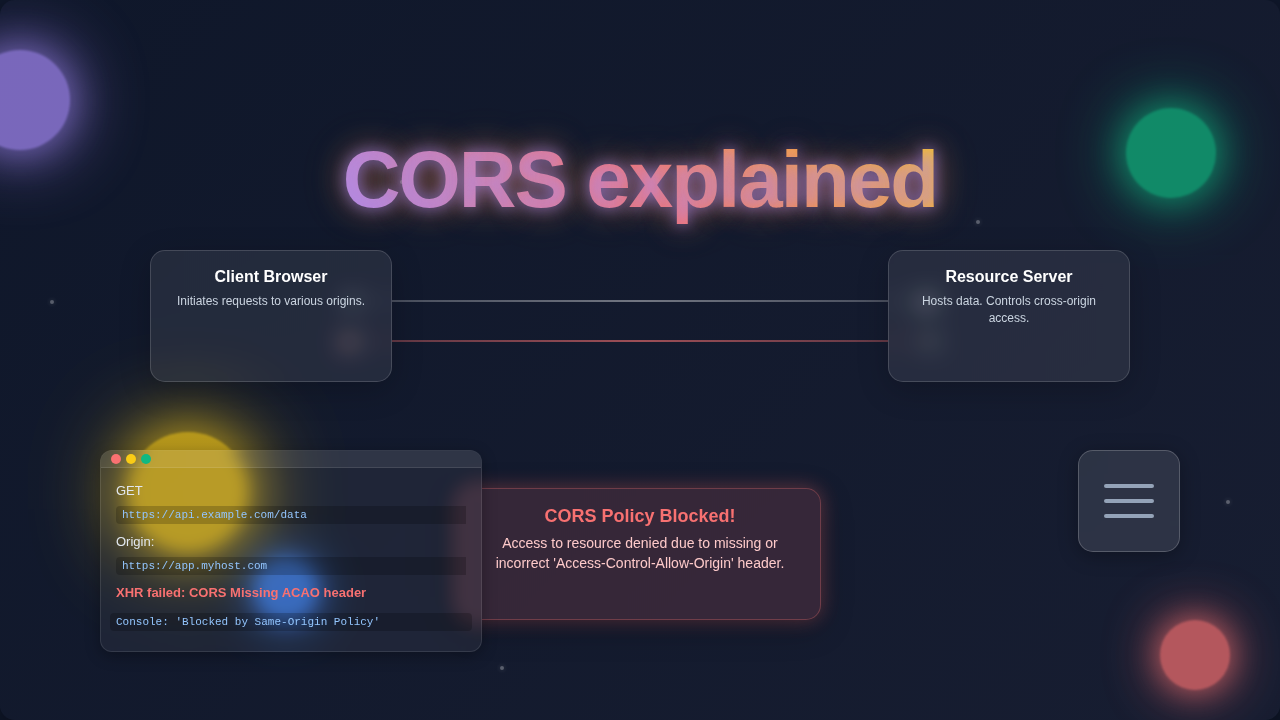
So, you write the code to make that request. You hit refresh. And then, the dreaded error message appears. Your browser console lights up in red. “Access to fetch at ‘https://api.myawesomewebsite.com/data’ from origin ‘https://myawesomewebsite.com’ has been blocked by CORS policy.” It feels like a direct slap in the face.
But what does this even mean? Why is your perfectly good request getting shut down? It boils down to something called the “same-origin policy.” This is a fundamental security concept in web browsers. Ultimately, it’s designed to keep you safe online.
What is an “Origin” Anyway? (And Why Your Browser Cares)
Before we properly tackle the basics of CORS, let’s understand “origin.” Think of an origin like a unique address label for a website or web application. Every single website you visit has one. Indeed, it’s its digital home address.
An origin is made up of three key parts: the protocol, the domain, and the port. For instance, https://procoder09.com:443 is an origin. https is the protocol. procoder09.com is the domain. And 443 is the port (the default for HTTPS).
If any of these three parts are different, then you have a different origin. Let’s look at some examples:
https://procoder09.comandhttp://procoder09.comare different origins (different protocol).https://procoder09.comandhttps://blog.procoder09.comare different origins (different domain/subdomain).https://procoder09.com:8080andhttps://procoder09.com:443are different origins (different port).
Your browser takes this origin concept very seriously. It acts like a vigilant bouncer at an exclusive club. By default, it only allows interactions between resources that share the exact same origin. This is the “same-origin policy” in action. It prevents malicious websites from stealing your data or performing actions on your behalf without your knowledge.
CORS Explained: The Browser’s Security Guard
Okay, so your browser is a security guard. It’s diligently doing its job to protect you. But what if you want two different origins to talk to each other? What if your front-end at https://myawesomewebsite.com really needs to chat with your API at https://api.myawesomewebsite.com? This is precisely where CORS steps in.
CORS stands for Cross-Origin Resource Sharing. It’s a standard, a set of rules. These rules allow a web page from one origin to request resources from another origin. Think of it as a special permission slip system. It lets the browser relax its strict same-origin policy, but only under specific, controlled conditions.
Without CORS, your browser would simply block every single cross-origin request. This would make modern web development incredibly difficult. We constantly need to fetch data from different places. So, CORS provides a secure, agreed-upon method for this to happen. It’s not about blocking you for no reason. Instead, it’s about letting you share data safely and intentionally.
CORS Explained in Action: How Permissions Work
So, how does this permission slip system actually work? It involves a handshake between your browser and the server you’re trying to reach. When your front-end (Origin A) tries to access resources on an API server (Origin B), your browser adds a special HTTP header. This header is part of its request.
This header is called Origin. The Origin header tells the server: “Hey, I’m a request from https://myawesomewebsite.com. Can I get some data?”
The API server then receives this request. It looks at the Origin header. The server decides: “Do I trust this origin? Am I configured to share my resources with them?” If the server agrees, it sends back a response. That response also has a special HTTP header: Access-Control-Allow-Origin.
This Access-Control-Allow-Origin header is the server’s permission slip. For example, it might say Access-Control-Allow-Origin: https://myawesomewebsite.com. This tells your browser, “Yes, https://myawesomewebsite.com is allowed to access this resource.” Your browser sees this. Consequently, it then happily allows your JavaScript to receive the response.
What if the server doesn’t send that header? Or if the origin in the header doesn’t match your website’s origin? Then your browser, being the diligent security guard, blocks the request. That’s when you see the dreaded CORS error. It’s the browser saying, “The server didn’t give you the permission slip.”
Sometimes, for more complex requests, your browser even performs a “preflight” request. This uses the OPTIONS HTTP method. It’s like a quick phone call before the main visit. The browser asks the server: “Are these specific methods or headers okay for my upcoming request?” The server responds. If all clear, the actual request goes through. For those of you dabbling in server-side scripting, understanding how HTTP requests work is helpful. Tools like the Python Requests Library: Simplified HTTP for Devs provide excellent context.
Fixing CORS Issues: What You Can Do Next
So, you’ve got the error. You understand the “why.” Now, what about the “how to fix it”? Here’s the most crucial takeaway: CORS is almost always a server-side problem. You, as the front-end developer, generally cannot fix it with client-side code alone.
The fix needs to happen on the API server. The server must be configured to send the correct Access-Control-Allow-Origin header in its responses. This tells your browser that it’s okay to share resources with your front-end’s origin.
If you control the API server:
- Allow Specific Origins: This is the safest approach. Configure your server to only allow your specific front-end origin (e.g.,
https://myawesomewebsite.com). - Allow Multiple Origins: If you have several front-ends, you can configure your server to send back the appropriate origin from a predefined list.
- Allow All Origins (
*): You can setAccess-Control-Allow-Origin: *. This means any origin can access your resources. Be very careful with this! It significantly lowers your API’s security. Only use this for truly public, non-sensitive data, or during early development when security isn’t the primary concern yet.
The specific steps to configure this depend on your server technology (Node.js, Python/Django/Flask, PHP/Laravel, etc.). You’ll usually find settings related to CORS middleware or headers in your server framework’s documentation.
If you DON’T control the API server:
- Contact the API Provider: This is your first step. Reach out to them. Ask them to add your origin to their allowed list.
- Use a Proxy: During development, you can often use a proxy. Tools like webpack-dev-server or a simple Nginx proxy can redirect your requests through your own origin. Your front-end thinks it’s talking to itself. Then the proxy forwards the request to the real API. This makes the browser happy.
Pro Tip: When debugging CORS, always check your browser’s network tab! Look at the request headers you sent (especially the
Originheader) and the response headers from the server (especiallyAccess-Control-Allow-Origin). This will show you exactly what’s happening in the handshake.
Practical Tips and Important Considerations for CORS
While fixing CORS often means adjusting server settings, there are a few more things to keep in mind. Security is paramount. Using Access-Control-Allow-Origin: * is convenient. However, it means any website on the internet can make requests to your API. Only do this if your API serves completely public data. Data that requires authentication or is user-specific should never be exposed in this way.
Another important aspect is credentials. If your API requests need to send cookies, HTTP authentication, or client certificates, you’ll need another header. The server must also send Access-Control-Allow-Credentials: true. Your client-side code also needs to specify that it wants to send credentials (e.g., credentials: 'include' in the Fetch API). This tells the browser to include those sensitive bits.
As you build more complex applications, perhaps even something like a React Todo App Tutorial: Build with Functional Components & Hooks, you’ll find yourself interacting with APIs more and more. Understanding CORS will save you countless hours of frustration. It truly is a core concept for any modern web developer.
Remember: CORS is a security feature, not a bug. It’s your browser protecting you and your users. When you encounter a CORS error, it means the browser did its job perfectly. Your task is to provide the server with the correct permissions.
Don’t let CORS intimidate you! It seems complicated at first. But once you grasp the idea of origins and permission slips, it clicks. You now understand the browser’s security measures. You also know how to make your servers play nice with them. Keep building, keep learning, and don’t be afraid to experiment. Who knows, maybe your next project will feature some stunning visuals, like a Glassmorphism Card: Build with Tailwind CSS & HTML Utilities, beautifully fetching data without a single CORS error in sight!
Happy coding!