Python Web Scraper: Beginners Guide to Data Extraction
Hey there, fellow coder! If you’ve ever wanted to build a Python Web Scraper but had no idea where to start, you are absolutely in the right place. Today, we’re going to dive into the exciting world of data extraction. You will learn to pull information from websites using Python’s powerful Requests and BeautifulSoup libraries. It’s going to be a fun, hands-on journey!
What We Are Building
We are going to build a simple but incredibly powerful Python Web Scraper. This tool will automatically visit a webpage. Then, it will extract specific pieces of data from it. Think about it: no more manually copying and pasting information! We’ll target some public data, like product names and prices from a sample HTML page. This project teaches you core scraping principles. These skills are super useful for market research, content aggregation, and much more. You’ll gain a valuable new skill for your coding toolkit.
Understanding Our Target HTML
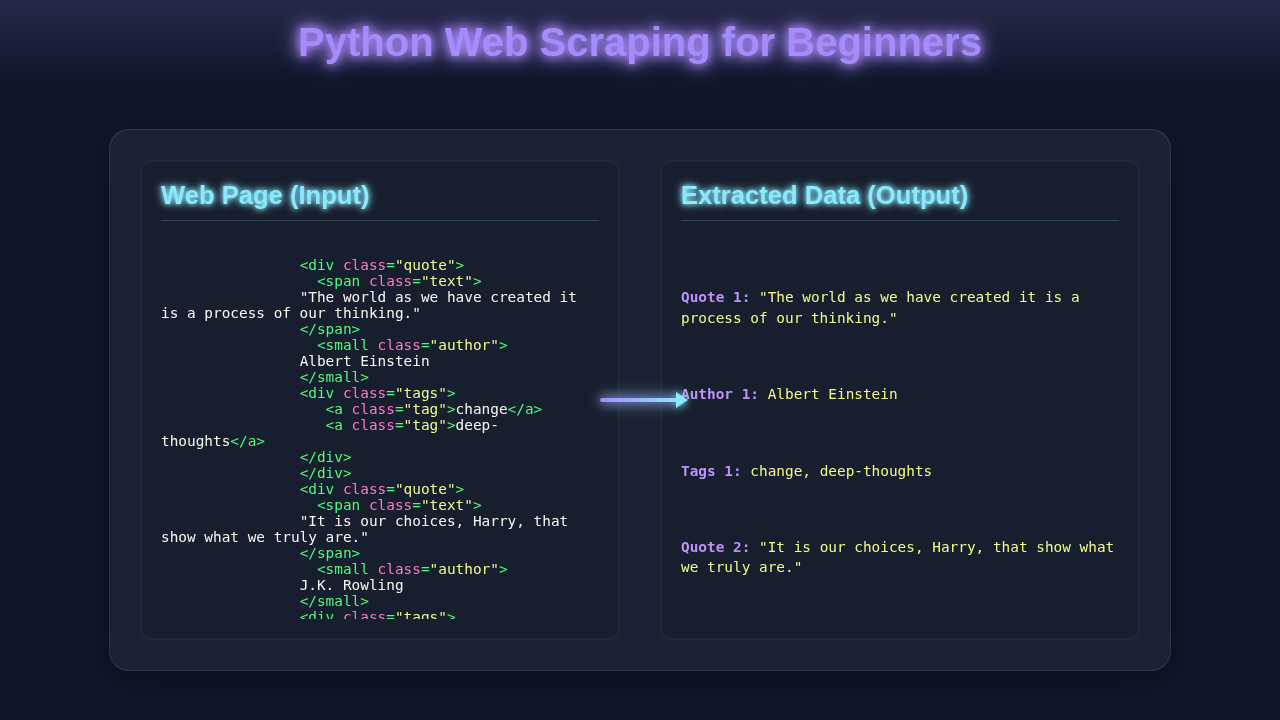
Before we can scrape, we need to know what we’re looking for. Websites are built with HTML. This language defines the structure and content of a page. Our scraper will “read” this HTML. Then it will identify the elements holding the data we want. We’ll focus on common HTML tags like <div>, <h2>, and <p>. These tags typically contain product information. Here’s a simplified example of the HTML structure we’ll imagine we are scraping:
How Your Python Web Scraper Works
Now, let’s get into the nitty-gritty. Building your Python Web Scraper involves a few key steps. We will go through each one carefully. We’ll use two fantastic Python libraries: requests and BeautifulSoup. First, we’ll set up our environment. Then, we’ll fetch the webpage content. Finally, we’ll parse it and extract our data. It’s a logical flow, and you’ll quickly see how it all connects.
Setting Up Your Environment
First things first, we need to install our tools. Open your terminal or command prompt. You will use pip for installation. This is Python’s package installer. We need requests to make HTTP requests. We also need beautifulsoup4 for parsing the HTML. Type these commands:
pip install requests beautifulsoup4That’s it! You’re ready to import these libraries into your Python script. It’s a quick and easy setup. You are now equipped for some serious web data extraction.
Fetching the Web Page
This is where the requests library shines! It lets your Python script act like a web browser. It sends an HTTP GET request to a URL. Then, it receives the webpage’s content back. Here’s the cool part: the response object contains all the raw HTML. We use response.text to access this content. Python Requests Library Explained – Mastering HTTP in Python covers this in depth. Remember, some websites might block simple requests. Always be mindful of website terms of service. For our practice, we’ll use a friendly, static HTML file or a test URL.
Pro Tip: Always check a website’s
robots.txtfile (e.g.,example.com/robots.txt) before scraping. It tells you which parts of the site can be crawled. Respecting these rules is very important for ethical scraping.
Parsing with BeautifulSoup
Once we have the raw HTML, it’s a big string of text. This is where BeautifulSoup comes in handy! It transforms that messy string into a navigable Python object. Think of it as turning a dense book into a neatly organized table of contents. You can then easily find specific chapters or paragraphs. We’ll create a BeautifulSoup object. We pass it our HTML content and specify an HTML parser. The most common parser is 'html.parser'. This step makes finding data much, much easier. You can learn even more about this library in its official documentation.
Locating and Extracting Data
This is the fun part of building your Python Web Scraper! BeautifulSoup provides powerful methods to navigate the HTML tree. We can search for elements by tag name, class, ID, or even by attributes. Common methods include find() and find_all(). find() gets the first match. find_all() returns a list of all matches. For instance, to get all product titles, we might search for <h2 class="product-title"> tags. To get the price, we might look for a specific <span class="price">. Once you have an element, you can extract its text content using .get_text(). This pulls out just the readable words. For attributes, like an image’s src, you can access them like dictionary keys. For further mastery of web interactions, check out Python Requests Library: Master Web Interaction with Ease.
Motivation Boost: Every successful extraction brings you closer to mastering data collection. Keep experimenting with different selectors!
Saving Our Scraped Data
After we extract the data, what do we do with it? We need to save it! The most common way to store structured data from a scraper is in a CSV file. CSV stands for Comma Separated Values. Each row is a record, and columns are separated by commas. Python has a built-in csv module that makes this straightforward. You open a file in write mode ('w') or append mode ('a'). Then you use a csv.writer to write rows. Each row is a list of strings. You could also store data in a database or a JSON file. The choice depends on your project’s needs. Understanding How Python Requests Works: Deep Dive & Visual Guide will also aid in handling diverse data formats.
Tips to Customise Your Scraper
You’ve built a foundational Python Web Scraper. Now, how can you make it even better? Here are a few ideas to extend your project:
- Scrape Multiple Pages: Modify your script to loop through several URLs. You could even iterate through pagination links.
- Error Handling: Add
try-exceptblocks. This makes your scraper more robust. It will handle network errors or missing elements gracefully. - Export to JSON: Instead of CSV, try saving your data as a JSON file. This is great for more complex, nested data structures.
- Schedule Your Scraper: Use tools like Cron (Linux/macOS) or Task Scheduler (Windows). This can run your scraper automatically at set intervals.
- Explore APIs: For some sites, an official API exists. This is often a more reliable and sanctioned way to get data.
Conclusion
Wow! You just built your very first Python Web Scraper. You took raw HTML. Then you transformed it into structured, usable data. That’s a huge accomplishment! You’ve learned to fetch web content with Requests. You’ve also mastered parsing it with BeautifulSoup. These are fundamental skills for anyone interested in data science or web development. Keep practicing. Experiment with different websites (responsibly!). Share what you’ve built with your friends. The world of data is now at your fingertips!
web_scraper.py
import requests
from bs4 import BeautifulSoup

def scrape_quotes(url):
    """
    Scrapes quotes, authors, and tags from a given URL.

    Args:
        url (str): The URL of the web page to scrape.

    Returns:
        list: A list of dictionaries, where each dictionary represents
              a quote with its text, author, and tags.
              Returns an empty list if scraping fails.
    """
    print(f"Attempting to scrape: {url}")
    try:
        # 1. Send an HTTP GET request to the URL
        # We add a User-Agent header to mimic a real browser.
        # Some websites might block requests without it.
        headers = {
            'User-Agent': 'Mozilla/5.0 (Windows NT 10.0; Win64; x64) AppleWebKit/537.36 (KHTML, like Gecko) Chrome/91.0.4472.124 Safari/537.36'
        }
        response = requests.get(url, headers=headers)

        # 2. Check if the request was successful (status code 200)
        response.raise_for_status() # Raises an HTTPError for bad responses (4xx or 5xx)

        # 3. Parse the HTML content using Beautiful Soup
        # 'html.parser' is Python's built-in HTML parser.
        soup = BeautifulSoup(response.text, 'html.parser')

        # List to store all extracted quotes
        quotes_data = []

        # 4. Find all quote containers
        # To identify the correct CSS selector or tag/class combination,
        # you typically inspect the target website's HTML using browser developer tools.
        # For quotes.toscrape.com, each quote is enclosed in a <div> with class "quote".
        quote_divs = soup.find_all('div', class_='quote')

        # 5. Loop through each quote container and extract specific data
        for quote_div in quote_divs:
            # Extract the quote text
            # The text itself is within a <span> tag that has the class "text".
            text_element = quote_div.find('span', class_='text')
            quote_text = text_element.get_text(strip=True) if text_element else 'N/A'

            # Extract the author
            # The author is found in a <small> tag with the class "author".
            author_element = quote_div.find('small', class_='author')
            author = author_element.get_text(strip=True) if author_element else 'N/A'

            # Extract the tags
            # Tags are within <a> tags with class "tag", inside a <div class="tags">.
            tags_elements = quote_div.find('div', class_='tags').find_all('a', class_='tag')
            tags = [tag.get_text(strip=True) for tag in tags_elements] if tags_elements else []

            # Store the extracted data in a dictionary
            quotes_data.append({
                'text': quote_text,
                'author': author,
                'tags': tags
            })

        return quotes_data

    except requests.exceptions.HTTPError as err_http:
        print(f"HTTP error occurred: {err_http}") # e.g., 404 Not Found, 500 Internal Server Error
    except requests.exceptions.ConnectionError as err_conn:
        print(f"Connection error occurred: {err_conn}") # e.g., DNS failure, refused connection
    except requests.exceptions.Timeout as err_timeout:
        print(f"Timeout error occurred: {err_timeout}") # e.g., server did not send data in time
    except requests.exceptions.RequestException as err:
        print(f"An unexpected error occurred during the request: {err}")
    except Exception as e:
        print(f"An error occurred during parsing or data extraction: {e}")

    return [] # Return an empty list if any error occurs

if __name__ == "__main__":
    # Define the target URL for scraping.
    # quotes.toscrape.com is a website specifically designed for practicing web scraping.
    target_url = "http://quotes.toscrape.com/"

    # Call the scraping function to get the data
    scraped_quotes = scrape_quotes(target_url)

    # Print the scraped data in a readable format
    if scraped_quotes:
        print("\n--- Scraped Quotes ---")
        for i, quote in enumerate(scraped_quotes):
            print(f"\nQuote {i+1}:")
            print(f"  Text: {quote['text']}")
            print(f"  Author: {quote['author']}")
            print(f"  Tags: {', '.join(quote['tags'])}")
    else:
        print("\nNo quotes were scraped. Please check the URL, your network connection, or the website's structure.")

    # Further steps for advanced scraping could include:
    # - Pagination: Finding 'Next Page' links and looping through multiple pages.
    # - Data Storage: Saving data to a CSV file, JSON, or a database.
    # - Error Handling: More robust error logging and retry mechanisms.
    # - Dynamic Content: Using headless browsers (like Selenium) for JavaScript-rendered content.