Python Requests Library Explained – Mastering HTTP in Python
Okay, real talk — when I first tried to understand how websites “talked” to each other, I felt like I was eavesdropping on a conversation in an alien language. You know that feeling? You see terms like ‘HTTP requests’ and ‘APIs,’ and it all sounds incredibly complex. Don’t worry — you are definitely not alone here. Many beginners hit this wall.
You’re building something cool. Maybe it’s a simple web scraper. Perhaps you need to connect to an external service. Suddenly, you realize you need your Python program to ‘talk’ to other computers. This means using HTTP. HTTP is the Hypertext Transfer Protocol. It’s the standard language for sending data across the internet. Trying to do that manually is tough. You end up wrestling with raw sockets. You deal with encoding and decoding data yourself. It’s a huge time sink. And honestly, it’s pretty frustrating. You just want to grab some info or send a message. You want it to be easy. Sound familiar?
The Headache of Web Interaction (Before Requests)
Historically, interacting with web services in Python was a bit of a chore. You had to manage low-level details. Think about setting up a connection. You needed to format your data precisely. You also had to parse the incoming response. This meant understanding every byte. It was like sending a letter with no envelope. You had to write the address directly on the paper. Then you’d carefully package it yourself. This approach required a lot of boilerplate code. Boilerplate code is repetitive code. It does standard things. It’s necessary but not very interesting. Therefore, many developers felt overwhelmed. They spent too much time on infrastructure. They didn’t focus enough on their actual project logic. Your program needs to communicate. It shouldn’t need a PhD in networking to do so.
Python Requests Library Explained: Your HTTP Superpower
Here’s where the magic happens. What if a friendly assistant handled all those tricky communication details for you? That’s exactly what the Python Requests Library Explained brings to your toolkit. This library is not just another tool. It’s your personal translator for the web. It transforms complex HTTP interactions. It makes them simple. You don’t need to worry about low-level connections anymore. It handles encoding, decoding, and connection pooling automatically. Connection pooling means reusing connections efficiently. So, you can focus on what really matters. You can build amazing features. It simplifies sending requests. It simplifies receiving responses. It truly is an HTTP superpower for your Python projects. You’ll find that mastering web interaction becomes effortless with this library.
How Requests Makes Life Easy: The Mental Model
Let’s use a simple analogy. Imagine you want to order a specific meal at a restaurant. You don’t walk into the kitchen. You don’t start telling the chef exactly how to cook it. Instead, you tell your waiter what you want. The waiter then conveys your order to the kitchen. They handle all the details. They bring your meal back to you. The Python Requests Library is that reliable waiter. You tell it what you need. For example, ‘Get me this webpage.’ Or, ‘Send this form data.’ The library then takes care of the intricate conversation with the web server. It sends the request. It waits for the server’s reply. Then, it hands you a neat ‘response object.’ This object contains everything you need. It has the content of the webpage. It also includes important details like status codes. A status code tells you if your order was successful. A ‘200 OK’ means perfect service. A ‘404 Not Found’ means the waiter couldn’t find your dish. You can explore various HTTP status codes on MDN. See how this mental model simplifies things? You delegate the hard work.
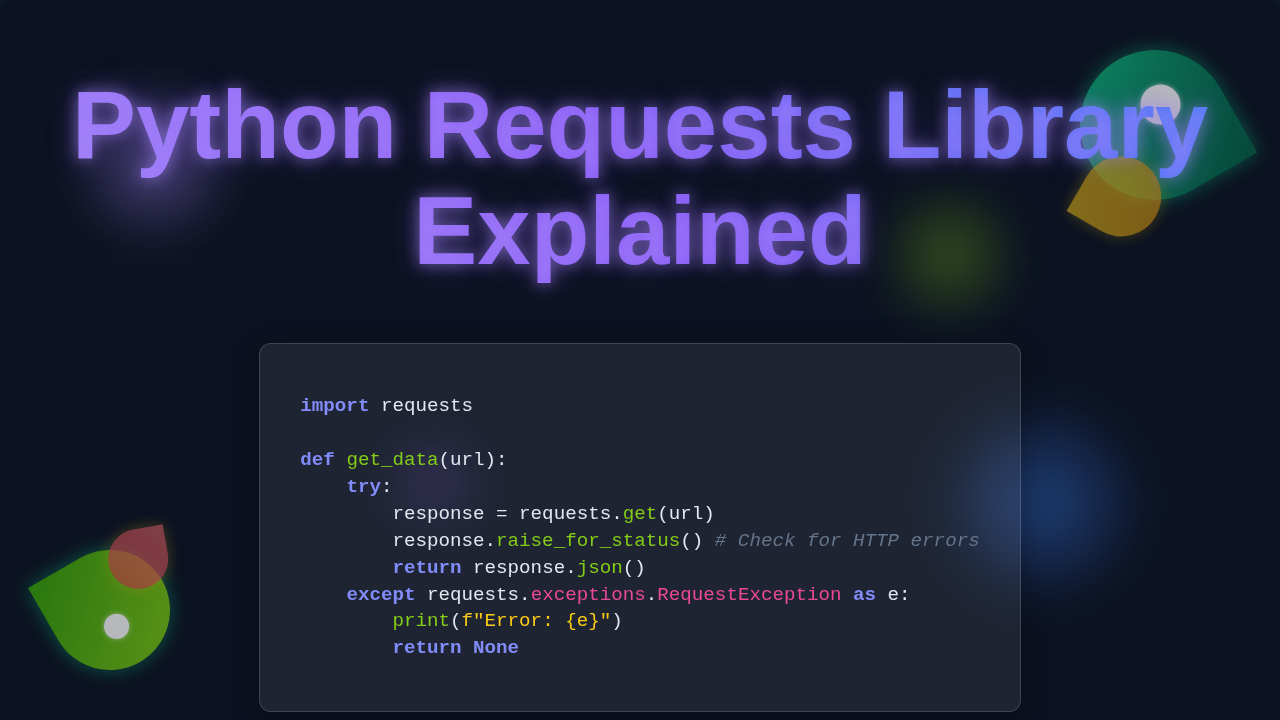
Pro Tip: Always check your response’s status code! It’s the first clue if your request succeeded or if something went wrong on the server side. Ignoring it can lead to unexpected bugs.
Getting Started with Python Requests Library Explained
Are you ready to make your first web interaction? The first step is simple. You “import” the Requests library into your Python script. This is like inviting your dependable waiter to your program’s table. Then, you decide what kind of ‘order’ you want to place. Do you want to fetch information? This is known as a GET request. You’re simply asking for data. Do you need to send new data? That’s a POST request. You might be submitting a form or uploading a file. These actions are called HTTP methods. You can learn more about common HTTP request methods on MDN. The Requests library makes these actions incredibly straightforward. You specify the web address. You include any data you want to send. Then, you make the simple ‘call.’ The library handles everything. It sends your request. It brings back the server’s ‘response.’ This response could be plain text. It could be structured JSON data. It might even be an image. You then easily access this information. This makes interacting with web services truly accessible. You can dive deeper into how Python Requests works to truly understand its efficiency.
Beyond the Basics: Unlocking More Power
As you become more comfortable, you’ll discover even more power within Requests. You can send custom ‘headers.’ These are like special notes to the kitchen. Perhaps you need to specify the language you prefer. Or maybe you need to send an authentication token. You can also manage ‘timeouts.’ This prevents your program from waiting endlessly for a slow server. If the chef is taking too long, you can tell your waiter to stop waiting. You can even work with ‘sessions.’ A session maintains context across multiple requests. It’s like having the same waiter for your entire meal. This is crucial for maintaining login states. Furthermore, handling file uploads becomes simple. Dealing with complex authentication schemes also becomes manageable. These features are all built into the library. They are designed to streamline your web development. You spend less time debugging connections. You spend more time building cool stuff. There is so much more to learn about the Requests library for web interactions.
Remember: The Python Requests Library handles the nitty-gritty of HTTP. Your job is to tell it what you need, not how to talk to the internet!
So, there you have it! The Python Requests Library is a game-changer. It transforms a daunting task. It makes it approachable for every developer. You no longer need to fear web interactions. You have a powerful, friendly assistant at your fingertips. From fetching simple data to building complex integrations, Requests simplifies it all. You are now equipped. You can confidently make your Python programs talk to the internet. Keep exploring. Keep building. The web is your oyster. Go forth and connect!