How Python Requests Works: Deep Dive & Visual Guide
Hey there, future web wizard! You’ve probably heard chatter about web development, APIs, and data flying around the internet. Eventually, you’ll need your Python programs to join this conversation. That’s exactly where the fantastic Python Requests Library Explained comes in handy. It’s the tool that lets your Python code chat with websites and services.
Many beginners scratch their heads trying to figure out how Python Requests works under the hood. You might feel a bit lost in the jargon. Don’t worry, you are absolutely not alone! Today, we’re going to break it all down. We’ll explore the magic behind the scenes, making it crystal clear for you. By the end, you’ll understand exactly how your Python scripts send and receive information across the web.
What is Python Requests, Anyway?
Think of Python Requests as your program’s personal web browser. Seriously! When you open Google Chrome or Firefox, you’re sending a request to a server. That server then sends back a response, which is the webpage you see. Your browser handles all the complex networking details for you.
In the same way, Python Requests handles those complexities for your Python code. It lets your scripts act like a web client. This means your program can ask for data, send data, or even perform actions on a website. It simplifies the entire process of making HTTP requests. HTTP, or Hypertext Transfer Protocol, is the fundamental language of the web. It’s how web servers and clients communicate.
Without Requests, you would be building these communication messages by hand. That’s a lot of tedious work! Requests bundles up all the necessary parts. It then sends them across the internet for you. This makes interacting with web services incredibly simple. It lets you focus on what your program actually needs to do.
Why Does This Even Matter to You?
As a budding web developer, understanding how Python Requests works is a game-changer. Why? Because the internet is built on communication. Your web applications won’t live in a vacuum. They will need to talk to other services.
Perhaps you want to fetch weather data for your app. Maybe you need to post an update to a social media site automatically. Or perhaps you’re building a backend for a mobile app. In all these scenarios, your Python program needs to interact with external APIs. APIs, or Application Programming Interfaces, are just rules for how software components should interact. Requests is your direct line to these APIs.
Therefore, mastering this library opens up a world of possibilities. You can build powerful web scrapers. You can integrate third-party services into your projects. Think about automating tasks or even testing your own web APIs. It’s a foundational skill for modern web development. You’ll use it constantly once you grasp its power.
Pro Tip: Knowing how to use Python Requests effectively means you can make your Python apps truly connected. It’s the bridge between your code and the vast internet.
How Python Requests Works: The Behind-the-Scenes Story
Let’s peel back the layers and see what happens when you use Python Requests. Imagine your program needs to get some information from a website. It’s like sending a postcard to a friend across the country. There’s a process involved, right?
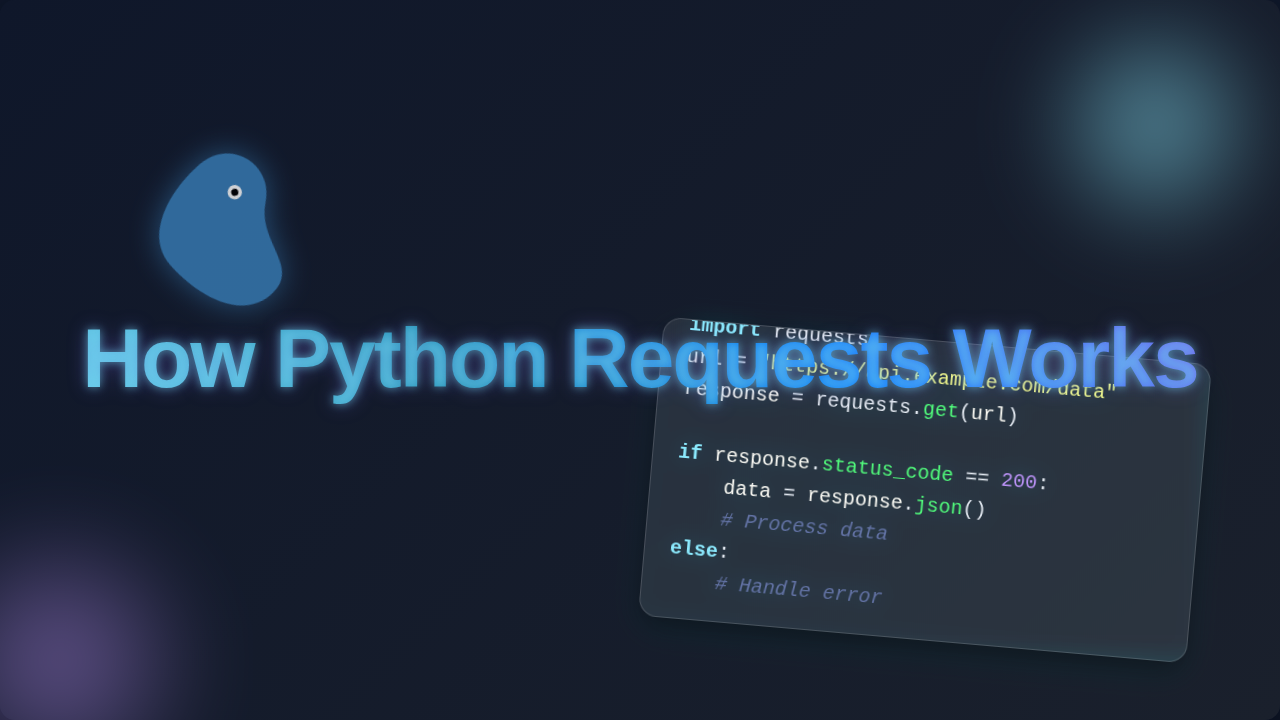
First, you tell Requests what you want. You specify the website address (the URL) and what kind of action you want to take. Do you want to retrieve data? That’s a GET request. Do you want to send new data? That’s typically a POST request. Requests then meticulously crafts an HTTP message. This message includes headers, which are like instructions for the server. It also includes the body if you’re sending data.
Next, Requests hands this perfectly formed message to your computer’s network stack. This stack is responsible for getting data onto the internet. It uses protocols like TCP/IP. Think of it as the postal service for your digital message. Your computer then looks up the server’s IP address using DNS. This is like finding the correct street address from a name. Then, your computer establishes a connection with that server.
Once connected, your HTTP request sails across the internet. It reaches the target server. The server receives your message. It processes your request based on the instructions you sent. Finally, the server sends back an HTTP response. This response contains a status code, like ‘200 OK’ meaning everything worked. It also includes the data you asked for, or an error message. Requests then takes this raw response. It neatly packages it into an easy-to-use Python object for you.
Common HTTP Methods in Action
You’ll mostly encounter a few core HTTP methods when you learn how Python Requests works. These are the verbs of the internet:
- GET: This is for retrieving data. It’s like asking for a menu at a restaurant. You’re not changing anything, just looking.
- POST: This method sends new data to the server. It’s like filling out an order form and giving it to the waiter. You’re creating something new.
- PUT: Use this to update existing data entirely. Think of it as replacing an old menu item with a completely new one.
- PATCH: This is for making partial updates to data. Maybe you’re just changing the price of one item on the menu, not the whole thing.
- DELETE: As you might guess, this removes data from the server. It’s like telling the restaurant to take a dish off the menu forever.
Each method has a specific purpose. Understanding them helps you interact correctly with web APIs. Want to learn more about these core concepts? Check out this guide on HTTP request methods from MDN Web Docs. It’s a fantastic resource.
Clearing Up Common Confusions
Sometimes, beginners get stuck on a few points when learning Python Requests. Let’s tackle them head-on!
Confusion #1: “Is Requests a web browser?” No, not really. It doesn’t render web pages like Chrome does. It only handles the data exchange. Your browser takes that data and draws pretty pictures. Requests just gets the raw ingredients.
Confusion #2: “Why do I get a weird number instead of the data?” Ah, you’re likely seeing an HTTP status code! A ‘200’ means success. ‘404’ means ‘Not Found.’ ‘500’ means a server error. These numbers tell you if your request was successful or if something went wrong. You always check these first. MDN has a great HTTP overview to explain more.
Confusion #3: “How do I deal with slow responses?” Sometimes, you’ll find that waiting for a response blocks your entire program. This is where asynchronous programming comes in. While Requests itself is synchronous, tools like Python Async Await Web Dev: Build Fast, Modern APIs are designed to handle these situations. They let your program do other things while waiting.
Remember This: Requests simplifies HTTP, but it doesn’t solve every networking challenge. Understanding HTTP basics and asynchronous patterns will make you a truly unstoppable force.
Key Takeaways for Your Web Dev Journey
So, what have we learned today about how Python Requests works? First, Requests is your Python program’s gateway to the internet. It simplifies making HTTP requests. These requests are the backbone of web communication. Second, you now understand the basic lifecycle of a request. Your program sends a request, the server responds. Finally, you know the common HTTP methods. Each one serves a specific purpose for interacting with data.
This knowledge isn’t just theoretical. It’s incredibly practical. You can start building real-world applications right away. Applications that interact with different services. That’s a powerful skill to have!
Ready to Connect? Your Next Steps!
You’ve taken a fantastic first step in understanding web communication. You now grasp how Python Requests works at a fundamental level. This is a foundational piece of knowledge for any web developer. Don’t stop here!
The best way to solidify this understanding is by doing. Try fetching data from a public API. Experiment with sending different types of requests. The more you play with it, the more natural it will become. You’ve got this. Keep coding, keep building, and soon you’ll be making your Python programs talk to the internet like seasoned pros. Happy coding, future web dev!