Hey there, future web wizard! Ever wondered how your favorite apps talk to each other online? How does your weather app fetch the latest forecast? Or how does a simple "like" on social media get registered? It all happens through web requests. And in the Python world, one library makes this super easy. Today, we’re diving deep into the Python Requests Library Explained. You’ll learn how this powerful tool actually works, far beyond basic usage.
Think of the Requests library as your personal messenger. It handles all the complex parts of sending messages across the internet. You tell it what message to send and where. Then, it delivers your message and brings back the reply. It’s like sending a letter, but for computers talking to other computers. This process is called making an HTTP request. HTTP stands for Hypertext Transfer Protocol. It’s the language web browsers and servers use to communicate.
You might think, "I just want to build cool stuff." And that’s exactly why Requests matters. It unlocks a massive world of possibilities for your projects. Need to get data from an API? Requests does it. Want to automate tasks on a website? Requests is your friend. Building a web scraper to collect information? You guessed it – Requests. This library lets your Python programs interact with virtually any website or web service out there. It’s a foundational skill for any modern web developer. Understanding its mechanics will make you a much more capable developer.
How the Python Requests Library Explained: Under the Hood
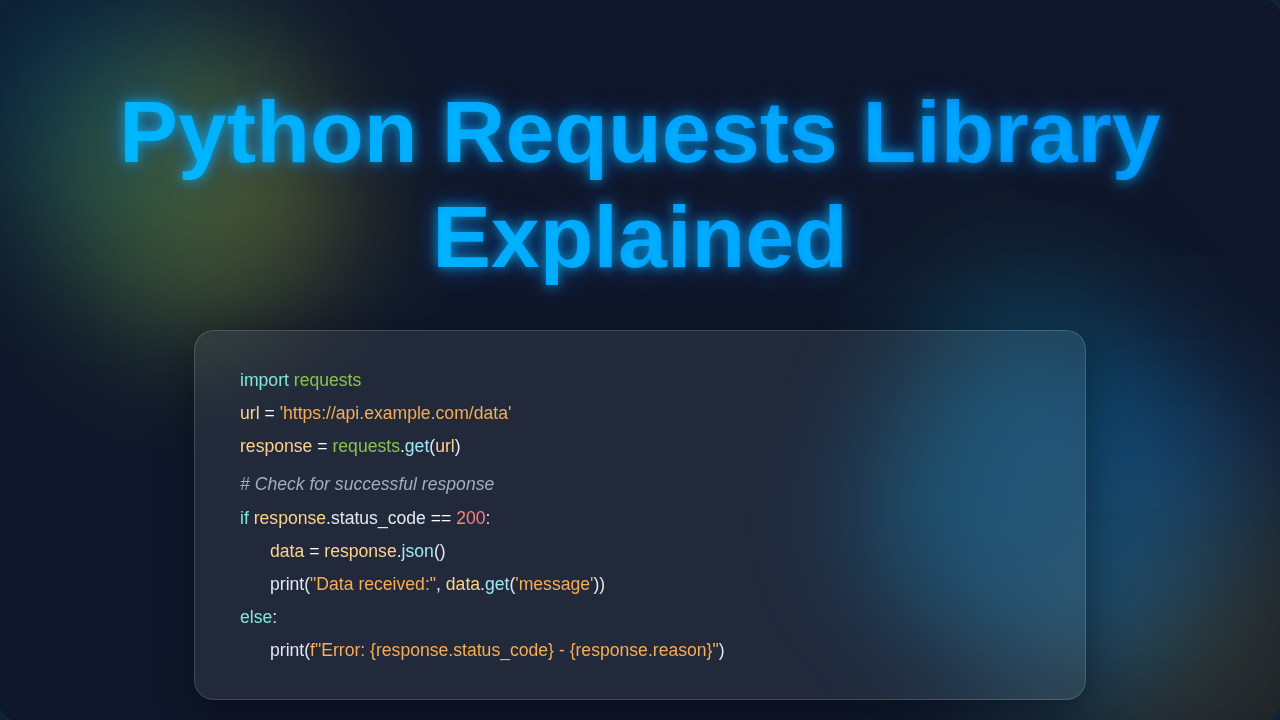
So, you’ve seen requests.get('some_url') before. It looks simple, right? But what magic happens behind that single line? The Python Requests Library Explained is designed to hide complexity. It makes talking to the internet feel natural, almost like calling a function.
Making Your First Request (The Gist)
Imagine you’re at a coffee shop. You want a specific type of coffee. You tell the barista your order. This is similar to making a GET request. You are asking for something from a server. The barista (the server) then prepares your coffee (the data). Then they give it back to you (the response). When you use requests.get(), your Python program is the customer. It sends a specific message to a web server. That message travels across the internet to the server. The server processes your request. It then sends back some information. This information usually comes in a format like JSON or HTML. The library packages all of this up for you.
Headers: Your Request’s ID Card
Every time you send a request, you send "headers" too. Think of headers as extra bits of information. They are like details on a shipping label for a package. They don’t contain the main content of your message. Instead, they describe the message itself. Headers can tell the server what type of content you prefer to receive. They might also say what language you speak. Sometimes, they even include special security tokens. These tokens prove you are allowed to access certain resources. The Requests library often sets sensible default headers for you. But you can customize them too, for more advanced interactions.
Parameters: Asking for Specifics
Let’s go back to the coffee shop. You might ask for "a latte, extra hot, with almond milk." "Extra hot" and "almond milk" are like parameters. They modify your basic request for a latte. In web requests, parameters are often added to the URL. They are key-value pairs that help the server narrow down what you want. For example, if you’re searching for articles, ?query=python&page=2 uses parameters. query and page are the keys. python and 2 are their respective values. Requests handles adding these to your URL neatly. It keeps your code clean and readable.
Request Bodies: Sending Data
Sometimes you don’t just ask for information. You need to send some data to the server yourself. Imagine you’re filling out an online form. You’re sending your name, email, and message. This data goes in the "request body." POST, PUT, and PATCH requests typically carry a body. These are used for creating new resources or updating existing ones. Requests makes sending JSON or form data straightforward. You just pass a Python dictionary, and it converts it for you.
Pro Tip: Always think about the intent of your request. Are you getting information, or sending new information? This helps you choose the right HTTP method (GET, POST, PUT, DELETE).
Responses: What You Get Back
After sending your request, the server replies. This reply is called the "response." The Requests library gives you a "Response object." This object holds everything the server sent back. It contains the actual data, like the coffee you ordered. But it also has important metadata. You’ll find status codes (like 200 OK or 404 Not Found). It includes response headers, telling you about the server. And, of course, the main content, often as text or JSON. You can easily access the raw text or parse JSON data. For complex parsing, you might combine this with building fast, modern APIs to handle results. The Response object is your window into the server’s reply.
Mastering Web Interactions: Advanced Python Requests Library Explained
You’ve got the basics down. Now, let’s look at how the Python Requests Library Explained handles trickier situations. These features make your web interactions robust and reliable.
Sessions: Keeping the Conversation Going
Imagine you’re having a conversation with someone. You don’t re-introduce yourself every single sentence. That would be exhausting! Web interactions can be similar. Many websites need to remember you across multiple requests. This is often handled using "cookies" and "sessions." The Requests Session object is perfect for this. It lets you persist certain parameters across requests. Cookies, headers, and even authentication details can be maintained. This means you log in once. Then, all subsequent requests within that session are authenticated. It’s like keeping an open tab at the coffee shop. You make multiple orders, but they all go under the same account. This is super useful for scraping or interacting with protected APIs. For instance, understanding HTTP cookies can deepen your grasp of sessions.
Timeouts: Setting Your Patience Level
What if the server you’re talking to is really slow? Or what if it doesn’t respond at all? Your program could just hang forever, waiting. That’s not good for user experience or system resources. Timeouts let you set a limit on how long your program will wait. You can specify a duration in seconds. If the server doesn’t respond within that time, Requests raises an error. This allows your program to move on or try again. It’s like deciding you’ll wait five minutes for your coffee. If it’s not ready by then, you’ll order something else or leave. This simple feature prevents your applications from getting stuck.
Authentication: Proving Who You Are
Many web services require you to prove your identity. This is called authentication. It ensures only authorized users or applications access data. Requests supports various authentication methods. You might use a username and password. Or perhaps an API key. Sometimes, it’s more complex, like OAuth tokens. The library provides straightforward ways to include these credentials. You just pass an auth parameter, and it handles the details. This keeps sensitive information secure. It also simplifies complex login flows.
Heads Up: Never hardcode sensitive API keys or credentials directly in your script. Use environment variables or a secure configuration file instead. Future you will thank you!
Troubleshooting & Robustness: Python Requests Library Explained in Action
The internet is a wild place. Requests sometimes fail. A server might be down. You might send incorrect data. Understanding how to handle these failures is crucial. HTTP status codes tell you a lot about what happened. 200 OK means success. 404 Not Found means the resource doesn’t exist. 500 Internal Server Error points to a server-side issue. The Response object has status_code and reason attributes. You can check these to understand the outcome. Requests also raises exceptions for network issues. These allow you to write robust code. You can gracefully catch errors and react to them. Perhaps you want to retry a request. Or maybe log the error for later investigation. For more on HTTP status codes, check out this comprehensive MDN guide. This is vital when you’re making a Flask To-Do App: Build a Simple Python Web Application that relies on external services.
Key Takeaways: Your Requests Toolbox
You’ve explored the inner workings of the Python Requests Library. It’s more than just simple get() and post() calls. You now understand how headers, parameters, and request bodies function. Sessions help maintain continuity in your web interactions. Timeouts protect your applications from unresponsive servers. Authentication ensures secure access to protected resources. And robust error handling makes your programs resilient. This library abstracts away much of the internet’s complexity. It empowers you to focus on building amazing things. It truly simplifies interacting with web services.
Ready to Build Something Incredible?
You’ve just peeled back the layers of a fundamental web development tool. This knowledge isn’t just theoretical. It’s practical power waiting for you to unleash it. Now, when you use requests.get(), you’ll know what’s happening. You’ll understand the intricate dance between your code and a distant server. Don’t stop here! Start experimenting with different types of requests. Try interacting with a public API, like a weather API. The more you practice, the more confident you’ll become. You’ve got this, future web wizard. Go build something awesome! If you’re looking for an even deeper dive, consider checking out this visual guide to understanding Requests.