React Re-Render Explained: Visual Guide & Neon Diagram
Hey there, future coding wizard! Have you ever seen your React app come to life? You click a button. Maybe some data loads. And poof! The screen instantly updates. It feels like magic, doesn’t it?
You might have heard whispers about something called a “re-render.” Perhaps you’ve even wondered, “What exactly IS that?” Well, today, we’re going to pull back the curtain. We’ll explore the mystical process known as the React Re-Render Explained. It’s how your components stay fresh and relevant.
Think of your React application like a bustling stage. There are many actors, or components, on that stage. Sometimes an actor needs to change their costume. Sometimes they need to deliver a new line. That’s essentially what a re-render is all about. It’s React making sure everyone on stage has the right outfit and script for the current scene. It’s truly fascinating when you break it down.
What a React Re-Render Means in Plain English
Let’s simplify this concept a bit. Imagine you’re drawing a picture. You start with a blank canvas. This is your initial user interface (UI). Now, you decide to add a red circle. Then, you want to change that circle to blue. You don’t redraw the entire picture from scratch, right?
Instead, you just change the circle’s color. A React re-render works similarly. It means your component function runs again. This creates a fresh “snapshot” of what your UI should look like. It’s like taking a new photo of that specific part of your drawing. React then compares this new snapshot to the old one. Finally, it figures out only what needs to change on your actual screen.
Why Understanding React Re-Renders Matters to YOU
Why should you care about this under-the-hood process? This isn’t just a technical detail. It directly impacts your app’s performance. Knowing how and when re-renders happen is super powerful. It helps you build faster applications. It also makes debugging much easier. You’ll stop scratching your head. You might wonder why things aren’t updating, or updating too often. It gives you control over your components. It gives you confidence in your code. You can make smarter decisions as a developer. Therefore, understanding this concept is really important for your journey.
React Re-Render Explained: The Core Mechanism
Okay, so how does this magic actually work? At its heart, React has a clever way of keeping your UI current. It uses something called the Virtual DOM. This is not the actual browser’s DOM. Instead, it’s a lightweight copy. Think of it as React’s internal blueprint of your UI. When something changes in your app, React doesn’t immediately touch the real browser interface. That would be slow and inefficient.
Here’s the cool part. When a component re-renders, React creates a brand new Virtual DOM tree. This new tree reflects the component’s latest state and props. Then, React performs a speedy comparison. It contrasts the new Virtual DOM tree with the previous one. This process is called “reconciliation.” React precisely identifies the differences. Only the absolute minimum necessary changes are then applied to the actual browser DOM. This makes your updates incredibly fast. You get that seamless user experience. It’s a highly optimized process. Consequently, your users see instant feedback. You can learn more about the actual DOM structure on MDN if you’re curious about its underlying principles.
The “Why” Behind the Update: Triggers for a React Re-Render
What sets off a re-render? It’s not just random. There are specific triggers that tell React, “Hey, something needs updating!”
State Changes
This is the most common reason. When you use a feature like `useState` to manage data within a component, that data is called “state.” If your component’s state changes, React sees this. It knows it needs to re-run your component function. For instance, if you have a counter that increments, its state changes. This prompts a re-render. Suddenly, the new count appears on your screen. Managing state effectively ensures predictable re-renders. Check out our post on React useLocalStorage Hook: Persist State in React JSX Apps for a practical state management example.
Prop Changes
Components often receive data from their parent components. This data is passed down as “props.” Think of props as instructions from a parent to a child. If a parent component re-renders, it might pass down new props to its children. When a child component receives different props than before, it will also re-render. Even if its own internal state hasn’t changed. This is a crucial concept to grasp. It explains why a component might update. It’s often because its parent passed it new information. For complex component relationships, understanding React Lifting State Up: Component Tree & Neon Diagram clarifies prop flow.
Context Changes
React’s Context API shares data across your component tree. You don’t need to pass props down manually. If the value provided by a Context changes, any component consuming that Context will re-render. This is a powerful feature for global data. However, it can also trigger many re-renders if not used carefully. Consider the impact of Context updates.
Force Update (Less Common)
There’s also a method called `forceUpdate`. As the name suggests, it forces a component to re-render. However, it’s generally discouraged. It bypasses React’s natural rendering flow. You should almost never need to use it. If you find yourself reaching for `forceUpdate`, better state or prop management is usually the answer.
Pro Tip: Most re-renders are triggered by state or prop changes. Master these two, and you’ll master the “why” behind most UI updates!
Common Confusions Cleared Around React Re-Renders
When you’re first learning, some things about re-renders can seem a bit puzzling. Let’s clear up a few common misconceptions.
“Does EVERYTHING Re-Render?”
No, definitely not the whole browser screen! When we say a component “re-renders,” its function runs again. This generates a new Virtual DOM representation. However, thanks to React’s reconciliation, only parts of the actual browser DOM that have genuinely changed are updated. It’s highly efficient. Think of it like this: your entire movie script might be re-read. But only the actors with new lines or costumes actually move on stage. The static backdrop stays put. This selective updating saves a lot of processing power. It keeps your app feeling snappy. No need to redraw every pixel.
“Why is My Component Re-Rendering When I Don’t Expect It?”
This is a classic head-scratcher. Remember how parent components pass props to children? If a parent re-renders, by default, all its child components will also re-render. Even if the child’s props haven’t technically changed. This might seem inefficient. But it’s React’s default behavior. It ensures your UI is always consistent. You might see these “unexpected” re-renders often. However, there are ways to optimize this. We’ll touch on those next.
“Is Re-Rendering Bad for Performance?”
Not inherently! A re-render itself is usually very fast. React is incredibly good at optimizing this process. Problems arise when components re-render unnecessarily or too frequently. This leads to wasted computation. It can slow down your app. Imagine our stage director re-reading the script every few seconds. Even if nothing needs to change! That would be a lot of wasted effort. So, the goal isn’t to prevent all re-renders. Instead, it’s to prevent pointless re-renders. This distinction is crucial for building performant applications. You want a responsive, not sluggish, app.
Optimizing Your App: When Less is More
Since unnecessary re-renders can impact performance, React provides tools. These tools tell React, “Hey, only re-render this component if its props or state have actually changed in a meaningful way.”
One common technique involves `React.memo`. This is a higher-order component. You can wrap your functional components with it. React.memo then “memoizes” the component. It means React will skip re-rendering if its props haven’t changed. It’s powerful. `useCallback` and `useMemo` hooks also memoize functions/values. They prevent re-creation, avoiding child component re-renders. Sometimes, structuring your components correctly helps. For example, careful React Lifting State Up: Neon Component Tree Flow strategies centralize state. This reduces component updates, minimizing unnecessary re-renders. You can explore more general frontend performance best practices on CSS-Tricks to further refine your app’s speed and responsiveness.
Remember: Optimize when you measure a performance problem, not just because you think there might be one. Premature optimization can be a time sink!
Your UI’s Lifeline: A React Re-Render Walkthrough
Let’s walk through a simple scenario. Imagine you have a shopping cart icon on your e-commerce site. It shows the number of items you’ve added.
- Initial Render: When you first load the page, the cart icon renders. It shows “0 items.” This is the first display of your component.
- User Interaction: You click an “Add to Cart” button on a product page.
- State Update: This click triggers an update to your app’s internal state. Perhaps a `cartItemCount` state variable increments from 0 to 1.
- Re-render Triggered: Because the `cartItemCount` state has changed, React flags the component that uses this state for a re-render.
- Component Re-runs: That component’s function runs again. It now calculates its output based on the new `cartItemCount` (which is 1). It generates a new Virtual DOM representation.
- Reconciliation: React compares this new Virtual DOM with the old one. It notices that only the number inside the cart icon has changed.
- Actual DOM Update: React efficiently updates only that number in the real browser DOM. The rest of the page remains untouched.
- UI Updated: Instantly, your cart icon now proudly displays “1 item.” This seamless update is React re-render in action. You see the result almost immediately.
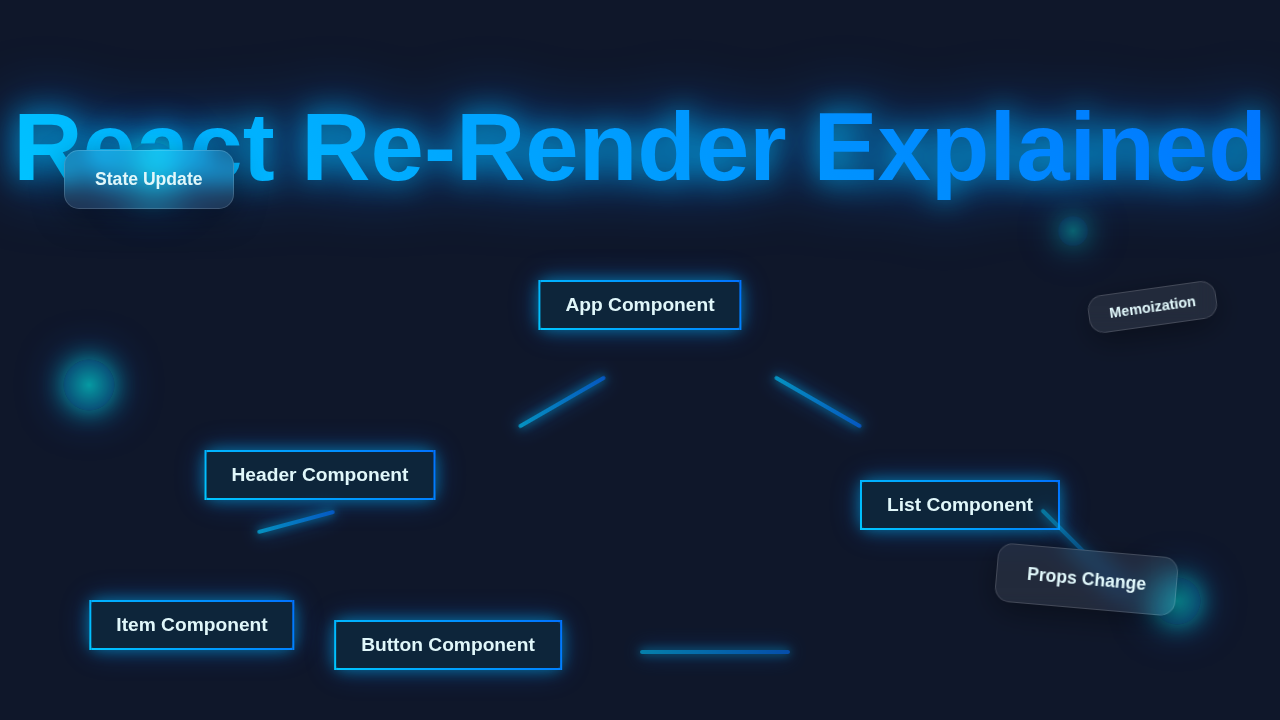
Visualize this with our “Neon Diagram” concept. When you click “Add to Cart,” imagine your `cartItemCount` state glowing bright. Then, the specific components dependent on that state light up too. They quickly recalculate their appearance. Finally, only the numerical display on the cart icon flashes with its new value. The rest of the page stays dark, indicating no changes. It’s a precise, targeted update. This targeted approach keeps your app fast. It provides a smooth user experience. You can build dynamic interfaces with confidence. Mastering this will boost your skills.
Key Takeaways from React Re-Render Explained
Let’s recap the essential points you should carry forward:
- A React re-render means a component’s function runs again. This creates a new snapshot of its UI.
- React uses a Virtual DOM and reconciliation. This ensures only necessary updates hit the browser.
- State changes and prop changes are the primary triggers for re-renders.
- Not all re-renders are bad. Unnecessary or excessive re-renders are what you want to avoid.
- Tools like `React.memo`, `useCallback`, and `useMemo` help optimize re-renders.
Your Goal: Understand why and when your components re-render. Then, optimize strategically for the best performance!
Keep Building, Keep Growing!
See? The React re-render isn’t some terrifying monster. It’s a powerful and elegant mechanism. It makes your applications dynamic and responsive. You’ve taken a massive step. You’ve looked behind the scenes. Now, build smarter, faster React apps. This knowledge sets you apart. Keep experimenting. Keep building. You’re doing great!