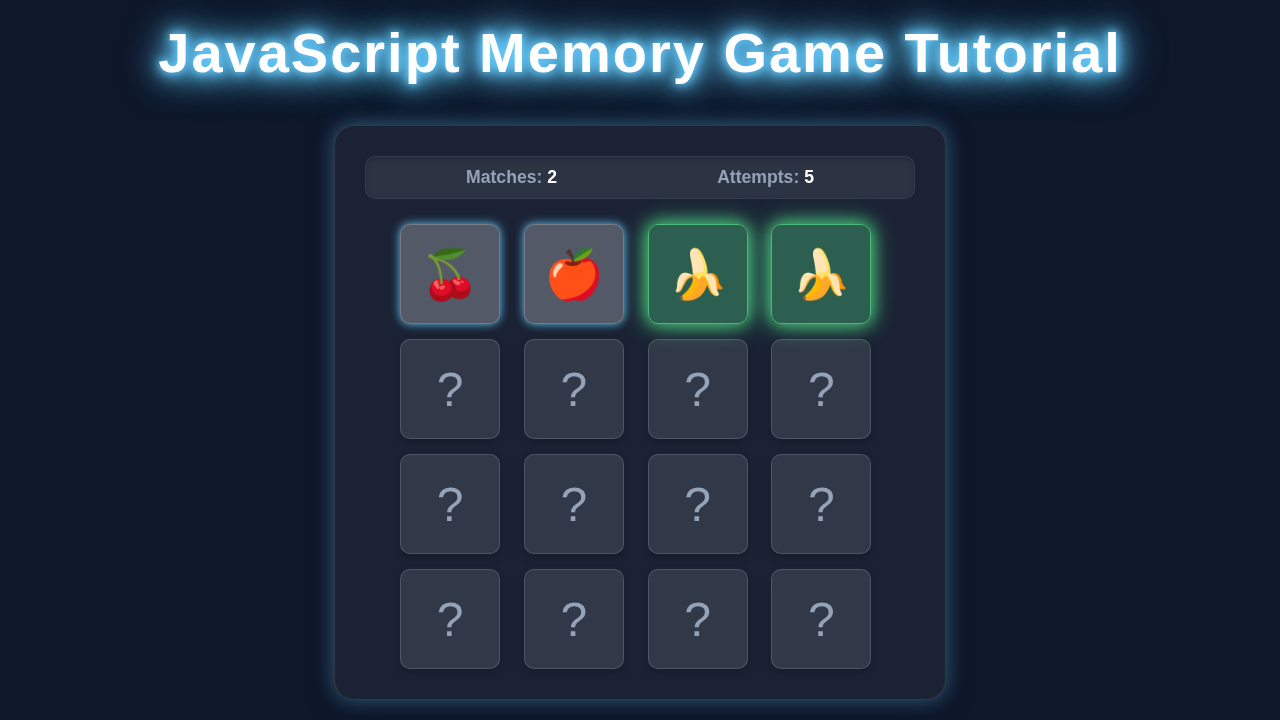
Hey! If you’ve ever wanted to build a fun, interactive web game, you’re in the right place. Today, we’re diving into building a classic Memory Game JavaScript style, using just HTML, CSS, and vanilla JavaScript. It’s a fantastic project. You’ll solidify your core web development skills. Get ready to create some magic!
What We Are Building
Imagine a grid of hidden cards. Each card has a matching pair. Your goal is to find all the pairs! We’ll build a sleek, responsive game board. It will look great on any device. We’ll add cool flip animations too. This project is perfect for beginners. It teaches so many vital concepts. You’ll love seeing it come to life.
HTML Structure
First, we set up the basic structure of our game. HTML provides the bones for everything. We’ll define our game board and individual cards. This simple setup gives us a solid foundation.
index.html
<!DOCTYPE html>
<html lang="en">
<head>
    <meta charset="UTF-8">
    <meta name="viewport" content="width=device-width, initial-scale=1.0">
    <title>Memory Game JavaScript</title>
    <link rel="stylesheet" href="styles.css">
</head>
<body>
    <div class="game-container">
        <h1>Memory Game</h1>
        <div class="score-board">
            Matches: <span id="matches">0</span>
            Attempts: <span id="attempts">0</span>
        </div>
        <div class="memory-game" id="memoryGame">
            <!-- Cards will be inserted here by JavaScript -->
        </div>
        <button id="resetButton" class="reset-button">Reset Game</button>
    </div>
    <script src="script.js"></script>
</body>
</html>
CSS Styling
Next, we bring our game to life with CSS. This is where the magic happens visually. We’ll make our cards flip and look amazing. Furthermore, we’ll ensure our game is responsive. It will adapt to different screen sizes beautifully. You’ll be amazed at how CSS transforms a simple grid!
styles.css
/* Basic Reset & Body Styling */
body {
    margin: 0;
    font-family: Arial, Helvetica, sans-serif; /* Safe sans-serif font */
    background-color: #1a202c; /* Dark background color */
    color: #edf2f7; /* Light text color */
    display: flex;
    justify-content: center;
    align-items: center;
    min-height: 100vh;
    overflow: hidden; /* Prevent scrollbars */
    box-sizing: border-box; /* Include padding and border in the element's total width and height */
}

/* Game Container Styling */
.game-container {
    background: #2d3748; /* Slightly lighter dark background for container */
    padding: 30px;
    border-radius: 15px;
    box-shadow: 0 10px 25px rgba(0, 0, 0, 0.4); /* Soft shadow for depth */
    text-align: center;
    max-width: 90%; /* Max width for responsiveness */
    width: 600px; /* Fixed width for larger screens */
    box-sizing: border-box;
}

/* Heading Styling */
h1 {
    color: #66ccff; /* Neon blue color for the title */
    margin-bottom: 20px;
    font-size: 2.5em;
    text-shadow: 0 0 5px #66ccff, 0 0 10px #66ccff; /* Neon glow effect */
}

/* Score Board Styling */
.score-board {
    font-size: 1.2em;
    margin-bottom: 25px;
    background: #4a5568;
    padding: 10px 20px;
    border-radius: 8px;
    display: flex;
    justify-content: space-around;
    box-shadow: inset 0 2px 5px rgba(0, 0, 0, 0.2); /* Inner shadow for depth */
}

.score-board span {
    font-weight: bold;
    color: #a0aec0;
}

/* Memory Game Grid Styling */
.memory-game {
    display: grid;
    grid-template-columns: repeat(4, 1fr); /* 4 columns for a 4x4 grid (16 cards) */
    grid-gap: 15px;
    perspective: 1000px; /* Required for 3D flip effect */
    margin: 0 auto;
    max-width: 500px; /* Adjust based on card size and gap (4*100 + 3*15) */
}

/* Individual Memory Card Styling */
.memory-card {
    width: 100px; /* Fixed width for cards */
    height: 100px; /* Fixed height for cards */
    position: relative;
    transform-style: preserve-3d; /* Enable 3D transforms for children */
    transition: transform 0.5s; /* Smooth flip animation */
    cursor: pointer;
    border-radius: 10px;
    box-shadow: 0 4px 8px rgba(0, 0, 0, 0.2); /* Card shadow */
    box-sizing: border-box;
}

.memory-card:active {
    transform: scale(0.98); /* Slight squash effect on click */
    transition: transform 0.2s;
}

.memory-card.flip {
    transform: rotateY(180deg); /* Rotate card to show its front face */
}

/* Front and Back Face Styling */
.front-face,
.back-face {
    width: 100%;
    height: 100%;
    padding: 10px;
    position: absolute;
    border-radius: 10px;
    backface-visibility: hidden; /* Hide the back of the element when facing away */
    display: flex;
    justify-content: center;
    align-items: center;
    font-size: 3em;
    box-sizing: border-box;
}

.back-face {
    background: #4a5568; /* Color for the back of the card */
    border: 2px solid #5a6270;
    color: #cbd5e1; /* Color for the question mark */
    font-weight: bold;
}

.front-face {
    background: #a0aec0; /* Color for the front of the card */
    color: #2d3748; /* Color for the emoji */
    transform: rotateY(180deg); /* Start hidden, show on flip */
    border: 2px solid #a0aec0;
}

/* Matched Card Styling */
.memory-card.matched .front-face,
.memory-card.matched .back-face {
    border-color: #48bb78; /* Green border for matched cards */
    box-shadow: 0 0 10px #48bb78, 0 0 20px #48bb78; /* Subtle green glow */
}
.memory-card.matched .front-face {
    background: #48bb78; /* Green background for matched card front */
    color: #edf2f7;
}

/* Reset Button Styling */
.reset-button {
    background-color: #66ccff; /* Neon blue */
    color: #1a202c;
    border: none;
    padding: 12px 25px;
    border-radius: 8px;
    font-size: 1.1em;
    cursor: pointer;
    margin-top: 30px;
    transition: background-color 0.3s ease, box-shadow 0.3s ease; /* Smooth transition for hover effects */
    box-shadow: 0 0 8px #66ccff;
    font-weight: bold;
}

.reset-button:hover {
    background-color: #88eeff;
    box-shadow: 0 0 15px #88eeff, 0 0 25px #88eeff; /* Enhanced neon glow on hover */
}
JavaScript for Our Memory Game
Now for the brain of our game: JavaScript! This code will handle all the game logic. It will manage card flips, matches, and game state. Indeed, JavaScript makes our game interactive. It brings our HTML and CSS to life. Let’s make this game playable!
script.js
document.addEventListener('DOMContentLoaded', () => {
    // Get DOM elements
    const memoryGame = document.getElementById('memoryGame');
    const resetButton = document.getElementById('resetButton');
    const matchesDisplay = document.getElementById('matches');
    const attemptsDisplay = document.getElementById('attempts');

    // Array of card emojis (each emoji represents a unique card type)
    const cardEmojis = ["🍎", "🍌", "🍒", "🍇", "🍋", "🍓", "🍍", "🥭"];

    // Game state variables
    let cards = []; // Stores the current set of cards for the game
    let hasFlippedCard = false; // Tracks if a card has been flipped in the current turn
    let lockBoard = false; // Prevents further card flips while cards are being checked/unflipped
    let firstCard, secondCard; // Stores the two flipped cards for comparison
    let matches = 0; // Counts the number of matched pairs
    let attempts = 0; // Counts the number of attempts (two cards flipped)

    /**
     * Shuffles an array randomly using the Fisher-Yates algorithm.
     * @param {Array} array - The array to shuffle.
     * @returns {Array} The shuffled array.
     */
    function shuffle(array) {
        for (let i = array.length - 1; i > 0; i--) {
            const j = Math.floor(Math.random() * (i + 1));
            [array[i], array[j]] = [array[j], array[i]]; // Swap elements
        }
        return array;
    }

    /**
     * Initializes the game board by creating and shuffling cards.
     * Resets score and attempts.
     */
    function initializeGame() {
        // Reset game stats
        matches = 0;
        attempts = 0;
        matchesDisplay.textContent = matches;
        attemptsDisplay.textContent = attempts;
        memoryGame.innerHTML = ''; // Clear any existing cards from previous games

        // Create pairs of cards by duplicating the emoji array
        const gameCards = [...cardEmojis, ...cardEmojis];
        cards = shuffle(gameCards); // Shuffle the cards

        // Create and append card elements to the DOM
        cards.forEach((emoji, index) => {
            const cardElement = document.createElement('div');
            cardElement.classList.add('memory-card');
            cardElement.dataset.emoji = emoji; // Store the emoji for matching logic
            cardElement.dataset.index = index; // Store a unique index for card identity

            cardElement.innerHTML = `
                <div class="front-face">${emoji}</div>
                <div class="back-face">?</div>
            `;
            cardElement.addEventListener('click', flipCard); // Attach click event listener
            memoryGame.appendChild(cardElement);
        });

        resetBoard(); // Reset board state for a fresh game
    }

    /**
     * Handles the click event for flipping a card.
     * Manages first and second card selection.
     */
    function flipCard() {
        if (lockBoard) return; // If board is locked, prevent further flips
        if (this === firstCard) return; // Prevent double clicking the same card

        this.classList.add('flip'); // Add 'flip' class to trigger CSS animation

        if (!hasFlippedCard) {
            // This is the first card flipped in a turn
            hasFlippedCard = true;
            firstCard = this;
            return;
        }

        // This is the second card flipped in a turn
        secondCard = this;
        attempts++;
        attemptsDisplay.textContent = attempts;

        checkForMatch(); // Check if the two flipped cards match
    }

    /**
     * Compares the two flipped cards to see if they match.
     */
    function checkForMatch() {
        let isMatch = firstCard.dataset.emoji === secondCard.dataset.emoji;

        if (isMatch) {
            disableCards(); // Cards match, disable them
        } else {
            unflipCards(); // Cards don't match, unflip them after a delay
        }
    }

    /**
     * Disables matched cards by removing their click listeners
     * and updating their visual state (e.g., adding a 'matched' class).
     */
    function disableCards() {
        firstCard.removeEventListener('click', flipCard);
        secondCard.removeEventListener('click', flipCard);

        firstCard.classList.add('matched'); // Add 'matched' class for styling
        secondCard.classList.add('matched');

        matches++;
        matchesDisplay.textContent = matches;

        resetBoard(); // Reset board state for the next turn

        // Check for win condition (all pairs matched)
        if (matches === cardEmojis.length) {
            setTimeout(() => {
                alert(`Congratulations! You've matched all ${matches} pairs in ${attempts} attempts!`);
            }, 500); // Small delay before alert for better UX
        }
    }

    /**
     * Unflips non-matching cards after a short delay.
     * Locks the board during the unflip animation.
     */
    function unflipCards() {
        lockBoard = true; // Lock the board to prevent clicking more cards

        setTimeout(() => {
            firstCard.classList.remove('flip'); // Remove 'flip' class to unflip
            secondCard.classList.remove('flip');
            resetBoard(); // Reset board state
        }, 1000); // Cards stay visible for 1 second before unflipping
    }

    /**
     * Resets the game board's internal state for the next turn.
     */
    function resetBoard() {
        [hasFlippedCard, lockBoard] = [false, false]; // Reset flags
        [firstCard, secondCard] = [null, null]; // Clear card references
    }

    // Event listener for the reset button
    resetButton.addEventListener('click', initializeGame);

    // Initial game setup when the DOM is fully loaded
    initializeGame();
});
How It All Works Together
Let’s break down the magic behind our Memory Game. It’s a fantastic example of client-side logic. You’ll see how JavaScript interacts with the DOM. This gives our game its dynamic feel. It’s quite empowering to understand these connections.
Setting Up the Game
When the page loads, our JavaScript kicks into action. It shuffles the cards randomly. This ensures a fresh game every time. Subsequently, it creates our cards dynamically. Each card gets a unique identifier. We then append these cards to our game board. This initial setup is crucial for randomness and playability.
Handling Card Clicks
When you click a card, we flip it over. We store this card’s information. Then we wait for the second card click. We attach an event listener to each card. This listener triggers a function on click. It also prevents clicking the same card twice. So, it feels very intuitive for players.
Checking for Matches
After two cards are flipped, we compare them. Do they have the same symbol? If so, they stay open. We mark them as matched. Thus, these cards are removed from future consideration. Understanding how JavaScript manages these states is crucial. It’s a bit like managing data flow, much like how concepts in React Lifting State Up: Neon Component Tree Flow handle parent-child communication in more complex applications.
Mismatched Cards
If the cards don’t match, we flip them back. A short delay makes this clear. You get another chance to find pairs. This delay uses JavaScript’s setTimeout function. It adds to the user experience. Eventually, the cards hide again. This gives players time to strategize. To truly master event handling and timing in JavaScript, exploring resources like the MDN Web Docs on setTimeout is incredibly helpful. It shows how we can create those delightful delays.
Pro Tip: Think about JavaScript’s event loop here. It perfectly handles user interactions and animations without freezing the browser. It’s a powerful concept!
Game Over
The game ends when all pairs are found. We can display a celebratory message. Maybe add a ‘play again’ button too! This provides a clear end to the game. It also encourages replayability. The feeling of completing a game is so satisfying!
Tips to Customise Your Memory Game JavaScript
You’ve built a fantastic game! Now, let’s make it truly yours. Customization is where the real learning happens. Feel free to tweak and experiment. These ideas will spark your creativity.
More Cards, More Fun!
Increase the number of cards on the board. Change the symbols to emojis or images. This makes the game more challenging. You could add more unique pairs. Perhaps try a 6×6 grid instead of 4×4. The possibilities are endless!
Add a Score and Timer
Keep track of the player’s moves. Add a countdown timer for extra pressure. This adds competitive elements. Players will love trying to beat their best score. You could even save high scores locally. For managing and persisting settings like difficulty, you might explore techniques similar to those used in the React useLocalStorage Hook: Persist State in React JSX Apps. It’s all about storing and retrieving user preferences.
Difficulty Levels
Implement different difficulty settings. Maybe fewer cards for ‘easy’. More for ‘hard’. You could even adjust the flip-back delay! This offers a tailored experience. Players can choose their challenge. It adds so much replay value. If you’re curious about how variables retain their values across function calls in such a game, dive into JavaScript Closures: Neon Code Insight. It explains how functions ‘remember’ their environment.
Theming and Animation
Change the colors and fonts. Experiment with new card flip animations. CSS-Tricks on transform property offers great inspiration for animations! Explore different transitions. You can make the game truly unique. Your visual flair will impress everyone!
Remember: Every customization you try teaches you something new. Don’t be afraid to experiment! That’s how we grow as developers.
Conclusion
Wow, you did it! You just built a fully functional Memory Game JavaScript project. You’ve practiced HTML, CSS, and JavaScript. These are fundamental web development skills. Feel proud of your accomplishment. Keep experimenting and building. Share your creation with friends! What will you build next?