Python RAG Chatbot: Build a Web Scraping Q&A System
Hey there, fellow coders! If you’ve wanted to build a Python RAG Chatbot but felt overwhelmed, you’re in the right place. We are creating something truly amazing today. Imagine a smart Q&A system. It answers questions using only information you provide. No external APIs are needed here! This project is fantastic for understanding AI basics. You will love what you build.
What We Are Building: Your Own Python RAG Chatbot
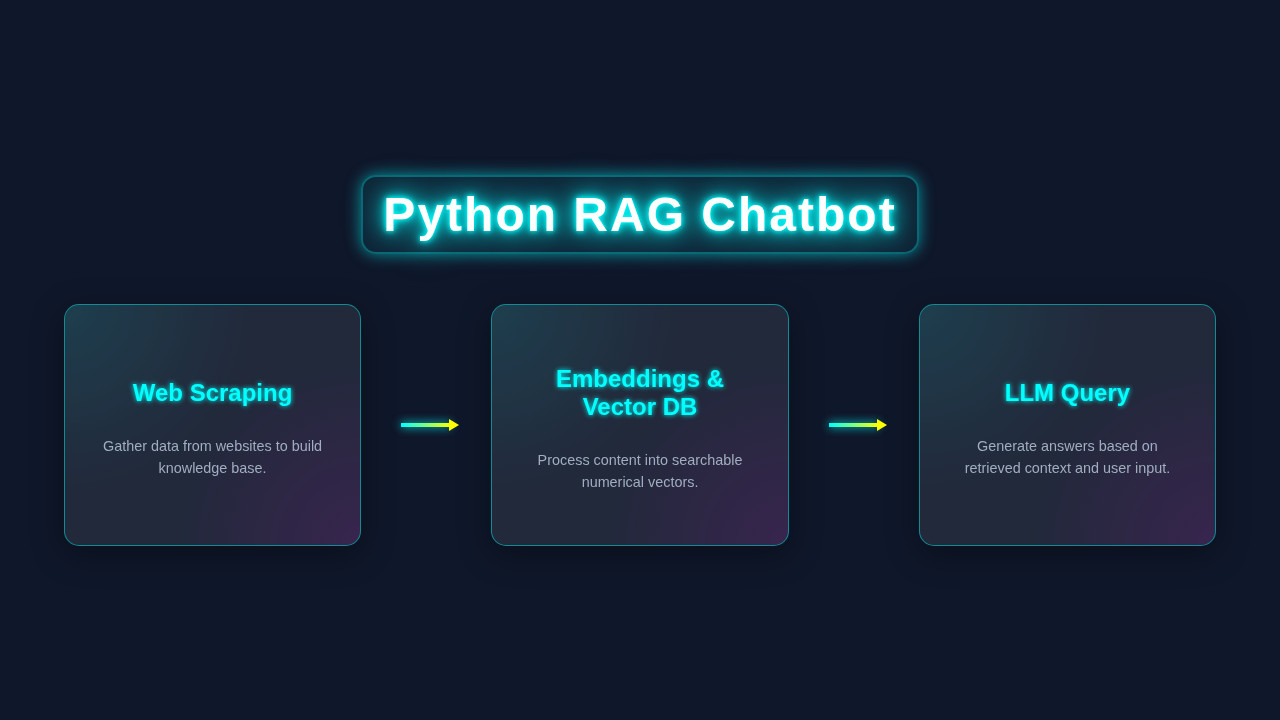
Today, we’re building a fantastic local Q&A chatbot. This isn’t just any chatbot; it’s a Python RAG Chatbot. RAG stands for Retrieval-Augmented Generation. This means our bot retrieves information first. Then it uses that information to generate its answers. It’s like having a super-smart librarian!
We will design a system that can scrape data from websites. Then, it will store this data locally. When you ask a question, it searches its own knowledge base. It gives you precise, context-aware answers. This is incredibly useful for personal projects. Or even for creating internal company knowledge bases. Think of the possibilities! And the best part? No costly API keys. No complicated Docker setups. Just pure Python power!
HTML Structure
Let’s start by laying the foundation. Our HTML will be simple and clean. It provides the basic layout for our chat interface. This makes it easy for users to interact. We’ll have a chat window, an input field, and a send button. It’s a familiar design.
CSS Styling
Next, we’ll make our chatbot look great with some CSS. Good styling makes any application a joy to use. We want a friendly and modern look. Our CSS will ensure a responsive and intuitive design. It will be easy on the eyes. For more on responsive layouts, consider checking out MDN’s guide on Flexbox.
JavaScript (Frontend Interaction)
Now for the brain of our frontend: JavaScript. This script handles user input and displays chatbot responses. It connects the visual to the logic. It also sends your questions to our Python backend. Then it retrieves the answers. This creates a smooth user experience.
rag_chatbot.py
#!/usr/bin/env python3

import os
import requests
from bs4 import BeautifulSoup
from dotenv import load_dotenv

# Langchain components
from langchain_community.document_loaders import WebBaseLoader
from langchain_community.vectorstores import Chroma
from langchain_openai import OpenAIEmbeddings, ChatOpenAI
from langchain_text_splitters import RecursiveCharacterTextSplitter
from langchain.chains import create_retrieval_chain
from langchain.chains.combine_documents import create_stuff_documents_chain
from langchain_core.prompts import ChatPromptTemplate

# Load environment variables (e.g., OPENAI_API_KEY) from a .env file
load_dotenv()

# --- Configuration ---+
# You can replace this with any URL you want to scrape for your knowledge base.
# Ensure the website's robots.txt allows scraping, or use public domain content.
TARGET_URL = "https://www.paulgraham.com/greatwork.html" # Example: Paul Graham's essay on 'How to Do Great Work'

# Check for OpenAI API Key
if not os.getenv("OPENAI_API_KEY"):
    print("Error: OPENAI_API_KEY not found in environment variables.")
    print("Please create a .env file with OPENAI_API_KEY='your_api_key_here'")
    exit(1)

# Initialize LLM and Embeddings model
llm = ChatOpenAI(model="gpt-3.5-turbo", temperature=0)
embeddings = OpenAIEmbeddings()

# --- Step 1: Web Scraping and Document Loading ---
print(f"[INFO] Loading content from {TARGET_URL}...")
# Langchain's WebBaseLoader handles fetching and initial parsing
loader = WebBaseLoader(TARGET_URL)
docs = loader.load()
print(f"[INFO] Loaded {len(docs)} document(s).")

# --- Step 2: Document Splitting ---
print("[INFO] Splitting documents into chunks...")
# Split documents into smaller, manageable chunks for better retrieval performance.
text_splitter = RecursiveCharacterTextSplitter(
    chunk_size=1000,
    chunk_overlap=200
)
split_docs = text_splitter.split_documents(docs)
print(f"[INFO] Split into {len(split_docs)} chunks.")

# --- Step 3: Create Vector Store and Embeddings ---
print("[INFO] Creating vector store with embeddings (this might take a moment)...")
# Create a vector store (ChromaDB for local, in-memory storage) from the split documents
# Each chunk is converted into an embedding (numerical vector) and stored.
vectorstore = Chroma.from_documents(documents=split_docs, embedding=embeddings)
print("[INFO] Vector store created.")

# --- Step 4: Define Retriever ---
# The retriever is responsible for finding relevant document chunks based on a query.
retriever = vectorstore.as_retriever()

# --- Step 5: Define the RAG Prompt Template ---
# This prompt guides the LLM on how to use the retrieved context.
prompt = ChatPromptTemplate.from_template(
    """Answer the user's question based only on the provided context.
    If the answer cannot be found in the context, politely state that you don't have enough information.

    Context: {context}

    Question: {input}"""
)

# --- Step 6: Create the RAG Chain ---
# The chain orchestrates the retrieval and generation steps.
# It first retrieves relevant documents, then passes them along with the question to the LLM.
document_chain = create_stuff_documents_chain(llm, prompt)
retrieval_chain = create_retrieval_chain(retriever, document_chain)
print("[INFO] RAG Chatbot is ready! Type 'exit' to quit.")

# --- Step 7: Chat Loop ---
while True:
    user_input = input("\nAsk a question about the content (or type 'exit'): ")
    if user_input.lower() == 'exit':
        print("Exiting chatbot. Goodbye!")
        break

    if not user_input.strip():
        print("Please enter a question.")
        continue

    try:
        # Invoke the RAG chain with the user's question
        response = retrieval_chain.invoke({"input": user_input})
        print("\nChatbot: ")
        print(response["answer"])

        # Optional: Print retrieved context for debugging/transparency
        # print("\n--- Retrieved Context ---")
        # for doc in response["context"]:
        #     print(f"Source: {doc.metadata.get('source', 'N/A')}")
        #     print(doc.page_content[:200] + "...") # Print first 200 chars
        #     print("-------------------------")

    except Exception as e:
        print(f"An error occurred: {e}")
        print("Please ensure your OPENAI_API_KEY is correct and try again.")
How It All Works Together
Here’s the cool part: understanding the full journey. Our chatbot uses several powerful components. They all work together seamlessly. Let’s break down the process step by step.
1. Setting Up Your Python Environment
First, we need to prepare our Python workspace. This is always the starting point for any project. Install necessary libraries. We will use requests for web scraping. We’ll also need a library for parsing HTML, such as BeautifulSoup. For the RAG part, we’ll use langchain and a local embedding model. Also, a local LLM will generate responses.
Finally, a local vector database like FAISS or ChromaDB will store our data. This keeps everything private and fast. Make sure you create a virtual environment. This keeps your project dependencies tidy. You can use python -m venv venv and then source venv/bin/activate (or venv\Scripts\activate on Windows). Then run pip install requests beautifulsoup4 langchain faiss-cpu sentence-transformers ctransformers flask. This setup ensures all components are ready. It sets the stage for our amazing chatbot.
2. Web Scraping for Knowledge
The first step in building our RAG system is gathering data. Our chatbot needs information to answer questions. We will write a Python script to scrape content from a target website. Choose a site relevant to your desired Q&A topic. For example, you could scrape an FAQ page or a series of blog posts. This data then becomes our bot’s entire knowledge base.
Use requests to fetch the webpage content. Then use BeautifulSoup to parse the HTML. Extract relevant text, like paragraphs and headings. Filter out navigation and other irrelevant elements. Store this extracted text in a structured way. Each piece of text is a ‘document’. This process is crucial for a focused chatbot. It gives our bot specific expertise. Consider checking out this guide on Dependency Injection in JavaScript to see how managing different parts of your code can be beneficial, similar to how we manage our scraping and RAG components.
Pro Tip: Always respect
robots.txtwhen scraping websites. This file tells you which parts of a site you can (or can’t) scrape. Ethical scraping is good practice!
3. Embedding and Vector Storage
Now for the ‘smart’ part of our RAG system! We need to make our text searchable in a meaningful way. We use something called ’embeddings.’ An embedding is a numerical representation of text. Words with similar meanings will have similar numerical representations. This allows for semantic search.
We’ll use a local embedding model, like one from sentence-transformers. This converts our scraped text into vectors. These vectors are then stored in a vector database. We’ll use FAISS locally for this. FAISS creates an index. This index allows for very fast similarity searches. When a user asks a question, we convert their question into an embedding too. This makes it comparable. The vector database then finds the most similar documents to the question. It retrieves the most relevant information. This step is key to accurate, context-aware answers. It forms the ‘Retrieval’ part of RAG.
4. Local Language Model (LLM) for Generation
Once we have retrieved the relevant documents, it’s time for the ‘Generation’ part. We need a powerful language model to formulate an answer. But remember, no API keys are required here! So, we’ll use a local Large Language Model (LLM). Models like Llama 2 or Mistral can run on your CPU. You can find quantized versions of these models, often in GGML or GGUF format. These are smaller and more efficient.
The ctransformers library allows Python to interact with these local models easily. It acts as our bridge. We feed the retrieved documents and the user’s question to this local LLM. The LLM then synthesizes an answer. The LLM’s task is to provide a coherent and helpful response. It uses the provided context to stay grounded. This ensures our chatbot’s answers are not only smart but also factual, based on the data you scraped. For another fascinating example of dynamic content, check out how we handle updates in a Virtual DOM implementation. It highlights similar principles of efficient data handling.
5. Integrating with Flask (or FastAPI)
Finally, we need to connect our Python RAG backend to our frontend. We’ll use a simple web framework like Flask. It’s perfect for creating a local API endpoint. Our Flask application will listen for incoming HTTP requests from our JavaScript frontend. This is how the question gets to Python. When a question arrives, Flask triggers our RAG pipeline. It initiates the embedding, retrieval, and generation steps.
The generated answer is then sent back to the frontend as a JSON response. The user sees it instantly! This creates a complete, interactive chatbot experience. It brings all our components together. A Flask app is like the conductor of an orchestra. It makes sure every instrument plays its part. You can explore more about web components and structured interfaces in our Kanban Board UI Design tutorial.
Remember, the power of a Python RAG Chatbot lies in its focused knowledge. The better your scraped data, the smarter your bot becomes!
Tips to Customise It
You’ve built something incredible! But the fun doesn’t stop here. Here are some ideas to make it even better.
- 1. More Data Sources: Instead of just one website, scrape multiple. Or use local PDF documents!
- 2. Advanced UI: Enhance the frontend with more chat features. Think typing indicators or message history. Check CSS-Tricks for UI layout ideas.
- 3. Model Experimentation: Try different local LLMs or embedding models. Some might perform better for your specific data.
- 4. Persistent Storage: Implement a more robust vector database. ChromaDB is another great local option. This will save your knowledge base between sessions.
- 5. Error Handling: Add robust error handling to your scraping. Web pages can change unexpectedly!
This is your project now. Make it truly yours!
Conclusion
Wow, you did it! You just built your very own Python RAG Chatbot from scratch. This is a huge achievement. You’ve tackled web scraping, embeddings, vector databases, and local LLMs. You now understand the core principles of retrieval-augmented generation. This is a cutting-edge AI concept! Go ahead, show off your creation! Share it with your friends. Explain how it works. Keep learning, keep building. The world of AI and Python is vast and exciting. Happy coding!
rag_chatbot.py
#!/usr/bin/env python3

import os
import requests
from bs4 import BeautifulSoup
from dotenv import load_dotenv

# Langchain components
from langchain_community.document_loaders import WebBaseLoader
from langchain_community.vectorstores import Chroma
from langchain_openai import OpenAIEmbeddings, ChatOpenAI
from langchain_text_splitters import RecursiveCharacterTextSplitter
from langchain.chains import create_retrieval_chain
from langchain.chains.combine_documents import create_stuff_documents_chain
from langchain_core.prompts import ChatPromptTemplate

# Load environment variables (e.g., OPENAI_API_KEY) from a .env file
load_dotenv()

# --- Configuration ---+
# You can replace this with any URL you want to scrape for your knowledge base.
# Ensure the website's robots.txt allows scraping, or use public domain content.
TARGET_URL = "https://www.paulgraham.com/greatwork.html" # Example: Paul Graham's essay on 'How to Do Great Work'

# Check for OpenAI API Key
if not os.getenv("OPENAI_API_KEY"):
    print("Error: OPENAI_API_KEY not found in environment variables.")
    print("Please create a .env file with OPENAI_API_KEY='your_api_key_here'")
    exit(1)

# Initialize LLM and Embeddings model
llm = ChatOpenAI(model="gpt-3.5-turbo", temperature=0)
embeddings = OpenAIEmbeddings()

# --- Step 1: Web Scraping and Document Loading ---
print(f"[INFO] Loading content from {TARGET_URL}...")
# Langchain's WebBaseLoader handles fetching and initial parsing
loader = WebBaseLoader(TARGET_URL)
docs = loader.load()
print(f"[INFO] Loaded {len(docs)} document(s).")

# --- Step 2: Document Splitting ---
print("[INFO] Splitting documents into chunks...")
# Split documents into smaller, manageable chunks for better retrieval performance.
text_splitter = RecursiveCharacterTextSplitter(
    chunk_size=1000,
    chunk_overlap=200
)
split_docs = text_splitter.split_documents(docs)
print(f"[INFO] Split into {len(split_docs)} chunks.")

# --- Step 3: Create Vector Store and Embeddings ---
print("[INFO] Creating vector store with embeddings (this might take a moment)...")
# Create a vector store (ChromaDB for local, in-memory storage) from the split documents
# Each chunk is converted into an embedding (numerical vector) and stored.
vectorstore = Chroma.from_documents(documents=split_docs, embedding=embeddings)
print("[INFO] Vector store created.")

# --- Step 4: Define Retriever ---
# The retriever is responsible for finding relevant document chunks based on a query.
retriever = vectorstore.as_retriever()

# --- Step 5: Define the RAG Prompt Template ---
# This prompt guides the LLM on how to use the retrieved context.
prompt = ChatPromptTemplate.from_template(
    """Answer the user's question based only on the provided context.
    If the answer cannot be found in the context, politely state that you don't have enough information.

    Context: {context}

    Question: {input}"""
)

# --- Step 6: Create the RAG Chain ---
# The chain orchestrates the retrieval and generation steps.
# It first retrieves relevant documents, then passes them along with the question to the LLM.
document_chain = create_stuff_documents_chain(llm, prompt)
retrieval_chain = create_retrieval_chain(retriever, document_chain)
print("[INFO] RAG Chatbot is ready! Type 'exit' to quit.")

# --- Step 7: Chat Loop ---
while True:
    user_input = input("\nAsk a question about the content (or type 'exit'): ")
    if user_input.lower() == 'exit':
        print("Exiting chatbot. Goodbye!")
        break

    if not user_input.strip():
        print("Please enter a question.")
        continue

    try:
        # Invoke the RAG chain with the user's question
        response = retrieval_chain.invoke({"input": user_input})
        print("\nChatbot: ")
        print(response["answer"])

        # Optional: Print retrieved context for debugging/transparency
        # print("\n--- Retrieved Context ---")
        # for doc in response["context"]:
        #     print(f"Source: {doc.metadata.get('source', 'N/A')}")
        #     print(doc.page_content[:200] + "...") # Print first 200 chars
        #     print("-------------------------")

    except Exception as e:
        print(f"An error occurred: {e}")
        print("Please ensure your OPENAI_API_KEY is correct and try again.")