CORS errors: Unraveling Cross-Origin Issues
Hey there, future web wizard! Ever hit a wall with your web project? You know, when your slick frontend just won’t talk to your carefully crafted backend? It’s a common headache. Chances are, you’ve stumbled into the mysterious world of CORS errors.
Don’t worry, you are not alone. These messages can feel like a secret code. Many developers, even seasoned ones, find them confusing. But trust me, once you understand the core idea, it all starts to click. Let’s unravel this together, shall we?
What Exactly Are CORS errors? (The Plain English Version)
Imagine your web browser as a very protective bouncer at an exclusive club. This club is your website. By default, the bouncer has a strict rule: only guests from *this* club are allowed to mingle. This is called the Same-Origin Policy.
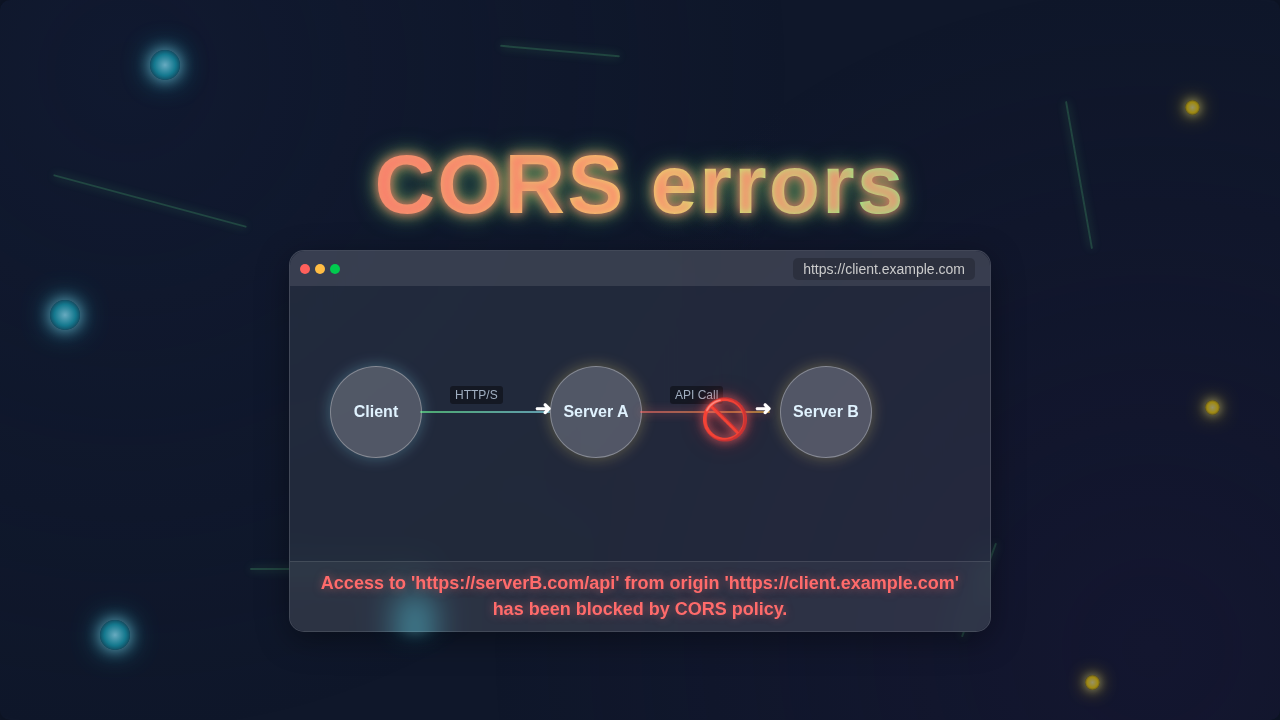
The Same-Origin Policy is a fundamental security feature. It prevents a malicious website from grabbing data from your banking site. It keeps your information safe. So, if your frontend (say, at my-cool-app.com) tries to fetch data from your backend (at api.my-cool-app.com), the bouncer might say no. Even though they look similar, these are different origins. A different domain, port, or protocol counts as a different origin.
Here’s the thing: sometimes you *do* want two different origins to talk. Maybe your API lives on a separate server. This is where Cross-Origin Resource Sharing, or CORS, comes in. CORS is like giving the bouncer a VIP list. It’s a mechanism that tells browsers: “Hey, it’s okay for *this specific external guest* to access my resources.”
Therefore, a CORS error simply means: “The bouncer said no because the VIP list (CORS configuration) didn’t explicitly allow this guest (your frontend) from that other origin (your backend’s address).” Make sense so far?
Why Do CORS errors Matter to Your Web Projects?
You’re building an amazing web application. You’ve got a beautiful user interface. Meanwhile, your backend is a powerhouse of data. You connect them with API calls. But then, *bam!* – a CORS error pops up in your browser’s console. This error stops your data from flowing. It keeps your app from working as intended.
Think of it like trying to order food from a restaurant. You send your order (an API request). The kitchen (your backend) prepares it. However, the delivery driver (your browser) refuses to pick it up. Why? Because the kitchen didn’t put the right label on the package. This label, in our analogy, is the CORS header. Your users will see a broken application. Furthermore, you’ll be scratching your head trying to debug it.
Understanding CORS saves you massive amounts of time. It helps you build more robust applications. It also makes you a more capable developer. When you tackle performance issues, for instance, you’re constantly thinking about how data moves around. CORS is another layer of that data movement puzzle. It’s as important as knowing how to optimize your React Performance Mistakes for a smooth user experience.
Pro Tip: When you see a CORS error, remember it’s your browser trying to protect you. It’s not a bug in *your* frontend code, but rather a miscommunication or missing permission from the *server* your frontend is trying to talk to.
How Does Cross-Origin Resource Sharing (CORS) Really Work?
Let’s dive a little deeper into how CORS operates. When your browser makes a request to a different origin, it adds an Origin header. This header tells the server where the request is coming from. For example, it might say Origin: https://my-cool-app.com.
The server then receives this request. If it wants to allow cross-origin access, it must respond with an Access-Control-Allow-Origin header. This header specifies which origins are permitted. If the server responds with Access-Control-Allow-Origin: *, it means any origin can access it. However, a more secure approach is to specify particular domains, like Access-Control-Allow-Origin: https://my-cool-app.com.
Sometimes, things get a bit more complex. If your request uses methods other than GET or POST (like PUT or DELETE), or if it includes custom headers, the browser does something special. It sends a “preflight request” first. This is an OPTIONS request. It’s like asking the server, “Hey, before I send my actual request, are you okay with me doing X, Y, and Z from my origin?”
The server then responds to this preflight. It sends back headers like Access-Control-Allow-Methods and Access-Control-Allow-Headers. These headers tell the browser what methods and headers are allowed. Only if this preflight is successful will the browser send the actual request. This two-step process adds an extra layer of security. It gives the server more control over what types of cross-origin requests it will permit.
Decoding Common CORS errors You’ll Encounter
You’ll likely see a few common messages when battling CORS. Understanding these helps you pinpoint the problem quickly. One very frequent error is: “No ‘Access-Control-Allow-Origin’ header is present on the requested resource.” This means the server you tried to reach didn’t send back the required header. The bouncer didn’t have the VIP list. Therefore, your browser blocked the response.
Another one you might encounter is: “Response to preflight request doesn’t pass access control check.” This specific error tells you something went wrong during the OPTIONS request. The server either didn’t respond to the preflight at all. Or perhaps it responded with headers that didn’t allow your particular method or custom headers. This indicates a server-side configuration issue related to preflight handling.
Sometimes, you might even see errors about credentials. For example, if you’re trying to send cookies or authentication headers cross-origin, you need more configuration. Both the client and server must explicitly allow it. The server needs Access-Control-Allow-Credentials: true. Your frontend code also needs to specify that it sends credentials. It’s a common oversight. Debugging can feel like solving a puzzle, but knowing the pieces helps. For instance, when you’re building a Flask HTMX Live Search, you might encounter similar challenges with data flow and requests, making this understanding even more crucial.
Clearing Up CORS Confusions and Misconceptions
Many beginners think CORS is a firewall. It’s not! It’s purely a browser-enforced security model. Your server might send the data just fine. The problem is your browser blocks your JavaScript from *accessing* that data. The response actually arrives. You just can’t use it.
Another common mistake is trying to “fix” CORS solely on the client-side. You might see advice to use a proxy or disable web security in your browser. These are usually development-only workarounds. They don’t solve the underlying problem. The true fix for CORS errors almost always lies on the server that’s serving the resource.
It’s important to remember that CORS is there for a good reason. It protects users from cross-site request forgery and other attacks. So, while it can be frustrating, embrace it! Learning how to configure your server correctly is a valuable skill. It ensures both security and functionality. For more in-depth technical details on specific headers and server configurations, the MDN Web Docs on CORS are an excellent resource.
Quick Fix Checklist: If you’re stuck, always check two places first: 1. Your server’s CORS configuration (e.g., in Node.js, Flask, Apache, Nginx). 2. The
Originheader sent by your browser in the request. These are usually the culprits.
Key Takeaways for Tackling CORS Issues
So, let’s recap the essentials. First, CORS errors are a security feature, not a bug. Your browser is simply doing its job. It’s enforcing the Same-Origin Policy. Second, the actual solution usually involves configuring the server correctly. This means setting the appropriate Access-Control-Allow-Origin and other CORS-related headers.
Third, understand preflight requests. If you’re making complex requests, look for issues with the OPTIONS method. Fourth, test your server configuration thoroughly. Use tools like Postman or your browser’s network tab. This helps you see the actual headers being sent. Finally, don’t use client-side “fixes” in production. They bypass security and won’t work long-term.
You’ve got this! Every time you solve a CORS error, you’re leveling up your web development skills. It’s a common hurdle, but one that you’re now equipped to overcome. Keep this in mind when you’re working on frontend projects, perhaps even while experimenting with things like a Tailwind Dark Mode Toggle with HTML & CSS for v4. It’s all about making different parts of your web ecosystem play nicely together.
Ready to Conquer CORS errors?
You’ve just taken a big step towards mastering one of web development’s trickiest challenges. CORS errors can be frustrating, but they’re solvable. They teach you a lot about web security and server-client communication. Now, when you see that familiar error message, you won’t panic. Instead, you’ll know exactly what questions to ask and where to look for answers.
Keep experimenting. Keep building. The more you encounter and resolve these kinds of issues, the more skilled you become. Embrace the learning process! For more advanced strategies and edge cases in CORS configuration, consider checking out this informative article on CORS Requests on CSS-Tricks.
Happy coding, and may your API requests always be free of unexpected bouncers!