Python Web Scraping Tutorial: Data Extraction with BeautifulSoup
Hey there, fellow coder! If you’ve ever wanted to build something cool online but felt lost, you’re in the perfect spot. Today, we’re diving into Python Web Scraping. It’s an awesome skill! You will learn how to grab data directly from websites. Imagine collecting product prices, news headlines, or even real estate listings. This guide will show you how to do just that with Requests and BeautifulSoup!
What We Are Building
We’re going to build a simple but powerful web scraper. This tool will visit a specific webpage. Then, it will extract some key pieces of information from it. Think of it like being a super-efficient data collector! Our scraper won’t have a fancy visual interface. Instead, it will print the extracted data right to your console. This project is a fantastic first step. It opens up a whole world of possibilities for data collection and analysis!
Understanding the HTML Structure We’ll Scrape
Before we can scrape anything, we need to understand the website’s blueprint: its HTML. Every webpage is built with HTML tags. These tags organize content like headings, paragraphs, and links. Our scraper needs to know what to look for! You can use your browser’s developer tools (usually F12 or right-click → Inspect) to peek behind the scenes. Look for unique identifiers like class names or ids on the elements you want to grab. For example, if you want product names, find the HTML tag that wraps them. This is how we target our data effectively. Learning to inspect HTML is a super valuable skill! It helps you pinpoint exactly where your target data lives. You can learn more about basic HTML elements on MDN Web Docs.
Now, let’s kick off our Python script! Even though this section is about HTML structure, our first step in Python is to fetch that structure. We will use the awesome Requests library for this. This is the very beginning of our Python Web Scraping adventure.
Styling Our Data Extraction with BeautifulSoup Selectors
You might be wondering about CSS in a Python tutorial. Well, while we aren’t writing CSS for our scraper, we use similar logic! BeautifulSoup helps us navigate the fetched HTML. It lets us ‘select’ specific parts of the page. It’s like using CSS selectors to style a page, but instead, we’re using them to find data. We can target elements by their tag name, class, or ID. This makes extracting information super precise. It’s a fundamental part of effective web scraping! CSS-Tricks has a great guide on selectors if you want to understand how they work.
Here’s how we parse the HTML and start pinpointing our target data. This step uses BeautifulSoup to make the messy HTML organized and searchable.
Bringing Our Scraped Data to Life
We’re not running JavaScript in our scraper. Requests and BeautifulSoup focus on the raw HTML. But this is where we bring our extracted data to life! After finding the elements we want, we need to clean them up. We’ll loop through our findings. Then, we’ll extract the text content from each. Finally, we’ll print it out or store it. This part transforms raw HTML chunks into usable information. It’s the most rewarding step! You actually see the data you’ve successfully scraped. This process makes the data actionable and ready for your next project. It’s a crucial step in any data extraction pipeline.
Let’s complete our Python script by looping through the found elements and extracting their text. This is where the magic happens!
web_scraper.py
import requests
from bs4 import BeautifulSoup

def scrape_website(url):
    """
    Scrapes a target website for quotes and authors using requests and BeautifulSoup.

    Args:
        url (str): The URL of the website to scrape.

    Returns:
        list: A list of dictionaries, where each dictionary represents an extracted quote,
              or None if an error occurs.
    """
    print(f"Attempting to scrape: {url}")
    try:
        # 1. Send an HTTP GET request to the URL
        # We add headers to mimic a real browser request, which can help avoid some blocks.
        headers = {
            'User-Agent': 'Mozilla/5.0 (Windows NT 10.0; Win64; x64) AppleWebKit/537.36 (KHTML, like Gecko) Chrome/91.0.4472.124 Safari/533.36'
        }
        response = requests.get(url, headers=headers, timeout=10) # Added timeout for robustness
        response.raise_for_status() # Raises an HTTPError for bad responses (4xx or 5xx)

        # 2. Parse the HTML content of the page
        # 'lxml' is often faster and more robust than Python's default 'html.parser'
        soup = BeautifulSoup(response.text, 'lxml')
        print("Successfully fetched and parsed HTML.")

        extracted_quotes = []

        # Find all quote containers
        # On quotes.toscrape.com, each quote is inside a <div class="quote">
        quotes_divs = soup.find_all('div', class_='quote')

        if not quotes_divs:
            print("No quote elements found with class 'quote'. Check website structure or CSS selector.")
            return None # Or return an empty list if it's not an error condition

        for quote_div in quotes_divs:
            # Extract the quote text
            text_tag = quote_div.find('span', class_='text')
            quote_text = text_tag.get_text(strip=True) if text_tag else 'N/A'

            # Extract the author
            author_tag = quote_div.find('small', class_='author')
            quote_author = author_tag.get_text(strip=True) if author_tag else 'N/A'

            # Extract tags (optional)
            tags_div = quote_div.find('div', class_='tags')
            quote_tags = [a.get_text(strip=True) for a in tags_div.find_all('a', class_='tag')] if tags_div else []

            extracted_quotes.append({
                'text': quote_text,
                'author': quote_author,
                'tags': quote_tags
            })

        return extracted_quotes

    except requests.exceptions.HTTPError as err_h:
        print(f"HTTP Error occurred: {err_h}")
    except requests.exceptions.ConnectionError as err_c:
        print(f"Error Connecting: {err_c}")
    except requests.exceptions.Timeout as err_t:
        print(f"Timeout Error: {err_t}")
    except requests.exceptions.RequestException as err:
        print(f"An error occurred during the request: {err}")
    except Exception as e:
        print(f"An unexpected error occurred during parsing: {e}")
    return None

def main():
    """
    Main function to run the web scraping tutorial.
    """
    # IMPORTANT: Always check the website's robots.txt file (e.g., http://quotes.toscrape.com/robots.txt)
    # and Terms of Service before scraping. Be polite and do not overload servers.
    # For learning purposes, quotes.toscrape.com is specifically designed to be scraped.
    target_url = "http://quotes.toscrape.com/"

    print("--- Python Web Scraping Tutorial ---")
    print(f"Target URL: {target_url}")
    print("Dependencies: requests, beautifulsoup4, lxml")
    print("Install them using: pip install requests beautifulsoup4 lxml\n")

    scraped_data = scrape_website(target_url)

    if scraped_data:
        print("\n--- Successfully Scraped Data ---")
        for i, quote in enumerate(scraped_data):
            print(f"--- Quote {i+1} ---")
            print(f"Text: {quote['text']}")
            print(f"Author: {quote['author']}")
            print(f"Tags: {', '.join(quote['tags']) if quote['tags'] else 'No Tags'}")
            print("-" * 30)
    else:
        print("\nFailed to retrieve or parse data from the target URL.")

if __name__ == "__main__":
    main()
How It All Works Together
Alright, you’ve seen the pieces of our scraper! Now, let’s put it all together conceptually. We will walk through the entire process. This gives you a clear picture of how each part contributes to our goal. Building a web scraper is like following a recipe. Each ingredient has its place!
Setting Up Your Tools
First things first, you need to set up your Python environment. You’ll need two main libraries: requests and BeautifulSoup4. The requests library lets your Python script act like a web browser. It sends HTTP requests to websites. BeautifulSoup (often referred to as bs4) is your parsing tool. It takes the raw HTML and makes it easy to navigate. To install them, simply open your terminal or command prompt. Then, run these commands: pip install requests and pip install beautifulsoup4. It’s quick and easy! Don’t worry if you’re new to this. These tools are beginner-friendly. They make working with HTTP requests in Python a breeze.
Pro Tip: Virtual Environments! Always use a Python virtual environment for your projects. This keeps your project dependencies separate. It avoids conflicts with other projects on your machine. It’s good practice for any Python developer!
Fetching the Web Page
The first real step for any web scraper is to get the content of the target URL. We use the requests.get() function for this. You pass it the website’s address. It then returns a Response object. This object holds all the information about the request, including the page’s HTML. The HTML content is usually found in response.content or response.text. Always remember to check the status code of the response. A 200 means everything went well. Any other code, like 404 or 403, means there might be a problem. Sometimes, websites block scrapers. You might need to add headers to your request to mimic a real browser. This is how we successfully download the webpage’s data.
Navigating the HTML with BeautifulSoup
Once we have the raw HTML, it’s a jumbled mess of tags and text. This is where BeautifulSoup comes to the rescue! We create a BeautifulSoup object. We pass it the HTML content and specify a parser (like 'html.parser'). BeautifulSoup then builds a parse tree. Think of it as organizing all the HTML elements into a neat, searchable structure. You can then use methods like .find(), .find_all(), or CSS selectors with .select(). These methods help you locate specific elements. For instance, you can find all <p> tags. Or, you can find all elements with a specific class. This makes navigating complex web pages much simpler.
Grabbing the Goodies: Extracting Data
After you’ve located the elements you want, the next step is to extract the actual data. If you found a list of product titles, you’ll typically loop through each element. For each element, you’ll extract its text content using .text. Sometimes, you might need to extract attribute values. For example, grabbing the href from an <a> tag. You can do this with element['attribute_name']. Always remember to clean up the extracted text! Use methods like .strip() to remove extra whitespace. This ensures your data is clean and ready for use. This precise extraction makes your scraper incredibly valuable. It turns raw webpage content into structured data.
The Full Picture
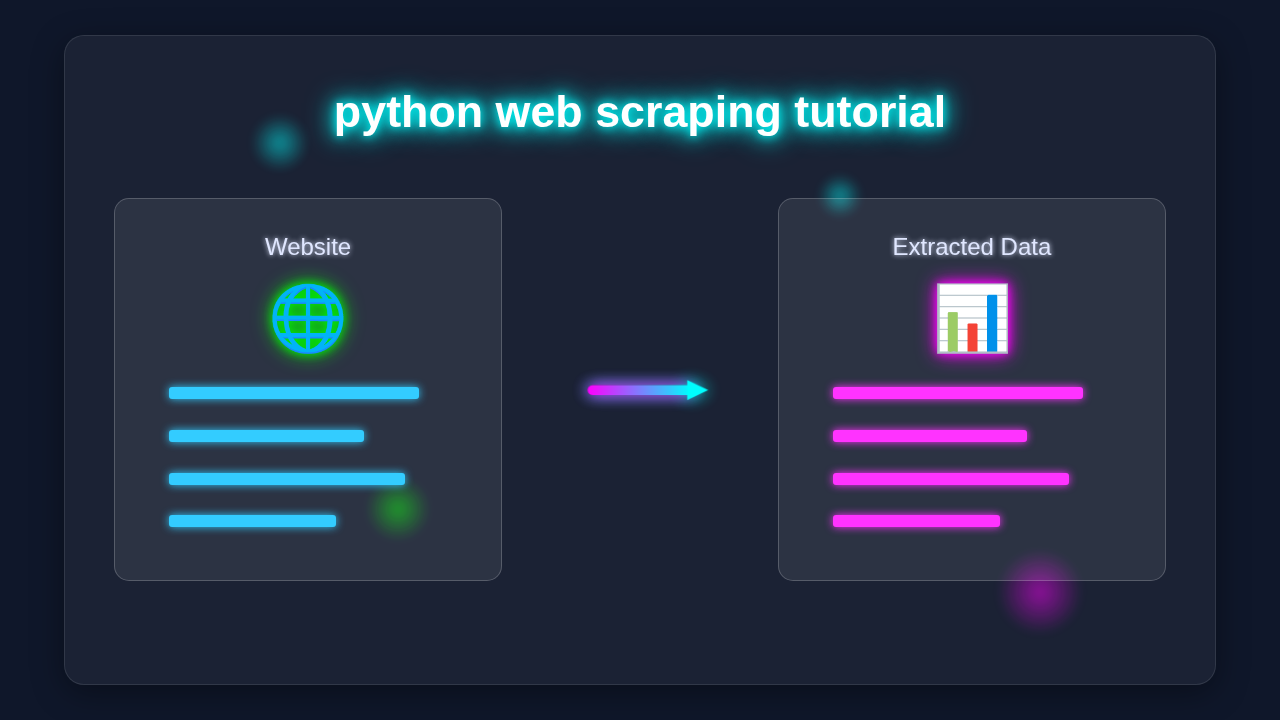
So, our scraper performs these steps in order. First, it sends a request to a URL. Then, it gets the HTML back. Next, BeautifulSoup parses that HTML. Finally, we use selectors to find the specific data we want. We then extract and present this data. It’s a simple yet powerful workflow. This process is the heart of Python Web Scraping. You’ve now built a tool that can interact with websites. You are no longer just a passive viewer. This is a huge step in your coding journey!
Heads Up on Ethics! Always check a website’s
robots.txtfile before scraping. This file tells you a site’s scraping policies. Respect these rules! Also, avoid overloading servers with too many requests. Scrape responsibly!
Tips to Customise It
You’ve built your first scraper, which is awesome! But the fun doesn’t stop here. Here are some ideas to make it even cooler:
- Scrape More Pages: Modify your script to scrape multiple pages. You can do this by changing the URL parameters or iterating through a list of URLs.
- Save to a File: Instead of just printing, save your data! You could write it to a CSV file or a JSON file. This makes your data portable.
- Add Error Handling: What if a page doesn’t load? Implement
try-exceptblocks to handle network errors or missing elements gracefully. - Build a Web App: Combine your scraper with a framework like Flask! You could build a simple web interface. This interface might trigger the scraper. It could then display the results. Check out our Flask To-Do App Tutorial: Build a Simple Python Backend for some ideas on starting with Flask.
- Advanced Parsing: Explore more advanced BeautifulSoup features. Learn about regular expressions or different parsing strategies. If you want to dive deeper, our Python Web Scraping Tutorial: A Complete Guide with BeautifulSoup has more advanced techniques.
Conclusion
Amazing job! You’ve successfully built your first Python Web Scraping tool. You’ve learned how to fetch web pages. You’ve parsed their HTML. Best of all, you’ve extracted valuable data. This skill is incredibly versatile. It’s used in data science, market research, and content aggregation. You now have a powerful new arrow in your developer quiver. Don’t stop here! Keep experimenting with different websites. Try to find new data. Share what you’ve built with your friends! The world of web scraping is vast and exciting. Happy coding!
web_scraper.py
import requests
from bs4 import BeautifulSoup

def scrape_website(url):
    """
    Scrapes a target website for quotes and authors using requests and BeautifulSoup.

    Args:
        url (str): The URL of the website to scrape.

    Returns:
        list: A list of dictionaries, where each dictionary represents an extracted quote,
              or None if an error occurs.
    """
    print(f"Attempting to scrape: {url}")
    try:
        # 1. Send an HTTP GET request to the URL
        # We add headers to mimic a real browser request, which can help avoid some blocks.
        headers = {
            'User-Agent': 'Mozilla/5.0 (Windows NT 10.0; Win64; x64) AppleWebKit/537.36 (KHTML, like Gecko) Chrome/91.0.4472.124 Safari/533.36'
        }
        response = requests.get(url, headers=headers, timeout=10) # Added timeout for robustness
        response.raise_for_status() # Raises an HTTPError for bad responses (4xx or 5xx)

        # 2. Parse the HTML content of the page
        # 'lxml' is often faster and more robust than Python's default 'html.parser'
        soup = BeautifulSoup(response.text, 'lxml')
        print("Successfully fetched and parsed HTML.")

        extracted_quotes = []

        # Find all quote containers
        # On quotes.toscrape.com, each quote is inside a <div class="quote">
        quotes_divs = soup.find_all('div', class_='quote')

        if not quotes_divs:
            print("No quote elements found with class 'quote'. Check website structure or CSS selector.")
            return None # Or return an empty list if it's not an error condition

        for quote_div in quotes_divs:
            # Extract the quote text
            text_tag = quote_div.find('span', class_='text')
            quote_text = text_tag.get_text(strip=True) if text_tag else 'N/A'

            # Extract the author
            author_tag = quote_div.find('small', class_='author')
            quote_author = author_tag.get_text(strip=True) if author_tag else 'N/A'

            # Extract tags (optional)
            tags_div = quote_div.find('div', class_='tags')
            quote_tags = [a.get_text(strip=True) for a in tags_div.find_all('a', class_='tag')] if tags_div else []

            extracted_quotes.append({
                'text': quote_text,
                'author': quote_author,
                'tags': quote_tags
            })

        return extracted_quotes

    except requests.exceptions.HTTPError as err_h:
        print(f"HTTP Error occurred: {err_h}")
    except requests.exceptions.ConnectionError as err_c:
        print(f"Error Connecting: {err_c}")
    except requests.exceptions.Timeout as err_t:
        print(f"Timeout Error: {err_t}")
    except requests.exceptions.RequestException as err:
        print(f"An error occurred during the request: {err}")
    except Exception as e:
        print(f"An unexpected error occurred during parsing: {e}")
    return None

def main():
    """
    Main function to run the web scraping tutorial.
    """
    # IMPORTANT: Always check the website's robots.txt file (e.g., http://quotes.toscrape.com/robots.txt)
    # and Terms of Service before scraping. Be polite and do not overload servers.
    # For learning purposes, quotes.toscrape.com is specifically designed to be scraped.
    target_url = "http://quotes.toscrape.com/"

    print("--- Python Web Scraping Tutorial ---")
    print(f"Target URL: {target_url}")
    print("Dependencies: requests, beautifulsoup4, lxml")
    print("Install them using: pip install requests beautifulsoup4 lxml\n")

    scraped_data = scrape_website(target_url)

    if scraped_data:
        print("\n--- Successfully Scraped Data ---")
        for i, quote in enumerate(scraped_data):
            print(f"--- Quote {i+1} ---")
            print(f"Text: {quote['text']}")
            print(f"Author: {quote['author']}")
            print(f"Tags: {', '.join(quote['tags']) if quote['tags'] else 'No Tags'}")
            print("-" * 30)
    else:
        print("\nFailed to retrieve or parse data from the target URL.")

if __name__ == "__main__":
    main()