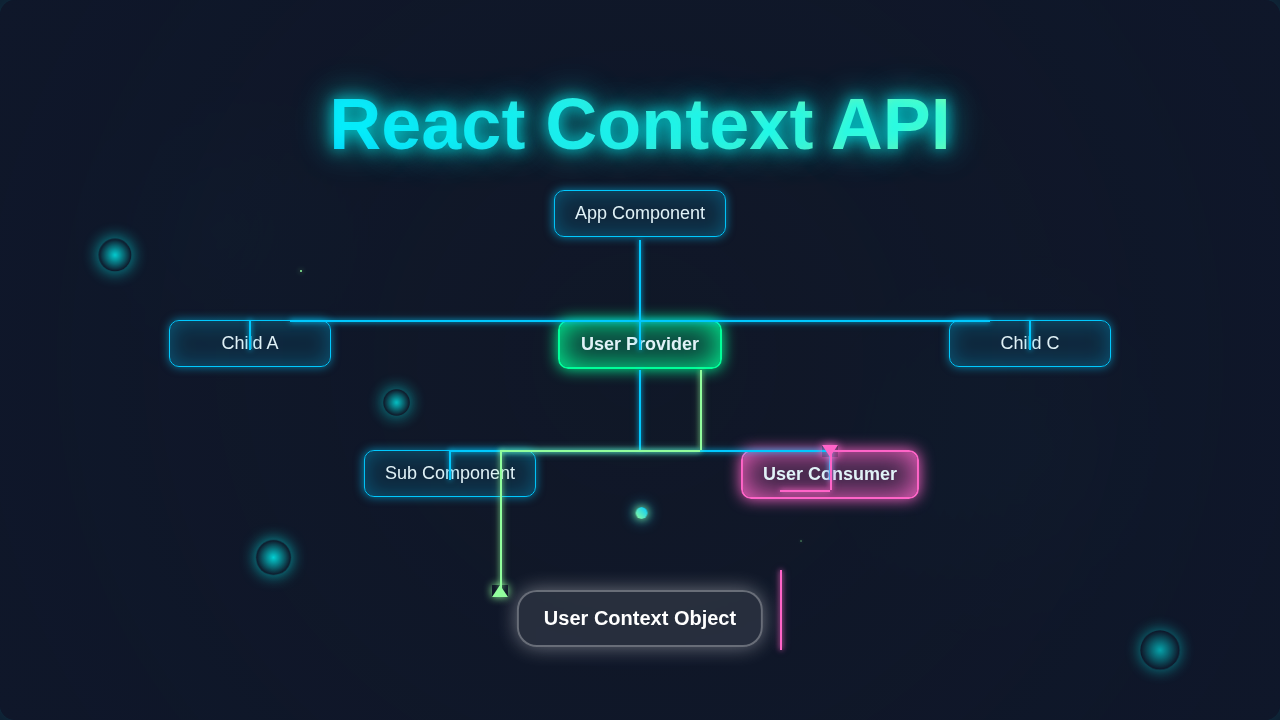
React Context API: Visualize Data Flow in Component Tree
Hey there, fellow self-taught coder! Have you ever stared at your React components? Did it feel like a never-ending game of telephone with your data? You know the drill. Data lives way up high in your component tree. Then, you need to pass it down. It goes down through a dozen intermediate components. It finally reaches the one that actually needs it. This often feels messy, right?
Well, you have probably heard whispers about the React Context API. Some folks say it’s a magical cure-all. Others warn you about it. Today, we are going to bust those myths wide open. We will explore exactly what the React Context API is for. More importantly, we will learn when you should actually use it. Get ready to clear up some confusion!
Myth #1 Busted: React Context API is Your Go-To Global State Management Solution
Let’s tackle this one first. Many beginners think the React Context API is meant to replace tools like Redux or Zustand. They see “global” and think, “perfect for everything!” Here’s the thing: it’s not really designed for that.
True global state management systems handle complex state. They offer features like middleware. They provide debugging tools. They also give you easy ways to update state from anywhere. Think of a big company’s central database. Everyone can access it. Many departments update it constantly. That’s true global state management.
The React Context API, on the other hand, is more like a specialized intercom system. You set up a channel for specific information. Then, only the components explicitly connected to that channel can listen in. It helps you avoid “prop drilling.” This happens when you pass props through many layers of components. Those components don’t actually need the data themselves. You are just passing it along.
Indeed, it’s super handy for avoiding that telephone game. However, it’s not built to manage every single piece of data in your entire application. It’s more targeted. Does that make sense so far?
Pro Tip: Think of React Context API as a direct mail service for specific, less-frequently changing information, not a public bulletin board for all announcements.
Myth #2 Busted: You Should Use React Context API for ALL Your State
This myth ties right into the first one. It feels so convenient. You might be tempted to use Context for every bit of state. Don’t fall into that trap! It might seem like a shortcut now. Yet, it can lead to performance headaches later. This is especially true for larger applications.
When a value provided by Context changes, every component consuming that context will re-render. This happens even if they only use a small part of the data. It happens even if they don’t visually change. This can be inefficient. Imagine a simple counter living in Context. Every time you click “increment,” all connected components might re-render. You probably don’t want that for frequently updating state.
Local component state is often perfectly fine. Passing props directly for just one or two levels works too. For complex forms, you might want dedicated solutions. You can even check out how we handle complex inputs in our guide on React Form Validation with JSX. Context isn’t a general-purpose highway for all data. It’s more like a dedicated express lane for specific cargo. That cargo needs to bypass regular traffic.
So, should you put your rapidly changing input values or animation states into Context? Probably not. It’s designed for stable, less dynamic data.
Myth #3 Busted: React Context API Replaces Redux, Zustand, or Other State Managers
Okay, this is a big one. You might hear people say, “Context API is here! We don’t need Redux anymore!” That’s a bit like saying a screwdriver replaces a whole toolbox. Sure, a screwdriver is useful. But you still need a wrench, a hammer, and maybe a power drill for bigger jobs.
State management libraries like Redux or Zustand offer a lot more. They provide a predictable state container. They often come with dev tools for inspecting state changes. They can handle asynchronous actions gracefully. These tools are built for large, complex applications. They help you manage application-wide state. They manage actions, reducers, and side effects.
The React Context API is fantastic for certain types of global-ish data. Think things like your app’s theme. This means dark mode or light mode. Or perhaps the currently logged-in user’s basic information. Or maybe the application’s language preference. These pieces of data usually don’t change very often. They also affect many parts of your UI.
However, what if you are building something like a complex to-do list? Items are added, deleted, reordered, and marked complete frequently. For that, a dedicated state management library might be a better fit. You can see how a dedicated library excels in our Zustand To-Do List in React: State Management Tutorial. Context can simplify passing these static-like values. But it doesn’t offer the robust architecture of a full state management solution.
The Truth: When to Reach for React Context API
So, if it’s not a global state solution and not for all your state, when should you use the React Context API? The sweet spot for Context is when you have data. This data needs to be accessible by many components. These components are often at different levels of the component tree. However, this data does not change frequently.
Think of configuration settings for your entire app. Or user authentication details. These are perfect candidates. Imagine your app has a dark mode toggle. You want many components to know if dark mode is active. You don’t want to pass an isDarkMode prop down through every single component. That’s what we call prop drilling. It makes your code harder to read. It makes it harder to maintain.
Here are some prime examples:
- Theme Data: Like dark or light mode settings.
- User Authentication: The current logged-in user’s ID, name, or authentication token. This data is usually set once at login. Then, it stays the same.
- Language Preferences: If your app supports multiple languages, the current language setting is a great fit.
- Static Configuration: Any settings that rarely change after the app loads.
When you use Context for these types of data, you provide the value once at a higher level. Then, any component deeper in the tree can “subscribe” to it. They can use that value without props being explicitly passed down. It’s like having a special courier service. The courier knows exactly who needs the specific package. No need to pass it through countless middlemen.
Remember: React Context API excels at simplifying the delivery of static or infrequently updated data to deeply nested components, effectively solving prop drilling.
How React Context API Actually Works (No Code, Just Concepts!)
Alright, let’s peek under the hood a bit. Don’t worry, we won’t be looking at any code! We’ll just talk about the basic concepts. First, you create a “context” object. This is like defining a specific channel for information. This channel has a name. For instance, “ThemeContext” or “UserContext.”
Then, you use something called a “Provider.” You wrap the part of your component tree that needs access to this data with the Provider. The Provider component accepts a value prop. This value is the actual data you want to share. So, you wrap your entire application, or a significant part of it, with your ThemeContext.Provider. Then, you pass in your isDarkMode status.
Finally, any component that wants to use this data simply “consumes” it. In modern React, you usually do this with the useContext hook. You tell useContext which context you want to tap into. For example, useContext(ThemeContext). Then, poof! That component gets the value that the Provider supplied. It’s a direct connection!
You can even think of how different parts of a React Todo List App might need to know the current filter state (all, active, completed). Context could be a neat way to share that filter state. It avoids prop-drilling through every single list item.
The beauty is that intermediate components don’t need to know anything about the data. They just sit there. They don’t get cluttered with props they don’t use. It cleans up your component’s props significantly. It makes your component tree easier to understand. It shows you a clearer picture of data flow for these specific, stable values.
You’ve Got This!
See? The React Context API isn’t some mythical beast. It’s a powerful tool with a specific job. It helps you manage certain types of state efficiently. It cleans up your component architecture. It does this by eliminating annoying prop drilling. It’s not a replacement for everything. Instead, it’s a valuable addition to your React toolkit.
Now you know when to use it. Crucially, you also know when to think twice. Keep building, keep experimenting, and keep learning! You are already visualizing that data flow like a pro. Go forth and create amazing things with React!