CORS Errors Explained: Visualizing Cross-Origin Issues
Hey there, future coding rockstar! You’ve probably been there, right? You’re building an awesome web app. Your frontend looks slick. Your backend API is humming along. Then you hit ‘send’ on a request. Suddenly, your browser console screams. A big, scary ‘CORS error’ glares back at you. Sound familiar?
If you’ve spent hours debugging and wondering why your perfectly good API isn’t responding, don’t worry. You are not alone. Today, we’re diving deep into CORS errors explained. We’ll uncover why they happen. Most importantly, we’ll learn how to finally resolve them. You’ll master this common web dev hurdle!
What are CORS Errors Explained?
So, what’s this mysterious CORS thing? CORS stands for Cross-Origin Resource Sharing. It’s a security feature built into web browsers. Think of it as a bouncer for your website. This bouncer checks if one website can talk to another. Specifically, it checks if a website from one ‘origin’ can request resources. Those resources might come from a different ‘origin.’ That’s where CORS errors explained come into play. When the bouncer says ‘no,’ you get an error. You might wonder why browsers do this. It’s all about keeping you safe online. Imagine a malicious website trying to steal your banking data. Your browser wants to prevent that. It acts as a shield.
How Your Browser Guards Against Trouble (The Same-Origin Policy)
Before CORS, there was something called the Same-Origin Policy (SOP). This policy is the foundation of browser security. It’s very strict. It says that code from one website can only interact with resources. Those resources must be from the exact same website. An ‘origin’ is defined by three things. These are the protocol, the domain, and the port. For example, https://procoder09.com:443 is one origin. http://procoder09.com:80 is a different origin. Even https://blog.procoder09.com is another distinct origin. Your browser is incredibly vigilant here. It prevents a website you visit from snooping on your data. That data might live on another site. Think of your neighbor’s fence. The fence is the Same-Origin Policy. Your house (website A) is on one side. Your neighbor’s house (website B) is on the other. You can easily access things within your own yard. But you can’t just walk into your neighbor’s house. You can’t grab their mail. You also can’t peek through their windows. The fence keeps everything separate and secure. This default behavior protects you from many threats.
When the Fence Needs a Gate: Cross-Origin Requests and CORS Explained
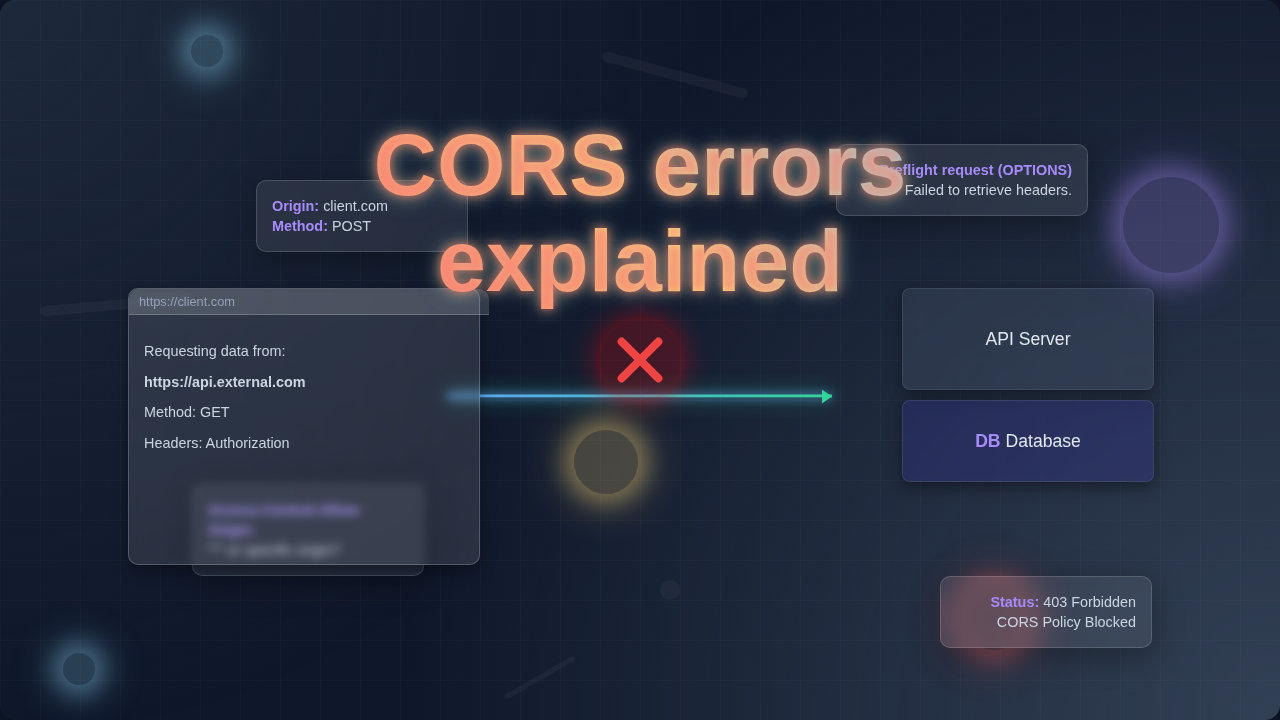
Sometimes, your fence needs a gate. You want your website to talk to another website. This is super common. Maybe you’re building a React app that needs data. This data lives on a separate backend API. You might use a Flask TODO API Tutorial: Build a Python Backend for Tasks you built. Your frontend runs on localhost:3000. Your API runs on localhost:5000. These are different origins. The Same-Origin Policy would block this. That’s where CORS comes to the rescue. CORS lets the backend server explicitly grant permission. It’s like your neighbor saying, ‘Hey, you can come over for coffee!’ How does this permission work? When your browser tries to make a request to a different origin, it doesn’t just send the data directly. First, it often sends a ‘preflight’ request. This is an OPTIONS HTTP request. It asks the server: ‘Can I send you a GET request? What about a POST request? Can I include special headers?’ The server then responds. It sends back special CORS headers. The most important one is Access-Control-Allow-Origin. This header tells your browser which origins are allowed. If your frontend’s origin is in that list, your browser lets the actual request go through. If not, BAM! You see a CORS error. So, CORS errors explained means the server didn’t give permission. Or perhaps it didn’t give permission in the way your browser expected.
Common Confusions & How to Fix CORS Errors Explained
You’ve probably hit a wall with CORS. One common confusion is, ‘Why does my Postman request work, but my browser doesn’t?’ Here’s the thing. Tools like Postman or curl don’t enforce CORS. They are not web browsers. They simply make HTTP requests. Your browser, however, strictly follows the rules. It’s protecting you by default. Another common head-scratcher: ‘I built both the frontend and backend myself! Why is CORS still bothering me?’ This happens because your browser doesn’t care who built it. It only cares about the origins. If they are different, it triggers the CORS check.
CORS Tip #1: Remember, the solution to a CORS error always lives on the server-side. Your backend needs to give permission!
So, how do you finally fix these frustrating CORS errors explained? You need to configure your backend. You must tell it to send the correct Access-Control-Allow-Origin header. This header specifies which origins are allowed to access your resources. You can allow a specific origin. For instance, https://your-frontend.com is a good choice. Or, for development, you might temporarily use a wildcard *. This means ‘allow any origin.’ But use the wildcard with extreme caution in production! It opens your API to everyone. You might also need to allow specific HTTP methods. These include GET, POST, PUT, DELETE. And sometimes you need to allow custom headers. You can find detailed configuration examples on MDN Web Docs about CORS. For your frontend React apps, remember to always ensure your fetch or Axios calls are directed to the correct server. You can learn more about handling data in forms with React Form Validation with JSX.
Quick Fixes vs. Best Practices
When you’re banging your head against a CORS error, quick fixes look tempting. You might find browser extensions. These extensions promise to ‘disable CORS.’ They can bypass browser security checks. They trick your browser into ignoring CORS headers. While they seem to solve the problem, they are for local development only.
CORS Tip #2: Never use browser extensions or client-side ‘disabling’ to solve CORS in production. Always fix it on the server!
Never use them for production work. They open up massive security holes. Your users would be vulnerable. Another approach involves using a proxy. A proxy server sits between your frontend and your backend. Your frontend makes a ‘same-origin’ request to the proxy. The proxy then makes the actual cross-origin request to your API. The proxy then sends the response back to your frontend. This works because the proxy isn’t a browser. It doesn’t enforce CORS. While a proxy can be useful, it adds complexity. It also introduces another point of failure. The best practice is always to configure your backend correctly. This ensures your API is secure. It allows access only to trusted origins. Think about a simple static site. It could be one styled with Tailwind Dark Mode Tutorial: HTML & Tailwind CSS Utility Classes. If it’s just HTML and CSS, you won’t encounter CORS issues. But as soon as you connect to an external API, CORS becomes essential. Do it right from the start. Your future self will thank you.
Key Takeaways
Here are the core ideas to remember about CORS:
- CORS (Cross-Origin Resource Sharing) is a browser security feature.
- It prevents websites from one origin from accessing resources on another origin without explicit permission.
- The Same-Origin Policy (SOP) is the strict default rule.
- CORS provides a controlled ‘gate’ through the SOP ‘fence.’
- CORS errors mean your backend server did not grant permission to your frontend’s origin.
- To fix CORS, you must configure your backend. You need to send the correct
Access-Control-Allow-Originheader. - Never disable CORS on the client-side for production. It creates huge security risks.
Phew! That was a lot, wasn’t it? But now you know what those cryptic CORS errors mean. You understand why they happen. And most importantly, you know how to tackle them. CORS can feel like a roadblock. However, it’s really just your browser doing its job. It’s keeping the web a safer place for everyone. With a little server-side configuration, you can overcome these hurdles. You can make your cross-origin requests work seamlessly. Keep building. Keep learning. Every error is just a lesson in disguise. You’re becoming a more capable developer with every challenge you conquer. If you want to dive deeper into web security or API interactions, check out more fantastic resources like CSS-Tricks’ guide on AJAX. You’ve got this!