React RSS feed made easy
Hey! If you have wanted to build a React RSS feed but had no idea where to start, you are in the right place. We are building a simple React RSS component with JSX.
What We Are Building
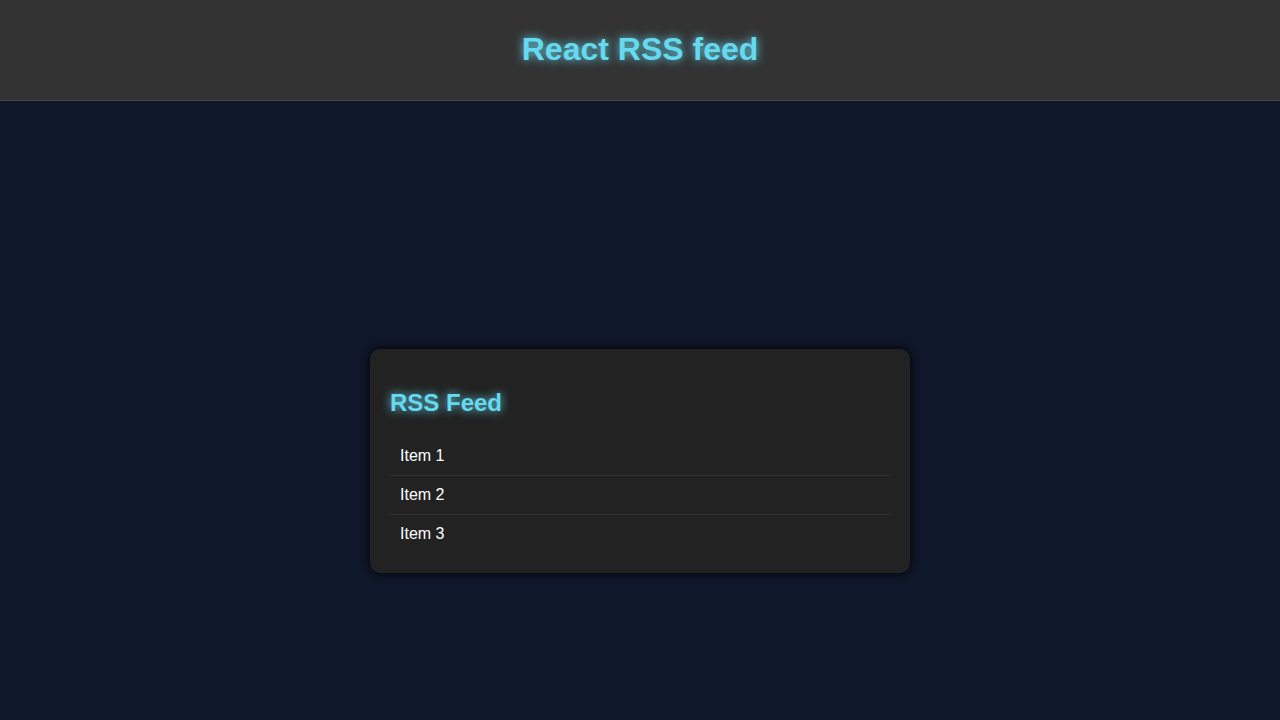
We’re making a customizable React RSS feed component.
HTML Structure
HTML is the base. We define the structure here. Don’t worry about this part, it’s simple.
index.html
<!DOCTYPE html><html lang='en'><head><meta charset='UTF-8'><meta name='viewport' content='width=device-width, initial-scale=1.0'><title>React RSS feed</title><link rel='stylesheet' href='styles.css'></head><body><div id='root'></div><script src='script.js'></script></body></html>CSS Styling
CSS makes it look nice. Here’s the cool part: styling our component.
styles.css
body { font-family: Arial, sans-serif; background-color: #0f172a; color: #fff; overflow: hidden; margin: 0; padding: 0; } .rss-feed { background-color: #222; padding: 20px; border-radius: 10px; box-shadow: 0px 0px 10px #000; width: 500px; max-width: 100%; box-sizing: border-box; overflow: hidden; } .rss-feed h2 { color: #66d9ef; text-shadow: 0px 0px 10px #66d9ef; } .rss-feed ul { list-style: none; padding: 0; margin: 0; } .rss-feed li { padding: 10px; border-bottom: 1px solid #333; } .rss-feed li:last-child { border-bottom: none; } .rss-feed a { color: #fff; text-decoration: none; } .rss-feed a:hover { color: #66d9ef; }JavaScript
We use JavaScript to make it work. Let me explain what’s happening here: we’re using React.
script.js
import React, { useState, useEffect } from 'react';import ReactDOM from 'react-dom';const RssFeed = () => { const [items, setItems] = useState([]); useEffect(() => { fetch('https://example.com/rss') .then(response => response.text()) .then(data => { const parser = new DOMParser(); const xmlDoc = parser.parseFromString(data, 'text/xml'); const items = xmlDoc.getElementsByTagName('item'); const itemArray = Array.from(items); setItems(itemArray.map(item => ({ title: item.getElementsByTagName('title')[0].textContent, link: item.getElementsByTagName('link')[0].textContent }))); }); }, []); return ( <div className='rss-feed'> <h2>RSS Feed</h2> <ul> {items.map((item, index) => ( <li key={index}> <a href={item.link}>{item.title}</a> </li> ))} </ul> </div> );};ReactDOM.render(<RssFeed />, document.getElementById('root'));How It All Works Together
Breaking It Down
First, we set up our component. Then, we add the feed.
Making It Dynamic
Next, we make it update automatically. This is the magic of React RSS.
Pro tip: use the MDN for reference.
Tips to Customise It
Now, let’s customize. You can change the colors, add more feeds, or even use a different library like CSS-Tricks for inspiration.
Conclusion
Celebrate! You just built a React RSS feed component. Check out our other tutorials like React useState Tabs Tutorial, React Weather App Tutorial, or React Debounced Search Component for more fun projects.
Remember, practice makes perfect. Keep building and soon you’ll be a pro!