JavaScript Movie Search App with HTML, CSS & Vanilla JS
Hey there, awesome coder! If you’ve ever wanted to build a cool Movie Search App but felt a bit lost, you are in the perfect spot. Today, we will create a dynamic web app from scratch. You’ll learn to fetch movie data using a powerful API. Get ready to impress yourself with what you can build!
What We Are Building: Your Very Own Movie Search App!
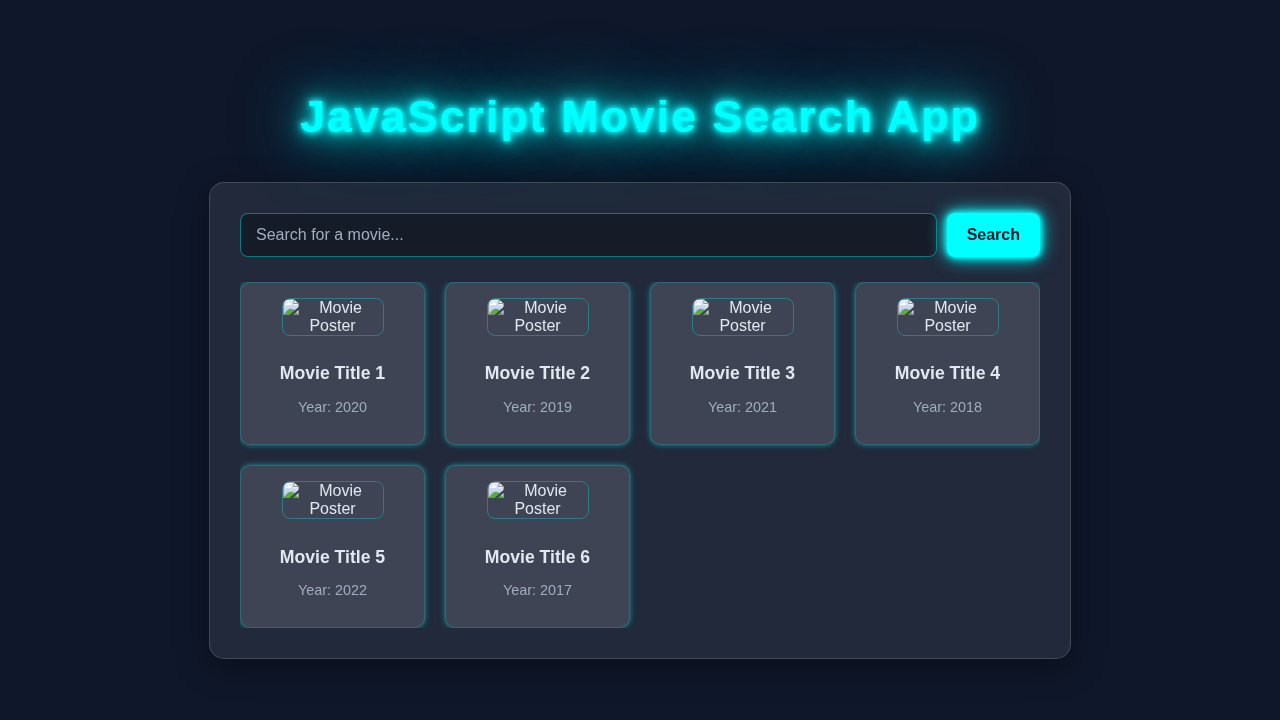
We are going to build a sleek Movie Search App. This app will let you search for any movie you can think of. Moreover, it will display results with their posters, titles, and ratings. It’s a fantastic project to solidify your JavaScript, HTML, and CSS skills. You will see your code bring information to life. How cool is that?
HTML Structure
First, let’s lay down the foundation with some HTML. This will give our app its basic structure. It’s like sketching out the blueprint for your house. We will set up the main container, a search input, and a section for movie results.
index.html
<!DOCTYPE html>
<html lang="en">
<head>
    <meta charset="UTF-8">
    <meta name="viewport" content="width=device-width, initial-scale=1.0">
    <title>Movie Search App</title>
    <link rel="stylesheet" href="styles.css">
</head>
<body>
    <div class="container">
        <h1>Movie Search App</h1>
        <div class="search-section">
            <input type="text" id="searchInput" placeholder="Search for a movie...">
            <button id="searchButton">Search</button>
        </div>
        <div id="message" class="message"></div>
        <div id="moviesGrid" class="movies-grid">
            <!-- Movie cards will be inserted here by JavaScript -->
        </div>
    </div>

    <script src="script.js"></script>
</body>
</html>
CSS Styling
Next, we’ll make our app look fantastic with CSS. We want it to be user-friendly and visually appealing. Good design makes a huge difference, right? We’ll add some modern touches to make our movie posters pop and the layout clean.
styles.css
/* Global styles */
* {
    box-sizing: border-box;
    margin: 0;
    padding: 0;
}

body {
    font-family: Arial, Helvetica, sans-serif;
    background-color: #1a202c; /* Dark background */
    color: #e2e8f0; /* Light text color */
    display: flex;
    justify-content: center;
    align-items: flex-start; /* Align to top initially */
    min-height: 100vh;
    padding: 20px;
    overflow-x: hidden; /* Prevent horizontal scroll */
}

.container {
    max-width: 960px;
    width: 100%;
    margin-top: 40px;
    padding: 30px;
    background: rgba(255, 255, 255, 0.08); /* Glassmorphism background */
    backdrop-filter: blur(10px);
    border: 1px solid rgba(255, 255, 255, 0.15);
    border-radius: 15px;
    box-shadow: 0 8px 32px 0 rgba(0, 0, 0, 0.37);
    display: flex;
    flex-direction: column;
    gap: 25px;
}

h1 {
    font-size: 2.5rem;
    text-align: center;
    color: #0ff; /* Neon blue */
    margin-bottom: 20px;
    text-shadow: 0 0 5px #0ff, 0 0 10px #0ff;
}

.search-section {
    display: flex;
    gap: 10px;
    width: 100%;
}

.search-section input {
    flex-grow: 1;
    padding: 12px 15px;
    border: 1px solid rgba(0, 255, 255, 0.4); /* Neon border */
    border-radius: 8px;
    background: rgba(0, 0, 0, 0.3); /* Darker input background */
    color: #e2e8f0;
    font-size: 1rem;
    outline: none;
    transition: border-color 0.3s, box-shadow 0.3s;
}

.search-section input::placeholder {
    color: #a0aec0;
}

.search-section input:focus {
    border-color: #0ff;
    box-shadow: 0 0 8px rgba(0, 255, 255, 0.6);
}

.search-section button {
    padding: 12px 20px;
    background-color: #0ff; /* Neon button color */
    color: #1a202c;
    border: none;
    border-radius: 8px;
    cursor: pointer;
    font-size: 1rem;
    font-weight: bold;
    transition: background-color 0.3s, transform 0.2s, box-shadow 0.3s;
    box-shadow: 0 0 5px #0ff;
}

.search-section button:hover {
    background-color: #0bd;
    transform: translateY(-2px);
    box-shadow: 0 0 15px #0ff;
}

.message {
    text-align: center;
    padding: 15px;
    background-color: rgba(255, 0, 0, 0.2); /* Error background */
    border-radius: 8px;
    margin-top: 15px;
    color: #fca5a5; /* Light red text */
    border: 1px solid rgba(255, 0, 0, 0.3);
    display: none; /* Hidden by default */
}

.movies-grid {
    display: grid;
    grid-template-columns: repeat(auto-fill, minmax(180px, 1fr));
    gap: 20px;
    padding-top: 10px;
}

.movie-card {
    background: rgba(255, 255, 255, 0.05);
    backdrop-filter: blur(5px);
    border: 1px solid rgba(0, 255, 255, 0.2);
    border-radius: 10px;
    padding: 15px;
    text-align: center;
    transition: transform 0.3s ease, box-shadow 0.3s ease;
    box-shadow: 0 4px 15px rgba(0, 0, 0, 0.2);
    overflow: hidden;
}

.movie-card:hover {
    transform: translateY(-5px);
    box-shadow: 0 8px 20px rgba(0, 255, 255, 0.4);
}

.movie-card img {
    max-width: 100%;
    height: 250px; /* Fixed height for consistency */
    width: 100%; /* Ensure image fills width */
    border-radius: 8px;
    margin-bottom: 10px;
    object-fit: cover; /* Crop image to fit */
    border: 1px solid rgba(0, 255, 255, 0.3);
}

.movie-card h3 {
    font-size: 1.1rem;
    margin-bottom: 5px;
    color: #e2e8f0;
    white-space: nowrap;
    overflow: hidden;
    text-overflow: ellipsis;
}

.movie-card p {
    font-size: 0.9rem;
    color: #a0aec0;
}

/* Responsive adjustments */
@media (max-width: 768px) {
    .container {
        margin-top: 20px;
        padding: 20px;
        gap: 20px;
    }

    h1 {
        font-size: 2rem;
    }

    .search-section {
        flex-direction: column;
        gap: 15px;
    }

    .search-section button {
        width: 100%;
    }

    .movies-grid {
        grid-template-columns: repeat(auto-fill, minmax(150px, 1fr));
    }

    .movie-card img {
        height: 220px;
    }
}

@media (max-width: 480px) {
    .container {
        padding: 15px;
    }

    h1 {
        font-size: 1.8rem;
    }

    .movies-grid {
        grid-template-columns: 1fr;
    }

    .movie-card img {
        height: 200px;
    }
}
JavaScript
Now for the real magic: JavaScript! This is where our Movie Search App comes alive. We will add all the dynamic functionality here. You will learn to interact with an API and display data in the browser. It’s exciting to see it all come together!
script.js
// IMPORTANT: Replace with your actual OMDB API Key
// You can get one from http://www.omdbapi.com/ (free for personal use)
const OMDB_API_KEY = 'YOUR_OMDB_API_KEY_HERE';

const searchInput = document.getElementById('searchInput');
const searchButton = document.getElementById('searchButton');
const moviesGrid = document.getElementById('moviesGrid');
const messageElement = document.getElementById('message');

/**
 * Fetches movies from the OMDB API based on the search term.
 * @param {string} searchTerm - The movie title to search for.
 */
async function fetchMovies(searchTerm) {
    if (!OMDB_API_KEY || OMDB_API_KEY === 'YOUR_OMDB_API_KEY_HERE') {
        displayMessage('Please replace "YOUR_OMDB_API_KEY_HERE" in script.js with your actual OMDB API key.');
        return;
    }

    if (searchTerm.trim() === '') {
        displayMessage('Please enter a movie title to search.');
        return;
    }

    displayMessage('Searching...', false);
    moviesGrid.innerHTML = ''; // Clear previous results

    const url = `http://www.omdbapi.com/?s=${encodeURIComponent(searchTerm)}&apikey=${OMDB_API_KEY}`;

    try {
        const response = await fetch(url);
        if (!response.ok) {
            throw new Error(`HTTP error! status: ${response.status}`);
        }
        const data = await response.json();

        if (data.Response === 'True') {
            displayMovies(data.Search);
            hideMessage();
        } else {
            displayMessage(data.Error || 'No movies found for your search term. Please try another one.');
        }
    } catch (error) {
        console.error('Error fetching movies:', error);
        displayMessage('Failed to fetch movies. Please check your network connection or API key.');
    }
}

/**
 * Displays an array of movie objects in the grid.
 * @param {Array<Object>} movies - An array of movie objects from the OMDB API.
 */
function displayMovies(movies) {
    moviesGrid.innerHTML = ''; // Clear existing content
    if (!movies || movies.length === 0) {
        displayMessage('No movies found. Try a different search term.');
        return;
    }

    movies.forEach(movie => {
        const movieCard = document.createElement('div');
        movieCard.classList.add('movie-card');

        const poster = movie.Poster !== 'N/A' ? movie.Poster : 'https://via.placeholder.com/100x150/000000/FFFFFF?text=No+Poster';

        movieCard.innerHTML = `
            <img src="${poster}" alt="${movie.Title} Poster">
            <h3>${movie.Title}</h3>
            <p>Year: ${movie.Year}</p>
        `;
        moviesGrid.appendChild(movieCard);
    });
    hideMessage();
}

/**
 * Displays a message to the user.
 * @param {string} message - The message content.
 * @param {boolean} isError - True if it's an error message, false for informational/loading.
 */
function displayMessage(message, isError = true) {
    messageElement.textContent = message;
    messageElement.style.display = 'block';
    if (isError) {
        messageElement.style.backgroundColor = 'rgba(255, 0, 0, 0.2)';
        messageElement.style.borderColor = 'rgba(255, 0, 0, 0.3)';
        messageElement.style.color = '#fca5a5';
    } else {
        messageElement.style.backgroundColor = 'rgba(0, 255, 255, 0.2)';
        messageElement.style.borderColor = 'rgba(0, 255, 255, 0.3)';
        messageElement.style.color = '#99ffff';
    }
}

/**
 * Hides the message element.
 */
function hideMessage() {
    messageElement.style.display = 'none';
}

// Event listeners
searchButton.addEventListener('click', () => {
    fetchMovies(searchInput.value);
});

searchInput.addEventListener('keypress', (event) => {
    if (event.key === 'Enter') {
        fetchMovies(searchInput.value);
    }
});

// Initial search on page load (optional)
document.addEventListener('DOMContentLoaded', () => {
    fetchMovies('Avengers'); // Example initial search
});
How It All Works Together
Let’s break down the different pieces of our Movie Search App. Understanding each step helps you grasp the full picture. You’ll see how HTML, CSS, and JavaScript cooperate beautifully.
Setting Up TheMovieDB API
The first step involves getting your tools ready. We use TheMovieDB API to access a huge database of movies. An API is essentially a way for different software to communicate. You will need to sign up on their website to get an API key. This key is like your secret password. It tells the API that your app is allowed to request data. Keep it safe and never share it publicly! Moreover, this key lets you fetch movie titles, posters, and ratings easily.
Getting User Input
Our app needs to know what movie you want to find. So, we listen for user input. We attach an event listener to our search form. When you type a movie name and press Enter, this event fires. We then grab the text from the input field. This text becomes our search query. It’s a crucial part of making our app interactive.
Fetching Movie Data
Here’s the cool part! We use the Fetch API in JavaScript. It allows us to send requests to TheMovieDB. We build a special URL with your search query and API key. Then, we use async/await to handle the response. This pattern makes asynchronous code much cleaner. It fetches the movie data in the background. Thus, your app remains responsive while it waits. We then convert the response into a usable JSON format.
Displaying Results
Once we have the movie data, we need to show it! We loop through the array of movies that the API sends back. For each movie, we dynamically create new HTML elements. We add the movie’s title, poster, and vote average. This content then gets injected into our results container. If no movies are found, we display a friendly message. This process updates the page without needing a full reload. For more dynamic content ideas, check out our React Weather App Tutorial!
Error Handling and Loading States
What if something goes wrong? Good apps anticipate problems. We wrap our fetch requests in a try...catch block. This helps your app respond gracefully to issues. For example, if the network is down, the catch block can display an error message. Also, we can add a simple loading indicator. This tells the user that data is being fetched. It vastly improves the user experience.
Pro Tip: Always include error handling in your API calls. It makes your applications much more robust and user-friendly. Users appreciate knowing what’s happening!
Tips to Customise It
You’ve built a solid foundation! Now, let’s think about how you can make it even better. Customising your projects is super rewarding. It helps you explore new concepts too!
- Add a Details Page: When a user clicks a movie poster, navigate to a new page. This page could show more details about that specific movie.
- Implement Pagination: The API returns many results. Add previous/next buttons to browse through pages of movies. You can find excellent UI examples on CSS-Tricks.
- Genre Filters: Allow users to filter movies by genre (e.g., Action, Comedy). This would involve another API call to get genre lists.
- Save Favorites: Use local storage to let users save their favorite movies. They can then view their list later. This is similar to what we did in our JavaScript AI Content Generator.
Conclusion
Wow, you did it! You just built a functional and dynamic Movie Search App. You used HTML, CSS, and vanilla JavaScript. That is a massive achievement! You learned how to interact with an external API. Moreover, you displayed dynamic content on your web page. This project boosts your web development skills significantly. Now, share your awesome creation with your friends and fellow coders! Remember that building accessible applications is also very important. Learn more with our Keyboard Navigation tutorial.
Keep building, keep learning! Every line of code brings you closer to becoming a true pro coder. Your journey is just beginning!