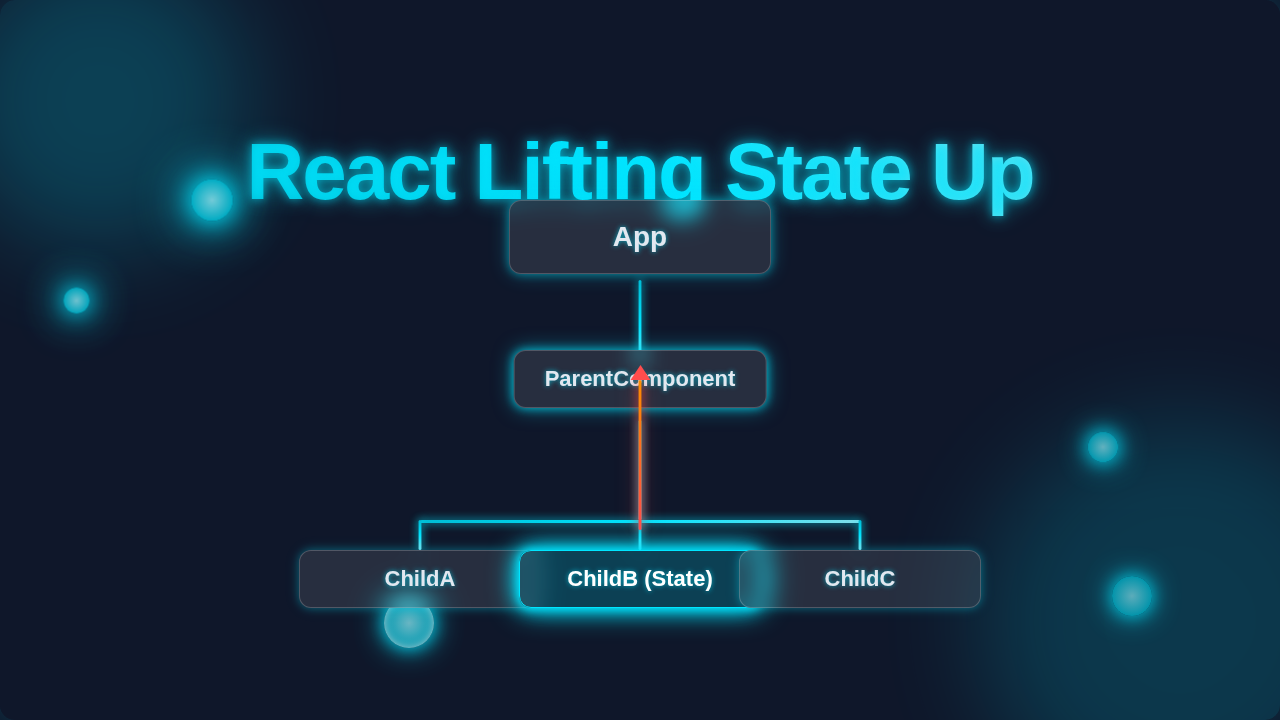
React Lifting State Up: Component Tree & Neon Diagram
Hello, future coding legend! Have you ever built a React app and felt like your data was playing hide-and-seek? One component has the info. Another one needs it. Suddenly, you’re passing props down a mile-long chain, or worse, trying to make components chat through telepathy. It’s a mess, right?
You’re definitely not alone. Many self-taught beginners hit this wall. But there’s a superhero pattern waiting to save your day: React Lifting State Up. It’s not a fancy new hook. It’s a fundamental principle for managing component data flow. Let’s bust some myths and get you on the path to cleaner, happier React apps!
Myth #1: “Every Component Is an Island” – Why That Breaks Your React App
Okay, real talk. When you first start with React, you might think, “This button has its own state. This input box has its own state. Everything is isolated and perfect!” Sounds logical, doesn’t it? You build small, focused components.
Here’s the thing, though. Your application is rarely just a collection of disconnected parts. Data often needs to be shared. Imagine you have a shopping cart component. It needs to know which items the product display components have added. If every product component holds its own “added to cart” state, how does the cart component ever know anything?
This isolation quickly turns into a nightmare. You end up with fragmented data. It becomes impossible to keep everything in sync. This concept is about centralizing data. You move the state to a common parent. This parent then distributes the data. Think of it like a train system. Each train has a driver (its own state). But for the whole network to work, a central control tower (lifted state) needs to know where all trains are. Make sense so far? That central tower is where your shared state should live.
Myth #2: “Props Are Only for Displaying Data” – The Secret to Two-Way Communication
You probably learned that props flow down. They carry data from a parent component to its child. The child then uses this data to display things. This is absolutely true. Props are perfect for showing names, prices, or status messages.
But here’s the cheeky part: props can do so much more! You can pass *functions* down as props. This is the secret handshake. It allows a child component to “talk back” to its parent. Ever wondered how a button in a child component can trigger an update in the parent? It uses this exact trick.
The parent defines a function. This function updates the parent’s state. Then, the parent passes that function down to the child as a prop. When the child needs to make a change, it simply calls this function. It’s like giving a child a walkie-talkie (the function) to report back to you (the parent) when something important happens. This is key to how React Lifting State Up truly works. It establishes a clear communication channel, making your components more interactive and responsive.
Myth #3: “Lifting State Up Is Just Prop Drilling in Disguise” – The Grand Orchestrator
Some beginners look at Lifting State Up and sigh. “Wait,” you might think, “I’m just pushing state higher up the tree. Then I still have to pass it all the way back down! Isn’t that just glorified prop drilling?” It certainly can feel that way at first glance. Prop drilling is when you pass data through many intermediary components that don’t actually need that data themselves.
The distinction is crucial, though. Lifting State Up isn’t about arbitrarily moving state. It’s about finding the *closest common ancestor*. This is the component that is the parent to all components needing that specific piece of state. It becomes the intelligent manager, the grand orchestrator. It holds the “source of truth” for that data.
Think of a conductor leading an orchestra. Each musician (component) plays their part. But the conductor (the common ancestor with the lifted state) holds the score. They direct the tempo and dynamics. They receive cues from different sections and ensure harmony across the whole performance. This reduces scattered, hard-to-track state. It makes your component tree more predictable. Instead of randomly passing props, you’re making deliberate choices about where your shared data truly belongs.
The Truth: Lifting State Up Creates a Predictable Data River
When you embrace unidirectional data flow by applying React Lifting State Up, you establish a crystal-clear path for your data. It’s like setting up a single, well-defined river. This river originates from a mountain peak (your parent component). It flows cleanly down to all the villages (your child components) that need its water.
This pattern centralizes related state. When multiple components need to share or modify the same piece of data, that data lives in their nearest common ancestor. This parent component then holds the “source of truth.” It passes the data down to its children via props. If a child needs to change the data, it calls a function passed down from the parent. This function updates the parent’s state, which then causes all relevant children to re-render with the new data.
React Lifting State Up ensures a single source of truth for shared data. This makes debugging easier and your app’s behavior much more predictable.
This clear, one-way street makes your application’s logic much simpler to follow. If something breaks, you know exactly where to look. The data always flows down. Changes always flow up. It’s elegant. It’s efficient. And it’s essential for building robust React applications, especially as they grow in complexity.
Your React Component Tree: Think Neon Signs in a City Grid
Imagine your React app’s component tree as a bustling city grid. Each component is a building. State is like the electrical power running through the city. When you “lift state up,” you’re essentially creating a central power station. This station efficiently distributes electricity (data) to all the buildings (components) that need it. Data then lights up your tree like neon signs, flowing from the top, illuminating pathways.
This isn’t about putting *all* state at the very top of your app. That would be chaotic! It’s about placing state at the highest level where all its relevant consumers can access it without excessive drilling. For instance, if only a single component uses some internal toggle, its state should remain local. If you want to persist local user preferences, a React useLocalStorage Hook might be a better fit.
To identify where to lift state, ask: Which is the lowest common ancestor of all components that *use* this state or *need to change* this state?
Understanding component composition and how props facilitate communication is vital. When you build a complex feature, like a React Todo Local Storage App Tutorial, you’ll quickly see how a shared list of todos needs to live in a parent component. This parent can then manage adding, deleting, and marking todos as complete. It passes the todo list down to display components. It also passes functions for updating the list back up. This pattern is fundamental.
So, the next time your data feels scattered, remember the power of React Lifting State Up. It’s not a magical incantation. It’s a thoughtful approach to data management. It gives your app structure. It provides clarity. It makes your development process smoother.
You’ve got this, future React wizard! Keep practicing these core concepts. Each time you apply them, your understanding will deepen. Soon, managing your component’s data flow will feel intuitive and natural. Happy coding!