Hey there, fellow coder! If you have wanted to build a web application but had no idea where to start, you are in the right place. Today, we’re diving into an exciting project. We will create a simple Flask Web Scraper. This cool tool grabs information from the internet. Then, it displays that data right in your browser. It’s a fantastic way to see Python and Flask in action!
What We Are Building: Your First Flask Web Scraper
Imagine being able to pull headlines from a news site. Or perhaps you want to get product details from an e-commerce page. That’s exactly what our Flask Web Scraper will do. We are building a small web application. It will visit a website, grab specific pieces of information, and then show them neatly on a web page. This project uses Python’s powerful libraries. We will combine them with Flask, a lightweight web framework. Indeed, it is perfect for beginners!
HTML Structure: The Blueprint of Our Display
First, let’s lay the groundwork. Our HTML provides the basic structure for displaying our scraped data. It’s like the skeleton of our web page. We will keep it super clean and simple. This way, our data shines through. We will have a main container. Inside, individual data points will appear. This structure makes our content readable. It also allows for easy styling.
CSS Styling: Making Our Data Look Great
Next, we add some style! CSS makes our plain HTML look appealing. We will apply some basic styling rules. These rules ensure our scraped data is easy to read. Moreover, it will give our application a professional touch. We want it to be user-friendly. Think about colors, fonts, and spacing. These elements truly enhance the user experience. Good design always matters!
JavaScript: Adding Dynamic Flair (Optional for Now)
For this specific project, our core functionality lives on the server. That means we don’t need complex JavaScript for scraping or display. However, JS is usually where you add interactive elements. Things like dynamic filters or sortable tables. For now, we are focusing on the Python backend. Let’s keep our client-side lean! If you wanted to add search or real-time updates later, JavaScript would be your friend. It powers many dynamic web features.
app.py
from flask import Flask, request, jsonify
import requests
from bs4 import BeautifulSoup
from urllib.parse import urljoin
import logging

app = Flask(__name__)

# Configure logging for production environment (optional, Flask's default handles debug)
if not app.debug:
    file_handler = logging.FileHandler('scraper_errors.log')
    file_handler.setLevel(logging.WARNING)
    formatter = logging.Formatter('%(asctime)s - %(levelname)s - %(message)s')
    file_handler.setFormatter(formatter)
    app.logger.addHandler(file_handler)

@app.route('/scrape', methods=['GET'])
def scrape_website():
    """
    Web scraping endpoint.
    Expects a 'url' query parameter.
    Example usage:
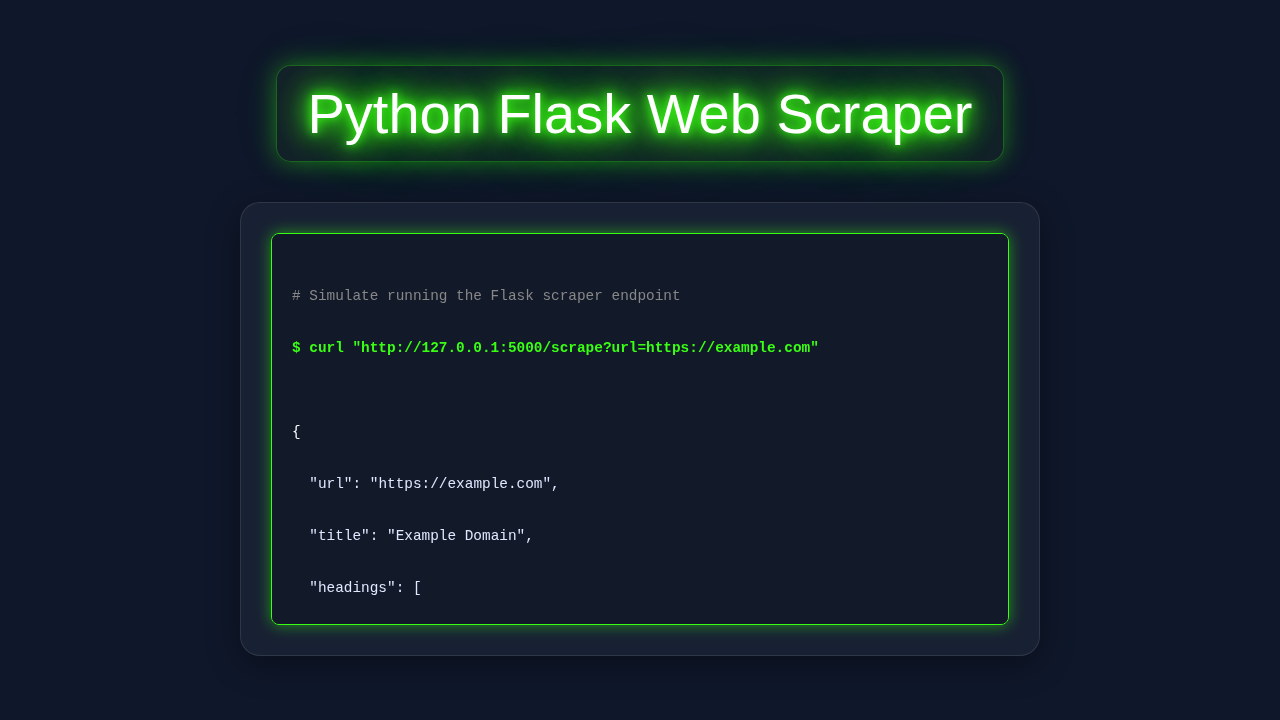
    curl "http://127.0.0.1:5000/scrape?url=https://quotes.toscrape.com"
    """
    target_url = request.args.get('url')

    if not target_url:
        app.logger.warning("Scrape request missing URL parameter.")
        return jsonify({"error": "URL parameter is missing. Please provide a 'url' query parameter."}), 400

    try:
        # Set a User-Agent header to mimic a browser, which can help prevent some blocking
        headers = {
            'User-Agent': 'Mozilla/5.0 (Windows NT 10.0; Win64; x64) AppleWebKit/537.36 (KHTML, like Gecko) Chrome/91.0.4472.124 Safari/537.36'
        }

        # Fetch the content from the target URL with a timeout
        response = requests.get(target_url, headers=headers, timeout=10)
        response.raise_for_status() # Raise an HTTPError for bad responses (4xx or 5xx)

        # Parse the HTML content
        soup = BeautifulSoup(response.text, 'html.parser')

        # --- Example Scraping Logic ---
        # This section demonstrates how to extract various data points.
        # You'll customize this heavily based on the specific website you're scraping.

        # 1. Page Title
        page_title = soup.title.string.strip() if soup.title and soup.title.string else 'No Title Found'

        # 2. All Headings (h1-h6)
        headings = []
        for i in range(1, 7):
            headings.extend([h.get_text(strip=True) for h in soup.find_all(f'h{i}')])
        headings = [h for h in headings if h] # Filter out empty strings

        # 3. All Paragraph Texts
        paragraphs = [p.get_text(strip=True) for p in soup.find_all('p')]
        paragraphs = [p for p in paragraphs if p] # Filter out empty strings

        # 4. All Links (href and text)
        links = []
        for a_tag in soup.find_all('a', href=True):
            link_text = a_tag.get_text(strip=True)
            link_href = a_tag['href']

            # Handle relative URLs by joining them with the base URL
            if not link_href.startswith(('http://', 'https://', '#', 'javascript:')): # Exclude anchors/js links
                link_href = urljoin(target_url, link_href)

            if link_text and link_href: # Only add if both text and href exist
                links.append({"text": link_text, "href": link_href})

        # Organize the scraped data into a dictionary
        scraped_data = {
            "requested_url": target_url,
            "scraped_title": page_title,
            "headings": headings,
            "paragraphs": paragraphs,
            "links": links
            # Add more data points here, e.g., images, specific table data, etc.
        }

        return jsonify(scraped_data), 200

    except requests.exceptions.RequestException as e:
        # Catch network-related errors (e.g., DNS failure, refused connection, timeout)
        app.logger.error(f"Request failed for {target_url}: {e}")
        return jsonify({"error": f"Failed to fetch content from URL: {e}"}), 500
    except Exception as e:
        # Catch any other unexpected errors during scraping or parsing
        app.logger.error(f"An unexpected error occurred during scraping {target_url}: {e}", exc_info=True)
        return jsonify({"error": f"An unexpected error occurred: {e}"}), 500

if __name__ == '__main__':
    # To run this Flask application:
    # 1. Ensure you have Flask, requests, and beautifulsoup4 installed (see requirements.txt).
    # 2. Save this file as `app.py`.
    # 3. Open your terminal in the same directory and run: `python app.py`
    # The application will be available at http://127.0.0.1:5000/

    # For development, debug=True provides helpful error messages in the browser
    # and reloads the server automatically on code changes.
    # For production, set debug=False.
    app.run(debug=True)
requirements.txt
Flask
requests
beautifulsoup4
How It All Works Together: Building Your Flask Web Scraper
Now for the fun part! This is where Python and Flask come alive. We will connect all the pieces. You will see how to fetch data and then serve it up. This setup brings your Flask Web Scraper to life! We will walk through each step. Therefore, you can understand the entire process. It is a powerful concept!
Setting Up Your Python Environment for Scraping
Every great project starts with the right tools. We need a few Python libraries. Open your terminal or command prompt. Then, run this simple command:
pip install flask requests beautifulsoup4Let me explain what’s happening here. Flask is our web framework. It helps us create web pages and handle requests. Requests lets our Python script ask for web pages. It’s like your browser making an HTTP request. It fetches the raw HTML content. Beautiful Soup 4 (beautifulsoup4) is our data extraction tool. Indeed, it helps us parse HTML content. It finds the specific bits of information we need. It’s truly powerful for navigating complex page structures. We will use these libraries heavily.
Pro Tip: Always use a virtual environment for your projects. This keeps your project dependencies clean. It prevents conflicts between different Python projects. Type
python -m venv venvand thensource venv/bin/activate(Linux/macOS) orvenv\Scripts\activate(Windows) to get started! This isolates your project dependencies beautifully.
Crafting the Core Web Scraping Logic
Our Python script needs to fetch a web page. Then, it needs to find the specific data. Here’s the cool part! We use the requests library for fetching. It downloads the page’s HTML content. Next, Beautiful Soup steps in. It parses that HTML into a Python object. You provide specific selectors. These selectors tell Beautiful Soup what to look for. For example, a specific `div` with a class name. Or perhaps an `h2` tag within a certain section. It then extracts the text or attribute values. It’s like treasure hunting in the HTML!
Consider a news website. You might want all the headlines. Beautiful Soup helps you locate all <h2> tags containing article titles. Or maybe <a> tags with a specific class for article links. Methods like find() and find_all() are your best friends here. They make navigating HTML straightforward. Indeed, this is the core of our scraping operation. We are targeting data precisely. Always remember to check a website’s `robots.txt` file first. This tells you what parts you can legally scrape. Respect website policies!
Integrating Your Scraper with Flask
Now, let’s bring Flask into the picture. Flask creates a route for our web page. When someone visits that route (like your browser going to `/`), our scraping code runs. First, you define a function. This function holds your scraping logic. Next, you decorate it with @app.route('/'). This makes it accessible from your browser. The function will then execute the scraping. It gathers all the necessary data. This data is often a list of dictionaries or objects. Flask effectively connects your Python backend to the web.
After scraping, Flask renders an HTML template. It passes the scraped data to this template. This means your Python code and HTML work together. Flask acts as the bridge. It makes your backend data available to the frontend. It’s a very elegant solution. You define a template file (e.g., `index.html`). Then, you use render_template('index.html', data=scraped_data). This sends your information over. Check out Flask HTMX Live Search: Real-time UI with Python & HTMX for how Flask can power even more dynamic UIs and server-side rendering!
Displaying the Scraped Data in Your Template
Once Flask has the data, it sends it to our HTML template. We use Jinja2 templating syntax for this. It’s built right into Flask. Jinja2 allows you to embed Python-like logic directly in your HTML. You can loop through lists of data. You can display individual items dynamically. For instance, if you scraped a list of product names and prices, you could show each name and price in its own table row or card. The template dynamically generates the HTML based on the data provided.
This separation is really important. Your Python code handles data extraction and processing. Your HTML template handles presentation and layout. This makes your application clean and maintainable. You can easily change the look and feel without touching the scraping logic. It’s a best practice in web development. You might use expressions like {{ item.title }} or `{% for item in data %}`. Indeed, this makes displaying dynamic content incredibly flexible. MDN Web Docs offer great insights on semantic HTML elements for structuring content like this effectively.
Encouragement: Don’t feel overwhelmed by new concepts. Take it one step at a time! Each piece builds upon the last. You are doing great by building something real. Keep experimenting and have fun with it!
Tips to Customise Your Flask Web Scraper
You’ve built a solid foundation. But there’s so much more you can do! Here are a few ideas to extend and personalise your project. These can take your scraper to the next level.
- Scrape Multiple Pages or Follow Links: Modify your scraper to navigate beyond a single page. You could implement logic to follow “next page” links. This allows you to gather much more comprehensive data from a site. Think about scraping multiple product listings across different categories.
- Add User Input for Dynamic Scraping: Let users type in a URL or a search query to scrape. This makes your tool truly interactive. You could create a simple form. Then, Flask would use that input for the scraping target. This adds incredible flexibility.
- Advanced CSS & Responsive Layouts: Experiment with modern CSS techniques like Grid or Flexbox. Create more complex and responsive layouts. Ensure your displayed data looks great on any device. CSS-Tricks is an amazing resource for this! Good design always enhances usability.
- Save the Data to a Database or CSV: Instead of just displaying, save the scraped data permanently. You could use SQLite (built into Python) or a CSV file. This allows for data analysis later. It transforms your scraper into a data collection tool.
- Implement Error Handling and Retries: Websites can be unpredictable. Add `try-except` blocks. Handle connection errors or missing elements gracefully. You could even implement retry logic. This makes your scraper more robust and reliable.
- Schedule Automated Scraping: Use a tool like Celery, Flask-APScheduler, or a simple cron job on your server. Automate your scraping process. You can update your displayed data regularly, keeping it fresh! This is great for monitoring changes over time.
- Consider Performance for Larger Tasks: When you start scraping many pages, performance matters. Understanding concepts like the Python GIL Explained: Concurrency & Performance can help you optimize larger scraping tasks. Especially if you consider using threads or asynchronous operations for faster data collection.
Conclusion: You Did It!
Wow, what an achievement! You just built your very own Flask Web Scraper. You’ve harnessed the power of Python and Flask. You can now extract and display web data effectively. This is a fundamental skill for many data-driven projects. Feel proud of what you’ve created! You have truly leveled up your web development skills.
Experiment with different websites (responsibly, of course!). Try scraping different types of data. Share your project with fellow beginners. Your journey in web development is just getting started. Keep building, keep learning, and keep creating amazing things! The web is your oyster!
app.py
from flask import Flask, request, jsonify
import requests
from bs4 import BeautifulSoup
from urllib.parse import urljoin
import logging

app = Flask(__name__)

# Configure logging for production environment (optional, Flask's default handles debug)
if not app.debug:
    file_handler = logging.FileHandler('scraper_errors.log')
    file_handler.setLevel(logging.WARNING)
    formatter = logging.Formatter('%(asctime)s - %(levelname)s - %(message)s')
    file_handler.setFormatter(formatter)
    app.logger.addHandler(file_handler)

@app.route('/scrape', methods=['GET'])
def scrape_website():
    """
    Web scraping endpoint.
    Expects a 'url' query parameter.
    Example usage:
    curl "http://127.0.0.1:5000/scrape?url=https://quotes.toscrape.com"
    """
    target_url = request.args.get('url')

    if not target_url:
        app.logger.warning("Scrape request missing URL parameter.")
        return jsonify({"error": "URL parameter is missing. Please provide a 'url' query parameter."}), 400

    try:
        # Set a User-Agent header to mimic a browser, which can help prevent some blocking
        headers = {
            'User-Agent': 'Mozilla/5.0 (Windows NT 10.0; Win64; x64) AppleWebKit/537.36 (KHTML, like Gecko) Chrome/91.0.4472.124 Safari/537.36'
        }

        # Fetch the content from the target URL with a timeout
        response = requests.get(target_url, headers=headers, timeout=10)
        response.raise_for_status() # Raise an HTTPError for bad responses (4xx or 5xx)

        # Parse the HTML content
        soup = BeautifulSoup(response.text, 'html.parser')

        # --- Example Scraping Logic ---
        # This section demonstrates how to extract various data points.
        # You'll customize this heavily based on the specific website you're scraping.

        # 1. Page Title
        page_title = soup.title.string.strip() if soup.title and soup.title.string else 'No Title Found'

        # 2. All Headings (h1-h6)
        headings = []
        for i in range(1, 7):
            headings.extend([h.get_text(strip=True) for h in soup.find_all(f'h{i}')])
        headings = [h for h in headings if h] # Filter out empty strings

        # 3. All Paragraph Texts
        paragraphs = [p.get_text(strip=True) for p in soup.find_all('p')]
        paragraphs = [p for p in paragraphs if p] # Filter out empty strings

        # 4. All Links (href and text)
        links = []
        for a_tag in soup.find_all('a', href=True):
            link_text = a_tag.get_text(strip=True)
            link_href = a_tag['href']

            # Handle relative URLs by joining them with the base URL
            if not link_href.startswith(('http://', 'https://', '#', 'javascript:')): # Exclude anchors/js links
                link_href = urljoin(target_url, link_href)

            if link_text and link_href: # Only add if both text and href exist
                links.append({"text": link_text, "href": link_href})

        # Organize the scraped data into a dictionary
        scraped_data = {
            "requested_url": target_url,
            "scraped_title": page_title,
            "headings": headings,
            "paragraphs": paragraphs,
            "links": links
            # Add more data points here, e.g., images, specific table data, etc.
        }

        return jsonify(scraped_data), 200

    except requests.exceptions.RequestException as e:
        # Catch network-related errors (e.g., DNS failure, refused connection, timeout)
        app.logger.error(f"Request failed for {target_url}: {e}")
        return jsonify({"error": f"Failed to fetch content from URL: {e}"}), 500
    except Exception as e:
        # Catch any other unexpected errors during scraping or parsing
        app.logger.error(f"An unexpected error occurred during scraping {target_url}: {e}", exc_info=True)
        return jsonify({"error": f"An unexpected error occurred: {e}"}), 500

if __name__ == '__main__':
    # To run this Flask application:
    # 1. Ensure you have Flask, requests, and beautifulsoup4 installed (see requirements.txt).
    # 2. Save this file as `app.py`.
    # 3. Open your terminal in the same directory and run: `python app.py`
    # The application will be available at http://127.0.0.1:5000/

    # For development, debug=True provides helpful error messages in the browser
    # and reloads the server automatically on code changes.
    # For production, set debug=False.
    app.run(debug=True)
requirements.txt
Flask
requests
beautifulsoup4