Okay, real talk — when I first tried to understand how data moves and changes in React, I was completely lost. You’ve probably heard terms like “Props” and “State” thrown around a lot. They might sound like secret passwords, right? Don’t worry, you are absolutely not alone. Many self-taught beginners stumble right here. But mastering React Props and State is truly essential. It’s the core of building dynamic, responsive web applications. And guess what? It’s genuinely not as scary as it sounds. We’re going to bust some common myths today.
Myth #1: Props and State Are Interchangeable (They’re Definitely Not!)
Some folks often think Props and State are just two different names. You might even use them interchangeably by accident sometimes. Here’s the thing, though: they have very distinct jobs. Think of a restaurant analogy. Your specific food order, like “a vegan burger with extra pickles and no onions,” is a Prop. This order comes into the kitchen from the outside. The kitchen doesn’t decide your order; it simply receives it. It’s read-only data for the kitchen.
Now, the number of burger patties currently cooking on the grill is like State. That’s data internal to the kitchen itself. The chef tracks and updates that count. This count changes as new burgers are placed on or removed from the grill. It’s managed from within.
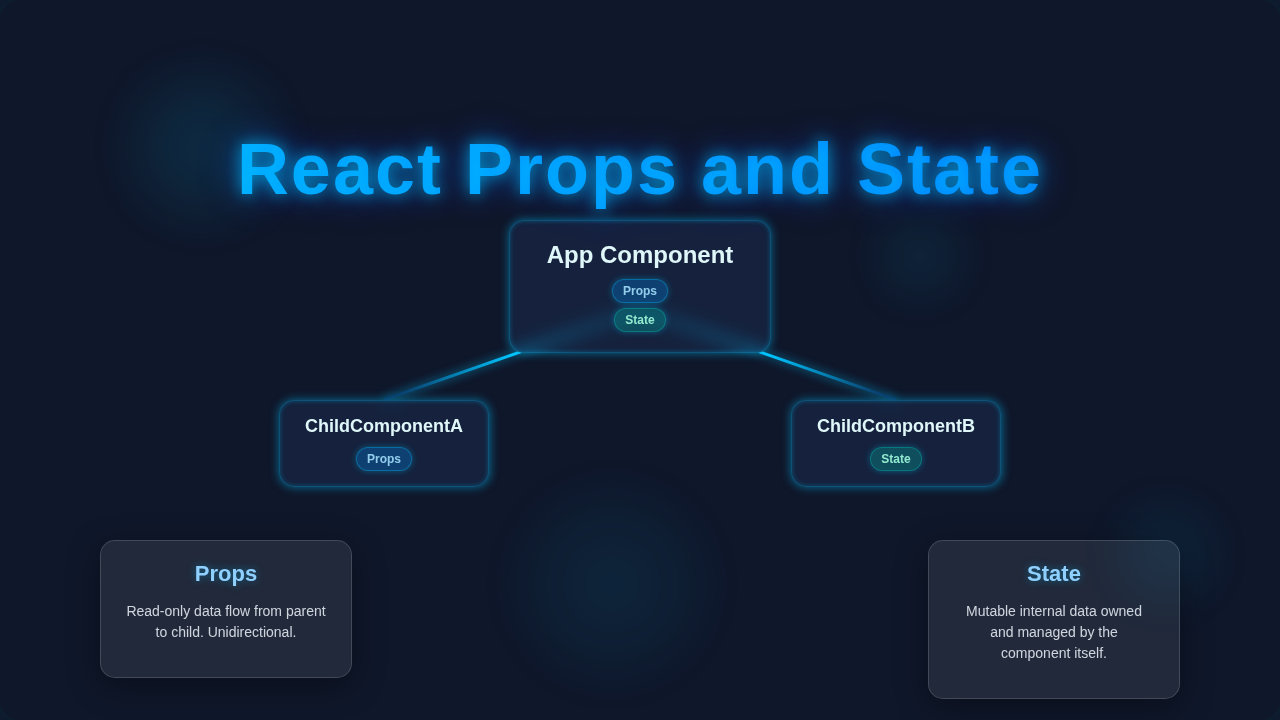
Props are read-only. A component receives Props from its parent component. It absolutely cannot change those Props. Imagine you receive a specific recipe card. You can read the ingredients and steps. But you cannot rewrite the original card and send it back to the recipe book. State, on the other hand, is managed internally by the component itself. The component has complete control over its own State. It can update it anytime it needs to. This update then triggers a re-render of the component. This distinction is crucial for smooth applications. You pass data down with Props. You manage data within a component using State. Making sense so far, procoder?
Myth #2: You Should Use State for Everything (Please, Please Don’t!)
It’s super tempting to just throw everything into State. After all, if State lets you manage data, why not use it for all your data needs? You might think, “More control equals more power!” However, this approach can quickly lead to a tangled, unmanageable mess. Imagine a component that displays a user’s profile information. Should the user’s name be in State? What about their profile picture URL? Probably not. If the parent component already knows the user’s name, it should simply pass it down as a Prop. The child component just displays it.
Here’s a good rule of thumb for you: If data doesn’t change within the component itself, it probably doesn’t need to be State. If data originates from a parent component and isn’t modified by the child, then use Props. Simple as that! Only use State for data that genuinely changes over time. This data should directly affect what the component renders. Good examples include a counter value, the current text in a form input, or whether a dropdown menu is open or closed.
Overusing State makes your components much harder to understand. It also makes them tougher to debug when things go wrong. Worse still, it can lead to unnecessary re-renders. Your entire app could even slow down. Keep your State lean and purposeful.
Tip: If a specific piece of data is “owned” and actively managed by a component, it’s State. If it’s passed from a parent and cannot be changed by the child, it’s a Prop. This simple distinction makes a huge difference.
Myth #3: Once You Set State, It Updates Immediately (Nope, It’s Asynchronous!)
This is a very common gotcha. It bites many beginners right when they least expect it. You might update a piece of State using useState‘s setter function. Then you immediately try to use its new value. But suddenly, you see the old value instead! You probably scratch your head, wondering what on earth went wrong. The truth is, setState (or useState‘s setter function) doesn’t update State synchronously. It’s fundamentally asynchronous. This means React batches multiple updates together for performance reasons. It doesn’t instantly re-render your component after every single State change.
Think of it like this: you’re adding several items to an online shopping cart. The website doesn’t ship each item individually as soon as you click “add to cart.” Instead, it collects all your chosen items. Then, it processes the entire order at once when you check out. React works in a similar fashion. It gathers several State updates. Then, it applies them together in a single, more efficient batch. This clever approach prevents performance bottlenecks. If you truly need to do something after State has definitely updated, you often use an effect hook like useEffect. Or, for very simple cases, you might use the callback form of setState (though less common with modern functional components and useState). Understanding this asynchronous nature saves you a lot of frustrating debugging headaches. It’s a key piece of mastering React derived state – Mastering Component Data Flow.
The Truth About React Props and State: It’s All About Intentional Data Flow
So, what’s the real story you should remember? React Props and State are the two fundamental pillars. They dictate how data moves and how it changes within your applications. Truly mastering React Components Explained: Node Tree & Neon Glow definitely means understanding this intentional data flow. Props are like arguments passed into a function. They flow unidirectionally, always from parent to child components. You use them primarily to configure a child component. For example, if you have a Button component, its display text (e.g., “Click Me!”) and its color might be passed as Props. The Button just uses these values; it doesn’t change them internally.
State, on the other hand, is how a component manages its own internal, mutable data. This data can and will change over time. When State changes, React wisely re-renders the component and all its children. Imagine a “Like” button on a social media post. The number of likes displayed on that button is absolutely perfect for State. When you click it, the State updates, and the button instantly re-renders with the new, correct count. This mechanism makes your UI wonderfully interactive. Learning to correctly identify what should be a Prop and what should be State is easily half the battle. This critical skill lets you build efficient, predictable, and maintainable React applications. It’s especially useful when tackling React Forms Handling Tutorial: Mastering Inputs & State in JSX.
Pro-Tip: Always ask yourself this simple question: “Does this specific data change inside this component, or is it given to this component from above?” Your answer will immediately guide your choice.
For a deeper dive into foundational JavaScript concepts that underpin React, you might want to explore working with JavaScript objects and data structures on MDN. Also, understanding how various web elements arrange themselves can be enhanced by knowing about different CSS display properties on CSS-Tricks. These foundational skills are invaluable.
You Got This: Go Master React Props and State!
Don’t worry, procoder, if this all feels a bit overwhelming at first. Everyone goes through this exact learning curve. The absolute key is consistent practice. Start building small, simple components. Experiment boldly with passing different Props down from parents. Try updating State within a component and observe how it immediately affects the display. You will make mistakes along the way. That is not just okay, it’s a crucial part of the learning process. Each mistake is a fantastic learning opportunity.
With every single component you build, your understanding of React Props and State will grow exponentially. Soon, you’ll be instinctively knowing which to use and exactly when. You’ll be building powerful, interactive UIs with absolute confidence and clarity. Keep at it, procoder! Your exciting journey to mastering React is well underway. You are doing great work!