Hey there, pro coder! If you’ve ever wanted to build a super smart chat assistant but felt overwhelmed, you’re in the right place. Today, we’re diving deep into creating a voice-enabled AI chatbot. We’ll use Python Telegram Gemini AI to make something truly amazing. Get ready to build your very own intelligent assistant that understands your voice and chats back!
What We Are Building: Your Voice-Enabled Python Telegram Gemini AI Assistant
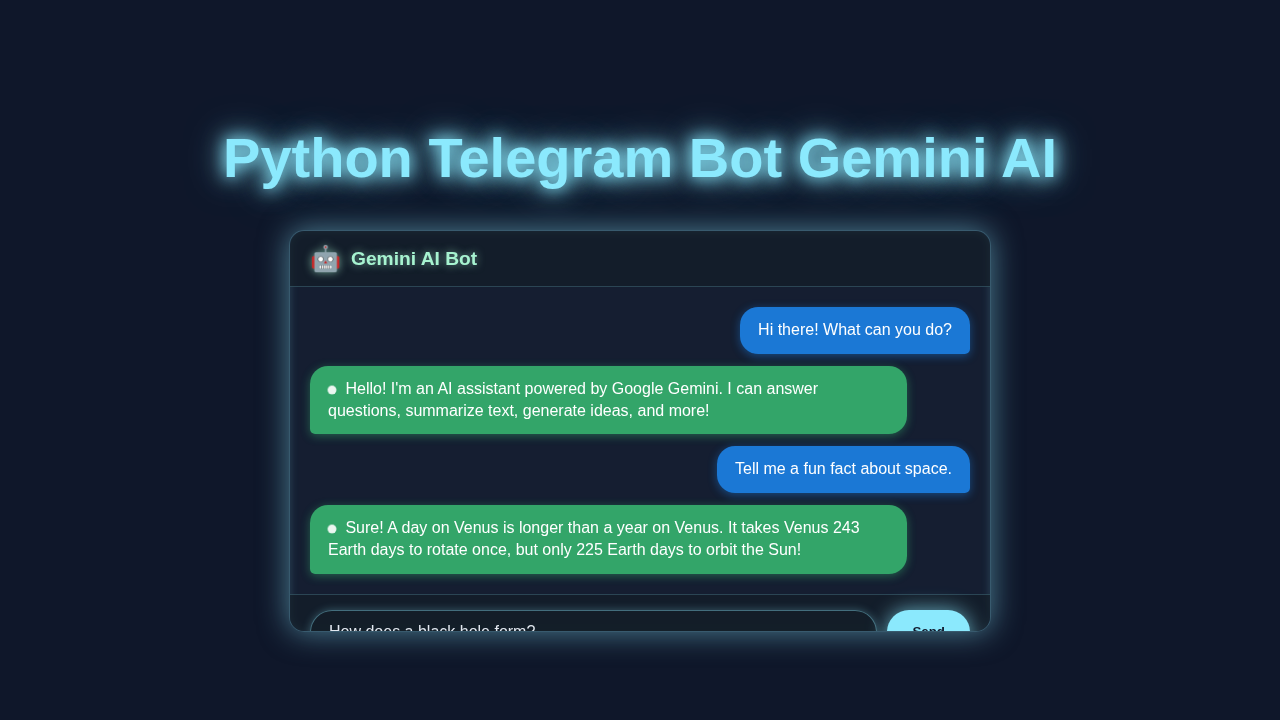
Imagine a chatbot that lives right inside your Telegram app. This isn’t just any chatbot; it can listen to your voice and talk back. We are combining the power of the Telegram Bot API with Google’s cutting-edge Gemini AI. This means our bot will understand complex requests and generate creative, helpful responses. It’s like having a personal AI assistant in your pocket, always ready to help. This project will teach you about API interactions, asynchronous programming, and voice processing. You’ll be amazed at what you can create!
Setting Up Your Python Telegram Gemini AI Bot’s Foundation
For a web project, this section would usually cover HTML. However, for our Python Telegram bot, this is where we set up our main script. Think of this as the ‘skeleton’ of our bot. We will include necessary imports and environment variable loading here. This ensures our bot has everything it needs to start running. This foundational code is crucial for our bot’s operation.
Defining Your Bot’s Reactions: Message Handling
On a website, CSS styles the look and feel. For our bot, this section defines its ‘behavioral style.’ This Python code tells our bot how to react to different types of messages from users. We will set up handlers for commands and text messages. This is where we start building the interactive core of our bot. It’s how our bot understands what you want it to do.
Pro Tip: Using Python Decorators can make your command handling code much cleaner and more readable. They help you wrap functions with extra functionality easily!
Bringing AI to Life: Integrating Gemini and Voice
Typically, JavaScript powers the dynamic parts of a webpage. Similarly, this Python section is the dynamic brain of our bot. Here, we integrate the Gemini API for intelligent responses. We also handle converting speech-to-text and text-to-speech. This is where the magic of our voice-enabled AI truly happens. Prepare to be impressed by your bot’s capabilities!
main.py
# main.py
#
# Python Telegram Bot Gemini AI
# This script creates a Telegram bot that interacts with Google's Gemini AI.
# Users can send text messages to the bot, and the bot will use the Gemini API
# to generate a response and send it back.
#
# --- Prerequisites ---
# 1. Python 3.8+ installed.
# 2. pip (Python package installer).
#
# --- Setup Instructions ---
#
# 1. Install required Python libraries:
#    pip install python-telegram-bot google-generativeai python-dotenv
#
# 2. Obtain your Telegram Bot Token:
#    - Open Telegram and search for "@BotFather".
#    - Start a chat with BotFather and send the `/newbot` command.
#    - Follow the instructions to choose a name and username for your bot.
#    - BotFather will give you an HTTP API Token. Copy this token.
#
# 3. Obtain your Google Gemini API Key:
#    - Go to Google AI Studio: https://aistudio.google.com/
#    - Log in with your Google account.
#    - Create a new API key. Copy this key.
#
# 4. Create a `.env` file in the same directory as this script:
#    - This file will store your sensitive API keys securely.
#    - Add the following lines to your `.env` file, replacing the placeholder values:
#      TELEGRAM_BOT_TOKEN="YOUR_TELEGRAM_BOT_TOKEN_HERE"
#      GEMINI_API_KEY="YOUR_GEMINI_API_KEY_HERE"
#    - Ensure the `.env` file is NOT committed to version control (e.g., add to `.gitignore`).
#
# 5. Run the bot:
#    python main.py
#
# Your bot will now start polling for messages. Open Telegram, search for your bot
# by its username, and start chatting!
#
import os
import logging
from dotenv import load_dotenv # Import load_dotenv
from telegram import Update
from telegram.ext import Application, CommandHandler, MessageHandler, filters, ContextTypes
import google.generativeai as genai

# --- Configuration & Setup ---

# Load environment variables from .env file
load_dotenv()

# Set up logging
logging.basicConfig(
    format='%(asctime)s - %(name)s - %(levelname)s - %(message)s',
    level=logging.INFO
)
logger = logging.getLogger(__name__)

# Retrieve API keys from environment variables
TELEGRAM_BOT_TOKEN = os.getenv("TELEGRAM_BOT_TOKEN")
GEMINI_API_KEY = os.getenv("GEMINI_API_KEY")

# Basic validation for API keys
if not TELEGRAM_BOT_TOKEN:
    logger.error("TELEGRAM_BOT_TOKEN environment variable not set. Please set it in your .env file or environment.")
    exit("Exiting: TELEGRAM_BOT_TOKEN is missing.")
if not GEMINI_API_KEY:
    logger.error("GEMINI_API_KEY environment variable not set. Please set it in your .env file or environment.")
    exit("Exiting: GEMINI_API_KEY is missing.")

# Configure Google Generative AI
genai.configure(api_key=GEMINI_API_KEY)

# Initialize the Gemini GenerativeModel
# We use 'gemini-pro' for general text-based conversational responses.
# For more advanced multimodal capabilities, 'gemini-pro-vision' might be used,
# but it requires handling image inputs.
gemini_model = genai.GenerativeModel('gemini-pro')

# --- Telegram Bot Handlers ---

async def start_command(update: Update, context: ContextTypes.DEFAULT_TYPE) -> None:
    """Sends a welcoming message when the /start command is issued."""
    user = update.effective_user
    await update.message.reply_html(
        f"Hello {user.mention_html()}! I'm your AI assistant powered by Google Gemini. "
        "Send me any question or topic you want to discuss, and I'll do my best to help!"
    )
    logger.info(f"User {user.first_name} ({user.id}) started the bot.")

async def gemini_chat_handler(update: Update, context: ContextTypes.DEFAULT_TYPE) -> None:
    """Processes user text messages, sends them to Gemini AI, and replies with Gemini's response."""
    user_message = update.message.text
    user_id = update.effective_user.id
    logger.info(f"User {user_id} sent message: '{user_message}'")

    if not user_message:
        await update.message.reply_text("Please send a text message.")
        return

    try:
        # Acknowledge the message and indicate processing
        await update.message.reply_text("Thinking...")

        # Generate content using Gemini AI
        # For a more conversational flow, you might want to maintain chat history
        # using `start_chat()` and `send_message()` methods of the model.
        # For simplicity, this example treats each message as a new query.
        response = gemini_model.generate_content(user_message)

        # Gemini's response might have multiple parts. We are interested in the text part.
        gemini_text = response.text
        logger.info(f"Gemini responded to {user_id}: '{gemini_text[:100]}...' ")

        # Send Gemini's response back to the user
        await update.message.reply_text(gemini_text)

    except Exception as e:
        logger.error(f"Error processing message from {user_id}: {e}", exc_info=True)
        await update.message.reply_text(
            "Oops! I encountered an issue while talking to Gemini AI. "
            "Please try again later. If the problem persists, ensure your API key is valid."
        )

def main() -> None:
    """Starts the Telegram bot application."""
    # Create the Application and pass your bot's token.
    application = Application.builder().token(TELEGRAM_BOT_TOKEN).build()

    # Register handlers for commands and messages
    application.add_handler(CommandHandler("start", start_command))
    # Register a MessageHandler to process all incoming text messages that are not commands.
    application.add_handler(MessageHandler(filters.TEXT & ~filters.COMMAND, gemini_chat_handler))

    logger.info("Telegram Bot started. Polling for updates...")
    # Run the bot until the user presses Ctrl-C or the process receives SIGINT, SIGTERM or SIGABRT.
    # This will block until the application is stopped.
    application.run_polling(allowed_updates=Update.ALL_TYPES)

if __name__ == "__main__":
    main()
How It All Works Together
Now, let’s connect all these pieces. Building this chatbot involves several key steps. We will walk through each part. You’ll see how everything communicates seamlessly. Therefore, your bot will be smart and responsive. It’s a fantastic journey to creating a functional AI assistant.
Setting Up Your Environment
Firstly, you need to prepare your development environment. We recommend using a virtual environment. This keeps your project dependencies separate. Install the `python-telegram-bot` library and the `google-generativeai` library. You’ll also need `pydub` and `SpeechRecognition` for voice features. Moreover, ensure you have FFmpeg installed for audio processing. This setup is vital for preventing conflicts. Learn more about environment variables for secure API key storage.
Getting Your Telegram Bot Token
Next, you must create a new bot on Telegram. Talk to the BotFather in Telegram. It will guide you through the process. The BotFather gives you a unique token. This token is like your bot’s identity card. Keep it secret and safe! Store it as an environment variable for security. This token allows your Python script to communicate with Telegram’s servers.
Gemini API Key
Then, you’ll need an API key for Google’s Gemini. Visit the Google AI Studio to get one. This key grants your bot access to the powerful Gemini models. With this key, your bot can generate human-like text responses. Remember to protect this key like your Telegram token. Store it securely in your environment variables. This step unlocks your bot’s intelligence.
Core Bot Logic
Our `main.py` script starts the bot. It registers message handlers for different types of input. For instance, the `/start` command triggers a welcome message. Text messages go to Gemini for a response. Voice messages are converted to text first. The bot then sends the text to Gemini. This central script orchestrates all interactions.
Voice Processing
This is where the voice magic happens. When a user sends a voice note, Telegram provides an audio file. We download this file. Then, `pydub` helps us convert it to a suitable format. The `SpeechRecognition` library then transcribes the audio into text. Afterwards, this text is sent to Gemini. Gemini’s response is converted back to speech. Finally, an audio file is sent back to the user. This creates a natural, spoken conversation flow.
Keep Learning: Exploring Python File Organizer Script: Automate Your Downloads Folder is another great way to see Python in action. It builds practical skills!
Tips to Customise It
You’ve built an amazing foundation! Now, let’s make it truly yours.
- Add More Commands: Implement specific commands like `/joke` or `/weather`. You could integrate other APIs for these features. This expands your bot’s utility.
- Personality Settings: Give your Gemini model a specific persona. Make it funny, formal, or even a specific character. This adds a unique touch to your conversations.
- Memory Feature: Store past conversation turns. This allows Gemini to have more contextual discussions. It makes the bot feel even smarter.
- Different Voice Options: Experiment with various text-to-speech voices. You can find many open-source libraries or cloud services. This offers more personalization.
Conclusion
Wow, you did it! You just built a fantastic voice-enabled AI chatbot using Python Telegram Gemini AI. You combined powerful APIs with clever Python code. This project is a testament to your growing coding skills. You now have a smart assistant that truly understands and responds. Don’t stop here! Keep experimenting and building. Share your amazing creation with friends and family. What will you build next?
main.py
# main.py
#
# Python Telegram Bot Gemini AI
# This script creates a Telegram bot that interacts with Google's Gemini AI.
# Users can send text messages to the bot, and the bot will use the Gemini API
# to generate a response and send it back.
#
# --- Prerequisites ---
# 1. Python 3.8+ installed.
# 2. pip (Python package installer).
#
# --- Setup Instructions ---
#
# 1. Install required Python libraries:
#    pip install python-telegram-bot google-generativeai python-dotenv
#
# 2. Obtain your Telegram Bot Token:
#    - Open Telegram and search for "@BotFather".
#    - Start a chat with BotFather and send the `/newbot` command.
#    - Follow the instructions to choose a name and username for your bot.
#    - BotFather will give you an HTTP API Token. Copy this token.
#
# 3. Obtain your Google Gemini API Key:
#    - Go to Google AI Studio: https://aistudio.google.com/
#    - Log in with your Google account.
#    - Create a new API key. Copy this key.
#
# 4. Create a `.env` file in the same directory as this script:
#    - This file will store your sensitive API keys securely.
#    - Add the following lines to your `.env` file, replacing the placeholder values:
#      TELEGRAM_BOT_TOKEN="YOUR_TELEGRAM_BOT_TOKEN_HERE"
#      GEMINI_API_KEY="YOUR_GEMINI_API_KEY_HERE"
#    - Ensure the `.env` file is NOT committed to version control (e.g., add to `.gitignore`).
#
# 5. Run the bot:
#    python main.py
#
# Your bot will now start polling for messages. Open Telegram, search for your bot
# by its username, and start chatting!
#
import os
import logging
from dotenv import load_dotenv # Import load_dotenv
from telegram import Update
from telegram.ext import Application, CommandHandler, MessageHandler, filters, ContextTypes
import google.generativeai as genai

# --- Configuration & Setup ---

# Load environment variables from .env file
load_dotenv()

# Set up logging
logging.basicConfig(
    format='%(asctime)s - %(name)s - %(levelname)s - %(message)s',
    level=logging.INFO
)
logger = logging.getLogger(__name__)

# Retrieve API keys from environment variables
TELEGRAM_BOT_TOKEN = os.getenv("TELEGRAM_BOT_TOKEN")
GEMINI_API_KEY = os.getenv("GEMINI_API_KEY")

# Basic validation for API keys
if not TELEGRAM_BOT_TOKEN:
    logger.error("TELEGRAM_BOT_TOKEN environment variable not set. Please set it in your .env file or environment.")
    exit("Exiting: TELEGRAM_BOT_TOKEN is missing.")
if not GEMINI_API_KEY:
    logger.error("GEMINI_API_KEY environment variable not set. Please set it in your .env file or environment.")
    exit("Exiting: GEMINI_API_KEY is missing.")

# Configure Google Generative AI
genai.configure(api_key=GEMINI_API_KEY)

# Initialize the Gemini GenerativeModel
# We use 'gemini-pro' for general text-based conversational responses.
# For more advanced multimodal capabilities, 'gemini-pro-vision' might be used,
# but it requires handling image inputs.
gemini_model = genai.GenerativeModel('gemini-pro')

# --- Telegram Bot Handlers ---

async def start_command(update: Update, context: ContextTypes.DEFAULT_TYPE) -> None:
    """Sends a welcoming message when the /start command is issued."""
    user = update.effective_user
    await update.message.reply_html(
        f"Hello {user.mention_html()}! I'm your AI assistant powered by Google Gemini. "
        "Send me any question or topic you want to discuss, and I'll do my best to help!"
    )
    logger.info(f"User {user.first_name} ({user.id}) started the bot.")

async def gemini_chat_handler(update: Update, context: ContextTypes.DEFAULT_TYPE) -> None:
    """Processes user text messages, sends them to Gemini AI, and replies with Gemini's response."""
    user_message = update.message.text
    user_id = update.effective_user.id
    logger.info(f"User {user_id} sent message: '{user_message}'")

    if not user_message:
        await update.message.reply_text("Please send a text message.")
        return

    try:
        # Acknowledge the message and indicate processing
        await update.message.reply_text("Thinking...")

        # Generate content using Gemini AI
        # For a more conversational flow, you might want to maintain chat history
        # using `start_chat()` and `send_message()` methods of the model.
        # For simplicity, this example treats each message as a new query.
        response = gemini_model.generate_content(user_message)

        # Gemini's response might have multiple parts. We are interested in the text part.
        gemini_text = response.text
        logger.info(f"Gemini responded to {user_id}: '{gemini_text[:100]}...' ")

        # Send Gemini's response back to the user
        await update.message.reply_text(gemini_text)

    except Exception as e:
        logger.error(f"Error processing message from {user_id}: {e}", exc_info=True)
        await update.message.reply_text(
            "Oops! I encountered an issue while talking to Gemini AI. "
            "Please try again later. If the problem persists, ensure your API key is valid."
        )

def main() -> None:
    """Starts the Telegram bot application."""
    # Create the Application and pass your bot's token.
    application = Application.builder().token(TELEGRAM_BOT_TOKEN).build()

    # Register handlers for commands and messages
    application.add_handler(CommandHandler("start", start_command))
    # Register a MessageHandler to process all incoming text messages that are not commands.
    application.add_handler(MessageHandler(filters.TEXT & ~filters.COMMAND, gemini_chat_handler))

    logger.info("Telegram Bot started. Polling for updates...")
    # Run the bot until the user presses Ctrl-C or the process receives SIGINT, SIGTERM or SIGABRT.
    # This will block until the application is stopped.
    application.run_polling(allowed_updates=Update.ALL_TYPES)

if __name__ == "__main__":
    main()