Hey! If you have ever worried about losing your precious Django project data, you are in the right place. We are diving into a super important topic today. We will build an awesome system for automated Django S3 Backup. This ensures your database is always safe and sound. It is a fantastic skill for any web developer. Get ready to protect your data like a pro!
What We Are Building
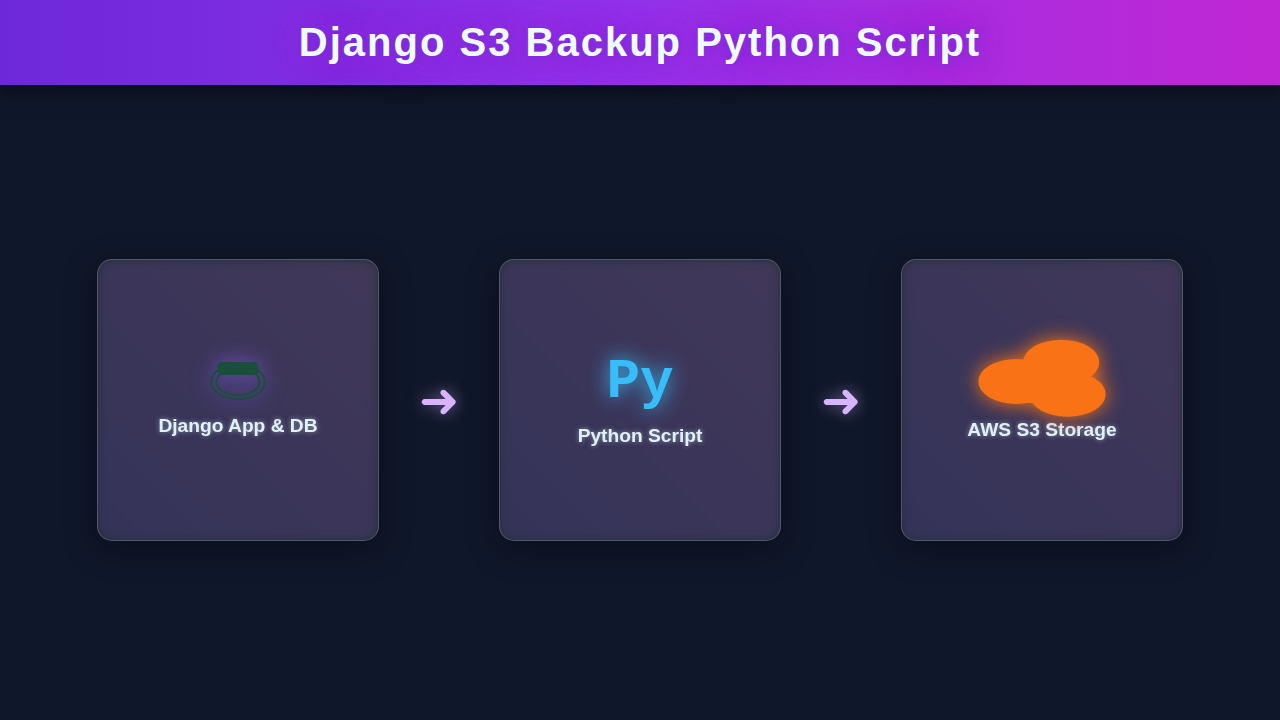
We are crafting a smart solution here. Imagine a friendly Python script working behind the scenes. It will make copies of your Django database. Then it securely uploads them to AWS S3. Think of S3 as your super-safe cloud storage vault. We will also touch upon a simple web interface. This interface lets you see or trigger your backups. The main focus is the script. This project gives you peace of mind. Your data will be protected, automatically.
Our Simple Backup Status Page (HTML)
To give our backend script a little visual flair, we will create a basic HTML page. This page could show the last backup time. Or it could even have a button to trigger a backup manually. We are keeping it super simple. This HTML is just a placeholder. It helps us visualize our system. Here’s the basic structure:
Styling Our Backup Status (CSS)
Let’s add just a touch of style to our page. This will make it look a bit cleaner. A little CSS goes a long way. We will use some basic styles here. Feel free to get creative with your own design. This is your project, after all!
Triggering Backups with JavaScript (Optional)
While our main backup mechanism will be automated, sometimes a manual trigger is handy. This JavaScript snippet will simulate that. It’s a placeholder for future functionality. We are just showing how it could work. The real magic happens in Python. This part is just for interaction.
requirements.txt
# requirements.txt
# Install these dependencies using: pip install -r requirements.txt

boto3~=1.34
python-decouple~=3.8
Django~=4.2 # Or your Django version, if you plan to import settings directly
.env.example
# .env.example
# Copy this file to .env and fill in your actual credentials and settings.

# AWS S3 Configuration
AWS_ACCESS_KEY_ID="YOUR_AWS_ACCESS_KEY_ID"
AWS_SECRET_ACCESS_KEY="YOUR_AWS_SECRET_ACCESS_KEY"
AWS_REGION_NAME="your-aws-region" # e.g., us-east-1
AWS_S3_BUCKET_NAME="your-s3-backup-bucket"
AWS_S3_PATH_PREFIX="django-backups/" # Optional: path inside the bucket

# Django Project Configuration (if not importing Django settings)
# If you import Django settings, these might not be needed or will be overridden.
DJANGO_PROJECT_ROOT="/path/to/your/django/project" # Full path to your Django project's root
DJANGO_MEDIA_ROOT="/path/to/your/django/project/media" # Full path to your Django MEDIA_ROOT
DJANGO_DB_NAME="your_database_name" # Used for database dumps
DJANGO_DB_USER="your_database_user"
DJANGO_DB_PASSWORD="your_database_password"
DJANGO_DB_HOST="localhost"
DJANGO_DB_PORT="5432" # e.g., 5432 for PostgreSQL, 3306 for MySQL
DJANGO_DB_ENGINE="postgresql" # Options: postgresql, mysql, sqlite3

# Backup Specific Settings
BACKUP_TEMP_DIR="/tmp/django_backups" # Temporary directory for backup files before upload
RETENTION_DAYS=7 # Number of days to keep old backups on S3 (0 for no retention policy)
backup_script.py
#!/usr/bin/env python3

import os
import shutil
import tarfile
import time
from datetime import datetime, timedelta
import subprocess
import logging
from decouple import config

# --- 1. Setup Logging ---
logging.basicConfig(
    level=logging.INFO,
    format='%(asctime)s - %(levelname)s - %(message)s',
    handlers=[
        logging.FileHandler("django_backup.log"),
        logging.StreamHandler()
    ]
)
logger = logging.getLogger(__name__)

try:
    import boto3
    from botocore.exceptions import ClientError
except ImportError:
    logger.error("boto3 not found. Please install it: pip install boto3")
    exit(1)

# --- 2. Load Configuration from .env file ---
# Make sure you have a .env file in the same directory as this script
AWS_ACCESS_KEY_ID = config('AWS_ACCESS_KEY_ID')
AWS_SECRET_ACCESS_KEY = config('AWS_SECRET_ACCESS_KEY')
AWS_REGION_NAME = config('AWS_REGION_NAME', default='us-east-1')
AWS_S3_BUCKET_NAME = config('AWS_S3_BUCKET_NAME')
AWS_S3_PATH_PREFIX = config('AWS_S3_PATH_PREFIX', default='django-backups/')

DJANGO_PROJECT_ROOT = config('DJANGO_PROJECT_ROOT')
DJANGO_MEDIA_ROOT = config('DJANGO_MEDIA_ROOT')

DJANGO_DB_ENGINE = config('DJANGO_DB_ENGINE', default='postgresql')
DJANGO_DB_NAME = config('DJANGO_DB_NAME')
DJANGO_DB_USER = config('DJANGO_DB_USER')
DJANGO_DB_PASSWORD = config('DJANGO_DB_PASSWORD')
DJANGO_DB_HOST = config('DJANGO_DB_HOST', default='localhost')
DJANGO_DB_PORT = config('DJANGO_DB_PORT', default='') # Empty string for default port

BACKUP_TEMP_DIR = config('BACKUP_TEMP_DIR', default='/tmp/django_backups')
RETENTION_DAYS = int(config('RETENTION_DAYS', default='7'))

# --- 3. Initialize S3 Client ---
logger.info(f"Connecting to AWS S3 bucket: {AWS_S3_BUCKET_NAME} in region: {AWS_REGION_NAME}")
s3_client = boto3.client(
    's3',
    aws_access_key_id=AWS_ACCESS_KEY_ID,
    aws_secret_access_key=AWS_SECRET_ACCESS_KEY,
    region_name=AWS_REGION_NAME
)


def create_temp_dir():
    """Creates a temporary directory for backup files."""
    os.makedirs(BACKUP_TEMP_DIR, exist_ok=True)
    logger.info(f"Temporary backup directory created at: {BACKUP_TEMP_DIR}")

def cleanup_temp_dir():
    """Removes the temporary directory after backup."""
    if os.path.exists(BACKUP_TEMP_DIR):
        shutil.rmtree(BACKUP_TEMP_DIR)
        logger.info(f"Cleaned up temporary directory: {BACKUP_TEMP_DIR}")

def dump_database(timestamp_str):
    """Dumps the Django database to a file."""
    db_dump_file = os.path.join(BACKUP_TEMP_DIR, f'db_backup_{timestamp_str}.sql')
    command = []

    if DJANGO_DB_ENGINE == 'postgresql':
        command = [
            'pg_dump',
            '-h', DJANGO_DB_HOST,
            '-p', DJANGO_DB_PORT,
            '-U', DJANGO_DB_USER,
            '-F', 'p',
            '-d', DJANGO_DB_NAME,
            '-f', db_dump_file
        ]
        env = os.environ.copy()
        env['PGPASSWORD'] = DJANGO_DB_PASSWORD
    elif DJANGO_DB_ENGINE == 'mysql':
        command = [
            'mysqldump',
            '-h', DJANGO_DB_HOST,
            f'--port={DJANGO_DB_PORT}',
            '-u', DJANGO_DB_USER,
            f'--password={DJANGO_DB_PASSWORD}',
            DJANGO_DB_NAME,
            '-r', db_dump_file
        ]
        env = os.environ.copy()
    elif DJANGO_DB_ENGINE == 'sqlite3':
        # For SQLite, the database file is usually located in the project root.
        # We assume its path is provided or derivable from DJANGO_PROJECT_ROOT.
        # Example: os.path.join(DJANGO_PROJECT_ROOT, 'db.sqlite3')
        sqlite_db_path = os.path.join(DJANGO_PROJECT_ROOT, 'db.sqlite3') # Adjust if your SQLite path is different
        if not os.path.exists(sqlite_db_path):
            logger.error(f"SQLite database not found at {sqlite_db_path}.")
            return None
        shutil.copy(sqlite_db_path, db_dump_file)
        logger.info(f"Copied SQLite database from {sqlite_db_path} to {db_dump_file}")
        return db_dump_file
    else:
        logger.error(f"Unsupported database engine: {DJANGO_DB_ENGINE}")
        return None

    try:
        logger.info(f"Dumping database '{DJANGO_DB_NAME}' using {DJANGO_DB_ENGINE}...")
        # subprocess.run for better error handling and output capture
        process = subprocess.run(command, env=env if DJANGO_DB_ENGINE != 'sqlite3' else None,
                                 capture_output=True, text=True, check=True)
        logger.info(f"Database dump successful: {db_dump_file}")
        if process.stdout: logger.debug(f"DB dump stdout: {process.stdout}")
        if process.stderr: logger.warning(f"DB dump stderr: {process.stderr}")
        return db_dump_file
    except subprocess.CalledProcessError as e:
        logger.error(f"Database dump failed: {e}")
        logger.error(f"DB dump error output: {e.stderr}")
        return None
    except FileNotFoundError:
        logger.error(f"Database dump tool ({command[0]}) not found. Make sure it's installed and in your PATH.")
        return None

def archive_media_files(timestamp_str):
    """Archives Django media files into a tar.gz file."""
    media_archive_file = os.path.join(BACKUP_TEMP_DIR, f'media_backup_{timestamp_str}.tar.gz')
    if not os.path.exists(DJANGO_MEDIA_ROOT):
        logger.warning(f"DJANGO_MEDIA_ROOT not found at {DJANGO_MEDIA_ROOT}. Skipping media backup.")
        return None

    try:
        logger.info(f"Archiving media files from {DJANGO_MEDIA_ROOT}...")
        with tarfile.open(media_archive_file, "w:gz") as tar:
            tar.add(DJANGO_MEDIA_ROOT, arcname=os.path.basename(DJANGO_MEDIA_ROOT))
        logger.info(f"Media files archived to: {media_archive_file}")
        return media_archive_file
    except Exception as e:
        logger.error(f"Failed to archive media files: {e}")
        return None

def upload_to_s3(file_path, s3_key):
    """Uploads a file to S3."""
    try:
        logger.info(f"Uploading {file_path} to s3://{AWS_S3_BUCKET_NAME}/{s3_key}")
        s3_client.upload_file(file_path, AWS_S3_BUCKET_NAME, s3_key)
        logger.info(f"Successfully uploaded {file_path} to S3.")
        return True
    except ClientError as e:
        logger.error(f"Failed to upload {file_path} to S3: {e}")
        return False
    except Exception as e:
        logger.error(f"An unexpected error occurred during S3 upload: {e}")
        return False

def apply_retention_policy():
    """Deletes old backup files from S3 based on RETENTION_DAYS."""
    if RETENTION_DAYS <= 0:
        logger.info("Retention policy is disabled (RETENTION_DAYS <= 0).")
        return

    cutoff_date = datetime.now() - timedelta(days=RETENTION_DAYS)
    logger.info(f"Applying retention policy: deleting backups older than {cutoff_date.strftime('%Y-%m-%d %H:%M:%S')} (UTC) from S3.")

    try:
        response = s3_client.list_objects_v2(Bucket=AWS_S3_BUCKET_NAME, Prefix=AWS_S3_PATH_PREFIX)
        if 'Contents' in response:
            for obj in response['Contents']:
                key = obj['Key']
                last_modified = obj['LastModified']

                # Ensure timezone awareness for comparison
                if last_modified.tzinfo is None:
                    # Assume UTC if no timezone info (S3 often returns naive datetime in older boto3 versions)
                    last_modified = last_modified.replace(tzinfo=datetime.now().astimezone().tzinfo) # Using local tz as a placeholder for comparison, better to convert to UTC
                    # Better: Assume UTC and make cutoff_date UTC-aware too
                    # last_modified = last_modified.replace(tzinfo=pytz.utc) # requires pytz
                    # cutoff_date = cutoff_date.replace(tzinfo=pytz.utc)

                if last_modified < cutoff_date:
                    logger.info(f"Deleting old backup: {key} (last modified: {last_modified})")
                    s3_client.delete_object(Bucket=AWS_S3_BUCKET_NAME, Key=key)
        logger.info("Retention policy applied successfully.")

    except ClientError as e:
        logger.error(f"Error applying S3 retention policy: {e}")
    except Exception as e:
        logger.error(f"An unexpected error occurred during retention policy: {e}")

def main():
    """Main function to orchestrate the backup process."""
    logger.info("--- Starting Django S3 Backup Script ---")
    start_time = time.time()

    # Get a timestamp for this backup
    timestamp_str = datetime.now().strftime('%Y%m%d_%H%M%S')
    backup_prefix = f"{AWS_S3_PATH_PREFIX}{timestamp_str}"

    create_temp_dir()

    db_backup_path = dump_database(timestamp_str)
    media_backup_path = archive_media_files(timestamp_str)

    all_uploads_successful = True

    if db_backup_path:
        s3_key_db = f"{backup_prefix}/db_backup.sql"
        if not upload_to_s3(db_backup_path, s3_key_db):
            all_uploads_successful = False
    else:
        all_uploads_successful = False
        logger.error("Database backup file was not created or found. Skipping upload.")

    if media_backup_path:
        s3_key_media = f"{backup_prefix}/media_backup.tar.gz"
        if not upload_to_s3(media_backup_path, s3_key_media):
            all_uploads_successful = False
    else:
        logger.warning("Media backup file was not created or found. Skipping upload.")

    cleanup_temp_dir()

    if all_uploads_successful:
        logger.info("All backup files successfully uploaded to S3.")
        apply_retention_policy() # Apply retention only if new backup succeeded
    else:
        logger.error("One or more backup uploads failed. Skipping retention policy for safety.")

    end_time = time.time()
    duration = end_time - start_time
    logger.info(f"--- Django S3 Backup Script Finished in {duration:.2f} seconds ---")

if __name__ == '__main__':
    main()
Building Our Django S3 Backup Script
Now for the real core of our project! This is where we build the engine. Our Python script will handle all the heavy lifting. It connects to your Django database. It then sends your backup files to S3. Let’s break down the steps.
AWS S3 Configuration: Your Cloud Vault
First, we need a place to store our backups. AWS S3 is perfect for this. It’s reliable and scalable. You’ll need an AWS account. Create a new S3 bucket there. Name it something descriptive, like your-project-backups. Then, set up an IAM user. This user needs specific permissions. It should only access your backup bucket. Grant s3:PutObject and s3:ListBucket permissions. This keeps things secure. Store the Access Key ID and Secret Access Key. We will need these credentials soon.
Django Settings Integration: Connecting the Dots
Next, let’s tell Django about our AWS setup. We will add our S3 credentials to your settings.py file. It is best practice to use environment variables for sensitive data. This keeps your keys safe. Install python-dotenv to manage these.
# settings.py
import os
from dotenv import load_dotenv

load_dotenv() # Load environment variables from .env file

AWS_ACCESS_KEY_ID = os.environ.get('AWS_ACCESS_KEY_ID')
AWS_SECRET_ACCESS_KEY = os.environ.get('AWS_SECRET_ACCESS_KEY')
AWS_STORAGE_BUCKET_NAME = os.environ.get('AWS_STORAGE_BUCKET_NAME')

# Ensure these are set for the backup script
if not all([AWS_ACCESS_KEY_ID, AWS_SECRET_ACCESS_KEY, AWS_STORAGE_BUCKET_NAME]):
    raise ImproperlyConfigured("AWS S3 credentials not configured properly.")
Create a .env file in your project root.
# .env
AWS_ACCESS_KEY_ID="YOUR_AWS_ACCESS_KEY_ID"
AWS_SECRET_ACCESS_KEY="YOUR_AWS_SECRET_ACCESS_KEY"
AWS_STORAGE_BUCKET_NAME="your-project-backups"
Remember to add .env to your .gitignore. We don’t want those keys public!
Pro Tip: Always use environment variables for sensitive information like API keys. Hardcoding credentials is a security risk. Your
.envfile should never be committed to version control! For more on web security, check out MDN Web Security Guide.
The Core Backup Logic: Python Power
Now for the star of the show: our Python script! This script will live outside your main Django app. It will be a standalone file. Let’s call it backup_db.py. This script will first dump your database. Then it uploads the dump to S3. We’ll use the subprocess module for database dumping. The boto3 library helps with S3 interactions. If you want to know more about how Python interacts with external services, check out Python Requests Library: Simplified HTTP for Devs. It is a great resource.
Let me explain what’s happening here. We import necessary modules. We fetch our AWS credentials. Then we define a function to dump the database. Another function handles the S3 upload. Finally, we call these functions. If you are curious about HTTP requests in Python generally, Python Requests Explained: Mastering HTTP in Python can give you a deeper dive.
# backup_db.py
import os
import datetime
import subprocess
import boto3
from dotenv import load_dotenv

load_dotenv()

AWS_ACCESS_KEY_ID = os.environ.get('AWS_ACCESS_KEY_ID')
AWS_SECRET_ACCESS_KEY = os.environ.get('AWS_SECRET_ACCESS_KEY')
AWS_STORAGE_BUCKET_NAME = os.environ.get('AWS_STORAGE_BUCKET_NAME')
DATABASE_ENGINE = os.environ.get('DATABASE_ENGINE', 'postgresql') # Default to postgres
DB_NAME = os.environ.get('DB_NAME')
DB_USER = os.environ.get('DB_USER')
DB_PASSWORD = os.environ.get('DB_PASSWORD')
DB_HOST = os.environ.get('DB_HOST', 'localhost')
DB_PORT = os.environ.get('DB_PORT', '5432') # Default for PostgreSQL

if not all([AWS_ACCESS_KEY_ID, AWS_SECRET_ACCESS_KEY, AWS_STORAGE_BUCKET_NAME, DB_NAME, DB_USER, DB_PASSWORD]):
    print("Error: Missing environment variables for AWS or Database connection.")
    exit(1)

def dump_database(db_type, db_name, db_user, db_password, db_host, db_port, output_file):
    """
    Dumps the database to a file. Supports PostgreSQL and SQLite for this example.
    """
    try:
        if db_type == 'postgresql':
            os.environ['PGPASSWORD'] = db_password # Set PGPASSWORD for pg_dump
            command = [
                'pg_dump',
                '-h', db_host,
                '-p', db_port,
                '-U', db_user,
                '-F', 'c', # Custom format
                '-b', # include blobs
                '-v', # verbose
                '-f', output_file,
                db_name
            ]
            subprocess.run(command, check=True, capture_output=True)
            del os.environ['PGPASSWORD'] # Unset PGPASSWORD for security
        elif db_type == 'sqlite3':
            import shutil
            shutil.copyfile(db_name, output_file)
        else:
            print(f"Unsupported database type: {db_type}")
            return False
        print(f"Database dumped successfully to {output_file}")
        return True
    except subprocess.CalledProcessError as e:
        print(f"Error dumping database: {e.stderr.decode()}")
        return False
    except Exception as e:
        print(f"An unexpected error occurred during database dump: {e}")
        return False

def upload_to_s3(file_path, bucket_name, object_name):
    """
    Uploads a file to an S3 bucket.
    """
    s3_client = boto3.client(
        's3',
        aws_access_key_id=AWS_ACCESS_KEY_ID,
        aws_secret_access_key=AWS_SECRET_ACCESS_KEY
    )
    try:
        s3_client.upload_file(file_path, bucket_name, object_name)
        print(f"File {file_path} uploaded to s3://{bucket_name}/{object_name}")
        return True
    except Exception as e:
        print(f"Error uploading file to S3: {e}")
        return False

if __name__ == '__main__':
    timestamp = datetime.datetime.now().strftime('%Y-%m-%d_%H-%M-%S')
    backup_file_name = f'db_backup_{timestamp}.dump' # For PostgreSQL

    if DATABASE_ENGINE == 'sqlite3':
        backup_file_name = f'db_backup_{timestamp}.sqlite3'

    local_backup_path = f'/tmp/{backup_file_name}' # Use /tmp or a dedicated backup folder

    print(f"Starting database backup for {DB_NAME}...")

    if dump_database(DATABASE_ENGINE, DB_NAME, DB_USER, DB_PASSWORD, DB_HOST, DB_PORT, local_backup_path):
        s3_object_key = f'django_backups/{backup_file_name}' # Folder inside S3
        if upload_to_s3(local_backup_path, AWS_STORAGE_BUCKET_NAME, s3_object_key):
            print("Backup completed successfully!")
        else:
            print("Backup failed during S3 upload.")

        if os.path.exists(local_backup_path):
            os.remove(local_backup_path)
            print(f"Local backup file {local_backup_path} removed.")
    else:
        print("Database dump failed. S3 upload skipped.")
This script handles dumping PostgreSQL (using pg_dump) or copying SQLite. It then uploads the created file to your S3 bucket. Understanding how your Python script makes network calls is valuable. For instance, How Python Requests Works – Blog Thumbnail Design offers great insights.
Automating with Cron: Set It and Forget It!
The real power of this Django S3 Backup solution is automation. We don’t want to run this script manually. On Linux systems, cron is your best friend. It schedules commands to run automatically. Open your crontab editor: crontab -e. Add a line like this to run your script daily at 2 AM:
0 2 * * * /usr/bin/python3 /path/to/your/project/backup_db.py >> /var/log/django_backup.log 2>&1
Replace /path/to/your/project/ with the actual path. Ensure python3 is the correct path to your interpreter. The >> part logs all output. This helps with debugging. You can learn more about cron commands from MDN Web Docs for general web server operations.
Encouragement: You’ve built a robust system! Don’t underestimate the value of automated backups. They are critical for data integrity and disaster recovery. Feel proud of this accomplishment!
How It All Works Together
Let’s put all the pieces into perspective. It’s a neat little flow.
- Scheduling: Your
cronjob kicks off thebackup_db.pyscript. This happens at a set time. - Database Dump: The Python script connects to your database. It uses the credentials from your
.envfile. It then runs apg_dumpcommand (for PostgreSQL) or copies the SQLite file. This creates a local backup file. - S3 Upload: The script then initializes
boto3. It uses your AWS credentials. It securely uploads the local backup file. This file goes directly into your S3 bucket. We include a timestamp. This helps identify different backups. - Cleanup: After a successful upload, the script cleans up. It removes the local backup file. This saves disk space.
- Monitoring (Optional): If you built the simple HTML/CSS/JS frontend, you could integrate. A separate process might update the last backup time. Or trigger the script via a backend endpoint. But the core automation runs independently.
This whole process is entirely automated. You get peace of mind. Your data is safe.
Tips to Customise It
You’ve got a great foundation. Here are some ideas to make it even better:
- Retention Policy: Implement logic to delete old backups from S3. Keep only the last 7 or 30 days. This saves storage costs.
- Email Notifications: Add a feature to send an email. It tells you if the backup was successful or failed. This gives you instant alerts.
- Multiple Databases: Extend the script to back up several databases. Or even different database types. It’s totally doable!
- Error Handling & Retries: Make the script more robust. Add retry logic for S3 uploads. Handle various database connection errors gracefully.
- Docker Integration: Package your script in a Docker container. This makes deployment easier. It’s a great skill to learn.
Conclusion
Wow, you did it! You have successfully set up an automated Django S3 Backup solution. This is a huge win for any project. You learned about AWS S3, Python scripting, and cron scheduling. You built something truly valuable. Your data is now secure. That’s a fantastic feeling. Share your success with the procoder09.com community! What improvements will you make first?
requirements.txt
# requirements.txt
# Install these dependencies using: pip install -r requirements.txt

boto3~=1.34
python-decouple~=3.8
Django~=4.2 # Or your Django version, if you plan to import settings directly
.env.example
# .env.example
# Copy this file to .env and fill in your actual credentials and settings.

# AWS S3 Configuration
AWS_ACCESS_KEY_ID="YOUR_AWS_ACCESS_KEY_ID"
AWS_SECRET_ACCESS_KEY="YOUR_AWS_SECRET_ACCESS_KEY"
AWS_REGION_NAME="your-aws-region" # e.g., us-east-1
AWS_S3_BUCKET_NAME="your-s3-backup-bucket"
AWS_S3_PATH_PREFIX="django-backups/" # Optional: path inside the bucket

# Django Project Configuration (if not importing Django settings)
# If you import Django settings, these might not be needed or will be overridden.
DJANGO_PROJECT_ROOT="/path/to/your/django/project" # Full path to your Django project's root
DJANGO_MEDIA_ROOT="/path/to/your/django/project/media" # Full path to your Django MEDIA_ROOT
DJANGO_DB_NAME="your_database_name" # Used for database dumps
DJANGO_DB_USER="your_database_user"
DJANGO_DB_PASSWORD="your_database_password"
DJANGO_DB_HOST="localhost"
DJANGO_DB_PORT="5432" # e.g., 5432 for PostgreSQL, 3306 for MySQL
DJANGO_DB_ENGINE="postgresql" # Options: postgresql, mysql, sqlite3

# Backup Specific Settings
BACKUP_TEMP_DIR="/tmp/django_backups" # Temporary directory for backup files before upload
RETENTION_DAYS=7 # Number of days to keep old backups on S3 (0 for no retention policy)
backup_script.py
#!/usr/bin/env python3

import os
import shutil
import tarfile
import time
from datetime import datetime, timedelta
import subprocess
import logging
from decouple import config

# --- 1. Setup Logging ---
logging.basicConfig(
    level=logging.INFO,
    format='%(asctime)s - %(levelname)s - %(message)s',
    handlers=[
        logging.FileHandler("django_backup.log"),
        logging.StreamHandler()
    ]
)
logger = logging.getLogger(__name__)

try:
    import boto3
    from botocore.exceptions import ClientError
except ImportError:
    logger.error("boto3 not found. Please install it: pip install boto3")
    exit(1)

# --- 2. Load Configuration from .env file ---
# Make sure you have a .env file in the same directory as this script
AWS_ACCESS_KEY_ID = config('AWS_ACCESS_KEY_ID')
AWS_SECRET_ACCESS_KEY = config('AWS_SECRET_ACCESS_KEY')
AWS_REGION_NAME = config('AWS_REGION_NAME', default='us-east-1')
AWS_S3_BUCKET_NAME = config('AWS_S3_BUCKET_NAME')
AWS_S3_PATH_PREFIX = config('AWS_S3_PATH_PREFIX', default='django-backups/')

DJANGO_PROJECT_ROOT = config('DJANGO_PROJECT_ROOT')
DJANGO_MEDIA_ROOT = config('DJANGO_MEDIA_ROOT')

DJANGO_DB_ENGINE = config('DJANGO_DB_ENGINE', default='postgresql')
DJANGO_DB_NAME = config('DJANGO_DB_NAME')
DJANGO_DB_USER = config('DJANGO_DB_USER')
DJANGO_DB_PASSWORD = config('DJANGO_DB_PASSWORD')
DJANGO_DB_HOST = config('DJANGO_DB_HOST', default='localhost')
DJANGO_DB_PORT = config('DJANGO_DB_PORT', default='') # Empty string for default port

BACKUP_TEMP_DIR = config('BACKUP_TEMP_DIR', default='/tmp/django_backups')
RETENTION_DAYS = int(config('RETENTION_DAYS', default='7'))

# --- 3. Initialize S3 Client ---
logger.info(f"Connecting to AWS S3 bucket: {AWS_S3_BUCKET_NAME} in region: {AWS_REGION_NAME}")
s3_client = boto3.client(
    's3',
    aws_access_key_id=AWS_ACCESS_KEY_ID,
    aws_secret_access_key=AWS_SECRET_ACCESS_KEY,
    region_name=AWS_REGION_NAME
)


def create_temp_dir():
    """Creates a temporary directory for backup files."""
    os.makedirs(BACKUP_TEMP_DIR, exist_ok=True)
    logger.info(f"Temporary backup directory created at: {BACKUP_TEMP_DIR}")

def cleanup_temp_dir():
    """Removes the temporary directory after backup."""
    if os.path.exists(BACKUP_TEMP_DIR):
        shutil.rmtree(BACKUP_TEMP_DIR)
        logger.info(f"Cleaned up temporary directory: {BACKUP_TEMP_DIR}")

def dump_database(timestamp_str):
    """Dumps the Django database to a file."""
    db_dump_file = os.path.join(BACKUP_TEMP_DIR, f'db_backup_{timestamp_str}.sql')
    command = []

    if DJANGO_DB_ENGINE == 'postgresql':
        command = [
            'pg_dump',
            '-h', DJANGO_DB_HOST,
            '-p', DJANGO_DB_PORT,
            '-U', DJANGO_DB_USER,
            '-F', 'p',
            '-d', DJANGO_DB_NAME,
            '-f', db_dump_file
        ]
        env = os.environ.copy()
        env['PGPASSWORD'] = DJANGO_DB_PASSWORD
    elif DJANGO_DB_ENGINE == 'mysql':
        command = [
            'mysqldump',
            '-h', DJANGO_DB_HOST,
            f'--port={DJANGO_DB_PORT}',
            '-u', DJANGO_DB_USER,
            f'--password={DJANGO_DB_PASSWORD}',
            DJANGO_DB_NAME,
            '-r', db_dump_file
        ]
        env = os.environ.copy()
    elif DJANGO_DB_ENGINE == 'sqlite3':
        # For SQLite, the database file is usually located in the project root.
        # We assume its path is provided or derivable from DJANGO_PROJECT_ROOT.
        # Example: os.path.join(DJANGO_PROJECT_ROOT, 'db.sqlite3')
        sqlite_db_path = os.path.join(DJANGO_PROJECT_ROOT, 'db.sqlite3') # Adjust if your SQLite path is different
        if not os.path.exists(sqlite_db_path):
            logger.error(f"SQLite database not found at {sqlite_db_path}.")
            return None
        shutil.copy(sqlite_db_path, db_dump_file)
        logger.info(f"Copied SQLite database from {sqlite_db_path} to {db_dump_file}")
        return db_dump_file
    else:
        logger.error(f"Unsupported database engine: {DJANGO_DB_ENGINE}")
        return None

    try:
        logger.info(f"Dumping database '{DJANGO_DB_NAME}' using {DJANGO_DB_ENGINE}...")
        # subprocess.run for better error handling and output capture
        process = subprocess.run(command, env=env if DJANGO_DB_ENGINE != 'sqlite3' else None,
                                 capture_output=True, text=True, check=True)
        logger.info(f"Database dump successful: {db_dump_file}")
        if process.stdout: logger.debug(f"DB dump stdout: {process.stdout}")
        if process.stderr: logger.warning(f"DB dump stderr: {process.stderr}")
        return db_dump_file
    except subprocess.CalledProcessError as e:
        logger.error(f"Database dump failed: {e}")
        logger.error(f"DB dump error output: {e.stderr}")
        return None
    except FileNotFoundError:
        logger.error(f"Database dump tool ({command[0]}) not found. Make sure it's installed and in your PATH.")
        return None

def archive_media_files(timestamp_str):
    """Archives Django media files into a tar.gz file."""
    media_archive_file = os.path.join(BACKUP_TEMP_DIR, f'media_backup_{timestamp_str}.tar.gz')
    if not os.path.exists(DJANGO_MEDIA_ROOT):
        logger.warning(f"DJANGO_MEDIA_ROOT not found at {DJANGO_MEDIA_ROOT}. Skipping media backup.")
        return None

    try:
        logger.info(f"Archiving media files from {DJANGO_MEDIA_ROOT}...")
        with tarfile.open(media_archive_file, "w:gz") as tar:
            tar.add(DJANGO_MEDIA_ROOT, arcname=os.path.basename(DJANGO_MEDIA_ROOT))
        logger.info(f"Media files archived to: {media_archive_file}")
        return media_archive_file
    except Exception as e:
        logger.error(f"Failed to archive media files: {e}")
        return None

def upload_to_s3(file_path, s3_key):
    """Uploads a file to S3."""
    try:
        logger.info(f"Uploading {file_path} to s3://{AWS_S3_BUCKET_NAME}/{s3_key}")
        s3_client.upload_file(file_path, AWS_S3_BUCKET_NAME, s3_key)
        logger.info(f"Successfully uploaded {file_path} to S3.")
        return True
    except ClientError as e:
        logger.error(f"Failed to upload {file_path} to S3: {e}")
        return False
    except Exception as e:
        logger.error(f"An unexpected error occurred during S3 upload: {e}")
        return False

def apply_retention_policy():
    """Deletes old backup files from S3 based on RETENTION_DAYS."""
    if RETENTION_DAYS <= 0:
        logger.info("Retention policy is disabled (RETENTION_DAYS <= 0).")
        return

    cutoff_date = datetime.now() - timedelta(days=RETENTION_DAYS)
    logger.info(f"Applying retention policy: deleting backups older than {cutoff_date.strftime('%Y-%m-%d %H:%M:%S')} (UTC) from S3.")

    try:
        response = s3_client.list_objects_v2(Bucket=AWS_S3_BUCKET_NAME, Prefix=AWS_S3_PATH_PREFIX)
        if 'Contents' in response:
            for obj in response['Contents']:
                key = obj['Key']
                last_modified = obj['LastModified']

                # Ensure timezone awareness for comparison
                if last_modified.tzinfo is None:
                    # Assume UTC if no timezone info (S3 often returns naive datetime in older boto3 versions)
                    last_modified = last_modified.replace(tzinfo=datetime.now().astimezone().tzinfo) # Using local tz as a placeholder for comparison, better to convert to UTC
                    # Better: Assume UTC and make cutoff_date UTC-aware too
                    # last_modified = last_modified.replace(tzinfo=pytz.utc) # requires pytz
                    # cutoff_date = cutoff_date.replace(tzinfo=pytz.utc)

                if last_modified < cutoff_date:
                    logger.info(f"Deleting old backup: {key} (last modified: {last_modified})")
                    s3_client.delete_object(Bucket=AWS_S3_BUCKET_NAME, Key=key)
        logger.info("Retention policy applied successfully.")

    except ClientError as e:
        logger.error(f"Error applying S3 retention policy: {e}")
    except Exception as e:
        logger.error(f"An unexpected error occurred during retention policy: {e}")

def main():
    """Main function to orchestrate the backup process."""
    logger.info("--- Starting Django S3 Backup Script ---")
    start_time = time.time()

    # Get a timestamp for this backup
    timestamp_str = datetime.now().strftime('%Y%m%d_%H%M%S')
    backup_prefix = f"{AWS_S3_PATH_PREFIX}{timestamp_str}"

    create_temp_dir()

    db_backup_path = dump_database(timestamp_str)
    media_backup_path = archive_media_files(timestamp_str)

    all_uploads_successful = True

    if db_backup_path:
        s3_key_db = f"{backup_prefix}/db_backup.sql"
        if not upload_to_s3(db_backup_path, s3_key_db):
            all_uploads_successful = False
    else:
        all_uploads_successful = False
        logger.error("Database backup file was not created or found. Skipping upload.")

    if media_backup_path:
        s3_key_media = f"{backup_prefix}/media_backup.tar.gz"
        if not upload_to_s3(media_backup_path, s3_key_media):
            all_uploads_successful = False
    else:
        logger.warning("Media backup file was not created or found. Skipping upload.")

    cleanup_temp_dir()

    if all_uploads_successful:
        logger.info("All backup files successfully uploaded to S3.")
        apply_retention_policy() # Apply retention only if new backup succeeded
    else:
        logger.error("One or more backup uploads failed. Skipping retention policy for safety.")

    end_time = time.time()
    duration = end_time - start_time
    logger.info(f"--- Django S3 Backup Script Finished in {duration:.2f} seconds ---")

if __name__ == '__main__':
    main()