Hello, fellow future web wizard! Have you ever wondered how your favorite Python scripts reach out and grab information from the internet? Maybe you’ve heard about a magical thing called the Requests library. It sounds a bit intimidating, right?
If you are brand new to this topic, don’t worry one bit. You are in the perfect place. We are going to explore How Python Requests Works together. We will break down complex ideas into super simple, bite-sized pieces. Think of this as your friendly guide to making your Python programs talk to the web. By the end, you will feel much more confident about using this powerful tool.
What You Need to Know First: The Web’s Secret Language
Before we jump into the Python Requests library, let’s talk about how the internet works at a fundamental level. You don’t need a computer science degree. Just a simple understanding will do.
When you visit a website, your web browser does something important. It sends a message. This message goes to a server. A server is essentially another computer. That computer holds the website’s files. Your browser then asks for the webpage you want to see. This ‘asking’ is called a request.
The server gets your request. It finds the information you asked for. Then, it sends that information back to your browser. This ‘sending back’ is called a response. Your browser then displays the content. This entire conversation happens using a set of rules. We call these rules HTTP. HTTP stands for Hypertext Transfer Protocol. It’s like the language computers use to chat over the internet. You use it every single day!
The Python Requests library simply helps your Python programs have these HTTP conversations. Instead of a browser, your script acts as the one sending and receiving. It makes your code a web client. That’s all there is to it!
How Python Requests Works: Your Web-Talking Sidekick
So, you understand that websites use requests and responses. Now, let’s talk about our star: the Python Requests library. Imagine you want to order food from a restaurant. You don’t walk into the kitchen yourself, right?
Instead, you talk to a friendly waiter. You tell them what you want. The waiter then goes to the kitchen. They communicate your order to the chef. Then, they bring your food back to you. This is exactly how Python Requests works!
Your Python script is like you, the customer. The website or web service you want to interact with is the restaurant. And the Python Requests library? That’s your super-efficient waiter. It handles all the complex parts of talking to the web. You just tell it what you want. It takes care of the technical details. This includes things like setting up the connection. It also manages sending your message correctly. Moreover, it waits for the server’s reply. This makes interacting with the web incredibly simple for you.
Pro Tip: Think of the Requests library as a translator. It turns your simple Python commands into the complex web language (HTTP) that servers understand, and then translates their replies back to you.
Making Your First “Order” (GET Requests)
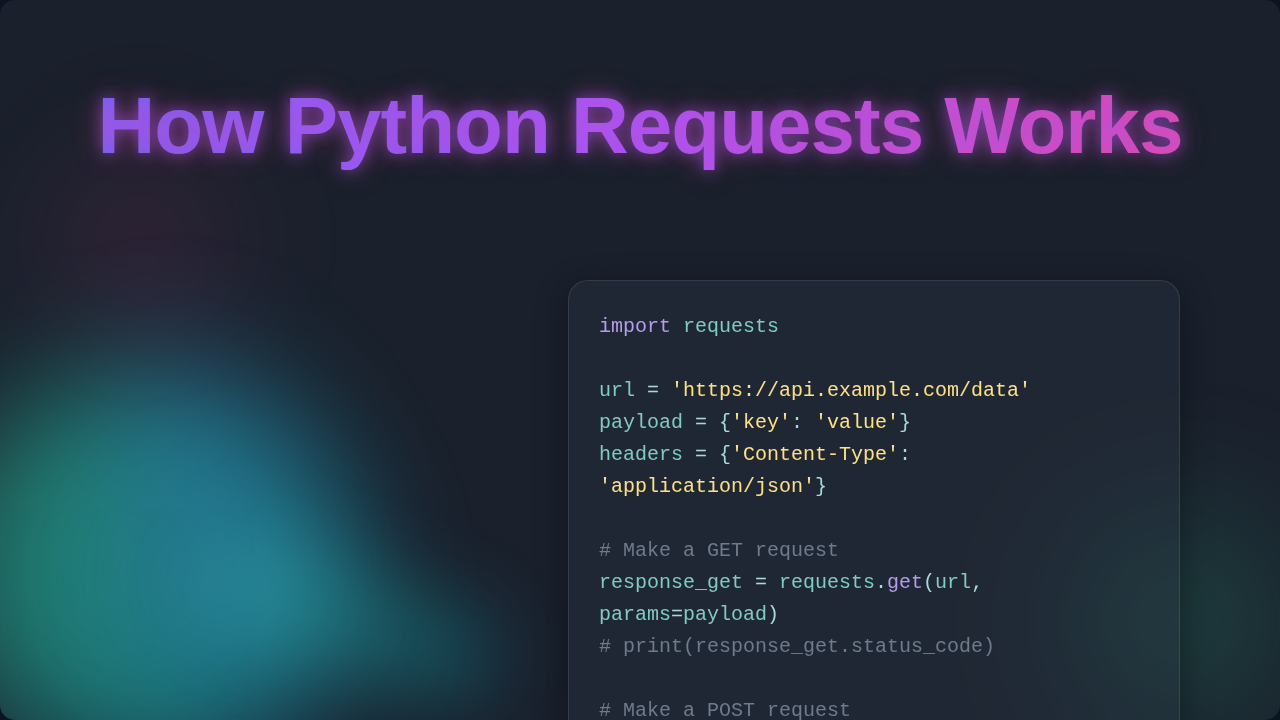
Let’s continue with our restaurant analogy. The most common thing you do with a website is simply view information. You want to see a blog post. You want to check the weather. Or maybe you just want to browse products. In web terms, this is called a GET request.
A GET request is like asking the waiter for the menu. You aren’t changing anything at the restaurant. You are just asking for information to be presented to you. When your Python script uses Requests to make a GET request, it’s essentially saying, “Hey server, please give me the content at this specific web address!”
The library packages up your request. It sends it off to the server. The server then processes it. If all goes well, the server sends back the webpage content. This could be HTML (the building blocks of a webpage). It could also be JSON (a common format for data exchange). Your script receives this content. You can then do whatever you need with it. Perhaps you extract specific data. Or you simply print it out. You are just fetching information without altering anything on the server. Make sense so far?
Sending Information Back (POST Requests)
Sometimes, you don’t just want to view information. You want to send information *to* the server. Think about filling out an online form. Perhaps you are creating a new account. Maybe you are submitting a comment on a blog. This action is handled by a POST request.
A POST request is like telling the waiter your actual food order. You are giving them new information. You expect them to process it in the kitchen. When your Python script makes a POST request, it bundles up some data. This data could be your username and password. It might be the text of a comment. It then sends this bundle to a specific web address on the server. The server receives this data. It then typically saves it, creates something new, or performs an action based on what you sent.
The Requests library takes care of packaging this data correctly. It makes sure the server understands it. This usually involves putting your data into a specific format. It then attaches it to your request. So, while GET is for retrieving, POST is for creating or submitting new data. You are actively participating in the web interaction. You are not just observing it.
The Server’s “Reply” (Responses and Status Codes)
After your script sends a request, it doesn’t just hang there. It waits for a response from the server. This response is critical. It tells you what happened. Did your request succeed? Was there a problem?
The Requests library makes handling these responses easy. When the server sends back its reply, Requests wraps it up nicely. It puts it into what we call a ‘response object’. This object contains lots of useful details. For example, it holds the actual content from the server. It also has information about the request you sent. Crucially, it includes a ‘status code’.
A status code is like the waiter’s immediate feedback. A ‘200 OK’ code means everything went perfectly. Your order was received. Your food is coming. A ‘404 Not Found’ means the web address you asked for doesn’t exist. It’s like asking for a menu item the restaurant doesn’t serve. A ‘500 Internal Server Error’ means something went wrong on the server’s end. This means the kitchen had a problem. Understanding these codes is super important. They tell you if your web interaction was successful. You can find a comprehensive list and explanation of all HTTP status codes on MDN Web Docs. It’s like learning the secret language of the internet!
How Python Requests Works Under the Hood: More Than Just Talking
The Python Requests library does more than just send simple GET and POST messages. It has many smart features built in. These features make your life as a web developer much easier. You don’t have to worry about the nitty-gritty details. It abstracts away a lot of the complexity.
For instance, imagine you need to log into a website. You then want to visit several pages while staying logged in. Requests can handle this with ‘sessions’. A session keeps track of your login status. It maintains other details across multiple requests. It’s like having your waiter remember your preferences. They remember them for your whole meal. This saves you from logging in every single time. Moreover, Requests simplifies handling things like ‘headers’. Headers are extra bits of information. They go along with your request. They might specify what kind of content you prefer. Or they could include authentication tokens. For a deeper dive into how different HTTP headers function, check out MDN’s guide to HTTP headers. The library also knows how to manage redirects automatically. If a website moves, Requests follows it. It always tries to get you to the right place. These behind-the-scenes actions are why Requests feels so magical. It truly simplifies HTTP for developers.
Quick Tip: The Requests library automatically handles things like cookies and retries for many common network issues, making your scripts more robust without extra effort from you.
What to Learn Next: Expanding Your Web Powers
You’ve grasped the core ideas of how Python Requests works. You understand GET and POST. You know about responses and status codes. You are already well on your way!
What should you explore next? Here are a few ideas to keep building your skills:
- Working with JSON Data: Many web services (APIs) send and receive data in JSON format. Requests makes this super easy. Learn how to extract information from JSON responses.
- Interacting with APIs: APIs are like specific doorways into a server’s data. They are designed for programs to talk to each other. Your Requests knowledge is perfect for this.
- Error Handling: What happens if a request fails? Learning to gracefully handle errors (like 404s or network issues) makes your programs much more reliable.
- Advanced Features: Explore more about sessions, authentication, and custom headers. These features unlock even more powerful web interactions. They can also help with Python automation tasks.
The world of web interaction is vast. Your understanding of Requests is a fantastic first step.
Resources for Your Journey
Ready to dig deeper? Here are some places you can go to continue learning:
- Official Requests Documentation: This is always the best place for detailed information. Search for ‘Python Requests official documentation’.
- MDN Web Docs: For a deeper understanding of HTTP itself, status codes, and headers, MDN is an invaluable resource.
- Online Tutorials: Many websites offer step-by-step guides for using Requests in various scenarios. A quick search will reveal many options.
Your Next Steps: Keep Exploring!
You did it! You’ve taken a big step in understanding how Python Requests works. This library is a cornerstone for many Python applications that interact with the web. Whether you’re building a tool to fetch data, automate tasks, or connect to an API, Requests will be your reliable companion.
Don’t be afraid to experiment. Try making a simple GET request to a public API. See what kind of response you get. The more you play, the more comfortable you will become. You have all the foundational knowledge you need now. Keep coding, keep learning, and keep building amazing things!