CORS Errors Explained: Solve Cross-Origin Resource Sharing
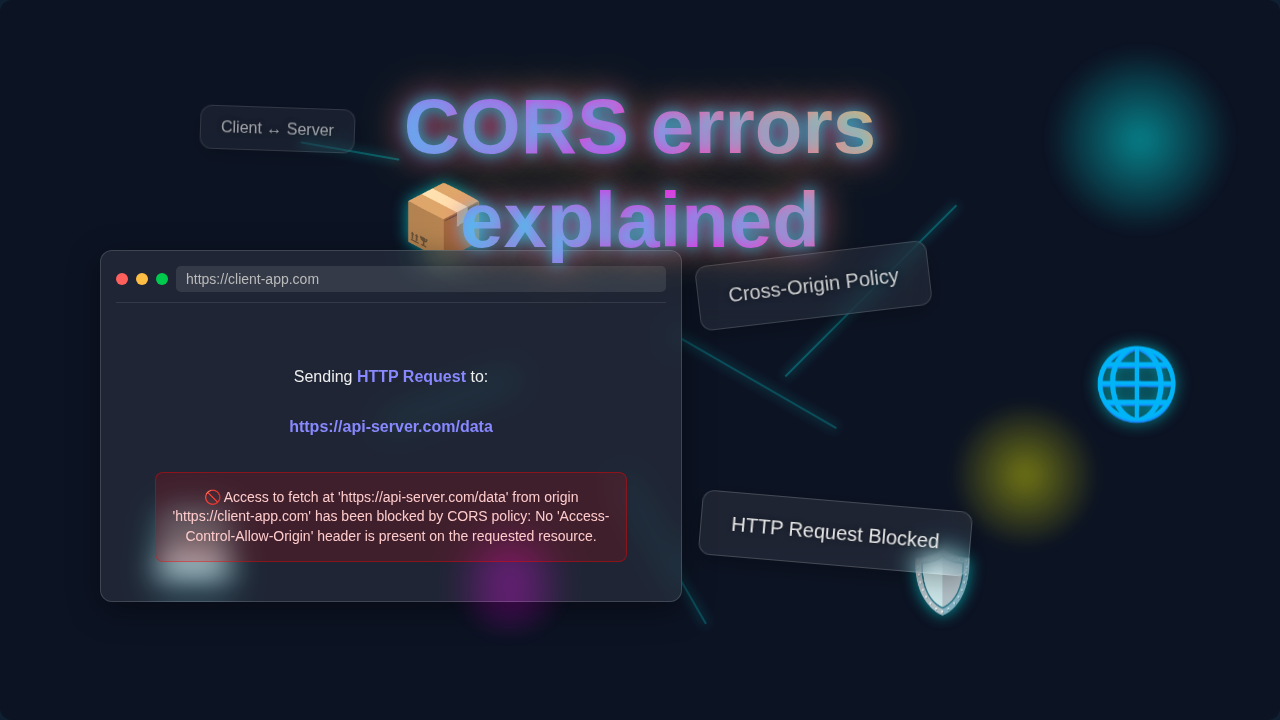
Hey there, future web wizard! Ever been happily coding along, building something awesome, and then BAM! Your web page suddenly refuses to talk to your backend? You open your browser’s console, and there it is: a cryptic message about “CORS policy.” Trust me, you are not alone. That frustrating wall is often a CORS error explained, and today, we are going to demystify it together.
What is CORS, Anyway? (In Plain English)
So, what exactly is CORS? CORS stands for Cross-Origin Resource Sharing. Think of your web browser as a super-strict security guard. When your webpage (say, `mysite.com`) tries to fetch data from another place (like `api.anothersite.com`), the browser gets suspicious. This is a cross-origin request. It means your page is trying to access resources from a different “origin.”
An origin is a unique web address. It’s defined by its protocol, like `http` or `https`. It also includes the domain, like `mysite.com`. Plus, it has a port, like `80` or `3000`. The browser has a built-in rule called the “Same-Origin Policy.” It’s like saying, “Hey, `mysite.com`, you can only talk directly to other parts of `mysite.com` by default.” CORS is the special permission slip. It allows your browser to break this rule. But only when the other side (the server) explicitly says it’s okay. Make sense so far?
Why CORS Errors Matter to YOU
Why does this even matter to you? Well, if you are building a modern web application, you are probably using a frontend. This might be React, Vue, or just plain HTML/CSS/JS. It lives on one address. Then, you have a backend API. Perhaps it is built with Python Flask or Node.js Express. It lives on a different address. Your frontend needs to talk to your backend constantly! Therefore, without CORS working correctly, your browser will block these crucial communications.
Imagine your app being mute! This means your data won’t load. Your forms won’t submit. Your brilliant ideas stay stuck in the browser console. It’s a common stumbling block for self-taught developers. But don’t worry — it clicks eventually. It’s totally solvable!
How Cross-Origin Resource Sharing Actually Works
Alright, let’s peek behind the curtain a bit. How does this permission slip system actually function? When your browser detects a cross-origin request, it doesn’t just send the request directly. Instead, it often performs a “preflight” check first. This “preflight request” is like your browser sending a quick query to the server. It asks, “Hey, `api.anothersite.com`, is it cool if `mysite.com` tries to grab some JSON data using a POST request?” This initial check uses the `OPTIONS` HTTP method.
The server then responds. Hopefully, it includes a set of `Access-Control` headers. The most important one is `Access-Control-Allow-Origin`. This header tells your browser exactly which origins are permitted to access its resources. If the server says, “Yep, `mysite.com` is good to go,” your browser then proceeds with the actual request. However, if the server says, “Nope, not allowed,” or doesn’t say anything at all, your browser throws that infamous CORS error explained message. Consequently, your request never even reaches your frontend JavaScript.
CORS Errors Explained: Common Causes
So, you’ve hit a CORS wall. Why did it happen? Most of the time, the problem isn’t with your frontend code itself. It’s usually about the server on the other end not sending the right signals. Here are the common culprits. First, the most frequent issue is a missing `Access-Control-Allow-Origin` header. Your server just forgot to tell the browser who is allowed in. Second, perhaps the header is there, but it lists the wrong origin. If your frontend is at `http://localhost:3000`, but the server only allows `https://myproductionapp.com`, you’ll get blocked.
Third, you might be using an HTTP method, like `PUT` or `DELETE`. Or perhaps custom headers. These trigger a preflight request. But the server isn’t set up to respond correctly to those `OPTIONS` checks. And sometimes, you’re trying to send credentials, such as cookies or auth tokens, with your request. However, the server hasn’t explicitly allowed that with the `Access-Control-Allow-Credentials` header. Building a solid backend means you need to manage these responses carefully. For instance, when you’re setting up a backend like a Python Task Manager Script: Backend Automation with Flask Logic, configuring these headers is a key part of making it accessible.
Pro Tip: When debugging CORS errors, always remember the browser is the enforcer. The error message you see isn’t from your server directly; it’s your browser telling you, “Hey, the server didn’t give me permission for this request.”
Solving CORS Errors: Your Action Plan
Alright, enough talk about problems. Let’s talk solutions! You can fix CORS errors from either the server side or, in development, with client-side workarounds.
Server-Side Solutions (The Right Way)
This is where the magic truly happens. You need to configure your backend server to send the correct CORS headers. The simplest fix is adding the `Access-Control-Allow-Origin` header.
- Allow Specific Origins: The safest approach is to specify exactly which origins can access your resources. If your frontend is at `http://localhost:3000`, your server should send: `Access-Control-Allow-Origin: http://localhost:3000`. You can list multiple origins too. However, it often requires a bit more dynamic logic on the server.
- Allow All Origins (Use with Caution!): For development, or for truly public APIs, you might see `Access-Control-Allow-Origin: *`. This tells browsers, “Anyone can access my stuff!” While easy, it’s generally not recommended for sensitive production APIs, as it weakens security.
- Specify Allowed Methods and Headers: Remember those preflight requests? You might also need to set `Access-Control-Allow-Methods` (e.g., `GET, POST, PUT, DELETE`) and `Access-Control-Allow-Headers` (e.g., `Content-Type, Authorization`). This tells the browser which types of requests and custom headers are permitted.
Client-Side “Workarounds” (Mainly for Development)
Sometimes, you just need to get your frontend working. This happens while the backend is still being built, or you don’t control the backend. So, you have options.
- Browser Extensions: Tools like “CORS Everywhere” exist. These extensions modify your browser’s behavior. They essentially ignore CORS policies. They are incredibly useful for local development. But never rely on them for production. They only fix the problem for your browser.
- Proxy Servers: A more robust development solution is to use a proxy. Your frontend makes requests to its own server, like `http://localhost:3000/api`. Then, that server forwards the request to your actual backend API. Since the proxy server-to-server request isn’t bound by browser CORS rules, it works. Tools like `webpack-dev-server` or `create-react-app`’s built-in proxy make this super easy.
- Leveraging Client-Side Frameworks: When you’re managing complex frontends, understanding how components re-render is crucial for performance. It’s similar to how efficiently your requests are handled. Take a look at this React Re-renders: Visual Guide to Optimization to see how careful management can lead to smoother user experiences. Speaking of client-side, when you structure your styles with frameworks like Tailwind CSS Scalability: Inline Styles & Best Practices, you’re building a robust foundation for your frontend, which should ideally communicate seamlessly with your backend.
CORS Errors Explained: Clearing Up Confusions
CORS can feel like a tricky subject. Therefore, let’s clear up a few common misunderstandings. First, many beginners think CORS is a server-side firewall. It’s not! CORS is a security feature enforced by your browser. The server simply provides the instructions (the headers). However, your browser is the one who actually blocks the request if those instructions aren’t met. Second, people sometimes confuse CORS with problems accessing data on the same origin. Remember, CORS is specifically about cross-origin requests. If `mysite.com` tries to fetch data from `mysite.com/api`, that’s same-origin, and CORS isn’t involved.
Third, you might hear about JSONP (JSON with Padding) as an alternative. While JSONP does allow cross-origin requests, it’s an older technique. It has security limitations. Plus, it only works for `GET` requests. Modern web development overwhelmingly favors CORS for its flexibility and security. Finally, don’t just blindly enable `Access-Control-Allow-Origin: *` on production servers. That’s like leaving your front door wide open! Always be intentional about which origins you allow. You can learn even more about the technical specifics and variations of these headers on the MDN Web Docs on Cross-Origin Resource Sharing. It’s a fantastic resource for deeper dives.
Senior Dev Insight: Think of CORS as a social contract between your website, your browser, and the server you’re trying to talk to. Everyone agrees on the rules before the conversation even starts.
Key Takeaways for Managing CORS
You’ve covered a lot today! Here are the core ideas to carry with you about CORS errors explained.
- Browser Enforces, Server Controls: Your web browser is the strict bouncer. The server you’re trying to reach gives the bouncer permission via `Access-Control-Allow-Origin` and other headers.
- It’s a Security Feature: CORS protects your users from malicious websites trying to steal their data or manipulate their sessions. It’s there for a good reason!
- Check Those Dev Tools: The first place to look when you see a CORS error is your browser’s developer console and network tab. The error messages, though sometimes cryptic, hold important clues.
- Backend Configuration is Key: Most often, you’ll solve CORS by adjusting the headers sent by your backend server.
- Develop Smart: Use proxy servers or temporary browser extensions for local development. But understand their limitations. Don’t rely on them for your live application.
- Specificity is Safer: Instead of `*`, try to specify the exact origins you want to allow. This keeps your application more secure.
For more details and real-world examples of how to implement these solutions, a great place to check is CSS-Tricks’ guide on Working with CORS.
You’ve Got This!
Hitting a CORS error can feel like hitting a brick wall. But now, you understand why that wall is there and, more importantly, how to climb over it. It’s a fundamental concept in modern web development. And mastering it makes you a much more capable developer. So, the next time that “CORS policy” error pops up, take a deep breath. You’ve got this. You know what it means, and you know how to debug it. Keep building, keep learning, and keep sharing those awesome creations with the world!