Understanding CORS Errors: Visualizing Cross-Origin Blocks
Pillar: Web Dev Concepts
Hey there, fellow web explorer! Ever tried to fetch some data for your awesome new web app, only to be smacked in the face by a cryptic browser error? You know the one. It screams about ‘Access-Control-Allow-Origin’ or something equally confusing. If you have been banging your head against the wall trying to figure out understanding CORS errors, you are definitely not alone. It is a super common hurdle for all of us.
Today, we are going to demystify this beast. Think of me as your friendly senior dev, explaining things over a much-needed coffee. We will break down what CORS is. You will see why it matters to your projects. Then, we will explore how it actually works. Ready to turn that frown upside down?
Understanding CORS Errors: The Browser’s Guard Dog
So, what exactly is CORS? CORS stands for Cross-Origin Resource Sharing. In plain English, it is a security feature built into your web browser. This feature controls how web pages request resources from a different origin. An ‘origin’ is simply a combination of a website’s protocol (like http:// or https://), its domain name (like procoder09.com), and its port number (like :80 or :443).
Imagine your browser as a very protective guard dog. This dog lives on your website’s property. It generally only trusts other things on that same property. Therefore, if your website at app.mycoolsite.com wants to grab data from api.mycoolsite.com, that is fine. It is all part of the same trusted ‘origin’. Your guard dog is happy.
However, what if your site at app.mycoolsite.com tries to fetch data from a completely different domain, say, data.anotherdomain.com? This is a ‘cross-origin’ request. Your browser’s guard dog suddenly gets very suspicious. It raises an alarm. It blocks the request by default. This block is what you see as a CORS error.
The guard dog does this for your safety. It prevents malicious websites from stealing your sensitive data. It also stops them from performing unauthorized actions on other sites you are logged into. Therefore, CORS is a good thing! It protects you and your users from various security threats.
Why Do You Keep Seeing Understanding CORS Errors?
You often encounter CORS errors when you are building front-end applications. Maybe you are using JavaScript in your browser. You try to communicate with a separate backend API server. For example, your React app runs on localhost:3000. It needs to talk to your Node.js API at localhost:5000. These are different origins because their port numbers are different. Boom! CORS error.
Similarly, your deployed front-end on www.mywebapp.com might try to access an API on api.externaltool.com. Again, different domains mean different origins. The browser steps in. It prevents this communication unless specifically allowed. This is why you need to understand how to handle these situations. You want your applications to interact smoothly.
Therefore, when you are making API requests, especially with tools like the Python Requests Library Explained from a server-side context, you might not see CORS errors. That is because server-to-server communication bypasses the browser’s security rules. CORS is purely a browser-side enforcement. Remember that key distinction.
It can feel frustrating. You build this cool feature. It works locally. Then, when deployed, it breaks. This is usually due to CORS. But do not worry. It is a solvable problem once you grasp the basics.
Pro Tip: CORS errors always appear in your browser’s console, not on your server logs. If your server is not seeing the request, your browser blocked it first!
How CORS Actually Works: A Detailed Look
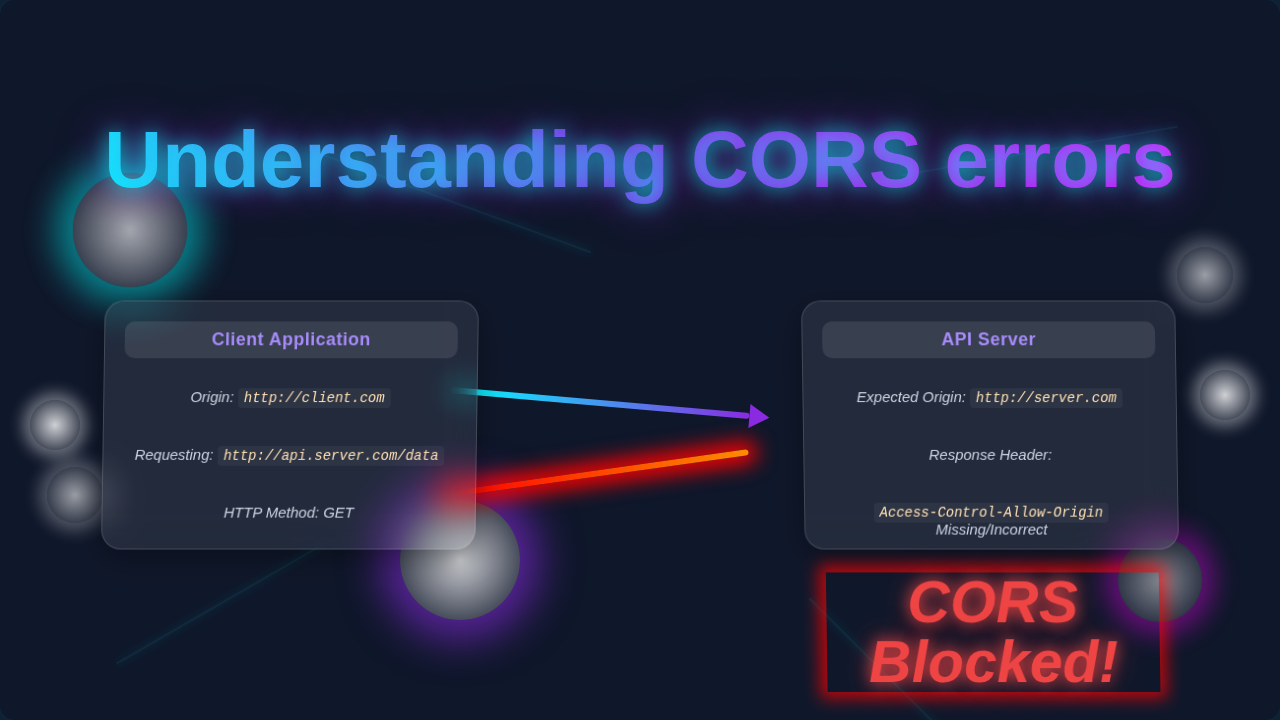
Let us peek behind the curtain. How does this guard dog actually do its job? It uses HTTP headers. When your front-end code makes a cross-origin request, the browser adds a special header. This is the Origin header. It tells the server where the request came from. For instance, Origin: https://app.mycoolsite.com.
Then, the server gets this request. It decides if it trusts the origin. If it does, the server sends back a special response header. This header is Access-Control-Allow-Origin. It contains the allowed origin. For example, Access-Control-Allow-Origin: https://app.mycoolsite.com. Or it could be * for any origin (though be careful with that!).
The browser receives the server’s response. It checks for that Access-Control-Allow-Origin header. Does the server’s allowed origin match your website’s origin? If yes, great! The browser lets your code access the data. If no, or if the header is missing, the browser throws a CORS error. It blocks access to the response data. This prevents your JavaScript from reading it.
The “Preflight” Request: A Chat Before the Main Event
Sometimes, requests are a bit more complex. They might use HTTP methods other than GET or POST. Think PUT, DELETE, or custom headers. These are called “preflighted requests.” The browser sends a tiny, preliminary request first. This is an OPTIONS request. It asks the server: “Hey, can I send the actual request from this origin? Will you allow it?”
The server then responds to this OPTIONS request. It uses headers like Access-Control-Allow-Methods and Access-Control-Allow-Headers. It tells the browser which methods and headers it accepts from that origin. If the server says “yes” to the preflight, the browser sends the actual request. If the server says “no” or does not respond correctly, the browser stops there. No actual request is ever sent. This is a common source of confusion. People think their main request failed, but it never even left the browser!
To dive deeper into Cross-Origin Resource Sharing and its intricacies, you can explore the MDN Web Docs on CORS. It is a fantastic resource for all web developers.
Clearing Up Common CORS Confusions
There are a few things that often trip up beginners with CORS. Let us clear those up right now.
Confusion 1: CORS is a Server Problem.
Not entirely! The server *enables* CORS. However, the *error* itself is enforced by the browser. Your server might be perfectly happy to send data. But if it does not send the correct Access-Control-Allow-Origin header, your browser will still block it. The server *needs* to be configured correctly. Yet, it is your browser that acts as the gatekeeper for your JavaScript code.
Confusion 2: My request failed because of CORS.
Actually, the request usually *succeeded* from the server’s perspective. The server processed it. It sent back a response. However, your browser prevented your JavaScript from *accessing* that response. The network tab in your developer tools will likely show a 200 OK status. But you will see an error in the console. This indicates the browser blocked your access.
Confusion 3: Just disable CORS!
You might find browser extensions that claim to “disable CORS.” These are generally for development purposes only. They bypass the browser’s security locally. Using them in production or telling users to do so is a huge security risk. It defeats the entire purpose of CORS. You should configure your server correctly instead. Security is paramount when managing user input and data, similar to how you would secure sensitive data in React Forms Handling Tutorial: Mastering Inputs & State in JSX.
Important Note: Never disable CORS in production environments or rely on client-side workarounds. Proper server-side configuration is the only secure and scalable solution.
Remember that CORS is a critical part of web security. It works hand-in-hand with the Same-Origin Policy itself. Understanding these foundations makes you a more capable developer.
Your Key Takeaways for Understanding CORS Errors
Let us recap what we have covered today. These are the core ideas to keep in mind.
- CORS is browser security: It is not your server failing. It is your browser preventing potential security risks.
- Origin matters: Protocol, domain, and port must match for same-origin requests. Any difference creates a cross-origin situation.
- Server-side configuration: The server needs to send specific HTTP headers. These headers explicitly tell the browser which origins are allowed.
- Preflight requests exist: For complex requests, an
OPTIONSrequest goes first. It asks for permission. - CORS errors block *access*, not the request: The server usually gets the request. Your JavaScript just cannot read the response.
Think of it like setting up the user interface elements for your site. Just as you might use Tailwind Dark Mode to control how your UI looks, CORS controls how your browser interacts with external resources. Both require careful configuration for a smooth user experience.
Conclusion: You Got This!
I know understanding CORS errors can feel like wrestling an octopus. However, you now have a solid foundation. You understand why these errors appear. You know how the browser and server communicate. This knowledge is incredibly powerful.
The next time you see a CORS error, you will not just panic. You will remember our chat. You will think about the guard dog. You will check your server’s Access-Control-Allow-Origin headers. You might even look for a preflight request. You are armed with information.
Keep building. Keep experimenting. These small victories over tricky concepts are what make you a stronger developer. You are doing great. Now, go conquer those cross-origin challenges!