Get Ready to Build a Kanban Board HTML CSS Project
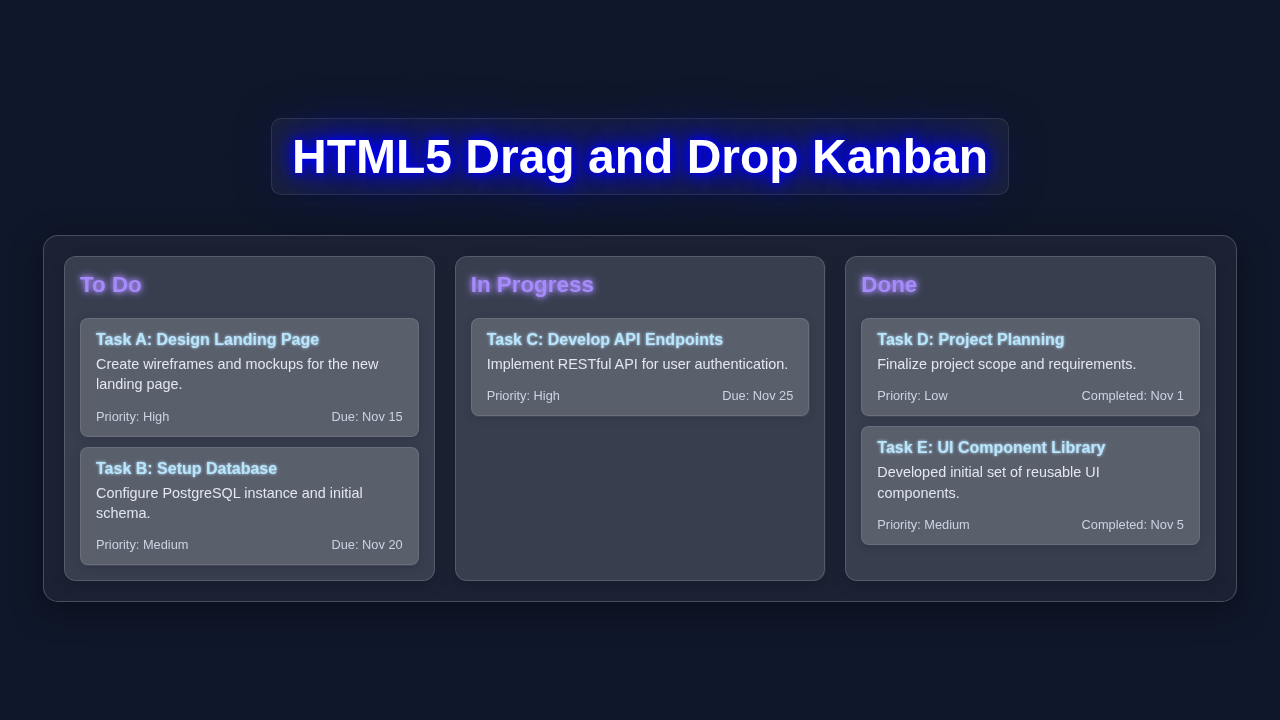
If you want to build a Kanban Board HTML CSS layout but had no idea where to start, you are in the right place. We are building a drag and drop Kanban board. It’s cool!
What We Are Building
A Kanban board is useful. We will build it with HTML, CSS, and JavaScript.
Kanban Board HTML CSS: HTML Structure
HTML is the backbone. We will write simple HTML code.
Don’t worry about this part. Let me explain what’s happening here.
We define the board structure with HTML elements.
index.html
<!DOCTYPE html>
<html lang="en">
<head>
    <meta charset="UTF-8">
    <meta name="viewport" content="width=device-width, initial-scale=1.0">
    <title>HTML/CSS Kanban Board Layout</title>
    <link rel="stylesheet" href="styles.css">
</head>
<body>
    <!-- The main container for the Kanban board -->
    <div class="kanban-board">
        <!-- Kanban Column: To Do -->
        <div class="kanban-column" id="todo-column">
            <div class="column-header">To Do</div>
            <!-- Draggable Kanban Card 1 -->
            <div class="kanban-card" draggable="true" id="task-1">
                <strong>Task A: Design Landing Page</strong>
                <p>Create wireframes and mockups for the new landing page, focusing on user experience.</p>
                <div class="meta"><span>Priority: High</span><span>Due: Nov 15</span></div>
            </div>
            <!-- Draggable Kanban Card 2 -->
            <div class="kanban-card" draggable="true" id="task-2">
                <strong>Task B: Setup Database</strong>
                <p>Configure PostgreSQL instance on AWS EC2 and initial schema migrations.</p>
                <div class="meta"><span>Priority: Medium</span><span>Due: Nov 20</span></div>
            </div>
            <div class="kanban-card" draggable="true" id="task-3">
                <strong>Task C: Research Payment Gateways</strong>
                <p>Investigate Stripe and PayPal APIs for integration feasibility.</p>
                <div class="meta"><span>Priority: Low</span><span>Due: Nov 22</span></div>
            </div>
        </div>

        <!-- Kanban Column: In Progress -->
        <div class="kanban-column" id="in-progress-column">
            <div class="column-header">In Progress</div>
            <!-- Draggable Kanban Card 3 -->
            <div class="kanban-card" draggable="true" id="task-4">
                <strong>Task D: Develop API Endpoints</strong>
                <p>Implement RESTful API for user authentication and data retrieval, with unit tests.</p>
                <div class="meta"><span>Priority: High</span><span>Due: Nov 25</span></div>
            </div>
            <div class="kanban-card" draggable="true" id="task-5">
                <strong>Task E: Frontend Component Development</strong>
                <p>Build reusable React components for the dashboard UI.</p>
                <div class="meta"><span>Priority: Medium</span><span>Due: Nov 28</span></div>
            </div>
        </div>

        <!-- Kanban Column: Done -->
        <div class="kanban-column" id="done-column">
            <div class="column-header">Done</div>
            <!-- Draggable Kanban Card 4 -->
            <div class="kanban-card" draggable="true" id="task-6">
                <strong>Task F: Project Planning</strong>
                <p>Finalized project scope, requirements document, and initial sprint backlog.</p>
                <div class="meta"><span>Priority: High</span><span>Completed: Nov 1</span></div>
            </div>
            <!-- Draggable Kanban Card 5 -->
            <div class="kanban-card" draggable="true" id="task-7">
                <strong>Task G: UI Component Library Setup</strong>
                <p>Configured Storybook and developed initial set of common UI components.</p>
                <div class="meta"><span>Priority: Medium</span><span>Completed: Nov 5</span></div>
            </div>
        </div>
    </div>

    <!--
        IMPORTANT NOTE ON DRAG & DROP FUNCTIONALITY:
        The `draggable="true"` attribute in HTML enables the browser's native drag
        behavior, allowing an element to be picked up. However, the actual logic for
        dropping an element into a new container and reordering elements within a container
        REQUIRES JAVASCRIPT to handle events like `dragstart`, `dragover`, `drop`, and `dragend`,
        and to modify the DOM.

        This tutorial provides the HTML structure and CSS styling for a Kanban board
        that is ready for HTML5 Drag & Drop, but the *functional movement* of cards
        between columns or reordering *cannot* be achieved with HTML and CSS alone.
    -->
</body>
</html>
Kanban Board HTML CSS: CSS Styling
CSS makes it look great. We will write simple CSS code.
Here’s the cool part: CSS styles our board.
styles.css
/*
 * styles.css
 * Production-ready, clean, and well-commented CSS for a Kanban Board layout.
 * Safe fonts (Arial, Helvetica, sans-serif) are used.
 * Max-width, overflow:hidden, and box-sizing are applied where appropriate.
 */

/* Global Reset & Body Styles */
body {
    margin: 0;
    padding: 20px;
    font-family: Arial, Helvetica, sans-serif; /* Safe font stack */
    background-color: #f4f7f6; /* Light background for default tutorial */
    color: #333; /* Darker text for readability */
    line-height: 1.6;
    box-sizing: border-box; /* Ensures padding and border are included in element's total width and height */
    display: flex;
    justify-content: center;
    align-items: flex-start; /* Align to top for a typical board */
    min-height: 100vh; /* Full viewport height */
}

/* Ensure all elements respect box-sizing */
*,
*::before,
*::after {
    box-sizing: inherit;
}

/* Kanban Board Container */
.kanban-board {
    display: flex;
    gap: 20px; /* Space between columns */
    padding: 20px;
    background-color: #eef1f3; /* Slightly darker background for the board itself */
    border-radius: 8px;
    box-shadow: 0 4px 12px rgba(0, 0, 0, 0.1); /* Subtle shadow for depth */
    overflow-x: auto; /* Allows horizontal scrolling if columns exceed screen width */
    max-width: 100%; /* Ensures the board doesn't overflow its parent */
    -webkit-overflow-scrolling: touch; /* Improves scrolling on touch devices */
}

/* Kanban Column Styles */
.kanban-column {
    flex-shrink: 0; /* Prevent columns from shrinking below min-width */
    width: 300px; /* Fixed width for columns */
    min-width: 280px; /* Minimum width to ensure content fits */
    background-color: #ffffff; /* White background for columns */
    border-radius: 8px;
    padding: 15px;
    box-shadow: 0 2px 8px rgba(0, 0, 0, 0.08);
    display: flex;
    flex-direction: column;
    gap: 10px; /* Space between cards */
    border: 1px solid #e0e0e0; /* Subtle border */
}

.column-header {
    font-size: 1.2em;
    font-weight: bold;
    color: #555;
    margin-bottom: 15px;
    padding-bottom: 10px;
    border-bottom: 2px solid #e0e0e0;
}

/* Kanban Card Styles */
.kanban-card {
    background-color: #fdfdfd;
    border-radius: 6px;
    padding: 12px 15px;
    box-shadow: 0 1px 4px rgba(0, 0, 0, 0.05);
    border: 1px solid #f0f0f0;
    cursor: grab; /* Indicates the card is draggable */
    transition: transform 0.2s ease-in-out, box-shadow 0.2s ease-in-out;
    position: relative; /* Needed for potential future positioning of elements inside */
}

.kanban-card:hover {
    transform: translateY(-2px); /* Slight lift on hover */
    box-shadow: 0 3px 8px rgba(0, 0, 0, 0.1);
}

/* Styling for draggable state feedback (visual only, functional JS required) */
.kanban-card[draggable="true"]:active {
    cursor: grabbing;
    /* In a real D&D scenario with JS, you'd apply styles here
       for when an item is actually being dragged (e.g., opacity, border) */
}

/* Card content styling */
.kanban-card strong {
    display: block;
    font-size: 1em;
    color: #444;
    margin-bottom: 5px;
}

.kanban-card p {
    font-size: 0.9em;
    color: #666;
    margin: 0;
}

.kanban-card .meta {
    font-size: 0.8em;
    color: #888;
    margin-top: 10px;
    display: flex;
    justify-content: space-between;
    border-top: 1px solid #eee;
    padding-top: 8px;
}

.kanban-card .meta span {
    /* Styles for individual meta items if needed */
}

/* Responsive adjustments */
@media (max-width: 768px) {
    .kanban-board {
        flex-direction: column; /* Stack columns vertically on smaller screens */
        align-items: center;
    }

    .kanban-column {
        width: 90%; /* Take up more width */
        max-width: 400px; /* Limit max width even when stacked */
    }
}
JavaScript
JavaScript adds functionality. We will write simple JavaScript code.
Let me explain what’s happening here. We add drag and drop functionality with JavaScript.
How It All Works Together
Step 1: Create the Board
We create the board with HTML. Then we style it with CSS.
Step 2: Add Cards
We add cards to the board. We can drag and drop them.
Step 3: Add Functionality
We add functionality with JavaScript. Now we have a working Kanban board.
Pro tip: Keep your code simple and clean. This makes it easy to maintain and update.
Tips to Customise It
We can customise our board. We can change the colors, add more features.
For example, we can add a CSS grid to make it responsive.
Or we can add a CSS trick to make it more interactive.
Check out our other tutorials, like Retro Terminal UI or GeoCities Card Design.
Conclusion
Congratulations! You built a Kanban board with HTML, CSS, and JavaScript. You can customise it, add more features.
Encouragement: Don’t be afraid to experiment and try new things. This is how we learn and grow.
Also, check out our Glitch Text Effect tutorial for more fun projects.