JavaScript Memory Game: HTML, CSS & Vanilla JS Tutorial
Hey there, amazing coder! If you’ve been wanting to build a cool project and learn some core JavaScript, then building a JavaScript Memory Game is a fantastic place to start. This classic game is super fun to make. It’s also perfect for practicing HTML, CSS, and vanilla JavaScript. We’ll explore objects and classes too. Let’s get building!
What We Are Building
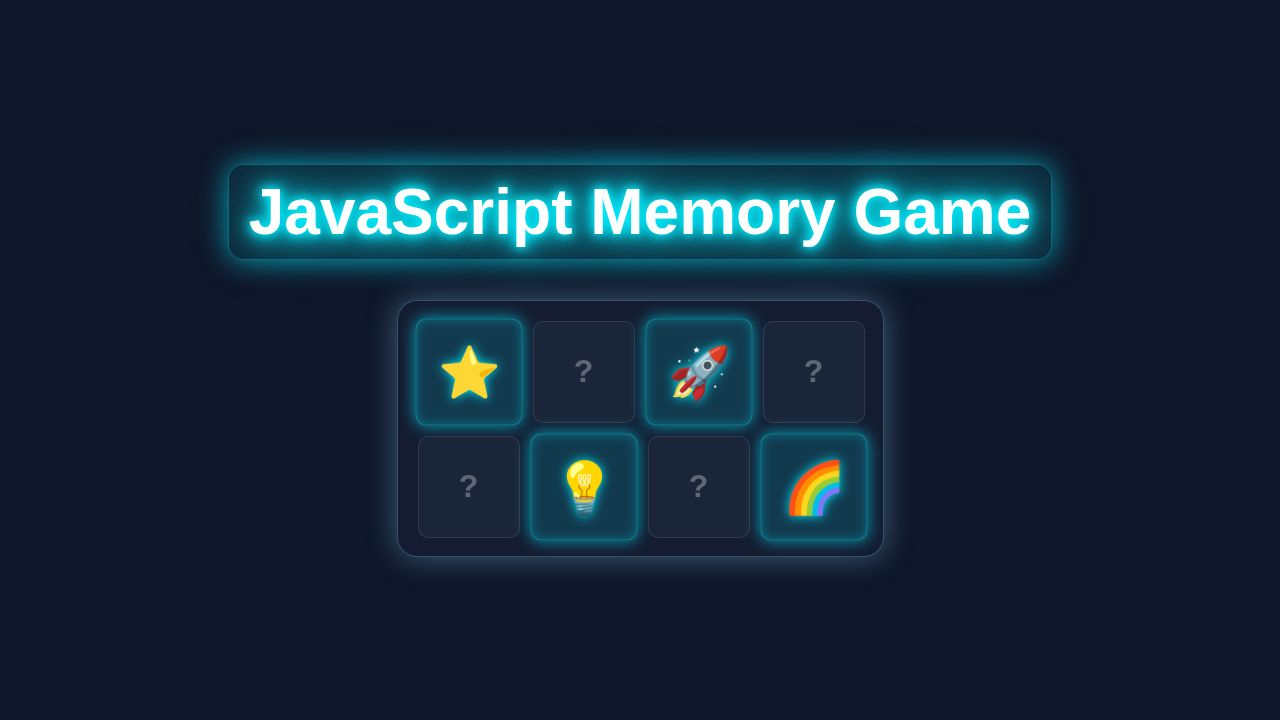
Imagine a grid of cards, face down. Your goal is to find matching pairs. Click a card, then another. If they match, they stay face up. If not, they flip back. We’ll build this classic game together! It’s a fantastic way to grasp object-oriented programming concepts. Plus, you’ll have a really cool project for your portfolio. This game gives you a solid foundation. You’ll learn how to manage game state and user interaction.
HTML Structure
First, we need the basic skeleton for our game. Our HTML will be quite simple. It will hold our game board and a button to reset the game. We will also include a spot for our score.
index.html
<!DOCTYPE html>
<html lang="en">
<head>
    <meta charset="UTF-8">
    <meta name="viewport" content="width=device-width, initial-scale=1.0">
    <title>Memory Game</title>
    <link rel="stylesheet" href="styles.css">
</head>
<body>
    <div class="game-container">
        <h1>Memory Game</h1>
        <div class="info-panel">
            <span id="moves">Moves: 0</span>
            <span id="timer">Time: 0s</span>
            <button id="reset-button">Reset Game</button>
        </div>
        <div class="game-board" id="game-board">
            <!-- Cards will be dynamically injected here by JavaScript -->
        </div>
        <div id="win-message" class="win-message hidden">
            <div class="win-message-content">
                <h2>Congratulations!</h2>
                <p>You found all matches in <span id="final-moves">0</span> moves and <span id="final-time">0</span> seconds!</p>
                <button id="play-again-button">Play Again</button>
            </div>
        </div>
    </div>
    <script src="script.js"></script>
</body>
</html>
CSS Styling
Next, let’s make our game look great! Our CSS will position the cards nicely. It will also add some smooth flip animations. We’ll use modern CSS features to create a responsive layout. This ensures our game looks good on any device.
styles.css
/* Global Styles */
body {
    font-family: Arial, Helvetica, sans-serif; /* Safe font stack */
    background-color: #1a202c; /* Dark background color */
    color: #e2e8f0; /* Light text color */
    margin: 0;
    display: flex;
    justify-content: center;
    align-items: center;
    min-height: 100vh; /* Full viewport height */
    box-sizing: border-box; /* Include padding and border in the element's total width and height */
    overflow: hidden; /* Prevent scrolling if content slightly overflows */
}

.game-container {
    background: #2d3748; /* Slightly lighter dark background for the container */
    border-radius: 15px;
    padding: 30px;
    box-shadow: 0 10px 20px rgba(0, 0, 0, 0.3); /* Subtle shadow for depth */
    text-align: center;
    max-width: 90%; /* Max width for responsiveness */
    margin: 20px; /* Margin around the container */
    box-sizing: border-box;
}

h1 {
    color: #63b3ed; /* Light blue heading */
    margin-bottom: 20px;
}

/* Info Panel Styles */
.info-panel {
    display: flex;
    justify-content: space-around;
    align-items: center;
    margin-bottom: 20px;
    padding: 10px;
    background-color: #4a5568;
    border-radius: 8px;
    flex-wrap: wrap; /* Allow items to wrap on smaller screens */
    gap: 10px; /* Space between items */
}

.info-panel span {
    font-size: 1.2em;
    font-weight: bold;
}

/* Button Styles */
button {
    background-color: #63b3ed; /* Primary button color */
    color: white;
    border: none;
    padding: 10px 20px;
    border-radius: 5px;
    cursor: pointer;
    font-size: 1em;
    transition: background-color 0.3s ease; /* Smooth hover effect */
}

button:hover {
    background-color: #4299e1; /* Darker blue on hover */
}

/* Game Board Styles */
.game-board {
    display: grid;
    grid-template-columns: repeat(4, 1fr); /* 4 columns for a 4x4 grid (16 cards) */
    grid-template-rows: repeat(4, 1fr);
    gap: 15px; /* Space between cards */
    perspective: 1000px; /* Essential for 3D flip effect */
    max-width: 600px; /* Max width for the entire game board grid */
    margin: 0 auto; /* Center the grid */
}

/* Individual Card Styles */
.card {
    width: 120px; /* Fixed width for cards */
    height: 120px; /* Fixed height for cards */
    position: relative;
    cursor: pointer;
    transform-style: preserve-3d; /* Children of this element will preserve 3D position */
    transition: transform 0.6s cubic-bezier(0.4, 0.0, 0.2, 1); /* Smooth flip animation */
}

.card.flipped {
    transform: rotateY(180deg); /* Flip card on Y-axis when 'flipped' class is added */
}

/* Inner Card Container for Front/Back */
.card-inner {
    position: absolute;
    width: 100%;
    height: 100%;
    text-align: center;
    font-size: 3em; /* Size of the symbol/question mark */
    font-weight: bold;
    color: #fff;
    border-radius: 10px;
    backface-visibility: hidden; /* Hide the back of the card when facing the user */
}

.card-front, .card-back {
    position: absolute;
    width: 100%;
    height: 100%;
    display: flex;
    justify-content: center;
    align-items: center;
    border-radius: 10px;
    box-shadow: 0 4px 8px rgba(0, 0, 0, 0.2); /* Subtle shadow for card faces */
}

.card-front {
    background-color: #4a5568; /* Color for the back of the card (question mark side) */
    color: #a0aec0; /* Light gray for question mark */
    z-index: 2; /* Ensure front is on top initially */
    transform: rotateY(0deg); /* Default position */
}

.card-back {
    background-color: #63b3ed; /* Color for the front of the card (symbol side) */
    color: white;
    transform: rotateY(180deg); /* Rotated to hide it initially */
}

.card.matched .card-back {
    background-color: #48bb78; /* Green color for matched cards */
    box-shadow: 0 0 15px rgba(72, 187, 120, 0.8); /* Glowing effect for matched cards */
    transform: rotateY(180deg) scale(0.95); /* Slightly scale down matched cards and keep flipped */
    transition: background-color 0.3s ease, box-shadow 0.3s ease, transform 0.3s ease; /* Smooth transition for matched state */
}

/* Win Message Styles */
.win-message {
    position: fixed; /* Position over the entire screen */
    top: 0;
    left: 0;
    width: 100%;
    height: 100%;
    background: rgba(0, 0, 0, 0.7); /* Semi-transparent overlay */
    display: flex;
    justify-content: center;
    align-items: center;
    z-index: 1000; /* Ensure it's on top of other content */
    transition: opacity 0.3s ease; /* Smooth fade in/out */
}

.win-message.hidden {
    opacity: 0;
    pointer-events: none; /* Make it unclickable when hidden */
}

.win-message-content {
    background: #2d3748;
    padding: 40px;
    border-radius: 15px;
    text-align: center;
    box-shadow: 0 10px 30px rgba(0, 0, 0, 0.5);
    transform: scale(0.8); /* Start slightly smaller for a pop-in effect */
    transition: transform 0.3s ease; /* Smooth pop-in */
}

.win-message:not(.hidden) .win-message-content {
    transform: scale(1); /* Scale to normal size when visible */
}

.win-message h2 {
    color: #48bb78; /* Green for success message */
    font-size: 2.5em;
    margin-bottom: 15px;
}

.win-message p {
    font-size: 1.3em;
    margin-bottom: 25px;
}

/* Responsive Adjustments */
@media (max-width: 768px) {
    .game-board {
        grid-template-columns: repeat(4, 1fr); /* Maintain 4 columns */
        max-width: 400px; /* Adjust max-width for smaller screens */
    }
    .card {
        width: 90px;
        height: 90px;
        font-size: 2.5em;
    }
    .game-container {
        padding: 20px;
    }
    h1 {
        font-size: 1.8em;
    }
    .info-panel {
        flex-direction: column;
        gap: 10px;
    }
    .win-message-content {
        padding: 25px;
    }
    .win-message h2 {
        font-size: 2em;
    }
    .win-message p {
        font-size: 1.1em;
    }
}

@media (max-width: 480px) {
    .game-board {
        grid-template-columns: repeat(4, 1fr); /* Still 4 columns, cards just get smaller */
        max-width: 300px; /* Further reduce max-width */
        gap: 10px;
    }
    .card {
        width: 65px; /* Even smaller cards */
        height: 65px;
        font-size: 2em;
    }
    .game-container {
        padding: 15px;
    }
    h1 {
        font-size: 1.5em;
    }
}
JavaScript (The Brains of Our JavaScript Memory Game)
Here’s the cool part! Our JavaScript code will handle all the game logic. It will manage card states and check for matches. We will use both JavaScript objects and classes. This approach keeps our code organised and easy to understand.
script.js
// --- Memory Game Logic --- //

// Array of card symbols (each symbol will be used twice to form pairs)
const symbols = ['🍎', '🍌', '🍒', '🍇', '🍋', '🥝', '🍓', '🍍']; // 8 unique symbols for 16 cards

// Game state variables
let cards = []; // Array to hold the current game's card elements
let firstCard = null; // Stores the first card flipped in a turn
let secondCard = null; // Stores the second card flipped in a turn
let lockBoard = false; // Prevents additional cards from being flipped during a comparison
let matchedPairs = 0; // Counts how many pairs have been successfully matched
let moves = 0; // Counts the number of moves made by the player
let timeElapsed = 0; // Tracks the time passed in seconds
let timerInterval; // Stores the interval ID for the game timer

// DOM Elements
const gameBoard = document.getElementById('game-board');
const movesDisplay = document.getElementById('moves');
const timerDisplay = document.getElementById('timer');
const resetButton = document.getElementById('reset-button');
const playAgainButton = document.getElementById('play-again-button');
const winMessage = document.getElementById('win-message');
const finalMovesDisplay = document.getElementById('final-moves');
const finalTimeDisplay = document.getElementById('final-time');

/**
 * Initializes or resets the game board and game state.
 */
function initGame() {
    // Clear previous board cards and hide win message
    gameBoard.innerHTML = '';
    winMessage.classList.add('hidden');

    // Create card pairs: duplicate each symbol and shuffle them
    cards = [...symbols, ...symbols]; // Creates 16 cards (8 pairs)
    shuffle(cards);

    // Reset game state variables
    firstCard = null;
    secondCard = null;
    lockBoard = false;
    matchedPairs = 0;
    moves = 0;
    timeElapsed = 0;

    // Update display for moves and timer
    movesDisplay.textContent = `Moves: 0`;
    timerDisplay.textContent = `Time: 0s`;

    // Clear any existing timer and reset it
    clearInterval(timerInterval);
    timerInterval = null;

    // Render cards to the game board
    cards.forEach(symbol => {
        const cardElement = document.createElement('div');
        cardElement.classList.add('card');
        cardElement.dataset.symbol = symbol; // Store the symbol as a data attribute
        cardElement.innerHTML = `
            <div class="card-inner">
                <div class="card-front">?</div>
                <div class="card-back">${symbol}</div>
            </div>
        `;
        cardElement.addEventListener('click', flipCard); // Attach click listener to each card
        gameBoard.appendChild(cardElement);
    });
}

/**
 * Shuffles an array randomly using the Fisher-Yates (Knuth) algorithm.
 * @param {Array} array - The array to be shuffled.
 */
function shuffle(array) {
    for (let i = array.length - 1; i > 0; i--) {
        const j = Math.floor(Math.random() * (i + 1));
        [array[i], array[j]] = [array[j], array[i]]; // Swap elements
    }
}

/**
 * Handles the logic when a card is clicked.
 * Flips the card and manages the comparison of two flipped cards.
 */
function flipCard() {
    // Prevent flipping if board is locked or if the same card is clicked twice
    if (lockBoard) return;
    if (this === firstCard) return;
    if (this.classList.contains('matched')) return; // Prevent flipping already matched cards

    this.classList.add('flipped'); // Add 'flipped' class for CSS animation

    // Start the timer if it's not already running (first card flip of the game)
    if (!timerInterval) {
        startTimer();
    }

    if (!firstCard) {
        firstCard = this; // This is the first card of the turn
        return;
    }

    secondCard = this; // This is the second card of the turn
    moves++; // Increment move count
    movesDisplay.textContent = `Moves: ${moves}`; // Update moves display
    lockBoard = true; // Lock the board to prevent more flips during comparison

    checkForMatch(); // Check if the two flipped cards are a match
}

/**
 * Compares the symbols of the two flipped cards.
 */
function checkForMatch() {
    const isMatch = firstCard.dataset.symbol === secondCard.dataset.symbol;
    isMatch ? disableCards() : unflipCards(); // Call appropriate function based on match result
}

/**
 * Handles logic for matched cards: disables them and checks for win condition.
 */
function disableCards() {
    // Remove click listeners so matched cards cannot be flipped again
    firstCard.removeEventListener('click', flipCard);
    secondCard.removeEventListener('click', flipCard);

    // Add 'matched' class for visual feedback (e.g., green background)
    firstCard.classList.add('matched');
    secondCard.classList.add('matched');

    matchedPairs++; // Increment matched pairs count
    resetBoard(); // Reset firstCard, secondCard, and lockBoard

    // Check if all pairs have been matched
    if (matchedPairs === symbols.length) {
        clearInterval(timerInterval); // Stop the timer
        showWinMessage(); // Display the win message
    }
}

/**
 * Handles logic for non-matched cards: flips them back after a short delay.
 */
function unflipCards() {
    setTimeout(() => {
        firstCard.classList.remove('flipped'); // Remove 'flipped' class
        secondCard.classList.remove('flipped'); // Remove 'flipped' class
        resetBoard(); // Reset firstCard, secondCard, and lockBoard
    }, 1000); // Cards stay flipped for 1 second before flipping back
}

/**
 * Resets the variables used for tracking the current turn's cards.
 */
function resetBoard() {
    [firstCard, secondCard, lockBoard] = [null, null, false]; // Destructuring assignment for concise reset
}

/**
 * Starts the game timer.
 */
function startTimer() {
    timerInterval = setInterval(() => {
        timeElapsed++; // Increment time every second
        timerDisplay.textContent = `Time: ${timeElapsed}s`; // Update timer display
    }, 1000);
}

/**
 * Displays the win message with final stats.
 */
function showWinMessage() {
    finalMovesDisplay.textContent = moves;
    finalTimeDisplay.textContent = timeElapsed;
    winMessage.classList.remove('hidden'); // Show the win message
}

// --- Event Listeners --- //
resetButton.addEventListener('click', initGame);
playAgainButton.addEventListener('click', initGame);

// --- Initialize Game on Page Load --- //
document.addEventListener('DOMContentLoaded', initGame);
How It All Works Together
Now, let’s dive into the JavaScript. We will connect our HTML and CSS. This brings our game to life! We’ll break down the core logic step by step. You’ll see how everything interacts.
Setting Up Our Game Board
We start by getting references to our HTML elements. This includes the game board and the reset button. Then, we define our card data. Each card needs a unique identifier and an image. We will create two copies of each card. This is essential for a memory game! We store these details in an array. Remember, clean data is key for any project. For more on handling user interaction, check out Vanilla JS Interaction: Build an Interactive Counter with HTML/CSS.
Pro Tip: Using an array of objects for your card data makes it super easy to add more cards later! Think of each object as a blueprint for a card.
Creating Cards Dynamically
Our JavaScript will dynamically create the card elements. We loop through our shuffled card data. For each card, we make a new div element. We add classes for styling, like ‘memory-card’. Also, we add a data-id attribute. This helps us track the card in our game logic. Each card gets an event listener. This listener waits for a ‘click’ event. When a card is clicked, our game logic starts working.
To learn more about data-* attributes, you can visit the MDN web docs on Custom data attributes. They are very useful for storing small bits of information on HTML elements.
Handling Card Clicks and Flips
When you click a card, we need to flip it. We add a CSS class like ‘flip’ to its element. This makes the card show its image. Our game needs to remember which cards are currently open. We store these in an array called flippedCards. If two cards are flipped, we then check if they match. This check happens after a short delay. The delay helps the user see both cards. It also makes the game feel smoother.
Checking for Matches
This is the core of our JavaScript Memory Game. When two cards are flipped, we compare their data-id values. If they are the same, it’s a match! We keep those cards face up. We also disable further clicks on them. If they don’t match, we flip them back over. This happens after our small delay. The cards return to their original, face-down state. Our game state needs to track matched pairs. We update the score or move count accordingly.
Resetting the Game
Players will want to play again! So, a reset button is vital. When clicked, we clear the game board. We then re-shuffle our card data. All cards get re-created and re-added to the board. This brings the game back to its starting state. The score also resets. A good reset mechanism makes your game much more enjoyable. Think about how important clean state management is. It’s similar to handling state in larger applications, like when building a React Cart Drawer with Hooks: Modern UI/UX Tutorial.
Friendly Reminder: Don’t be afraid to experiment! Changing small values, like the flip delay, can really alter the game feel.
Tips to Customise It
You’ve built a working JavaScript Memory Game. How cool is that! Now, let’s make it uniquely yours. Here are some fun ideas:
- Add a Timer: Implement a stopwatch to see how fast players can clear the board. This adds a challenge!
- Different Themes: Change the card images to animals, food, or anything else you like. Imagine a space-themed game!
- Difficulty Levels: Start with fewer cards for ‘Easy’. Add more cards for ‘Hard’. This offers varied gameplay.
- Sound Effects: Play a sound when cards match. Play a different sound when they don’t. Sound adds great feedback!
Conclusion
Wow, you did it! You just built your very own JavaScript Memory Game. You used HTML for structure, CSS for style, and vanilla JavaScript for all the smart logic. You even explored objects and classes. That’s a huge achievement! This project gives you a solid base. You can definitely build even more amazing things now. Show off your creation to your friends. Share it on social media. You should be super proud! Keep coding, keep learning, and I’ll catch you in the next tutorial.