The wrong choice between Vercel vs Netlify impacts your project’s performance and developer experience. Developers frequently face this decision for new applications or when migrating existing ones. This post details the distinct strengths of each platform. It outlines specific use cases and common pitfalls.
The Core Difference
Vercel and Netlify both deploy static sites and serverless functions. However, their core philosophies diverge. Vercel prioritizes integration with Next.js, offering a highly optimized experience for that framework. Meanwhile, Netlify provides a more framework-agnostic platform.
It gives extensive customization options via its build pipeline. This means Vercel often requires less configuration for Next.js projects. Netlify typically requires a configuration file for advanced setups. This contrast is evident when managing build settings.
# netlify.toml example
[build]
  command = "npm run build"
  publish = "build"
  functions = "netlify/functions"

[[redirects]]
  from = "/old-path"
  to = "/new-path"
  status = 301
Vercel usually handles these details implicitly for Next.js projects. Netlify explicitly defines them in netlify.toml. As a result, Netlify offers greater control over the build process. Vercel focuses on speed and simplicity for its preferred ecosystem.
When to Use Vercel
Developers should reach for Vercel when their project heavily relies on Next.js. Vercel’s platform is co-created with Next.js, ensuring deep integration and optimized performance. This includes features like Incremental Static Regeneration (ISR) and serverless functions. They work seamlessly out of the box. Use this when your site needs dynamic content with static page benefits.
Additionally, Vercel excels with global edge functions. These functions run close to your users, reducing latency for API calls or content delivery. This means applications with a global user base see significant performance gains. Consider Vercel for projects requiring minimal setup for Next.js SSR or API routes.
// pages/api/hello.js - a Vercel-optimized Next.js API route
export default function handler(req, res) {
  if (req.method === 'GET') {
    // Handle GET request
    res.status(200).json({ message: 'Hello from Vercel!' });
  } else {
    // Handle other methods
    res.setHeader('Allow', ['GET']);
    res.status(405).end(`Method ${req.method} Not Allowed`);
  }
}
For example, an e-commerce storefront built with Next.js benefits from Vercel’s fast deployments and caching. This reduces time to interactive for customers, much like a Code Playground: Interactive Design with HTML, CSS, JS needs a quick response. As a result, the user experience improves significantly.
When to Switch to Netlify
A clear signal to consider Netlify over Vercel appears when your project needs extensive custom build logic. This often happens with monorepos or projects using esoteric build tools. Netlify’s netlify.toml provides fine-grained control over the build process. This includes pre-build scripts, post-build functions, and specific caching strategies. In contrast, Vercel aims for zero-config. This can become restrictive for highly customized setups.
For example, if you need to run multiple commands before deploying your static assets, Netlify offers flexibility. This is especially true for projects with specific content management system (CMS) integrations requiring unique build steps. AI Code Assistant UI: HTML, CSS & JS Design might require a specific pre-build step for custom model compilation, making Netlify a better fit.
# netlify.toml for a complex build
[build]
  command = "npm install && npm run lint && npm run build:prod"
  publish = "dist"

[context.production.environment]
  NODE_VERSION = "18"
  MY_CUSTOM_VAR = "production-value"

[[plugins]]
  package = "@netlify/plugin-lighthouse"
    [plugins.inputs]
      thresholds = { performance = 0.9, accessibility = 0.9 }
Netlify also shines when you need advanced features like Netlify CMS integration or specific Identity management. The platform’s robust ecosystem of plugins extends its capabilities significantly. This allows developers to tailor the deployment pipeline precisely. This is a key differentiator in the Vercel vs Netlify discussion. Therefore, evaluate Netlify when Vercel’s simplicity becomes a bottleneck for custom requirements.
Vercel vs Netlify Compared Side by Side
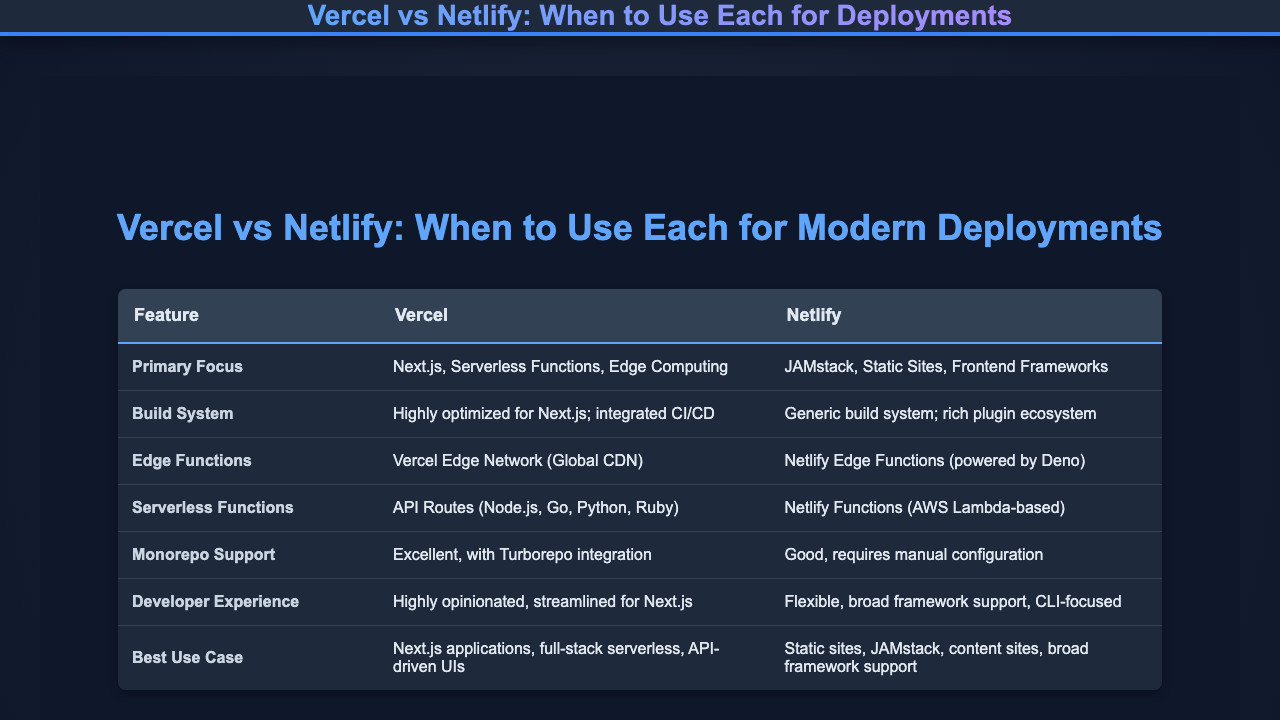
Understanding the features side-by-side clarifies the decision. Here’s a direct comparison of key aspects.
index.html
<!DOCTYPE html>
<html lang="en">
<head>
    <meta charset="UTF-8">
    <meta name="viewport" content="width=device-width, initial-scale=1.0">
    <title>Vercel vs Netlify Comparison</title>
    <style>
        body {
            margin: 0;
            background-color: #0f172a; /* Dark background */
            color: #e2e8f0; /* Light text */
            font-family: Arial, Helvetica, sans-serif;
            display: flex;
            flex-direction: column;
            justify-content: center;
            align-items: center;
            min-height: 100vh; /* Ensure it takes full viewport height */
            padding: 20px;
            box-sizing: border-box;
        }
        .container {
            width: 90%;
            max-width: 1100px;
            background-color: #1e293b; /* Slightly lighter dark */
            border-radius: 8px;
            overflow: hidden;
            box-shadow: 0 4px 10px rgba(0, 0, 0, 0.3);
        }
        h1 {
            color: #60a5fa; /* Accent blue */
            font-size: 36px;
            margin-bottom: 40px;
            text-align: center;
        }
        table {
            width: 100%;
            border-collapse: collapse;
        }
        th, td {
            padding: 16px;
            text-align: left;
            border-bottom: 1px solid #334155; /* Subtle border */
        }
        th {
            background-color: #334155; /* Header background */
            font-size: 18px;
            color: #e2e8f0;
            border-bottom: 2px solid #60a5fa; /* Accent border */
        }
        tr:last-child td {
            border-bottom: none; /* No border for the last row */
        }
        td {
            background-color: #1e293b;
            color: #e2e8f0;
        }
        td:first-child {
            color: #cbd5e1; /* Feature name slightly different color */
            font-weight: bold;
            width: 25%;
        }
        td:nth-child(2),
        td:nth-child(3) {
            width: 37.5%;
        }
    </style>
</head>
<body>
    <h1>Vercel vs Netlify: When to Use Each for Modern Deployments</h1>
    <div class="container">
        <table>
            <thead>
                <tr>
                    <th>Feature</th>
                    <th>Vercel</th>
                    <th>Netlify</th>
                </tr>
            </thead>
            <tbody>
                <tr>
                    <td>Primary Focus</td>
                    <td>Next.js, Serverless Functions, Edge Computing</td>
                    <td>JAMstack, Static Sites, Frontend Frameworks</td>
                </tr>
                <tr>
                    <td>Build System</td>
                    <td>Highly optimized for Next.js; integrated CI/CD</td>
                    <td>Generic build system; rich plugin ecosystem</td>
                </tr>
                <tr>
                    <td>Edge Functions</td>
                    <td>Vercel Edge Network (Global CDN)</td>
                    <td>Netlify Edge Functions (powered by Deno)</td>
                </tr>
                <tr>
                    <td>Serverless Functions</td>
                    <td>API Routes (Node.js, Go, Python, Ruby)</td>
                    <td>Netlify Functions (AWS Lambda-based)</td>
                </tr>
                <tr>
                    <td>Monorepo Support</td>
                    <td>Excellent, with Turborepo integration</td>
                    <td>Good, requires manual configuration</td>
                </tr>
                <tr>
                    <td>Developer Experience</td>
                    <td>Highly opinionated, streamlined for Next.js</td>
                    <td>Flexible, broad framework support, CLI-focused</td>
                </tr>
                <tr>
                    <td>Best Use Case</td>
                    <td>Next.js applications, full-stack serverless, API-driven UIs</td>
                    <td>Static sites, JAMstack, content sites, broad framework support</td>
                </tr>
            </tbody>
        </table>
    </div>
</body>
</html>
This table highlights the differing strengths. It shows where each platform offers distinct advantages for various project needs, framing the Vercel vs Netlify discussion. For instance, Vercel leads with Next.js optimization. Netlify offers broader framework support and deeper build customization.
Common Mistakes
Developers often encounter specific issues when choosing a deployment platform in the Vercel vs Netlify debate. Avoiding these common errors saves significant time and debugging effort.
Ignoring Framework-Specific Optimizations
A frequent error involves deploying a Next.js application on Netlify without adjusting for its specific serverless function requirements. This can lead to build failures or unexpected runtime errors. For example, Next.js’s API routes might not deploy correctly as Netlify functions without explicit configuration. This causes 404s for critical endpoints, often requiring a deeper understanding of HTTP status codes.
Practical Tip: Always consult the documentation for your chosen framework on the target platform. Netlify has guides for Next.js. Vercel provides migration guides for other frameworks. This prevents misconfiguration.
Underestimating Build Process Complexity
Another mistake involves trying to force complex, multi-stage build processes onto Vercel. While Vercel handles many cases automatically, highly customized build steps, like complex monorepo setups, can become problematic. This results in slow builds or timeout errors. Developers then spend hours trying to debug CI/CD pipeline issues rather than building features.
Over-engineering Simple Deployments
Conversely, some developers over-engineer simple static site deployments on Netlify. They add unnecessary build plugins or excessive custom scripts for a basic site. This can inflate build times and complicate maintenance. For a simple static site, keep the netlify.toml minimal. This aligns with best practices for web performance, as explored on CSS-Tricks performance articles. LLM Token Counter UI: HTML, CSS & JS Tutorial applications often benefit from a straightforward deployment, making complex setups counterproductive.
Practical Tip: For basic static sites, consider how much configuration you actually need. Less is often more. Keep your build steps lean. This speeds up deployment and simplifies troubleshooting.
Conclusion
For Next.js projects, Vercel generally remains the default choice. Its deep integration provides a streamlined workflow. However, if your project demands extensive custom build processes, complex redirects, or specific build-time environment configurations, Netlify offers the flexibility needed. This distinction is crucial in the Vercel vs Netlify comparison.
Review your project’s framework and build complexity. This helps you select the right platform. Your current project needs drive this decision. Use the insights here to map your project to the optimal deployment solution.

Ritesh Ranjan
Frontend Developer & Technical Writer
Ritesh builds web interfaces and writes about HTML, CSS, JavaScript, and
React at ProCoder09. He shares practical tutorials and real-world projects
on his
YouTube channel
and connects with developers on
LinkedIn.