Understanding CORS: Unraveling Web Security Mysteries
Hey there! If you’ve spent any time building web applications, chances are you’ve bumped into a cryptic error that leaves you scratching your head. It’s often related to something called CORS. You’re trying to make your cool front-end talk to a backend server. Suddenly, your browser throws a fit. It blocks your request completely. This experience is common for anyone understanding CORS for the first time.
The Frustration: When Your Web App Plays Hard to Get
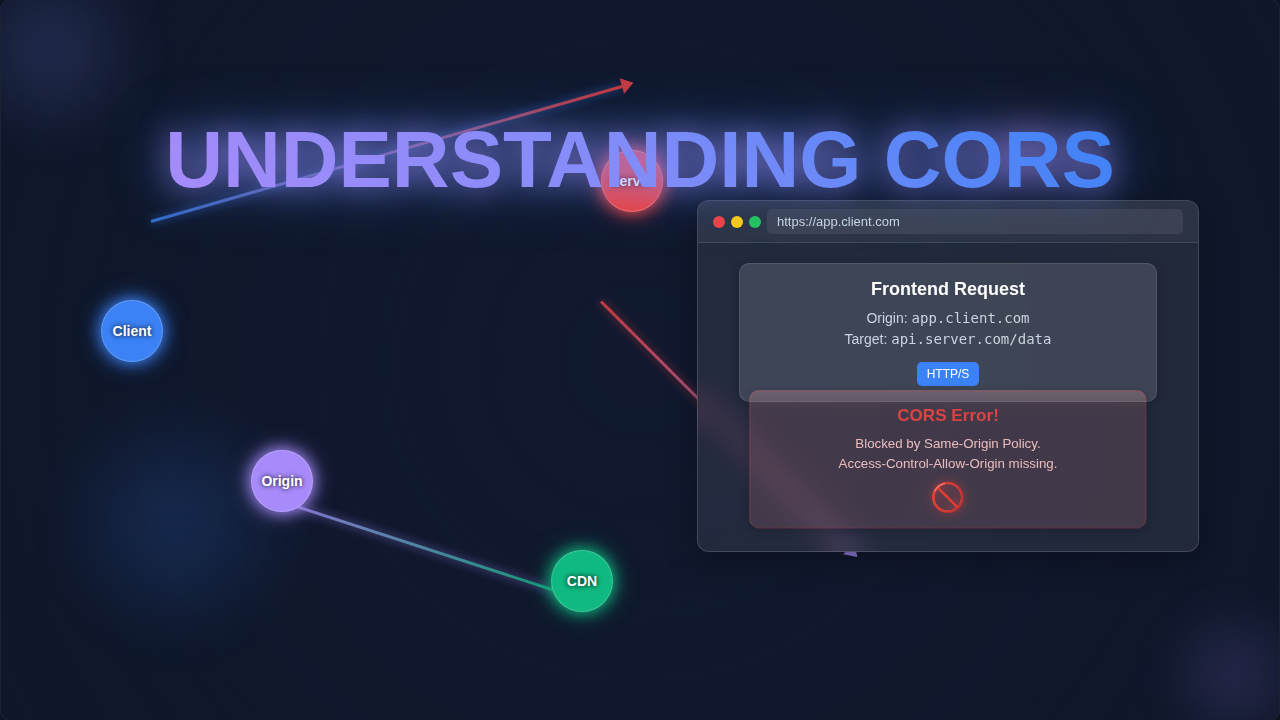
Sound familiar? You’ve just created a fantastic front-end application. Maybe you’re using a modern JavaScript framework. Now, you need to grab some crucial information from an external API. This could be anything. Perhaps it’s weather data. Maybe it’s a list of products. You write your fetch or Axios call. You hit refresh, eager to see your data populate. And then, the dreaded red error message appears in your console. Your browser is flashing warnings. It says something like, "Access to fetch at ‘http://external-api.com/data’ from origin ‘http://your-app.com’ has been blocked by CORS policy." Frustrating, isn’t it?
You probably think, "But I just want to get the data!" You’re not trying to do anything malicious. You simply want your app to talk to another server. It feels like an invisible wall just went up. This wall stops your innocent request cold. You scratch your head, wondering what went wrong. You might even spend hours debugging code that is actually perfectly fine. This confusing situation is incredibly common for self-taught beginners.
So, What *Is* CORS, Anyway? (And Why It Blocks You)
Let’s demystify CORS. CORS stands for Cross-Origin Resource Sharing. It’s an essential security feature. Modern web browsers have this feature built right in. Think of your browser as a very strict doorman. This doorman has a guest list. Normally, a webpage can only request resources from the *same origin* it came from. An "origin" is a combination of three things. It’s the protocol (like HTTP or HTTPS). It’s the domain (like example.com). And it’s the port number (like :80 or :3000).
Here’s the thing: If any of these three parts differ, it’s considered a different origin. Your browser’s default behavior is to block requests to different origins. This default is a security measure. It’s called the Same-Origin Policy. It protects you from malicious websites. Those bad sites might try to steal your data from other sites where you are logged in. This policy is a good thing for your safety!
However, the Same-Origin Policy is often *too* strict for modern web development. You frequently *need* your front-end app to talk to a separate backend API. They are usually on different domains or ports. This is where CORS comes in. It’s like an exception to the Same-Origin Policy. CORS allows controlled access to resources from different origins. The server hosting the resource needs to explicitly grant permission. This permission is given through special HTTP headers. If those headers are missing, or they don’t match, your browser blocks the request. That’s your CORS error in a nutshell. Understanding CORS means grasping this fundamental security negotiation.
Pro Tip: CORS isn’t *your* code failing. It’s your browser enforcing a security rule, awaiting permission from the server you’re trying to talk to. Think of it as a polite refusal, not a breakdown!
The "Aha!" Moment: How CORS Works Its Magic
Imagine your web app is trying to visit a fancy, exclusive club. Your app’s origin is like its unique ID card. When your app tries to make a request to a different server (the club), your browser first sends a special "preflight" request. This "preflight" is like calling the club ahead of time. It asks, "Hey, can my app from this specific origin come in and access this data?"
The club’s server (the API you want to access) then checks its rules. It looks for specific instructions. These instructions are in its HTTP response headers. The most important one is Access-Control-Allow-Origin. If the server says, "Yes, your origin is allowed!" then your browser lets the actual request go through. If the server says nothing, or says "No, not your origin," then your browser shuts it down. This is why you see the error message. It’s the browser protecting you. It’s following the rules the server *didn’t* provide or *didn’t* approve.
It’s not just the Access-Control-Allow-Origin header. Other headers control things too. These include which HTTP methods are allowed (GET, POST, PUT, DELETE). They also specify which custom headers your request can send. And whether credentials (like cookies or authentication tokens) can be sent. It’s a whole negotiation process. For more depth on these headers, you can check out MDN Web Docs on CORS. Make sense so far?
Understanding CORS in Action: Fixing the Problem
So, you know *why* it happens. Now, how do you fix it? The key insight is this: CORS is primarily a server-side configuration. Your front-end code is usually innocent. The problem lies with the server you are trying to reach. It needs to tell your browser that it’s okay for your origin to access its resources.
Here are the common ways to address CORS issues:
-
Configure the Server (Best Solution): If you control the API server, this is your primary fix. You need to add the correct CORS headers to the server’s responses. For development, you might set Access-Control-Allow-Origin: *. This means "allow requests from any origin." This is usually fine for local development. However, for production, you should specify the exact origin(s) of your front-end application. For example, Access-Control-Allow-Origin: https://your-frontend-domain.com. This makes your API more secure. Many server frameworks have built-in CORS middleware. For instance, in a Node.js Express app, you might use a simple library. It handles adding the necessary headers for you. For more detailed server-side configuration examples, you can check out resources like how different servers handle cross-origin requests.
-
Use a Proxy (Common Development Solution): Sometimes you don’t control the external API. Or you’re just quickly prototyping. In this case, you can use a proxy server. Your front-end app makes a request to your *own* backend server. This backend server then forwards the request to the external API. Since the backend server-to-server request isn’t subject to browser CORS rules, it works. The backend then sends the data back to your front-end. Tools like Webpack Dev Server often have proxy configurations built-in. This is a handy trick for local testing.
If you’re interested in making HTTP requests from a backend, check out our guide on the Python Requests Library Explained: HTTP for Humans, Simplified. It shows you how to easily interact with APIs from your server-side code.
-
Talk to the API Provider: If you’re using a third-party API, and it’s blocking you, reach out to them. They might have documentation on how to enable CORS for your domain. Or perhaps they offer a specific endpoint that is CORS-enabled. It’s always worth checking their API docs first.
Remember: Browser extensions that "disable CORS" are *only* for development and debugging. Never rely on them for production. They undermine crucial web security.
What to Do Next: Your Action Plan for CORS Success
Now that you have a better understanding CORS, you’re ready to tackle those errors head-on. Here’s your checklist:
-
Identify the Offender: Check your browser’s developer console. The CORS error message is usually pretty clear. It tells you which origin is trying to access what resource. It also sometimes suggests the missing header.
-
Check Server Access: Do you control the server providing the data? If yes, configure its CORS headers. Look into its documentation for how to do this. Each server-side language or framework has its own method.
-
Consider a Proxy: If you don’t control the server, or need a quick development fix, set up a proxy. Your local development server can often handle this easily. Think of it as a middleman for your requests.
-
Review API Docs: For third-party APIs, always read their documentation carefully. They might have specific instructions for handling CORS. Many APIs are designed with CORS in mind. They just need your domain added to their allowed list.
Remember that web security is a big topic. If you’re building a more complex web application, you might also be thinking about other features. For example, a solid dark mode feature can enhance user experience, and we have a great guide on how to implement it: Tailwind Dark Mode Toggle: HTML & Tailwind CSS Tutorial. Or if you’re fetching lots of data, React Infinite Scroll: Build Seamless Data Loading with JSX Hooks could be your next learning adventure!
Wrapping Up: You’ve Got This!
CORS errors feel like a brick wall when you first encounter them. But they are actually your browser doing its job. It’s protecting you and your users. Your goal is to give it the right "permission slip" from the server. Once you grasp this fundamental concept, those red error messages become much less intimidating. You now understand the "why" behind the "what." You’re not just fixing an error. You’re deepening your knowledge of web security and browser behavior. Keep experimenting, keep learning, and you’ll be navigating the web’s security landscape like a pro. Happy coding!