REST API Explained: A Visual Guide to Web Communication
Okay, real talk — when I first started building websites, I felt like a detective missing half the clues. You build a beautiful frontend, right? Then you want it to do something exciting. Maybe it needs to pull today’s weather data from a service, or save a user’s preferences to a database, or show a live list of products from an online store. But how does your app talk to those other services? It felt like a secret club, a hidden language I wasn’t invited to learn. You’ve probably been there, staring at an empty page, wondering, “How do I get my app to communicate with the outside world, beyond my own code?” Don’t worry, you are absolutely not alone in that frustration. Today, we’re going to dive into the core of that mystery: a REST API explained in plain English. It’s the essential bridge that connects your app to a vast universe of information.
The Puzzle of Web Communication
Think about your favorite social media app. It does so many complex things, right? You log in securely, you see your friend’s latest posts, or you browse through trending topics. But where does all that rich information truly come from? And how does your app efficiently send your actions, like liking a post or sending a message, back to the massive internet? You might have tried to imagine this process. Perhaps you pictured invisible wires directly connecting every single service. Or maybe it felt like sending a very fragile, secret message in a bottle across a vast digital ocean. The reality is, the web is a colossal network of countless different computers. They often speak unique “languages” or use different underlying technologies. Getting them to understand each other and share information seamlessly can feel like piecing together a huge, confusing puzzle. You want your app to fetch current data. You also want it to send your app’s data reliably. But how do you ensure that everyone involved follows the same clear, consistent rules for these digital interactions? That’s the real challenge you undoubtedly face. You need a universal, common understanding for these critical digital conversations to happen smoothly.
Your Digital Waiter: What is a REST API Explained?
Imagine you’ve walked into a fantastic, bustling restaurant. You don’t just stride into the kitchen yourself, do you? You wouldn’t directly tell the chef precisely what ingredients you want. Instead, you gracefully interact with a helpful waiter. The waiter carefully takes your specific order from the menu. They then efficiently deliver your request to the busy kitchen staff. And finally, they bring your delicious, perfectly prepared food back directly to your table. That extremely helpful waiter is your Application Programming Interface, or API. An API is simply a very precise set of clear rules. It rigorously defines exactly how different software components should reliably interact with one another. A REST API, or Representational State Transfer API, is a specific, widely adopted style of API. It uses simple, standardized, and highly efficient ways to communicate across the web. This particular architectural style makes web services incredibly easy to both build and consume. It genuinely helps different, disparate systems talk to each other clearly and consistently.
It’s truly like having a universally understood menu and a super-efficient, polite waiter at your service. You really don’t need to know the intricate inner workings of the kitchen. You simply tell the waiter what you need from the clearly presented menu. The skilled waiter then expertly handles all the complex logistical stuff for you. This powerful simplicity means your app can easily ask for vital data from various sources. And it can also confidently send your app’s data somewhere else, knowing it will be understood.
Pro-Tip: Always think of a REST API as the incredibly helpful middle-person. It diligently takes your app’s request, gets the specific job done by another system (the kitchen), and then promptly brings back the precise answer. No direct kitchen chaos or confusion needed!
How Your App “Talks”: HTTP Methods in Action
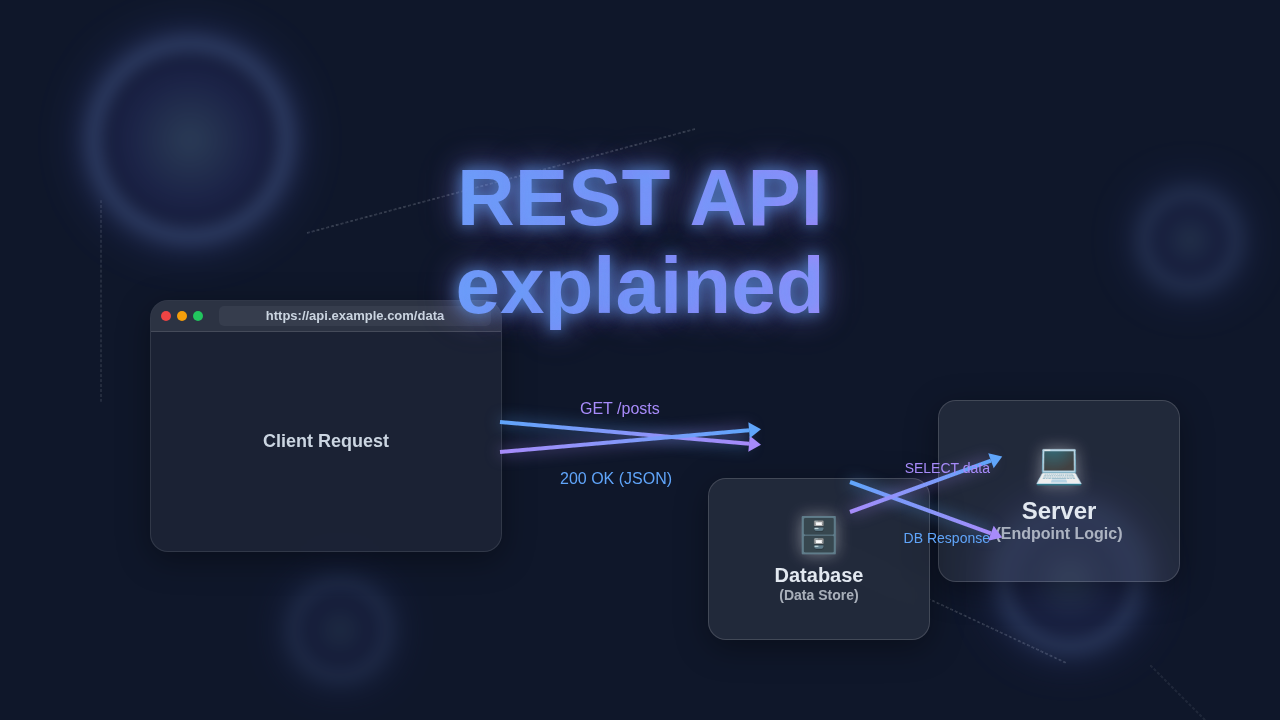
So, you have now understood the role of your digital waiter (the API). How do you actually order things, or request services? You use special “request methods.” These are very much like specifically telling your waiter, “I want to see the current menu,” or “I want to order this new, exciting dish.” On the vast landscape of the web, these crucial methods are a fundamental part of the HTTP protocol. HTTP stands for Hypertext Transfer Protocol. It’s the long-established standard for reliably sending requests and receiving responses between your web browser (or your app) and a target website or server.
The most common and fundamental methods you’ll consistently use are:
- GET: You use the GET method specifically to retrieve data. This is exactly like asking your waiter, “What’s on the menu today, please?” You are simply asking for information to be displayed. You are not changing any existing data. You are just fetching it.
- POST: You use the POST method to create completely new data. This is akin to enthusiastically telling your waiter, “I want to order this brand-new dish for the very first time!” You are actively sending new information to be stored. This often creates a new resource.
- PUT: You use the PUT method to update existing data. Imagine telling your waiter, “Actually, please change my order from the chicken dish to the fish dish instead.” You are specifically modifying something already stored.
- DELETE: You use the DELETE method to remove data from the server. This is like clearly saying, “Actually, please cancel that particular order completely.” You are directly asking the server to permanently get rid of a specific piece of information.
Each distinct method precisely tells the server what kind of core action you want to perform. The server then knows exactly how to correctly process your request. When you’re building sophisticated applications that fetch data, perhaps for a dynamic blog post feed, you’ll be using these powerful methods very often. For example, if you’re working with Python, you might use a powerful library to easily send these requests. You can learn much more about how to make these vital kinds of requests to different web services by checking out this helpful guide on the Python Requests Library Explained. It truly helps your programs “talk” to APIs like a pro.
Crafting Your Requests: Endpoints and Data
When you give your waiter a specific order, you don’t just vaguely say “food.” You carefully specify what particular food you desire. You also tell them where on the menu that specific item can be found. In API terminology, that “where” is precisely called an endpoint. An endpoint is fundamentally a specific URL. It accurately points to a particular resource or a specific function on the server you are interacting with. For example, /users might be a general endpoint for all user data. Whereas /users/123 would be a very specific endpoint for the user with the unique ID of 123.
So, when you send a GET request to /users, you are essentially asking for a comprehensive list of all users. If you send a POST request to /users, you are diligently trying to create a new user record. In this scenario, you would also need to send along the specific data for that brand-new user. This accompanying data is very often transmitted in a structured format called JSON (JavaScript Object Notation). JSON is a lightweight, incredibly efficient data-interchange format. It’s wonderfully easy for humans to both read and write. Crucially, it’s also remarkably easy for machines to parse and generate. It’s simply a structured, universally understood way to send crucial information back and forth. Think of it like meticulously filling out an order form with all the necessary, detailed specifications.
Remember: An endpoint is the precise address you send your request to on the server. The HTTP method is what exactly you want to do at that specific address. And the data is what particular information you’re either sending to the server or expecting to receive back.
You might frequently want to fetch valuable information to dynamically display on your website. Perhaps you have a custom component that needs to render this data. Knowing precisely how data gracefully moves across the web helps you build much more dynamic, interactive, and responsive user interfaces. For instance, when you diligently set up Tailwind Custom Breakpoints, you are carefully designing how your fetched API data looks. You are giving that data a perfect, polished presentation across all devices. Learning about different HTTP status codes can also give you incredibly important clues. They succinctly tell you if your request was gloriously successful, or if something unfortunately went wrong.
Ready for Action: Your Next Steps with REST APIs Explained
You’ve now successfully learned the fundamental basics of how a REST API works. You brilliantly grasped the waiter analogy. You understand the critical importance of different request methods. You also know about specific endpoints and the structure of data. That’s truly a monumental step forward in your web development journey! Now, what should you enthusiastically do next? The absolute best way to thoroughly learn and master these concepts is, without a doubt, by actively doing.
- Explore Public APIs: Many fantastic websites and services generously offer free, public APIs. Think about fetching real-time weather data, accessing open public datasets, or even fun ones like a “Dad Joke” API for your next project. You can actively practice making GET requests to these. This hands-on experience helps you clearly see actual data come back.
- Use Specialized Tools: There are truly excellent, user-friendly tools specifically designed to help you efficiently test APIs. Postman is a hugely popular and incredibly powerful choice among developers. Your web browser’s built-in developer tools (especially the “Network” tab) are also incredibly useful for inspection. They diligently let you see all the requests your browser makes.
- Build Something Simple: Try the rewarding experience of building a very simple, focused app. Maybe create a small utility that fetches a random inspiring quote. Or perhaps one that displays specific data from a public API that interests you. This hands-on experience will deeply solidify your understanding. When you diligently work on projects like a React ToDo App Tutorial, you’re often setting the stage to interact with a backend API. You would typically use an API to effectively save, update, and load your valuable tasks.
You now possess a solid, practical foundation for thoroughly understanding web communication. You can clearly see how different applications expertly exchange vital information. This foundational knowledge is incredibly powerful. It truly unlocks so many exciting possibilities for building dynamic, interactive, and robust web applications.
Conclusion
You bravely faced the initial challenge of making your apps talk to the wider web. Now you have a clear, well-defined path forward. The REST API, your diligent digital waiter, handles all the complex “kitchen” communication with expertise. You just need to give your instructions clearly. You use the right HTTP methods. You point to the correct endpoint. And you either send or receive the proper, structured data. You are no longer lost in the secret club of web communication. Instead, you’re a capable, confident participant. Keep exploring these powerful concepts, keep diligently building your projects, and watch your applications gracefully come alive with dynamic data! You’ve got this, ProCoder!