Optimize Django: Fix N+1 Queries & Boost Performance
By the procoder09.com team
Hey there, awesome coder! Have you ever built a cool Django app, hit refresh, and then… waited? And waited some more? You’re not alone. Many self-taught developers, just like you, run into this puzzling performance bottleneck. Often, the culprit is something called N+1 queries Django – a sneaky problem that can make your web app crawl.
It sounds super technical, right? Don’t worry. I promise you, by the end of this post, you’ll not only understand it but also know exactly how to fix it. Let’s bust some myths and get your Django app running like a cheetah!
Myth #1: N+1 Queries Only Affect HUGE Apps (Busted!)
You might think, “My app is small. I only have a few users. This N+1 stuff must be for big, complex systems.” Here’s the thing: that’s totally false! N+1 queries can hit you even in tiny projects. Imagine you’re building a blog. You have a list of posts, and each post has an author. Sounds simple, right?
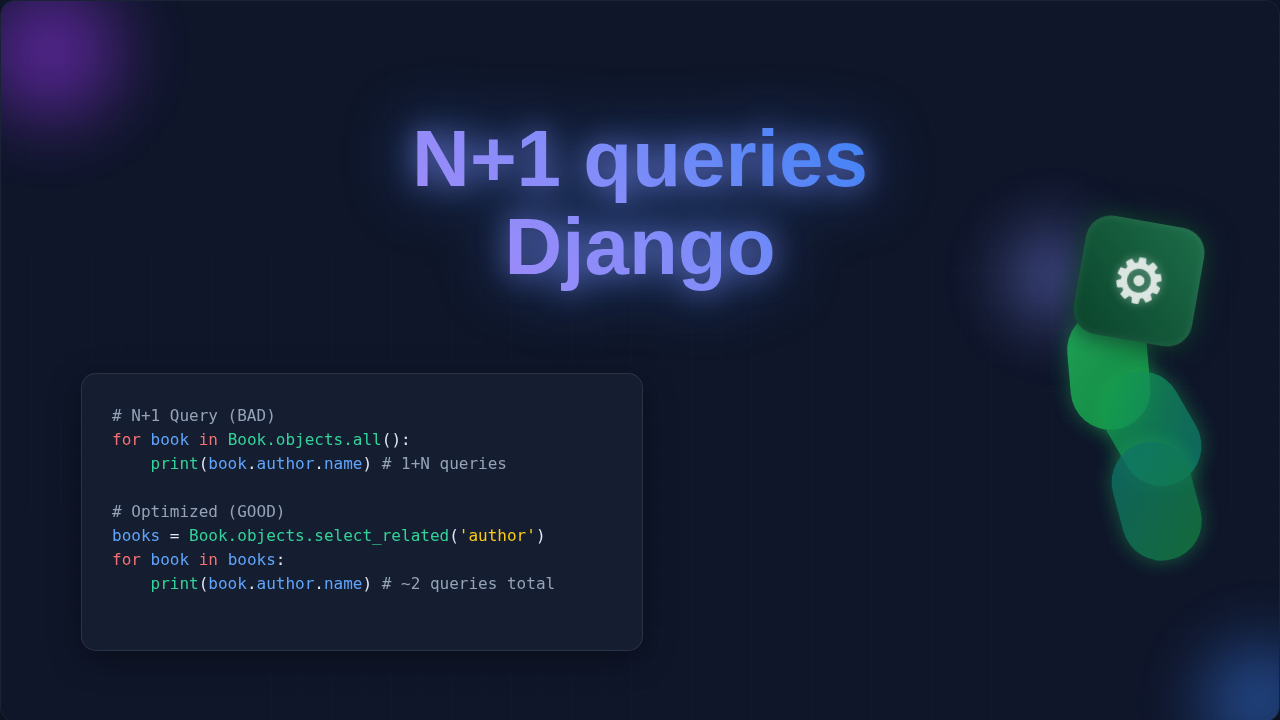
When your page loads, you first ask your database for all the posts. That’s one query. Then, for each individual post you fetched, you separately ask the database, “Hey, who’s the author for THIS post?” That’s another query, repeated N times for N posts. Suddenly, you have 1 (for all posts) + N (for each author) queries. If you have 100 posts, that’s 101 database trips! Each trip takes time.
“N+1 queries turn one simple request into a marathon of tiny, wasteful trips to your database. It’s like calling 100 people individually instead of sending one group text!”
This is what an N+1 query is: making one initial query, then many more subsequent queries, one for each related item. Even with a small amount of data, these extra trips add up. They drastically slow down your page load times. You want your users to have a snappy experience. This issue directly impacts that.
Myth #2: My ORM Handles Everything for Me (Nope!)
Django’s ORM, or Object-Relational Mapper, is amazing. It lets you interact with your database using Python code. You don’t have to write raw SQL commands. It feels like magic, doesn’t it? Because of this convenience, you might assume it automatically optimizes everything. Unfortunately, that’s not always true.
The ORM often uses “lazy loading.” This means it only fetches data when you explicitly ask for it. For example, if you fetch a list of posts, it might not automatically grab their authors. It waits until you try to access a post’s author property. Only then does it fire off another database query just for that single author. This is where the N+1 problem often starts. It’s a trade-off for flexibility.
Sometimes, retrieving data efficiently isn’t just about the ORM. Think about when you’re fetching data from external APIs. Just like managing database queries, being smart about your HTTP requests can save a lot of time. If you’ve ever worked with fetching data, perhaps building a Python Requests Library Tutorial – Master HTTP Requests, you know every network call matters. The same principle applies here.
So, while the ORM is fantastic, it doesn’t always know your intentions. You need to give it a little nudge. You have to tell it, “Hey, when you get these posts, please also grab their authors at the same time!” Otherwise, you’ll keep hitting that database repeatedly. Make sense so far?
Myth #3: Fixing N+1 Queries Django Means Complicated SQL (Not True!)
Okay, so you’ve got an N+1 problem. Do you need to dive deep into SQL and write complex join statements? Absolutely not! The cool part about Django is that it gives you powerful tools to avoid N+1 issues right within its ORM. You won’t need to write a single line of raw SQL. This is excellent news for anyone trying to fix N+1 queries Django.
Django provides two main methods to preemptively fetch related data: select_related and prefetch_related. These methods are your secret weapons against sluggish pages. They tell the ORM to do the heavy lifting in one go.
select_related: This is for “one-to-one” or “many-to-one” relationships. Think of our blog example: one post has one author. When you useselect_related, Django fetches the author data using a single SQL JOIN statement. It effectively links the tables together in one clever database trip. You get all the posts and their authors in a single, efficient query.prefetch_related: This handles “many-to-many” or “one-to-many” relationships. For instance, if a post could have multiple tags. Withprefetch_related, Django performs a separate query for the related items (the tags). However, it fetches ALL the tags for ALL the posts in just one additional query. Then, it cleverly matches them up in Python. Instead of N individual tag queries, you get one!
Using these methods is simpler than you think. You just chain them onto your queryset. For example, if you were building a Flask Web Scraper: Build a Python Scraper with Flask, you’d want to fetch all your scraped data efficiently. The same goes for your Django models. These ORM methods are designed to simplify your life.
The Truth About N+1 Queries Django & How to Win
The real truth is that N+1 queries are a common pitfall. They occur when your code iterates over a set of database results and, for each result, performs another database query to fetch related information. This happens because of lazy loading. You’re inadvertently making many small, inefficient database calls instead of one big, smart one.
The key to winning against N+1 is proactive data fetching. When you know you’ll need related data, tell Django to get it upfront. Use select_related for “foreign key” relationships. Use prefetch_related for “many-to-many” or “reverse foreign key” relationships. Doing this means your database is hit fewer times. This significantly reduces the total time your application spends waiting.
“Always ask yourself: ‘Will I need related data for this item?’ If the answer is yes, then
select_relatedorprefetch_relatedis your friend!”
To really understand the power of combining data, you might want to look at how SQL JOINs work. That’s what Django does under the hood with select_related. Learning the basics of database operations can really cement your understanding. Also, understanding understanding web caching helps you see the bigger picture of web performance. It’s all about reducing latency.
This optimization is crucial for building responsive user interfaces. Think about something like a live search feature. If you’re using something like Flask HTMX Live Search: Real-time UI with Python & HTMX, every millisecond counts for a smooth user experience. Fast backend queries make all the difference.
Your Path to a Faster Django App
So, you’ve seen the myths debunked. You now understand what N+1 queries are. More importantly, you know how to use Django’s built-in tools to solve them. This isn’t just about avoiding a problem. It’s about writing cleaner, more efficient code. It’s about giving your users a faster, more enjoyable experience.
You have the power to optimize your Django apps. Start by looking at your database queries. Identify where you might be making those extra trips. Then, apply select_related and prefetch_related strategically. You’ll be amazed at the performance boost you’ll see. Keep experimenting, keep learning, and keep building awesome things!