Flask REST API Tutorial: Build a Python Web Service
Hey there, future web wizard! If you’ve ever wanted to build a backend service but felt a bit lost, you’re in the right place. Today, we’re diving into the exciting world of Python to create your very own Flask REST API. This powerful tool will let your applications talk to each other. It’s how websites and mobile apps exchange information. We’ll build a simple web service for managing a list of books. It will be fun, practical, and a huge step forward in your web development journey, I promise!
What We Are Building
So, what’s our grand plan? We are building a simple, yet robust, book management system. Think of it as your own digital library! Our Flask REST API will be its core. It lets us perform CRUD operations. CRUD stands for Create, Read, Update, and Delete. This is the foundation for most web applications. We’ll use Flask for our web framework. SQLite will be our lightweight database. You will learn so much building this project. Get ready to code some magic!
HTML Structure
For this tutorial, our main focus is the API. But to test our API, imagine a simple HTML page. This page would have input fields and buttons. It would let us add, view, and manage books. This HTML isn’t part of the API. It’s just a client to interact with it. Here’s a placeholder for such a page.
CSS Styling
Our imagined HTML page would look better with some style! A little CSS makes our test client user-friendly. It improves readability and layout. This styling helps us focus on API functionality. Here’s where that CSS would go.
JavaScript
This is where a frontend client connects to our API! JavaScript sends requests to our Flask server. It captures user input. It fetches book data. It updates the web page dynamically. We use fetch() for these requests. This JS is the crucial bridge. It allows user interaction. While we focus on Flask, this JS is key for any client. Here’s where your client-side JavaScript would live.
app.py
# app.py
from flask import Flask, request, jsonify
import logging

# Configure logging for better visibility in the console
logging.basicConfig(level=logging.INFO, format='%(asctime)s - %(levelname)s - %(message)s')

# Initialize the Flask application
app = Flask(__name__)

# --- In-memory Data Store (for demonstration purposes) ---
# In a real application, this would typically be a database (SQL, NoSQL, etc.)
tasks = [
    {"id": 1, "title": "Learn Flask REST API", "description": "Understand basic Flask concepts for APIs.", "done": False},
    {"id": 2, "title": "Build a Simple Task API", "description": "Implement CRUD operations for tasks.", "done": False}
]
next_task_id = 3 # To assign unique IDs for new tasks

# --- Helper function to find a task by ID ---
def find_task(task_id):
    """
    Finds a task in the global 'tasks' list by its ID.
    Returns the task dictionary if found, otherwise None.
    """
    return next((task for task in tasks if task["id"] == task_id), None)

# --- API Endpoints ---

@app.route('/tasks', methods=['GET'])
def get_tasks():
    """
    Endpoint to retrieve all tasks.
    Returns a JSON array of task objects.
    Example: GET http://127.0.0.1:5000/tasks
    Test with curl: curl http://127.0.0.1:5000/tasks
    """
    app.logger.info("GET /tasks requested - Returning all tasks.")
    return jsonify({'tasks': tasks})

@app.route('/tasks/<int:task_id>', methods=['GET'])
def get_task(task_id):
    """
    Endpoint to retrieve a specific task by its ID.
    Returns a JSON object of the task if found, or a 404 error.
    Example: GET http://127.0.0.1:5000/tasks/1
    Test with curl: curl http://127.0.0.1:5000/tasks/1
    """
    task = find_task(task_id)
    if task is None:
        app.logger.warning(f"GET /tasks/{task_id} requested - Task not found.")
        return jsonify({'message': 'Task not found'}), 404
    app.logger.info(f"GET /tasks/{task_id} requested - Returning task.")
    return jsonify(task)

@app.route('/tasks', methods=['POST'])
def create_task():
    """
    Endpoint to create a new task.
    Expects a JSON payload with at least a 'title' field.
    Returns the newly created task object with its assigned ID.
    Example: POST http://127.0.0.1:5000/tasks
             Body: {"title": "New Task Title", "description": "Details for new task.", "done": false}
    Test with curl: curl -X POST -H "Content-Type: application/json" -d '{"title": "Buy groceries", "description": "Milk, eggs, bread"}' http://127.0.0.1:5000/tasks
    """
    if not request.json:
        app.logger.error("POST /tasks requested - No JSON data provided.")
        return jsonify({'message': 'No JSON data provided'}), 400
    if 'title' not in request.json:
        app.logger.error("POST /tasks requested - Missing 'title' field in JSON.")
        return jsonify({'message': 'Missing title field'}), 400

    global next_task_id
    new_task = {
        'id': next_task_id,
        'title': request.json['title'],
        'description': request.json.get('description', ""), # Optional description, defaults to empty string
        'done': request.json.get('done', False) # Optional 'done' status, defaults to False
    }
    tasks.append(new_task)
    next_task_id += 1
    app.logger.info(f"POST /tasks requested - Created new task with ID: {new_task['id']}")
    return jsonify(new_task), 201 # 201 Created

@app.route('/tasks/<int:task_id>', methods=['PUT'])
def update_task(task_id):
    """
    Endpoint to update an existing task by its ID.
    Expects a JSON payload with fields to update (e.g., 'title', 'description', 'done').
    Returns the updated task object.
    Example: PUT http://127.0.0.1:5000/tasks/1
             Body: {"title": "Updated Title", "done": true}
    Test with curl: curl -X PUT -H "Content-Type: application/json" -d '{"done": true, "title": "Master Flask (Updated)"}' http://127.0.0.1:5000/tasks/1
    """
    task = find_task(task_id)
    if task is None:
        app.logger.warning(f"PUT /tasks/{task_id} requested - Task not found.")
        return jsonify({'message': 'Task not found'}), 404
    if not request.json:
        app.logger.error(f"PUT /tasks/{task_id} requested - No JSON data provided.")
        return jsonify({'message': 'No JSON data provided'}), 400

    # Validate incoming JSON data for valid fields
    valid_keys = {'title', 'description', 'done'}
    if not all(key in valid_keys for key in request.json.keys()):
        invalid_keys = [key for key in request.json.keys() if key not in valid_keys]
        app.logger.error(f"PUT /tasks/{task_id} requested - Invalid fields: {', '.join(invalid_keys)}.")
        return jsonify({'message': f'Invalid fields in request: {', '.join(invalid_keys)}. Only "title", "description", "done" are allowed'}), 400

    # Update fields if present in the request JSON
    task['title'] = request.json.get('title', task['title'])
    task['description'] = request.json.get('description', task['description'])
    task['done'] = request.json.get('done', task['done']) # Boolean values are handled by .get()

    app.logger.info(f"PUT /tasks/{task_id} requested - Task updated.")
    return jsonify(task)

@app.route('/tasks/<int:task_id>', methods=['DELETE'])
def delete_task(task_id):
    """
    Endpoint to delete a task by its ID.
    Returns a success message or a 404 error if the task is not found.
    Example: DELETE http://127.0.0.1:5000/tasks/1
    Test with curl: curl -X DELETE http://127.0.0.1:5000/tasks/2
    """
    global tasks
    task_to_delete = find_task(task_id)
    if task_to_delete is None:
        app.logger.warning(f"DELETE /tasks/{task_id} requested - Task not found.")
        return jsonify({'message': 'Task not found'}), 404

    # Remove the task from the list using list comprehension
    tasks = [task for task in tasks if task['id'] != task_id]
    app.logger.info(f"DELETE /tasks/{task_id} requested - Task deleted.")
    # For a DELETE request, 204 No Content is often preferred if no response body is needed.
    # However, sending a message can be helpful for confirmation.
    return jsonify({'message': 'Task deleted successfully'}), 200

# --- Error Handlers ---
@app.errorhandler(404)
def not_found(error):
    """Custom 404 error handler for when a URL is not matched."""
    app.logger.warning(f"404 Not Found: {request.url}")
    return jsonify({'message': 'Resource not found', 'error': str(error)}), 404

@app.errorhandler(405)
def method_not_allowed(error):
    """Custom 405 error handler for when an HTTP method is not allowed for a URL."""
    app.logger.warning(f"405 Method Not Allowed: {request.method} on {request.url}")
    return jsonify({'message': 'Method not allowed', 'error': str(error)}), 405

@app.errorhandler(500)
def internal_server_error(error):
    """Custom 500 error handler for unexpected server errors."""
    app.logger.exception(f"500 Internal Server Error: {error}") # Log the full exception traceback
    return jsonify({'message': 'Internal server error', 'error': str(error)}), 500


# --- Running the Flask app ---
if __name__ == '__main__':
    # Instructions:
    # 1. Save this code as 'app.py'.
    # 2. Make sure you have Flask installed: pip install Flask
    # 3. Run the app from your terminal: python app.py
    # 4. Open your browser or use a tool like 'curl' or Postman/Insomnia
    #    to interact with the API endpoints.
    #
    # For development, `debug=True` provides a debugger and auto-reloader.
    # For production, you should use a WSGI server like Gunicorn or uWSGI
    # and set debug=False.
    # host='0.0.0.0' makes the server accessible from other devices on your network.
    # host='127.0.0.1' (default) makes it only accessible from your local machine.
    app.run(debug=True, host='127.0.0.1', port=5000)
How It All Works Together
Setting Up Your Project
First, let’s get your environment ready. You need Python installed. If not, install it now! Then, we’ll install our libraries. We need Flask for our web framework. Flask-SQLAlchemy is crucial for database interaction. It’s an Object-Relational Mapper (ORM).
pip install Flask Flask-SQLAlchemyCreate a new folder for your project. Inside, make app.py. This holds all our Python code. We’ll use SQLite for our database. It’s file-based, so books.db will be in your project folder. Super convenient!
Designing Our Database with SQLAlchemy
Our books database needs structure. Each book will have an ID, title, and author. SQLAlchemy helps us define this. It maps Python classes directly to database tables. Our Book class becomes the books table. Each Book instance is a database row. The to_dict method converts our Book object into a JSON-friendly dictionary. This is perfect for API responses.
# app.py (initial setup)
from flask import Flask, request, jsonify
from flask_sqlalchemy import SQLAlchemy

app = Flask(__name__)
app.config['SQLALCHEMY_DATABASE_URI'] = 'sqlite:///books.db'
app.config['SQLALCHEMY_TRACK_MODIFICATIONS'] = False
db = SQLAlchemy(app)

class Book(db.Model):
    __tablename__ = 'books'
    id = db.Column(db.Integer, primary_key=True)
    title = db.Column(db.String(80), nullable=False)
    author = db.Column(db.String(80), nullable=False)

    def to_dict(self):
        return {
            'id': self.id,
            'title': self.title,
            'author': self.author
        }

    def __repr__(self):
        return f'<Book {self.title}>'

with app.app_context():
    db.create_all()
Here, we set up Flask. We connect it to SQLite. The Book model defines our table’s structure. id is our primary key. title and author cannot be empty. to_dict formats output for JSON. db.create_all() creates the database and table on first run. It’s a neat setup!
Pro Tip: Always activate a Python virtual environment for your projects! It keeps your dependencies organised. This prevents conflicts. It’s a best practice. Learn about Python List Comps for slicker data processing in your API!
Implementing CRUD Operations (The Heart of Our API)
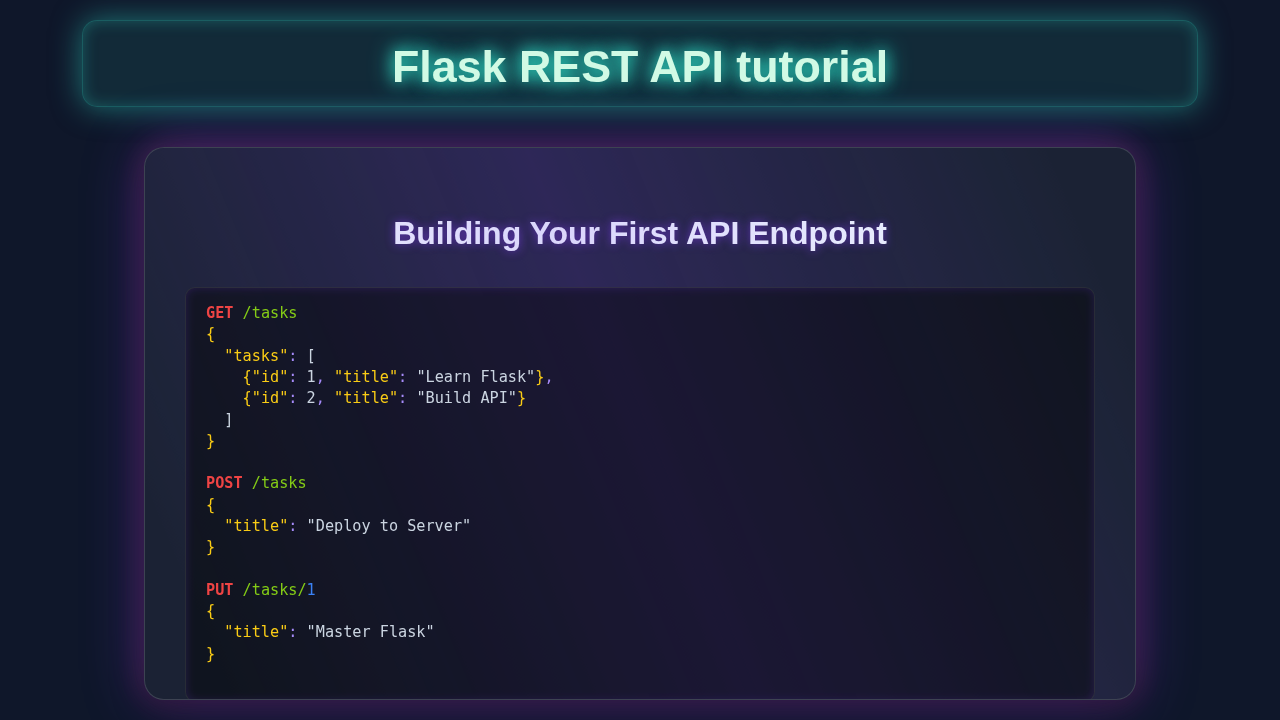
Now, let’s build the heart of our API: CRUD operations! We use Flask routes. Each route handles a specific HTTP method (GET, POST, PUT, DELETE). These methods tell the server what to do. Let’s dive into each one.
Create (POST /books)
To add a new book, send a POST request to /books. Include title and author in JSON. Our API gets the data. It creates a Book object. We add it to the database and commit. The new book’s details are returned. A 201 Created status confirms success!
@app.route('/books', methods=['POST'])
def create_book():
    data = request.get_json()
    if not data or not 'title' in data or not 'author' in data:
        return jsonify({"message": "Title and Author are required!"}), 400
    new_book = Book(title=data['title'], author=data['author'])
    db.session.add(new_book)
    db.session.commit()
    return jsonify(new_book.to_dict()), 201
This route lets users add books. Simple validation ensures good data. The jsonify function converts our book object to a JSON response.
Read All (GET /books)
Need all books? Send a GET request to /books. Our API queries all Book entries. Each book converts to a dictionary. These are returned as a JSON list. Easy and complete!
@app.route('/books', methods=['GET'])
def get_books():
    books = Book.query.all()
    return jsonify([book.to_dict() for book in books])
This provides a full book list. It is a common API feature. jsonify handles formatting.
Read One (GET /books/<int:book_id>)
Want a specific book? Send a GET request with its ID in the URL. Our API uses get_or_404. If found, its details are returned. If not, a 404 Not Found error occurs. This keeps our API reliable!
@app.route('/books/<int:book_id>', methods=['GET'])
def get_book(book_id):
    book = Book.query.get_or_404(book_id)
    return jsonify(book.to_dict())
This endpoint fetches individual books. It is vital for detail views. get_or_404 simplifies error handling.
Update (PUT /books/<int:book_id>)
To change book details, send a PUT request. Include the book ID in the URL. The request body has updated title or author. Our API finds the book. It updates provided fields. db.session.commit() saves changes. The updated book details are returned. This shows the changes applied!
@app.route('/books/<int:book_id>', methods=['PUT'])
def update_book(book_id):
    book = Book.query.get_or_404(book_id)
    data = request.get_json()
    book.title = data.get('title', book.title)
    book.author = data.get('author', book.author)
    db.session.commit()
    return jsonify(book.to_dict())
Updating data is key. This method handles partial updates. It provides flexibility for managing entries.
Delete (DELETE /books/<int:book_id>)
To remove a book, send a DELETE request. Provide its ID in the URL. Our API finds and deletes it. db.session.commit() makes it permanent. We respond with 204 No Content. This confirms success without sending data. Your library stays tidy!
@app.route('/books/<int:book_id>', methods=['DELETE'])
def delete_book(book_id):
    book = Book.query.get_or_404(book_id)
    db.session.delete(book)
    db.session.commit()
    return jsonify({'message': 'Book deleted successfully!'}), 204
And there it is! Our complete Flask REST API handles all fundamental data operations. You built a fully functional service! Save app.py. Run python app.py in your terminal. Your API will run, usually on http://127.0.0.1:5000. Test it with Postman or your JavaScript client!
if __name__ == '__main__':
    app.run(debug=True)
Pro Tip: Understanding HTTP methods (GET, POST, PUT, DELETE) is key for building good APIs. They define the “action” you want to perform. Check out the MDN Web Docs on HTTP Methods for a deep dive! Also, learning about Python Decorators can help you add authentication or logging to your routes efficiently.
Tips to Customise It
You’ve built an amazing foundation! Now, how can you make it even better?
- Add Input Validation: Ensure
titleandauthorfields are present and not empty. This makes your API robust. - Implement Authentication: Secure your API! Allow only authorized users to create or delete books. Flask-Login or JWT are great options.
- Enhance Error Handling: Provide more specific error messages. Return
400 Bad Requestfor invalid input. Or401 Unauthorizedfor access issues. - Introduce Pagination: For many books, send only a few at a time. Implement pagination for
GET /books. - Deployment to the Cloud: Get your API online! Services like Heroku or Render are perfect. Integrate it with your Python Telegram Bot Gemini AI: Your Smart Chat Assistant!
Conclusion
Wow, you did it! You just built a fully functional Flask REST API from scratch. You learned about setting up Flask, defining database models with SQLAlchemy, and implementing all the crucial CRUD operations. This project gives you a solid base in backend web development. It prepares you for more complex web services and microservices. Share what you built with your friends! Experiment further with the customisation tips. Keep coding, keep learning, and keep building amazing things. Happy coding!
app.py
# app.py
from flask import Flask, request, jsonify
import logging

# Configure logging for better visibility in the console
logging.basicConfig(level=logging.INFO, format='%(asctime)s - %(levelname)s - %(message)s')

# Initialize the Flask application
app = Flask(__name__)

# --- In-memory Data Store (for demonstration purposes) ---
# In a real application, this would typically be a database (SQL, NoSQL, etc.)
tasks = [
    {"id": 1, "title": "Learn Flask REST API", "description": "Understand basic Flask concepts for APIs.", "done": False},
    {"id": 2, "title": "Build a Simple Task API", "description": "Implement CRUD operations for tasks.", "done": False}
]
next_task_id = 3 # To assign unique IDs for new tasks

# --- Helper function to find a task by ID ---
def find_task(task_id):
    """
    Finds a task in the global 'tasks' list by its ID.
    Returns the task dictionary if found, otherwise None.
    """
    return next((task for task in tasks if task["id"] == task_id), None)

# --- API Endpoints ---

@app.route('/tasks', methods=['GET'])
def get_tasks():
    """
    Endpoint to retrieve all tasks.
    Returns a JSON array of task objects.
    Example: GET http://127.0.0.1:5000/tasks
    Test with curl: curl http://127.0.0.1:5000/tasks
    """
    app.logger.info("GET /tasks requested - Returning all tasks.")
    return jsonify({'tasks': tasks})

@app.route('/tasks/<int:task_id>', methods=['GET'])
def get_task(task_id):
    """
    Endpoint to retrieve a specific task by its ID.
    Returns a JSON object of the task if found, or a 404 error.
    Example: GET http://127.0.0.1:5000/tasks/1
    Test with curl: curl http://127.0.0.1:5000/tasks/1
    """
    task = find_task(task_id)
    if task is None:
        app.logger.warning(f"GET /tasks/{task_id} requested - Task not found.")
        return jsonify({'message': 'Task not found'}), 404
    app.logger.info(f"GET /tasks/{task_id} requested - Returning task.")
    return jsonify(task)

@app.route('/tasks', methods=['POST'])
def create_task():
    """
    Endpoint to create a new task.
    Expects a JSON payload with at least a 'title' field.
    Returns the newly created task object with its assigned ID.
    Example: POST http://127.0.0.1:5000/tasks
             Body: {"title": "New Task Title", "description": "Details for new task.", "done": false}
    Test with curl: curl -X POST -H "Content-Type: application/json" -d '{"title": "Buy groceries", "description": "Milk, eggs, bread"}' http://127.0.0.1:5000/tasks
    """
    if not request.json:
        app.logger.error("POST /tasks requested - No JSON data provided.")
        return jsonify({'message': 'No JSON data provided'}), 400
    if 'title' not in request.json:
        app.logger.error("POST /tasks requested - Missing 'title' field in JSON.")
        return jsonify({'message': 'Missing title field'}), 400

    global next_task_id
    new_task = {
        'id': next_task_id,
        'title': request.json['title'],
        'description': request.json.get('description', ""), # Optional description, defaults to empty string
        'done': request.json.get('done', False) # Optional 'done' status, defaults to False
    }
    tasks.append(new_task)
    next_task_id += 1
    app.logger.info(f"POST /tasks requested - Created new task with ID: {new_task['id']}")
    return jsonify(new_task), 201 # 201 Created

@app.route('/tasks/<int:task_id>', methods=['PUT'])
def update_task(task_id):
    """
    Endpoint to update an existing task by its ID.
    Expects a JSON payload with fields to update (e.g., 'title', 'description', 'done').
    Returns the updated task object.
    Example: PUT http://127.0.0.1:5000/tasks/1
             Body: {"title": "Updated Title", "done": true}
    Test with curl: curl -X PUT -H "Content-Type: application/json" -d '{"done": true, "title": "Master Flask (Updated)"}' http://127.0.0.1:5000/tasks/1
    """
    task = find_task(task_id)
    if task is None:
        app.logger.warning(f"PUT /tasks/{task_id} requested - Task not found.")
        return jsonify({'message': 'Task not found'}), 404
    if not request.json:
        app.logger.error(f"PUT /tasks/{task_id} requested - No JSON data provided.")
        return jsonify({'message': 'No JSON data provided'}), 400

    # Validate incoming JSON data for valid fields
    valid_keys = {'title', 'description', 'done'}
    if not all(key in valid_keys for key in request.json.keys()):
        invalid_keys = [key for key in request.json.keys() if key not in valid_keys]
        app.logger.error(f"PUT /tasks/{task_id} requested - Invalid fields: {', '.join(invalid_keys)}.")
        return jsonify({'message': f'Invalid fields in request: {', '.join(invalid_keys)}. Only "title", "description", "done" are allowed'}), 400

    # Update fields if present in the request JSON
    task['title'] = request.json.get('title', task['title'])
    task['description'] = request.json.get('description', task['description'])
    task['done'] = request.json.get('done', task['done']) # Boolean values are handled by .get()

    app.logger.info(f"PUT /tasks/{task_id} requested - Task updated.")
    return jsonify(task)

@app.route('/tasks/<int:task_id>', methods=['DELETE'])
def delete_task(task_id):
    """
    Endpoint to delete a task by its ID.
    Returns a success message or a 404 error if the task is not found.
    Example: DELETE http://127.0.0.1:5000/tasks/1
    Test with curl: curl -X DELETE http://127.0.0.1:5000/tasks/2
    """
    global tasks
    task_to_delete = find_task(task_id)
    if task_to_delete is None:
        app.logger.warning(f"DELETE /tasks/{task_id} requested - Task not found.")
        return jsonify({'message': 'Task not found'}), 404

    # Remove the task from the list using list comprehension
    tasks = [task for task in tasks if task['id'] != task_id]
    app.logger.info(f"DELETE /tasks/{task_id} requested - Task deleted.")
    # For a DELETE request, 204 No Content is often preferred if no response body is needed.
    # However, sending a message can be helpful for confirmation.
    return jsonify({'message': 'Task deleted successfully'}), 200

# --- Error Handlers ---
@app.errorhandler(404)
def not_found(error):
    """Custom 404 error handler for when a URL is not matched."""
    app.logger.warning(f"404 Not Found: {request.url}")
    return jsonify({'message': 'Resource not found', 'error': str(error)}), 404

@app.errorhandler(405)
def method_not_allowed(error):
    """Custom 405 error handler for when an HTTP method is not allowed for a URL."""
    app.logger.warning(f"405 Method Not Allowed: {request.method} on {request.url}")
    return jsonify({'message': 'Method not allowed', 'error': str(error)}), 405

@app.errorhandler(500)
def internal_server_error(error):
    """Custom 500 error handler for unexpected server errors."""
    app.logger.exception(f"500 Internal Server Error: {error}") # Log the full exception traceback
    return jsonify({'message': 'Internal server error', 'error': str(error)}), 500


# --- Running the Flask app ---
if __name__ == '__main__':
    # Instructions:
    # 1. Save this code as 'app.py'.
    # 2. Make sure you have Flask installed: pip install Flask
    # 3. Run the app from your terminal: python app.py
    # 4. Open your browser or use a tool like 'curl' or Postman/Insomnia
    #    to interact with the API endpoints.
    #
    # For development, `debug=True` provides a debugger and auto-reloader.
    # For production, you should use a WSGI server like Gunicorn or uWSGI
    # and set debug=False.
    # host='0.0.0.0' makes the server accessible from other devices on your network.
    # host='127.0.0.1' (default) makes it only accessible from your local machine.
    app.run(debug=True, host='127.0.0.1', port=5000)