Python Requests Library Explained: Essential Guide
Hello, future web wizard! Have you ever clicked a link or submitted a form online? You are sending a message to a distant computer, known as a server. That server then sends information back to you. This whole dance is how the internet works! If you are brand new to this topic, don’t worry. Today, we will simplify one of Python’s most powerful tools. We’re going to dive deep into the Python Requests library explained, making web interaction easy for everyone.
What You Need to Know First: The Web’s Secret Language
Before we grab data from the web, you need a quick primer. Think of your web browser as a translator. It speaks a language called HTTP, or Hypertext Transfer Protocol. This protocol is the set of rules computers use to talk to each other online. When you type a web address, your browser sends an HTTP request. This request asks a server for a webpage. The server then sends an HTTP response back to your browser. This response contains all the information you see. It could be text, images, or even videos. So, every time you visit a site, you are using HTTP. Make sense so far? You will be doing this with Python soon!
What is the Python Requests Library Explained? Your Web Messenger!
Now, let’s talk about our star player: the Python Requests library. Imagine you want to order a pizza. You could call the restaurant directly. You would need to know their exact ordering process. You would also need to speak their language perfectly. That sounds like a lot of work, right? The Python Requests library is like having a super-efficient assistant. This assistant knows exactly how to talk to any restaurant. You just tell it what you want, and it handles all the complicated steps. It simplifies the process of sending HTTP requests. It also makes handling the responses much easier for you. This library lets your Python programs act like a web browser. You can fetch data or send information to websites. It makes interacting with web services incredibly straightforward. You will use it for all sorts of amazing tasks. Data scraping, interacting with APIs, and automating web tasks become simple. This is why learning the Python Requests library explained is so important.
Core Idea 1: Fetching Information (GET Requests)
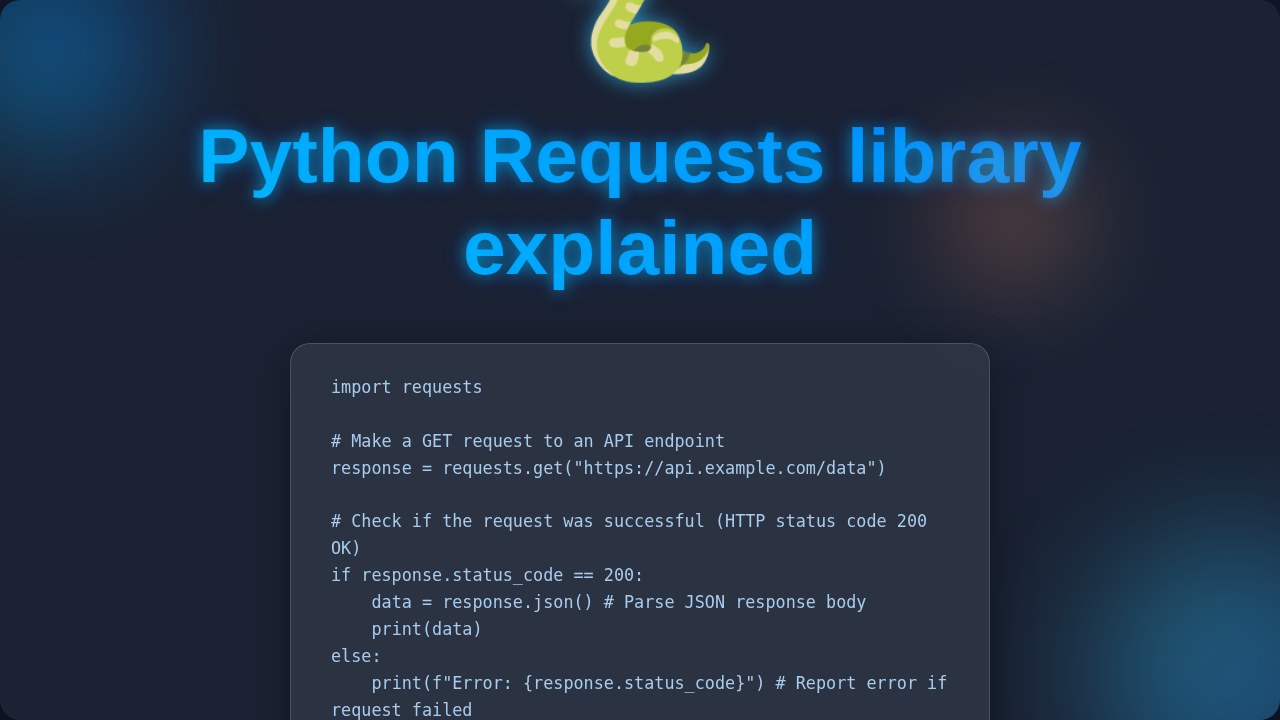
One of the most common things you will do is ‘get’ information. This is called a GET request. Think about when you visit a news website. You are simply asking the website to show you its content. You are not changing anything on their server. You are just retrieving data. With Python Requests, you can send a GET request to any URL. For instance, you could ask for the content of a specific blog post. The website server will then send back the information. This information might be an HTML page or structured data called JSON. JSON is a simple way to organize data. It is easy for computers to read and understand. When you make a request, you will also get a status code. This code tells you if your request was successful. A 200 OK means everything went perfectly. A 404 Not Found means the page you asked for does not exist. It’s like a quick message from the server. You can also send parameters with your GET requests. These are like filters. For example, if you search for ‘Python tutorials’ on a site, ‘Python tutorials’ is a parameter. You are telling the website exactly what you are looking for.
Pro Tip: Always check the HTTP status code after making a request. A ‘200’ means success, but other codes like ‘404’ or ‘500’ tell you something went wrong, and you’ll know exactly why!
Core Idea 2: Sending Information (POST Requests)
Sometimes, you don’t just want to look at a website. You want to give it some information. This is where POST requests come in handy. Imagine filling out a registration form on a new website. You type in your name, email, and password. When you click ‘submit,’ you are sending all that data to the server. This is a classic example of a POST request. You are ‘posting’ new data to the server. Your Python program can do the same thing. You can use it to create a new user account. You could also submit a comment on a blog. The data you send is often in a specific format. It might be JSON, which we mentioned earlier. Or it could be form-encoded data, like what a web form sends. The Requests library makes sending this data simple. You just provide your data, and it handles the packaging. The server then processes your information. It might save it to a database. It could also return a response confirming your action. This is powerful stuff! You can build amazing tools with this capability.
Quick Insight: GET requests are for fetching information without changing anything on the server. POST requests are for sending new data to the server, often creating or updating resources.
Core Idea 3: Handling Responses & Errors
Once you send a request, you will get a response back. This response contains valuable information. It has the status code we talked about. It also holds the actual data you requested. If you sent a GET request for a webpage, the response body will contain the HTML. This is the raw code of the page. If you requested data from an API, it will likely be in JSON format. The Python Requests library helps you easily access this data. You can convert JSON responses directly into Python dictionaries. This makes working with the data incredibly convenient for you. But what if things go wrong? Websites can be offline. Your internet might disconnect. You could ask for a page that does not exist. Good news: the Requests library helps you handle these errors gracefully. It can raise specific errors if a request fails. You can then write code to catch these errors. This means your program won’t just crash. Instead, it can tell you what went wrong. It can even try a different approach. Learning to anticipate and manage errors is a crucial skill. It makes your web interactions robust and reliable.
What To Learn Next on Your Web Journey
You have taken a fantastic first step with the Python Requests library. But the web has even more to explore! Next, you might want to delve into more HTTP methods. There are also PUT, DELETE, and PATCH methods. These allow you to update or remove data. You should also look into authentication. Many websites require a login. Requests can help you handle usernames, passwords, or API keys. Learning about session management is also useful. Sometimes you need to maintain a connection over several requests. Furthermore, exploring specific APIs will be very rewarding. Many services like weather apps or social media sites offer APIs. These APIs let your programs interact with their data directly. You could even build a simple web application using something like Flask or Django. This would show you web interaction from both sides. For a project idea, you could build a Flask To-Do App: Python Tutorial for Basic Task Management. This would integrate many of these concepts. Or, you might be interested in Django S3 Backup Script: Automated Python Solution for working with cloud storage.
Valuable Resources for Your Learning
Ready to dive deeper? The official documentation for the Requests library is your best friend. It has all the details you could ever need. You can find it by searching ‘Requests Python documentation’. Also, understanding HTTP basics will serve you well. The Mozilla Developer Network (MDN) has excellent guides. Check out their HTTP Overview on MDN for a fantastic primer. If you want to know more about the different HTTP status codes, MDN’s HTTP Status Codes page is incredibly comprehensive. And remember, we have more articles coming soon on web interaction! Stay tuned for more insights into the Python Requests Library Explained – Beginner Guide.
Conclusion
You have just unlocked a superpower for your Python programs! The Python Requests library is truly a game-changer. It transforms how you interact with the internet. You can now fetch data, send information, and build dynamic tools. This knowledge is fundamental for any web developer. Don’t be afraid to experiment. Try making requests to different websites (respectfully, of course!). You will learn something new every time. Keep practicing, and soon you’ll be writing scripts that amaze you. You have got this, future web pro!