JavaScript Fetch API Tutorial: HTML, CSS & Vanilla JS Guide
Hey there, fellow coders! If you’ve ever wanted to build dynamic web features, then mastering the JavaScript Fetch API is your secret. Today, we’re diving into an exciting project. We will build a super cool Random Quote Generator. This fantastic tool fetches fresh wisdom and inspiration with a simple button click. It’s a perfect way to learn about fetching data from external sources. You will absolutely love seeing your web page come alive with new content!
What We Are Building
Are you ready for some instant inspiration? We are going to craft a sleek and modern Random Quote Generator. Picture this: a beautifully designed box appears on your screen. Inside, it displays a new, profound quote and its author. Each time you click a button, a fresh piece of wisdom appears! This project is not just about looking pretty. You will gain hands-on experience pulling data from an external source. That’s a core skill for any aspiring web developer. This interactive project is absolutely perfect for boosting your portfolio. Moreover, you’ll master essential modern web development concepts with ease!
HTML Structure
First things first, let’s set up the foundational HTML. This structure will serve as the container for our quote text. It will also hold the author’s name. Plus, we need a button to generate new quotes. This is the simple skeleton of our entire application. Don’t worry, it’s incredibly straightforward to get started with this part.
index.html
<!DOCTYPE html>
<html lang="en">
<head>
    <meta charset="UTF-8">
    <meta name="viewport" content="width=device-width, initial-scale=1.0">
    <title>JavaScript Fetch API Tutorial</title>
    <!-- Link to the external CSS file -->
    <link rel="stylesheet" href="styles.css">
</head>
<body>
    <div class="container">
        <h1>JavaScript Fetch API Tutorial</h1>
        <p>Learn how to use the modern Fetch API to make network requests in JavaScript.</p>

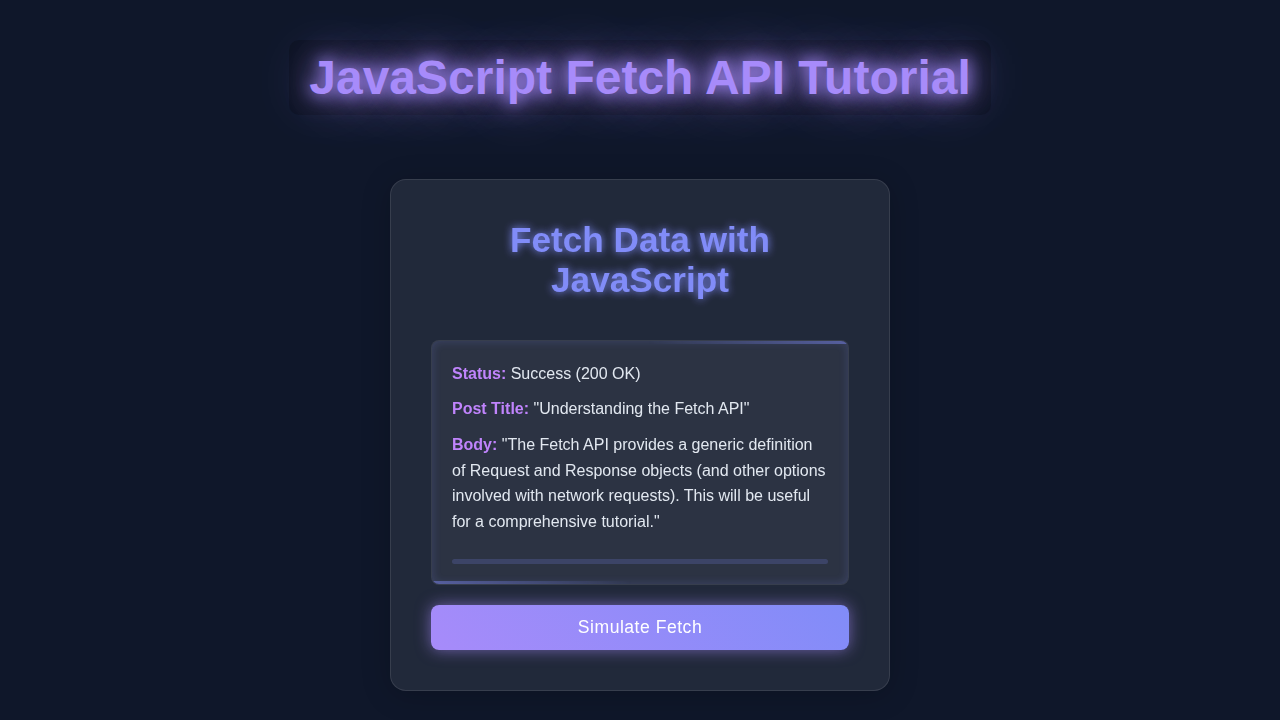
        <button id="fetchDataButton" class="fetch-button">Fetch Post Data</button>

        <div id="dataDisplay" class="data-card">
            <h2>Fetched Data:</h2>
            <p id="postTitle">Click 'Fetch Post Data' to load content.</p>
            <p id="postBody"></p>
            <p id="fetchStatus" class="status-message"></p>
        </div>

        <div id="loadingIndicator" class="loading-spinner"></div>
    </div>

    <!-- Link to the external JavaScript file, defer execution until HTML is parsed -->
    <script src="script.js" defer></script>
</body>
</html>
CSS Styling
Now for the visually engaging part: making our generator look fantastic! We will use CSS to center all our elements gracefully. Furthermore, we’ll give our main quote box a nice, modern, and clean aesthetic. A responsive design is always paramount. Therefore, your users will definitely appreciate a beautiful and intuitive interface. This styling will make your project shine.
styles.css
/* General Body Styles */
body {
    font-family: Arial, Helvetica, sans-serif; /* Safe sans-serif font stack */
    margin: 0;
    padding: 0;
    background-color: #f4f7f6; /* Light background for the tutorial */
    color: #333;
    display: flex;
    justify-content: center;
    align-items: flex-start; /* Align to top, then use margin for spacing */
    min-height: 100vh;
    box-sizing: border-box; /* Ensure padding/border are included in element's total width/height */
    overflow-x: hidden; /* Prevent horizontal scrollbars */
}

/* Container for content */
.container {
    background-color: #ffffff;
    border-radius: 12px;
    box-shadow: 0 6px 20px rgba(0, 0, 0, 0.1);
    padding: 30px;
    margin: 40px 20px; /* Add margin on top/bottom and sides */
    max-width: 800px;
    width: 100%; /* Ensure it takes full width up to max-width */
    text-align: center;
    box-sizing: border-box;
}

h1 {
    color: #2c3e50;
    margin-bottom: 20px;
    font-size: 2.2em;
}

p {
    line-height: 1.6;
    color: #555;
    margin-bottom: 15px;
}

/* Fetch Button Styles */
.fetch-button {
    background-color: #007bff; /* Primary blue */
    color: white;
    padding: 12px 25px;
    border: none;
    border-radius: 8px;
    font-size: 1.1em;
    cursor: pointer;
    transition: background-color 0.3s ease, transform 0.2s ease, box-shadow 0.3s ease;
    margin-top: 20px;
    margin-bottom: 30px;
    outline: none;
    box-shadow: 0 4px 10px rgba(0, 123, 255, 0.2);
}

.fetch-button:hover {
    background-color: #0056b3; /* Darker blue on hover */
    transform: translateY(-2px);
    box-shadow: 0 6px 15px rgba(0, 123, 255, 0.3);
}

.fetch-button:active {
    transform: translateY(0);
    box-shadow: 0 2px 5px rgba(0, 123, 255, 0.2);
}

/* Data Display Card */
.data-card {
    border: 1px solid #e0e0e0;
    border-radius: 10px;
    padding: 25px;
    margin-top: 30px;
    text-align: left;
    background-color: #f9f9f9;
    min-height: 150px; /* Ensure space even when empty */
    display: flex;
    flex-direction: column;
    gap: 10px;
    box-sizing: border-box;
    position: relative; /* For status messages positioning */
}

.data-card h2 {
    color: #34495e;
    margin-top: 0;
    margin-bottom: 15px;
    font-size: 1.8em;
    border-bottom: 2px solid #e0e0e0;
    padding-bottom: 10px;
}

.data-card p {
    margin: 0;
    color: #444;
}

.data-card p#postTitle {
    font-weight: bold;
    color: #2c3e50;
    font-size: 1.1em;
}

/* Loading Spinner Styles */
.loading-spinner {
    display: none; /* Hidden by default, shown by JS */
    width: 40px;
    height: 40px;
    border: 4px solid rgba(0, 0, 0, 0.1);
    border-top: 4px solid #007bff; /* Blue spinner */
    border-radius: 50%;
    animation: spin 1s linear infinite;
    margin: 30px auto; /* Center the spinner */
}

@keyframes spin {
    0% { transform: rotate(0deg); }
    100% { transform: rotate(360deg); }
}

/* Status Message Styles */
.status-message {
    font-style: italic;
    font-size: 0.9em;
    color: #888;
    margin-top: 15px;
    text-align: center;
}

.status-message.success {
    color: #28a745; /* Green for success */
    font-weight: bold;
}

.status-message.error {
    color: #dc3545; /* Red for error */
    font-weight: bold;
}

/* Responsive Adjustments */
@media (max-width: 768px) {
    .container {
        margin: 20px 10px;
        padding: 20px;
    }

    h1 {
        font-size: 1.8em;
    }

    .fetch-button {
        padding: 10px 20px;
        font-size: 1em;
    }

    .data-card h2 {
        font-size: 1.5em;
    }
}

@media (max-width: 480px) {
    h1 {
        font-size: 1.5em;
    }

    .fetch-button {
        width: 100%;
        margin-left: 0;
        margin-right: 0;
    }

    .data-card {
        padding: 15px;
    }
}
Powering Our Quote Generator with JavaScript Fetch API
Here’s truly the cool part: the JavaScript magic! This is where all the interactivity and dynamic content generation happens. We will leverage the powerful JavaScript Fetch API to grab new quotes from an external service. Then, we will effortlessly display these quotes directly onto our web page. You’ll quickly see how to make your web page feel alive and interactive. It’s an exciting skill to add to your toolkit!
script.js
document.addEventListener('DOMContentLoaded', () => {
    // Get references to DOM elements
    const fetchDataButton = document.getElementById('fetchDataButton');
    const postTitleElement = document.getElementById('postTitle');
    const postBodyElement = document.getElementById('postBody');
    const fetchStatusElement = document.getElementById('fetchStatus');
    const loadingIndicator = document.getElementById('loadingIndicator');

    // Define the API endpoint to fetch data from
    // Using JSONPlaceholder for dummy API data
    const API_URL = 'https://jsonplaceholder.typicode.com/posts/1';

    /**
     * Asynchronously fetches post data from the API and updates the DOM.
     * Includes error handling and a loading indicator.
     */
    async function fetchPostData() {
        // 1. Show loading indicator and clear previous content
        loadingIndicator.style.display = 'block'; // Make spinner visible
        postTitleElement.textContent = 'Loading...'; // Placeholder text
        postBodyElement.textContent = ''; // Clear body content
        fetchStatusElement.textContent = 'Fetching data...'; // Update status message
        fetchStatusElement.className = 'status-message'; // Reset status styling

        try {
            // 2. Make the fetch request to the API
            // await waits for the Promise returned by fetch() to resolve
            const response = await fetch(API_URL);

            // 3. Check if the response was successful (status code 200-299)
            if (!response.ok) {
                // If not successful, throw an error with the status
                const errorText = `HTTP error! Status: ${response.status}`;
                throw new Error(errorText);
            }

            // 4. Parse the JSON body of the response
            // await waits for the Promise returned by response.json() to resolve
            const data = await response.json();

            // 5. Update the DOM with the fetched data
            postTitleElement.textContent = data.title || 'No Title Available';
            postBodyElement.textContent = data.body || 'No Body Available';
            fetchStatusElement.textContent = 'Data fetched successfully!';
            fetchStatusElement.classList.add('success'); // Add success class for green styling

        } catch (error) {
            // 6. Handle any errors that occurred during the fetch operation
            console.error('Fetch error:', error); // Log the error to console
            postTitleElement.textContent = 'Error fetching data.';
            postBodyElement.textContent = `Details: ${error.message || 'Unknown error'}`;
            fetchStatusElement.textContent = `Error: ${error.message}`; // Display error message to user
            fetchStatusElement.classList.add('error'); // Add error class for red styling

        } finally {
            // 7. Always hide the loading indicator, regardless of success or failure
            loadingIndicator.style.display = 'none';
        }
    }

    // Add an event listener to the button to trigger the fetch operation
    fetchDataButton.addEventListener('click', fetchPostData);

    // Optional: You can uncomment the line below to fetch data automatically on page load
    // fetchPostData();
});
How It All Works Together
Setting Up Our Foundation (HTML & CSS)
We began by creating a very simple HTML file. This file provides the necessary div elements. These elements are specifically for housing our quote text and author’s name. Crucially, it also includes our ‘New Quote’ button. That button is what makes our app interactive. Next, we applied our CSS to make everything visually appealing. We utilized Flexbox extensively to center our content beautifully. This ensures a symmetrical and pleasing layout. Want to dive deeper into Flexbox layouts? Check out this fantastic guide! The CSS truly gives our project its clean, modern, and engaging look. Remember, a good design significantly enhances the user experience. Therefore, don’t underestimate the power of styling!
The Brains of the Operation: JavaScript Setup
Our JavaScript code acts as the intelligent orchestrator for everything. First, it carefully targets the specific HTML elements we created. These are the places where our dynamic quotes and author names will magically appear. Furthermore, our JavaScript is designed to listen for user interactions. It specifically waits for clicks on our ‘New Quote’ button. This event listener is absolutely crucial for the interactivity of our application. When you click that button, our script immediately springs into action. It initiates a network request. This process is the very heart of our dynamic content loading. It’s a powerful and fundamental pattern for all modern web applications.
Fetching Quotes with the JavaScript Fetch API
This is indeed where the JavaScript Fetch API truly shines brightly. When that ‘New Quote’ button is clicked, our special fetchQuote function runs its course. It thoughtfully sends a request to a public API endpoint. This endpoint is specifically designed to serve up random, inspiring quotes. The fetch() function itself returns a JavaScript Promise. A Promise essentially represents a future value or an eventual completion. Therefore, we use the .then() method to gracefully handle the successful response from the API. We also implement a .catch() method for robust error handling. Always prepare for potential network issues or API downtimes! Learn even more about making robust network requests with the Fetch API on MDN.
Next, we need to properly parse the response data that we received. Most quote APIs send their data in a structured JSON format. We use response.json() to efficiently convert this raw response into a usable JavaScript object. This conversion process also returns another Promise! Consequently, we chain another .then() block. This allows us to work directly with the actual quote data. Finally, we update our HTML elements. The freshly fetched quote text and its author’s name are placed into their respective divs. It’s an incredibly elegant and efficient way to retrieve and display external content. Furthermore, you’re making your web application dynamic and constantly fresh!
Handling Errors and Initial Load
What happens if the internet connection decides to fail? Or perhaps the external API is temporarily down? Our .catch() block is meticulously designed to handle these potential issues gracefully. It logs any encountered error directly to the console. This logging is super helpful for debugging purposes. We also make a smart call to fetchQuote() right when the entire page loads. This ensures a compelling quote appears instantly on the screen. You certainly don’t want an empty box just waiting for a click! This proactive approach makes the user experience much smoother and more inviting. It’s a small but significant detail that truly makes a big difference.
Pro Tip: Always include comprehensive error handling in all your network requests. It makes your applications much more robust, reliable, and user-friendly!
Tips to Customise It
You’ve successfully built a functional and fetching quote generator! Now, let’s explore some awesome ideas to make it truly unique and personal. Here are some fantastic ways to extend your project:
- Different Quote APIs: You could easily explore and integrate other free quote APIs. There are so many exciting options available online! Perhaps find one dedicated to programming jokes or famous historical speeches. It’s a fairly simple change to the
fetchURL. This allows you to broaden your collection of inspiring quotes. - Styling Themes: Why not add a stylish button to switch between different color themes? You could even implement a cool dark mode feature! Using CSS variables makes this kind of customization super easy to manage. Users absolutely love personalization options in their apps.
- Tweet Your Quote: Integrate a handy ‘Tweet Quote’ button. This button could gracefully open a new Twitter tab. The current quote would be pre-filled and ready to share! You can easily construct a Twitter share URL for this purpose. It’s a truly great way to spread inspiration directly from your app.
- Local Storage for Favorites: Allow users to save their absolute favorite quotes! You can effectively use
localStorageto store these treasured quotes in the user’s browser. Then, you could display a separate list of all their saved quotes. This adds a wonderfully valuable and personalized feature. For more advanced form building, check out our guide on React AI Form Assistant: Build Smart Forms with React JSX Hooks!
Conclusion
Fantastic job! You just built a fully functional Random Quote Generator. You mastered using the incredible JavaScript Fetch API. You also gained valuable experience with Promises and JSON data. This project is a solid step forward in your web development journey. Experiment with our customization ideas. Share your unique creation with friends and family! Keep coding, keep building, and keep learning. Your skills are growing stronger every single day!
Remember, consistent practice is truly the key to mastery! Each new project you successfully build makes you a more confident and capable developer. Keep up the awesome work, future pro coder!
If you’re eager to explore even more JavaScript intricacies, particularly within a modern framework context, you might find our article on React useEffect Dependencies: Visual Guide incredibly helpful. Or, if you wish to dive even deeper into the core mechanics of network requests, revisit our detailed JavaScript Fetch API Tutorial: HTML, CSS & Vanilla JS. The learning never stops!