CSS Library vs. CSS Architecture: Decoding the Difference for Scalable Styling
Okay, real talk. When you first dive into web development, CSS can feel like a wild, untamed beast, right? One minute you’re thrilled your button is red, the next you’re pulling your hair out trying to center a div. Then, somebody mentions "CSS library vs architecture," and suddenly you feel like you’ve stumbled into a secret society.
Don’t worry — you’re not alone in feeling a little lost. Many beginners mix up these two big ideas. But understanding the difference is like getting a secret map to styling nirvana. It’s the key to making your websites look amazing and easy to manage, even as they grow.
So, let’s clear up the confusion, bust some myths, and get you confidently building those beautiful, scalable interfaces.
Myth 1: CSS Libraries Are Magic Wands for All Your Styling Woes
You’ve probably heard someone say, "Just use a CSS library!" And it sounds so tempting, doesn’t it? The idea is that you drop in this magical file, and suddenly, your website looks professionally designed with minimal effort.
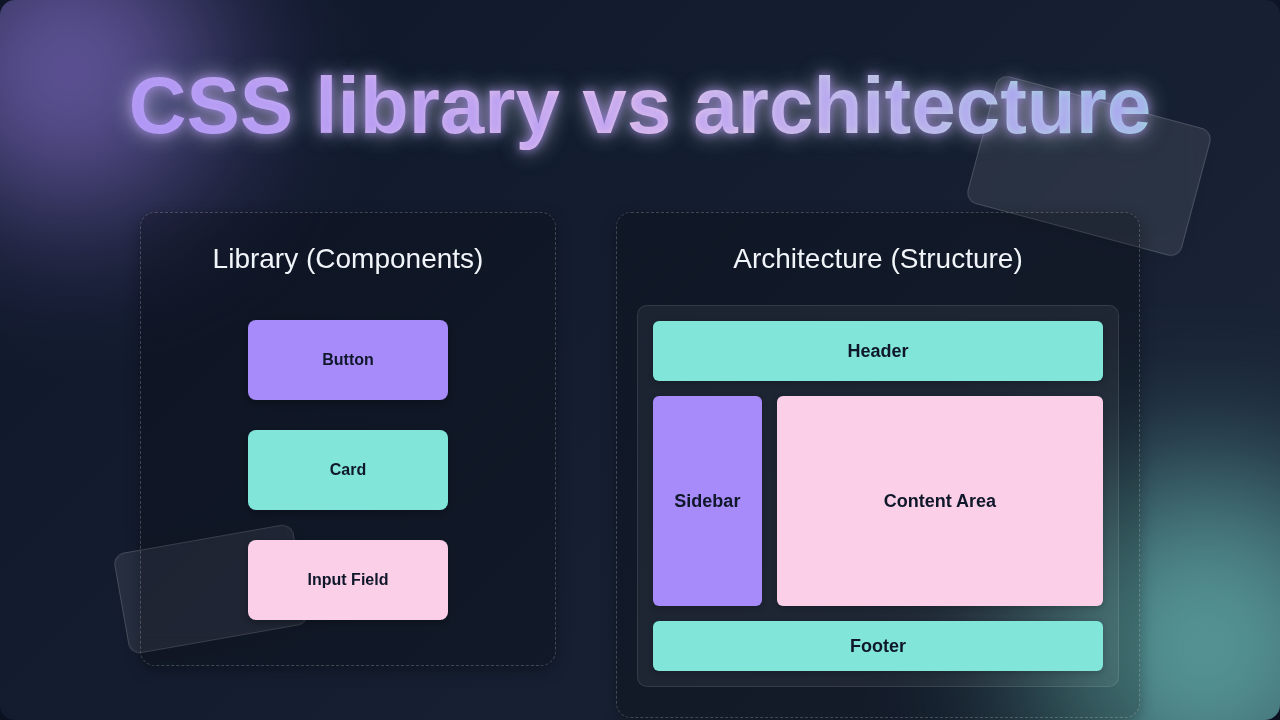
Here’s the thing: a CSS library is a collection of pre-written, reusable CSS code. Think of it like a toolbox filled with ready-made components. You get buttons, navigation bars, forms, and layout systems — all styled and ready to go. You just pick what you need.
However, many beginners fall into the trap of thinking a library is a silver bullet. You might import something like Bootstrap or Tailwind CSS, expecting it to solve every single design challenge. But if you don’t know how to use the tools, or when to use them, you’re still going to struggle.
Imagine you’re building a custom treehouse. A CSS library hands you a kit with pre-cut wood and screws for a standard doghouse. It’s super helpful for a doghouse! Yet, if your treehouse needs a spiral staircase and a secret entrance, that standard kit won’t quite get you there without a lot of extra work and maybe even some awkward pieces sticking out.
Libraries are awesome for speeding up development and ensuring consistency. Yet, they are not a substitute for understanding CSS fundamentals or how to structure your own styles. Do you want to learn more about setting up your styles? You might enjoy our CSS Variables Tutorial: Mastering Custom Properties in HTML & CSS for building flexible designs.
Myth 2: CSS Architecture Is Just for Big Teams and Giant Projects
Perhaps you’ve heard whispers of "CSS architecture" and thought, "That sounds way too complicated for my little portfolio site." Many believe it’s an advanced concept reserved only for massive companies like Google or Facebook, dealing with thousands of stylesheets.
Not true! CSS architecture is simply the way you organize and structure your CSS code. It’s about setting up rules, naming conventions, and patterns so your styles are predictable, maintainable, and scalable. It’s like planning the blueprint for your entire web project before you start hammering nails.
Without good architecture, your CSS can quickly become a tangled mess. You end up with styles overriding each other, !important declarations everywhere, and a codebase that’s a nightmare to update. This is often called ‘CSS spaghetti code.’ Sound familiar?
Even if you’re working on a tiny project, thinking about architecture helps immensely. Consider your kitchen pantry. If you just throw everything in there — spices, cereal, canned goods — it’s chaos. Finding cinnamon becomes an archaeological dig. But if you organize by type, label shelves, and have a system, suddenly cooking is a joy.
Likewise, a structured approach makes your styling life easier, whether you’re alone or part of a team. Plus, understanding architecture means you can build more robust and dynamic designs. Want to dive deeper into dynamic styling? Check out the CSS Variables Theming: Dynamic Themes with HTML & CSS blog for some practical insights.
Myth 3: You Must Choose: CSS Library OR CSS Architecture (Not Both!)
Another big misconception is the idea of an ‘either/or’ scenario when it comes to CSS library vs architecture. You might think, ‘Okay, I’ll either use a library and be fast, or I’ll build my own architecture and be organized, but I can’t do both.’
This couldn’t be further from the truth! In fact, the most effective web projects often use a smart blend of both. A CSS library provides the building blocks — those handy pre-styled components. CSS architecture gives you the framework and rules for how to assemble and manage those blocks, along with any custom styles you write.
Think of it this way: You’re constructing a custom modular home. The CSS library is like buying pre-fabricated wall sections, windows, and doors. They’re efficient, well-made, and save you tons of time. The CSS architecture is the detailed plan you draw up: where each wall goes, how the plumbing runs, the electrical wiring, and how you’ll add unique touches like a custom-built bookshelf.
You wouldn’t just buy a bunch of pre-fab parts and randomly stack them without a plan, would you? That would be a mess! Similarly, you wouldn’t spend ages crafting every single nail and screw from scratch if you could buy them. The best approach is to use the quality, off-the-shelf components where they make sense, then integrate them seamlessly into your own well-thought-out design system.
So, don’t feel pressured to pick sides. Instead, focus on how they can empower each other.
The Truth: Blending CSS Library and CSS Architecture for Real Power
Here’s the simple truth you need to remember about CSS library vs architecture: a library offers pre-built solutions, while architecture is your custom strategy for organizing all your styles, including those from a library and your own unique CSS. They’re not competing; they’re cooperating.
A library can accelerate your initial development. It provides a baseline style and common components, helping you get a prototype up and running fast. Meanwhile, a strong CSS architecture ensures that as your project grows, your custom styles integrate harmoniously with the library’s offerings.
This means you can enjoy the speed of a library without sacrificing the long-term maintainability and flexibility that good architecture provides. You get the best of both worlds!
Pro Tip:
A CSS library provides solutions. CSS architecture gives you a strategy for those solutions and everything else. One is a tool, the other is your toolbox layout.
For example, you might use a library for basic button styles and grid layouts. Then, you’d apply architectural principles — like BEM (Block, Element, Modifier) or SMACSS (Scalable and Modular Architecture for CSS) — to organize your custom component styles, global utilities, and theme adjustments. This makes it simple to add unique flair without fighting the library. If you’re looking to create responsive layouts that adapt beautifully, our CSS Clamp Fluid Typography Tutorial: HTML & CSS Only is a great next step to control your text sizing.
So, What Should Your Next Focus Be: CSS Library or Architecture First?
As a self-taught beginner, where should you direct your energy? Should you rush to pick the trendiest CSS library? Or should you dive deep into complex architectural patterns?
My advice? Start with architecture. Seriously. Understanding how to structure your CSS from the ground up will serve you better in the long run. Learn about clear naming conventions, how to avoid specificity wars, and how to organize your files logically. This foundational knowledge makes adopting any CSS library later a breeze.
When you grasp architectural principles, you’ll be able to evaluate libraries critically. You’ll understand why a library is structured a certain way, and how to integrate it effectively into your own organized system. You become the conductor, not just a passenger.
Quick Thought:
Don’t just use a CSS library; understand it. Don’t just hear about CSS architecture; build with it. Your understanding is your superpower.
So, begin by thinking about your own projects. How can you name your classes more clearly? How can you break down your styles into smaller, reusable chunks? These are architectural questions. They prepare you for sustainable growth. Plus, knowing these principles makes debugging so much simpler! To really solidify your understanding of good CSS practices, a resource like MDN’s guide on CSS Specificity is invaluable for avoiding those frustrating style conflicts.
Also, as you progress, consider exploring more advanced topics in CSS. For instance, CSS-Tricks often provides insightful articles on new CSS features like Cascade Layers, which can greatly influence architectural decisions for larger projects.
You’ve Got This!
The world of CSS can seem overwhelming at first, but breaking it down makes it manageable. Now you know that CSS libraries are fantastic tools, and CSS architecture is your essential roadmap. They work best when they work together.
So, go forth and style with confidence. Start organizing your personal projects today. Plan your CSS like you’re building a grand design, not just slapping paint on walls. Your future self (and any future collaborators) will absolutely thank you for it!