CORS Explained: Visual Guide to Cross-Origin Request Block
Ever seen that cryptic “CORS error” in your browser console? That dreaded red message staring back at you? Don’t worry, you’re definitely not alone. It’s like a secret handshake your web applications need to learn. You’ve probably mumbled, ‘What even is that?’ when it popped up during your latest project.
What is CORS, Really? CORS Explained for Beginners
Let’s get straight to it. CORS explained simply: it’s a security feature built into web browsers. CORS stands for Cross-Origin Resource Sharing. It’s a mechanism that allows a web page from one domain to request resources from another domain. Sounds a bit technical, right?
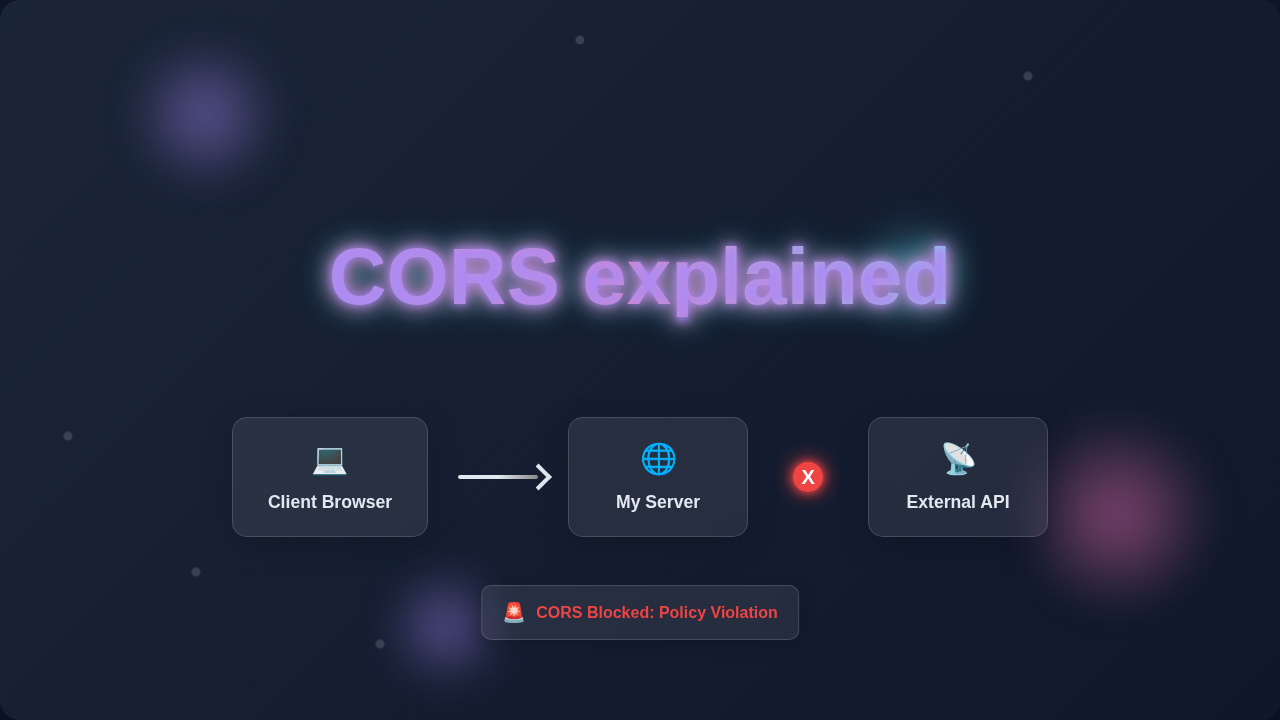
Think of your browser as a super strict bouncer at a fancy club. Usually, it only lets your website, say your-cool-app.com, talk to its own servers. It’s a one-club, one-server policy. But what if your-cool-app.com needs data from api.awesome-service.com? That’s a ‘cross-origin’ request. It means the request is coming from a different origin than the one it’s trying to access.
The bouncer, your browser, steps in. By default, it blocks these requests. Why? This is for your safety. It prevents malicious websites from snooping around. CORS is the set of rules that tells the bouncer when it’s okay to let these ‘outsider’ requests through. It provides a secure way for cross-origin communication.
Why Does CORS Matter to Your Dev Journey?
You’ll encounter CORS errors often. This is especially true when you build modern web applications. Picture this: you’re building a sleek frontend. Maybe you’re using React or just Vanilla JS. You try to fetch data from an external API. Bam! A CORS error appears. Your console lights up red.
It stops your frontend from showing data. Your beautiful UI remains empty. This can be super frustrating. It might make you feel stuck. But understanding CORS helps you fix these issues. It makes you a more effective developer. You’ll debug faster and build more robust apps as a result.
Imagine building a dynamic list filter. This filter needs data from a separate backend server. Without understanding CORS, that filter might never show any results! Your users would just see an empty list. So, it’s pretty important.
This security measure prevents malicious sites. Without CORS, bad-guy.com could easily try to access your sensitive bank details. It would just sneakily fetch data from your-bank.com. Your browser protects you from this kind of attack. It’s a good thing, really.
Understanding CORS is a core web development skill. It’s like learning about responsive design. Or how to optimize your React Performance Optimization. It helps your apps work seamlessly.
CORS isn’t a bug; it’s a feature! It’s your browser’s way of keeping you safe from malicious cross-site data access.
How CORS Actually Works Under the Hood
Let’s dive into how this bouncer system really works. When your your-cool-app.com tries to access data from api.awesome-service.com, your browser sends a request. This is the initial step.
The browser automatically adds a special header to this request. It’s called Origin. This header tells the api.awesome-service.com server where the request came from. It says, ‘Hey, this request is from your-cool-app.com.’ It’s like showing an ID at the club entrance.
The server at api.awesome-service.com then looks at this Origin header. Based on its configuration, it decides if your-cool-app.com is allowed to access its resources. If it is allowed, the server adds its own special header to the response. This one is Access-Control-Allow-Origin.
This server header tells the browser, ‘Yes, your-cool-app.com is an allowed origin. You can give them the data.’ Or it might say, ‘Any origin is allowed here.’ In that case, the value is * for any.
Finally, the browser receives the server’s response. It checks if the Access-Control-Allow-Origin header matches your site’s origin. If it doesn’t match, or if the header isn’t even there, the browser blocks the response. You get that dreaded CORS error. It prevents your frontend JavaScript from ever seeing the data. The data arrived at the browser, but JavaScript can’t touch it.
There’s also a ‘preflight’ request for more complex operations. Before sending the actual request (like PUT or DELETE, or requests with custom headers), your browser might send an OPTIONS request first. This is like asking, ‘Can I even try to do this?’ It checks with the server if the actual request is safe to send. The server responds with allowed methods and headers. Then, if all looks good, the browser sends the real request. It’s an extra layer of caution.
Want to learn more about these fascinating HTTP headers? Check out the MDN Web Docs on HTTP CORS. They offer fantastic technical details and examples.
Clearing Up Common CORS Confusions
Many beginners think CORS is purely a server-side bug. Here’s the thing: It’s actually a browser security feature. Your server might be sending data perfectly fine. But your browser is stopping your JavaScript from accessing it. It’s like the bouncer confiscating your souvenir.
Another common confusion: ‘Why does Postman work but my browser doesn’t?’ Postman is not a browser. It doesn’t enforce CORS policies. So, requests that fail in your browser might succeed in Postman. This can be super misleading for you. Always trust your browser’s console.
Sometimes you might think it’s a general network issue. But if other requests from your site work, it’s likely CORS. Always check your browser’s developer console. That’s where CORS errors show up clearly. You’ll see messages like ‘Cross-Origin Request Blocked’.
You might even wonder how to set up things like a responsive sidebar if your styling assets are on a CDN. Good news: images, scripts, and CSS files generally don’t trigger the same CORS checks for basic loading. The main concern is usually for programmatic data fetching. Things like fetch() or XMLHttpRequest are the culprits here.
Is it your backend’s fault? Often, yes. The backend needs to include the correct Access-Control-Allow-Origin header. This is how the server ‘gives permission’ to your browser. Your server must explicitly say, ‘It’s okay for your-cool-app.com to grab this data.’
You might need to configure your backend framework. Popular frameworks offer ways to enable CORS. For example, in Node.js, you’d use a special package. It might be called cors. In Python with Flask, you might use Flask-CORS. These tools simplify the process for you.
When debugging CORS, always remember: The error is in your browser console, but the solution is usually on the server sending the data.
Key Takeaways: Your CORS Checklist
So, what should you really remember about CORS explained?
- 1. It’s a browser security measure. It’s there to protect you from bad actors. It’s not trying to make your life harder.
- 2. CORS stands for Cross-Origin Resource Sharing. It means securely sharing resources between different domains.
- 3. Your browser adds an
Originheader. The server responds with anAccess-Control-Allow-Originheader. These two headers are key. - 4. If these headers don’t match, or the server header is missing, your browser blocks the request. The data never reaches your JavaScript.
- 5. Postman bypasses browser security. Don’t use it to confirm CORS issues. Always check your browser dev tools first!
- 6. The fix usually involves configuring your backend server. It needs to send the right
Access-Control-Allow-Originheader. For advanced configurations, you might specify allowed HTTP methods or custom headers too. A good resource for understanding HTTP methods is CSS-Tricks on the OPTIONS Method. - 7. For local development, some developers use browser extensions to temporarily disable CORS. But this is only for local testing! Never rely on this for production deployments. It’s a security risk.
- 8. If you’re working on performance-critical apps, like a React Performance Optimization project, slow CORS handshakes can impact load times. Especially preflight requests. Optimize your server configuration to be efficient.
You Got This: Conquering Cross-Origin Requests
CORS errors can feel like a brick wall. They often stop you in your tracks. But now you have the tools to understand them. You know why they happen. You know where to look for solutions. This knowledge is incredibly powerful for your journey.
You are building cool stuff. You are connecting different parts of the web. CORS is just another essential layer of security. It’s a skill you’ve now started to master. You’re leveling up as a developer.
Keep learning, keep building, and don’t let those red error messages scare you. You are becoming a confident web developer. And that, my friend, is truly awesome! Go forth and conquer those cross-origin requests!