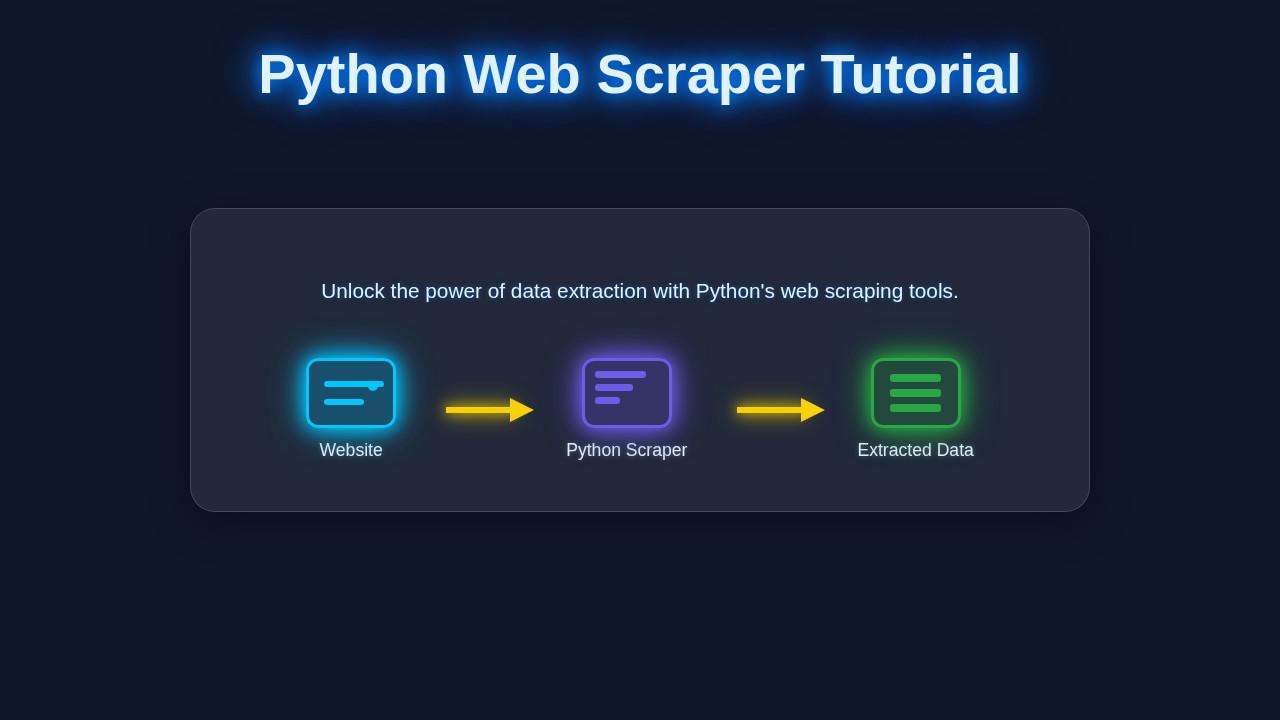
Hey there, fellow coder! If you’ve ever wanted to grab data from websites automatically, building a Python Web Scraper is an incredibly useful skill. It sounds complex, but trust me, we’re going to make it super simple today!
We’re going to build a basic scraper using two fantastic Python libraries: Requests and BeautifulSoup. These tools will let us fetch web pages and then dig through their HTML to pull out the information we need. Get ready to unlock a whole new world of data!
What We Are Building: Your First Python Web Scraper
Today, we are going to build a small script that fetches data from a simple, publicly available website. Imagine you want to collect the titles and links of articles from a blog or news site. Our scraper will visit that page, find the relevant sections, and then extract those headlines and their URLs.
It’s like being a super-fast reader who only cares about headlines! This project is exciting because it shows you how easy it is to automate data collection. Plus, it forms the foundation for much more complex web scraping tasks. Think of all the possibilities!
Understanding the Target HTML Structure
To successfully scrape data, you first need to understand the HTML structure of the page you are targeting. This is like knowing where to look in a book for specific information. Our Python script will read this HTML.
Below is an example of the kind of simple HTML structure we might encounter and want to extract data from. We are not building this HTML; rather, this is what our scraper will read.
Understanding the Target CSS Styling
While a web scraper doesn’t directly care about how a page looks, CSS can sometimes be helpful. Specific classes or IDs used for styling can also be excellent identifiers for the elements we want to scrape. It’s like finding a treasure by following a map with style notes.
Here’s an example of CSS that might style the HTML above. Our scraper won’t use this CSS, but knowing about classes like .article-card can help us locate elements.
Understanding the Target JavaScript (if applicable)
For a basic scraper, JavaScript isn’t usually processed directly. However, it’s important to know if the content you want to scrape is loaded dynamically by JavaScript. If so, a simple Requests/BeautifulSoup scraper might not see it.
For this project, we’re assuming the data is present in the initial HTML. If JavaScript *was* dynamically adding content, it would look something like this. Again, this is content our scraper might encounter, not something it creates.
main.py
# Python Web Scraper Tutorial: Build Your First Script Today
#
# This script demonstrates how to build a basic web scraper using Python.
# We will use the 'requests' library to fetch web pages and 'BeautifulSoup4'
# (from 'bs4') to parse the HTML and extract data.
#
# To run this script, you need to install the required libraries:
# pip install requests beautifulsoup4

import requests
from bs4 import BeautifulSoup
import csv

def main():
    """
    This script performs a basic web scraping operation on a sample website.
    It extracts quotes, their authors, and tags, then saves them to a CSV file.
    """

    print("--- Python Web Scraper Tutorial ---")
    print("Welcome! This script will guide you through building your first web scraper.\n")

    print("--- Important: Ethical Considerations ---")
    print("Always review a website's robots.txt file (e.g., http://example.com/robots.txt)")
    print("and their terms of service before scraping. Some websites prohibit scraping.")
    print("Be respectful: avoid making too many requests in a short period to prevent overloading servers.")
    print("Scrape responsibly!\n")

    # 1. Define the target URL
    # We'll use a website specifically designed for web scraping practice:
    target_url = "http://quotes.toscrape.com/"
    print(f"[STEP 1/5] Targeting URL: {target_url}")

    # 2. Make an HTTP GET request to the URL
    print("[STEP 2/5] Attempting to fetch the webpage content...")
    try:
        response = requests.get(target_url, timeout=10) # Added a timeout for robustness
        response.raise_for_status() # Raise an HTTPError for bad responses (4xx or 5xx)
        print("Successfully fetched the webpage content.")
    except requests.exceptions.RequestException as e:
        print(f"Error fetching the URL: {e}")
        print("Please check your internet connection and the URL.")
        return # Exit if fetching fails

    # 3. Parse the HTML content using BeautifulSoup
    # 'html.parser' is Python's built-in parser. 'lxml' is faster if installed.
    print("[STEP 3/5] Parsing the HTML content with BeautifulSoup...")
    soup = BeautifulSoup(response.text, 'html.parser')
    print("HTML content successfully parsed.\n")

    # 4. Find specific elements and extract data
    # We want to extract quotes, authors, and tags.
    # Inspecting http://quotes.toscrape.com/, we find that each quote is within
    # a <div> tag with the class "quote".
    print("[STEP 4/5] Extracting data (quotes, authors, tags)...")
    quotes_container = soup.find_all('div', class_='quote')

    if not quotes_container:
        print("No quote containers found. The website structure might have changed or parsing failed.")
        return

    extracted_data = []
    print(f"Found {len(quotes_container)} quotes on the page. Processing...")

    for i, quote_div in enumerate(quotes_container):
        # Extract the quote text
        text_element = quote_div.find('span', class_='text')
        quote_text = text_element.get_text(strip=True) if text_element else "N/A"

        # Extract the author
        author_element = quote_div.find('small', class_='author')
        author_name = author_element.get_text(strip=True) if author_element else "N/A"

        # Extract tags
        # Tags are within a div with class 'tags', containing 'a' tags with class 'tag'.
        tags_div = quote_div.find('div', class_='tags')
        tags = []
        if tags_div:
            tag_elements = tags_div.find_all('a', class_='tag')
            tags = [tag.get_text(strip=True) for tag in tag_elements]

        # Print extracted info for demonstration
        print(f"  Quote {i+1}:")
        print(f"    Text: {quote_text[:70]}...") # Truncate long quotes for display
        print(f"    Author: {author_name}")
        print(f"    Tags: {', '.join(tags)}\n")

        extracted_data.append({
            'quote_text': quote_text,
            'author': author_name,
            'tags': ', '.join(tags) # Join tags into a single string for CSV
        })

    # 5. Save the extracted data to a CSV file
    csv_filename = "quotes.csv"
    if extracted_data:
        print(f"[STEP 5/5] Saving {len(extracted_data)} quotes to {csv_filename}...")
        # Determine fieldnames from the keys of the first dictionary
        keys = extracted_data[0].keys()
        try:
            with open(csv_filename, 'w', newline='', encoding='utf-8') as csvfile:
                writer = csv.DictWriter(csvfile, fieldnames=keys)
                writer.writeheader() # Write the header row
                writer.writerows(extracted_data) # Write all data rows
            print(f"Data successfully saved to '{csv_filename}'.")
            print(f"You can open '{csv_filename}' with any spreadsheet software (e.g., Excel, Google Sheets).")
        except IOError as e:
            print(f"Error writing to CSV file '{csv_filename}': {e}")
    else:
        print("No data was extracted, so no CSV file will be created.")

    print("\n--- Tutorial Complete! ---")
    print("You've successfully built and run your first Python web scraper.")
    print("Now, try experimenting with different websites (responsibly!) and data points!")

if __name__ == "__main__":
    main()
How Your Python Web Scraper Works Together
Now for the fun part! Let’s break down how we’ll build our Python Web Scraper step-by-step. We’ll combine Requests to get the page and BeautifulSoup to parse it. This is where the magic happens!
Step 1: Installing Our Libraries
First, we need to install the tools. Python has a fantastic package manager called pip. Open your terminal or command prompt and run these commands. This gives our Python environment the power it needs!
pip install requests
pip install beautifulsoup4
Pro Tip: Virtual Environments! Always use a virtual environment for your Python projects. It keeps your project’s dependencies separate and tidy. Just type
python -m venv venvand then activate it!
Step 2: Making the HTTP Request
The first thing a web scraper does is ask the web server for a page. We use the Requests library for this. It’s like typing a URL into your browser, but in code!
Here, we import the requests library. Then, we define the URL of the page we want to scrape. Finally, requests.get() fetches the content for us. The .text attribute gives us the raw HTML of the page.
import requests

url = "http://www.example.com"  # Replace with the URL you want to scrape
response = requests.get(url)
html_content = response.text

print("Status Code:", response.status_code)
# print(html_content[:500]) # Uncomment to see the first 500 characters of HTML
Want to dive deeper into getting web content? Check out our Python Requests Library: Explained Simply with Code post!
Step 3: Parsing the HTML with BeautifulSoup
The raw HTML is just a long string. BeautifulSoup helps us turn that string into a navigable Python object. Think of it as organizing a messy pile of papers into a neat filing system!
We pass our html_content to BeautifulSoup. The 'html.parser' tells BeautifulSoup how to understand the HTML structure. Now, our soup object can be easily searched.
from bs4 import BeautifulSoup

# ... (from previous step: import requests, define url, get response, get html_content)

soup = BeautifulSoup(html_content, 'html.parser')

# print(soup.prettify()[:1000]) # Uncomment to see prettified HTML
Step 4: Finding Elements and Extracting Data
This is where we locate the specific information we need. BeautifulSoup offers powerful methods like find() and find_all(). We use CSS selectors or HTML tags to pinpoint our data.
Let’s say we want all <h2> tags with a class of 'article-title' and their parent <a> tags. We’ll iterate through them. This gives us precise control over what we grab.
# ... (from previous steps: import requests/BeautifulSoup, get soup object)

articles = soup.find_all('div', class_='article-card') # Find all div elements with class 'article-card'

print(f"Found {len(articles)} articles.\n")

for article in articles:
    title_tag = article.find('h2', class_='article-title') # Find the title within the article card
    link_tag = article.find('a', class_='article-link') # Find the link within the article card

    if title_tag and link_tag:
        title = title_tag.text.strip()
        link = link_tag['href'] # Get the value of the 'href' attribute
        print(f"Title: {title}")
        print(f"Link: {link}\n")
    else:
        print("Could not find title or link in an article card.\n")
The .text.strip() part grabs only the visible text and removes extra whitespace. The link_tag['href'] directly accesses the attribute value. It’s pretty neat!
Step 5: Putting It All Together: Your First Python Web Scraper
Here’s the complete script for your simple Python Web Scraper. Copy this into a .py file, like scraper.py. Remember to replace "http://www.example.com" with your actual target URL!
import requests
from bs4 import BeautifulSoup

def scrape_website(url):
    try:
        response = requests.get(url)
        response.raise_for_status() # Raises an HTTPError for bad responses (4xx or 5xx)
    except requests.exceptions.RequestException as e:
        print(f"Error fetching the URL: {e}")
        return []

    soup = BeautifulSoup(response.text, 'html.parser')

    extracted_data = []
    articles = soup.find_all('div', class_='article-card') # Adjust this selector for your target site

    for article in articles:
        title_tag = article.find('h2', class_='article-title') # Adjust this selector
        link_tag = article.find('a', class_='article-link') # Adjust this selector

        if title_tag and link_tag:
            title = title_tag.text.strip()
            link = link_tag['href']
            extracted_data.append({"title": title, "link": link})

    return extracted_data

# --- Main execution part ---
if __name__ == "__main__":
    target_url = "http://quotes.toscrape.com/"
    # IMPORTANT: Replace with the actual URL you want to scrape!
    # For demonstration, 'quotes.toscrape.com' is a good practice site.

    print(f"Starting scraper for: {target_url}\n")
    data = scrape_website(target_url)

    if data:
        for item in data:
            print(f"Title: {item['title']}")
            print(f"Link: {item['link']}\n")
    else:
        print("No data found or an error occurred.")
Just run python scraper.py in your terminal. You’ll see your extracted data printed out! Isn’t that amazing?
Tips to Customise It
You’ve built a solid foundation! Here are some ideas to make your scraper even better:
- Save to a File: Instead of printing, write the data to a CSV or JSON file. This is super useful for data analysis!
- Scrape Multiple Pages: Modify your script to loop through several pages of a website. Many sites have ‘next page’ buttons.
- Add Error Handling: Implement more robust error checks for missing elements or network issues. This makes your scraper more resilient.
- Use Headers: Some websites might block simple requests. Adding user-agent headers can make your scraper look more like a regular browser.
- Integrate with Flask: You could even build a simple web application using Python Flask Explained – Learn Web Dev to display your scraped data!
Conclusion
Wow, you did it! You just built your very own Python Web Scraper using Requests and BeautifulSoup. You’ve gone from zero to a working data extraction tool. This is a huge step in your programming journey!
The ability to programmatically gather data from the web opens up countless possibilities. You can track prices, monitor news, or even build your own datasets. Keep experimenting, keep coding, and don’t forget to share what you’ve built. We’re proud of your progress!
Keep Learning: This is just the beginning of your web scraping journey! For more advanced techniques and considerations, check out more on web scraping techniques.
main.py
# Python Web Scraper Tutorial: Build Your First Script Today
#
# This script demonstrates how to build a basic web scraper using Python.
# We will use the 'requests' library to fetch web pages and 'BeautifulSoup4'
# (from 'bs4') to parse the HTML and extract data.
#
# To run this script, you need to install the required libraries:
# pip install requests beautifulsoup4

import requests
from bs4 import BeautifulSoup
import csv

def main():
    """
    This script performs a basic web scraping operation on a sample website.
    It extracts quotes, their authors, and tags, then saves them to a CSV file.
    """

    print("--- Python Web Scraper Tutorial ---")
    print("Welcome! This script will guide you through building your first web scraper.\n")

    print("--- Important: Ethical Considerations ---")
    print("Always review a website's robots.txt file (e.g., http://example.com/robots.txt)")
    print("and their terms of service before scraping. Some websites prohibit scraping.")
    print("Be respectful: avoid making too many requests in a short period to prevent overloading servers.")
    print("Scrape responsibly!\n")

    # 1. Define the target URL
    # We'll use a website specifically designed for web scraping practice:
    target_url = "http://quotes.toscrape.com/"
    print(f"[STEP 1/5] Targeting URL: {target_url}")

    # 2. Make an HTTP GET request to the URL
    print("[STEP 2/5] Attempting to fetch the webpage content...")
    try:
        response = requests.get(target_url, timeout=10) # Added a timeout for robustness
        response.raise_for_status() # Raise an HTTPError for bad responses (4xx or 5xx)
        print("Successfully fetched the webpage content.")
    except requests.exceptions.RequestException as e:
        print(f"Error fetching the URL: {e}")
        print("Please check your internet connection and the URL.")
        return # Exit if fetching fails

    # 3. Parse the HTML content using BeautifulSoup
    # 'html.parser' is Python's built-in parser. 'lxml' is faster if installed.
    print("[STEP 3/5] Parsing the HTML content with BeautifulSoup...")
    soup = BeautifulSoup(response.text, 'html.parser')
    print("HTML content successfully parsed.\n")

    # 4. Find specific elements and extract data
    # We want to extract quotes, authors, and tags.
    # Inspecting http://quotes.toscrape.com/, we find that each quote is within
    # a <div> tag with the class "quote".
    print("[STEP 4/5] Extracting data (quotes, authors, tags)...")
    quotes_container = soup.find_all('div', class_='quote')

    if not quotes_container:
        print("No quote containers found. The website structure might have changed or parsing failed.")
        return

    extracted_data = []
    print(f"Found {len(quotes_container)} quotes on the page. Processing...")

    for i, quote_div in enumerate(quotes_container):
        # Extract the quote text
        text_element = quote_div.find('span', class_='text')
        quote_text = text_element.get_text(strip=True) if text_element else "N/A"

        # Extract the author
        author_element = quote_div.find('small', class_='author')
        author_name = author_element.get_text(strip=True) if author_element else "N/A"

        # Extract tags
        # Tags are within a div with class 'tags', containing 'a' tags with class 'tag'.
        tags_div = quote_div.find('div', class_='tags')
        tags = []
        if tags_div:
            tag_elements = tags_div.find_all('a', class_='tag')
            tags = [tag.get_text(strip=True) for tag in tag_elements]

        # Print extracted info for demonstration
        print(f"  Quote {i+1}:")
        print(f"    Text: {quote_text[:70]}...") # Truncate long quotes for display
        print(f"    Author: {author_name}")
        print(f"    Tags: {', '.join(tags)}\n")

        extracted_data.append({
            'quote_text': quote_text,
            'author': author_name,
            'tags': ', '.join(tags) # Join tags into a single string for CSV
        })

    # 5. Save the extracted data to a CSV file
    csv_filename = "quotes.csv"
    if extracted_data:
        print(f"[STEP 5/5] Saving {len(extracted_data)} quotes to {csv_filename}...")
        # Determine fieldnames from the keys of the first dictionary
        keys = extracted_data[0].keys()
        try:
            with open(csv_filename, 'w', newline='', encoding='utf-8') as csvfile:
                writer = csv.DictWriter(csvfile, fieldnames=keys)
                writer.writeheader() # Write the header row
                writer.writerows(extracted_data) # Write all data rows
            print(f"Data successfully saved to '{csv_filename}'.")
            print(f"You can open '{csv_filename}' with any spreadsheet software (e.g., Excel, Google Sheets).")
        except IOError as e:
            print(f"Error writing to CSV file '{csv_filename}': {e}")
    else:
        print("No data was extracted, so no CSV file will be created.")

    print("\n--- Tutorial Complete! ---")
    print("You've successfully built and run your first Python web scraper.")
    print("Now, try experimenting with different websites (responsibly!) and data points!")

if __name__ == "__main__":
    main()