
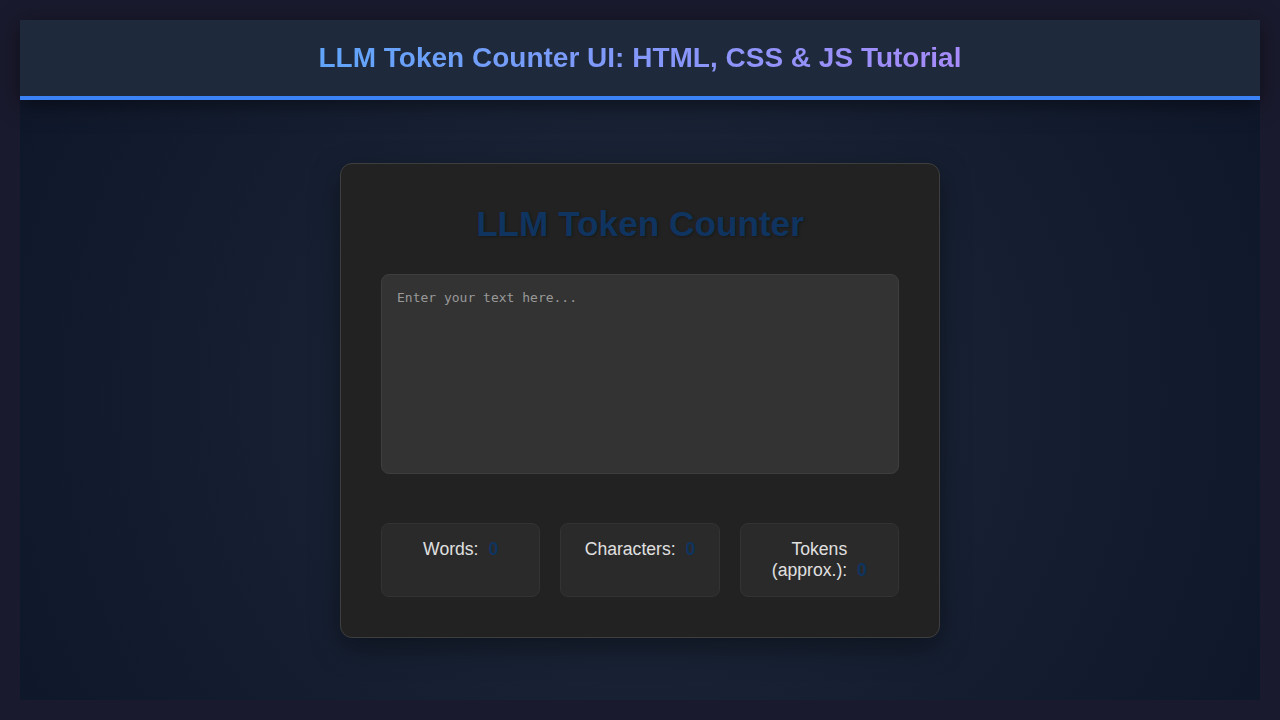
Are you diving deep into the fascinating world of Large Language Models (LLMs)? If so, then understanding token limits is absolutely crucial. Today, we’re going to build an awesome LLM Token Counter UI using nothing but HTML, CSS, and JavaScript. This tool will help you get a quick estimate of how many ‘tokens’ your text consumes, giving you better control over API costs and prompt engineering.
Imagine having a sleek, interactive web page where you can paste any text and instantly see its estimated word, character, and token counts. It’s a game-changer for anyone working with AI, enabling more efficient text management.
We’ll break down the entire process. You’ll learn the core concepts and gain practical web development skills along the way. Let’s start building something truly useful!
What We Are Building
We’re crafting a user-friendly web interface. This interface allows users to input text and immediately receive real-time feedback. It provides essential metrics like word count, character count, and, most importantly, an estimated LLM token count. Think of it as your personal text analyzer, right in your browser.
The design will be clean and intuitive, following modern web practices. We want a tool that’s not only functional but also pleasant to use. Many developers currently use browser extensions or external websites for this task. Building our own gives us complete control and a deeper understanding.
Why is this trending? As LLMs become ubiquitous, managing input length is vital. Overlooking token limits can lead to truncated responses or unexpected API charges. This simple tool empowers developers and content creators alike to optimize their prompts. It helps them stay within budget and generate precise outputs.
HTML Structure for Your LLM Token Counter
Our HTML forms the backbone of the application. It’s clean, semantic, and straightforward. We’ll use a main container, a textarea for input, and several paragraphs to display the counts. Here’s the essential markup:
<!DOCTYPE html>
<html lang="en">
<head>
    <meta charset="UTF-8">
    <meta name="viewport" content="width=device-width, initial-scale=1.0">
    <title>LLM Token Counter</title>
    <link rel="stylesheet" href="style.css">
</head>
<body>
    <div class="container">
        <h1>LLM Token Counter</h1>
        <p class="description">Paste your text below to get an estimated token count.</p>
        <textarea id="textInput" placeholder="Start typing or paste your text here..."></textarea>
        <div class="counts-container">
            <p>Words: <span id="wordCount">0</span></p>
            <p>Characters: <span id="charCount">0</span></p>
            <p>Estimated Tokens: <span id="tokenCount">0</span></p>
        </div>
    </div>
    <script src="script.js"></script>
</body>
</html>
CSS Styling for a Polished LLM Token Counter
Now, let’s bring our UI to life with some elegant CSS. We’ll style the overall layout, the text area, and the count displays. Our goal is a clean, modern look that’s easy on the eyes and highly readable. We want a design that just works!
body {
    font-family: 'Arial', sans-serif;
    background-color: #f4f7f6;
    display: flex;
    justify-content: center;
    align-items: center;
    min-height: 100vh;
    margin: 0;
    padding: 20px;
    box-sizing: border-box;
}

.container {
    background-color: #ffffff;
    border-radius: 12px;
    box-shadow: 0 4px 15px rgba(0, 0, 0, 0.1);
    padding: 30px;
    width: 100%;
    max-width: 700px;
    text-align: center;
}

h1 {
    color: #2c3e50;
    margin-bottom: 10px;
    font-size: 2.2em;
}

.description {
    color: #7f8c8d;
    margin-bottom: 25px;
    font-size: 1.1em;
}

textarea {
    width: calc(100% - 40px); /* Account for padding */
    height: 200px;
    padding: 20px;
    border: 1px solid #dfe6e9;
    border-radius: 8px;
    font-size: 1.1em;
    color: #34495e;
    resize: vertical;
    margin-bottom: 25px;
    box-sizing: border-box;
    transition: border-color 0.3s ease;
}

textarea:focus {
    border-color: #3498db;
    outline: none;
}

.counts-container {
    display: flex;
    justify-content: space-around;
    padding: 15px 0;
    border-top: 1px solid #ecf0f1;
    border-bottom: 1px solid #ecf0f1;
    margin-top: 20px;
}

.counts-container p {
    margin: 0;
    color: #34495e;
    font-size: 1.1em;
    font-weight: 500;
}

.counts-container span {
    font-weight: 700;
    color: #2980b9;
}
The beauty of modern web development lies in creating intuitive user experiences with minimal code. Small details, like smooth transitions and thoughtful spacing, make a huge difference in user perception and satisfaction.
Step-by-Step Breakdown: The JavaScript Logic
This is where the magic happens! Our JavaScript code will listen for user input and dynamically update the counts. We’ll grab references to our HTML elements, define our counting logic, and attach an event listener to the textarea. This ensures real-time updates for words, characters, and tokens.
Setting Up DOM References
First, we need to get handles on the specific elements we want to interact with. We use document.getElementById() for this. We target the textarea itself and each of the <span> elements where our counts will be displayed. This setup prepares our script to manipulate the page content effectively.
const textInput = document.getElementById('textInput');
const wordCountSpan = document.getElementById('wordCount');
const charCountSpan = document.getElementById('charCount');
const tokenCountSpan = document.getElementById('tokenCount');
You’ll notice we wrap our main logic within DOMContentLoaded. This ensures the script runs only after the entire HTML document has been fully loaded and parsed. This prevents errors if our script tries to access elements that aren’t yet available on the page.
Crafting the Token Estimator
LLM tokenization is complex. Real LLMs use sophisticated tokenizers like Byte-Pair Encoding (BPE). For our UI, we’ll use a practical estimation method. This function offers a reasonable approximation for English text. We’ll simply count the words and apply a common heuristic.
const estimateTokens = (text) => {
    // A common heuristic for English is about 0.75 words per token for GPT models.
    // This is a rough estimate and varies greatly by language and model.
    const words = text.trim().split(/\s+/).filter(word => word.length > 0);
    return Math.ceil(words.length * 1.3); // Rough estimate: 1 word ~ 1.3 tokens
};
This approach divides the text into words using whitespace. Then it multiplies the word count by a factor (e.g., 1.3 for about 1.3 tokens per word). Remember, this is an estimate! Actual token counts vary based on the specific LLM model and language. However, it’s perfect for quick checks and immediate feedback. For a more robust solution, you might consider integrating a pre-trained tokenizer library, though that adds complexity beyond this tutorial’s scope.
The `updateCounts` Function
This core function performs all the calculations. It takes the current text from the textarea, determines character count, word count, and then uses our estimateTokens function. Finally, it updates the display spans with the new values. This function is called every time the user types.
const updateCounts = () => {
    const text = textInput.value;
    const charCount = text.length;
    const words = text.trim().split(/\s+/).filter(word => word.length > 0);
    const wordCount = words.length;
    const tokenCount = estimateTokens(text);

    wordCountSpan.textContent = wordCount;
    charCountSpan.textContent = charCount;
    tokenCountSpan.textContent = tokenCount;
};
Notice the use of text.trim().split(/\s+/). This neat trick handles multiple spaces gracefully. It also removes leading or trailing whitespace. It gives us a cleaner, more accurate word count. It’s an efficient way to process the input string.
Event Listener for Real-time Updates
The final piece of our JavaScript puzzle is attaching an event listener. We listen for the 'input' event on our textarea. Every time the content changes (a character is typed, deleted, or text is pasted), our updateCounts function fires. This creates that desirable real-time feedback loop. It’s responsive and provides instant information to the user.
textInput.addEventListener('input', updateCounts);

// Initial count update in case there's pre-filled text or on page load
updateCounts();
We also call updateCounts() once when the page loads. This ensures that if the textarea has any pre-filled text, the counts are displayed immediately. It’s a small detail that greatly improves the user experience. Consider checking out MDN’s documentation on addEventListener for more event handling details.
For those interested in building interactive elements, this kind of dynamic update is fundamental. It’s a skill you’ll use across many projects. You can explore more interactive design patterns with HTML, CSS, and JS in our Code Playground resource.
Making It Responsive
A truly modern web application must look great on any device. Our LLM Token Counter is no exception. We’ll achieve responsiveness using CSS media queries. This ensures a seamless experience whether a user is on a desktop, tablet, or mobile phone. We always prioritize mobile-first design.
Our CSS includes specific breakpoints. These adjust the layout and font sizes for smaller screens. For instance, on narrower viewports, we stack the word, character, and token counts vertically. This optimizes space and readability. Flexbox is a powerful tool for this.
/* Responsive adjustments */
@media (max-width: 768px) {
    .container {
        padding: 20px;
    }
    h1 {
        font-size: 1.8em;
    }
    .description {
        font-size: 1em;
    }
    textarea {
        font-size: 1em;
        height: 150px;
    }
    .counts-container {
        flex-direction: column; /* Stack counts vertically */
        gap: 10px; /* Add space between stacked items */
    }
    .counts-container p {
        font-size: 1em;
    }
}

@media (max-width: 480px) {
    .container {
        padding: 15px;
        border-radius: 8px;
    }
    h1 {
        font-size: 1.5em;
    }
    .description {
        font-size: 0.9em;
    }
}
The key is to think about how content flows. We adjust padding, font sizes, and flex direction. This ensures that the UI remains usable and aesthetically pleasing across various screen dimensions. It’s an essential part of front-end development today. Consider these adjustments crucial for a broad audience reach.
Responsive design isn’t just about shrinking elements; it’s about re-imagining the user experience for every screen size. Adapting the layout intelligently ensures maximum usability and accessibility.
By implementing these media queries, our LLM Token Counter becomes versatile. It provides a consistent, quality experience for all users. This approach significantly enhances the utility of our tool. Learn more about creating adaptable components with our guide on Design System Components.
Final Output: A Functional LLM Token Counter
Once you’ve put all these pieces together, you’ll have a fully functional LLM Token Counter. The UI is clean, intuitive, and responsive. Users can paste large blocks of text and instantly see the critical metrics. This includes the estimated token count for LLM integration. The visual elements—the centered container, the spacious textarea, and the distinct count displays—all contribute to a professional feel. You’ve built a truly practical application.
This project demonstrates the power of vanilla HTML, CSS, and JavaScript. You don’t always need complex frameworks to create something useful. This hands-on experience strengthens your core web development skills. It also prepares you for more advanced projects. We’re proud of what you’ve achieved!
Conclusion
You’ve successfully built an LLM Token Counter UI from scratch! This project covers fundamental web development concepts: structuring with HTML, styling with CSS, and adding dynamic functionality with JavaScript. We tackled a practical problem faced by many LLM enthusiasts and developers. The ability to quickly estimate tokens is incredibly valuable in many scenarios.
From prompt engineering to content optimization for specific LLM contexts, this tool is ready to assist. It provides instant feedback, helping you refine your inputs. This knowledge is applicable across countless web applications, not just for LLM tools. You could adapt this same logic for character limits in tweets or blog post excerpts.
Keep experimenting with JavaScript for browser automation and utility scripts. Our Browser Automation Script Design with JavaScript resource offers further inspiration. Congratulations on adding a powerful utility to your development toolkit. Happy coding, and may your tokens always be optimized!
There is definately a lot to find out about this subject. I like all the points you made
Daha önce araştırıp pek Türkçe kaynak bulamadığım sorundu Elinize sağlık eminim arayan çok kişi vardır.
Nice post. I learn something totally new and challenging on websites
Verdiginiz bilgiler için teşekkürler , güzel yazı olmuş