Ever felt that sting? You are building something awesome. Your frontend looks amazing. Your backend is humming along beautifully. Then, you try to make them talk.
Suddenly, your browser screams. It flashes an ugly message. Something about a "CORS policy". Or maybe a "network error".
It stops your progress cold. You stare at the console. You think, "But it works when I test the API directly!" Sound familiar?
You have just bumped into CORS errors explained. Don’t worry, you are not alone. This is one of those classic web development headaches. But today, we are going to make it click for you. You will understand what these errors mean. More importantly, you will learn how to troubleshoot them. You will feel empowered.
What Even Are CORS Errors Explained?
Let’s demystify this beast. CORS stands for Cross-Origin Resource Sharing. It is a security feature. Your web browser strictly enforces it.
Think of it this way. Imagine your browser is a very strict bouncer. This bouncer is at the entrance of a VIP party. The party is your website’s data. Only specific guests are allowed in.
An "origin" is like a guest’s identity card. It is made up of three parts. It includes the protocol (like http:// or https://). It also includes the domain (like procoder09.com). Finally, it has the port number (like :3000 or :8080).
If any of these three things differ, it’s a different origin. Your browser treats them as completely separate entities.
So, why does the bouncer exist? Security. CORS prevents malicious websites. It stops them from stealing your sensitive data. It stops them from making unauthorized requests. Imagine if any website could just grab your banking info! That would be terrible.
The browser’s job is to protect you. It keeps different websites isolated. This isolation is called the "Same-Origin Policy." It is a fundamental web security model. CORS is the official way to relax this policy. It allows controlled sharing between origins.
Why You’re Seeing That Nasty "Blocked by CORS Policy" Message
Here’s the scenario that often causes trouble for you. You have your frontend application. Maybe it is running on localhost:3000. This is your first origin.
Then, you try to fetch some data. You send a request to your backend API. Perhaps it is at api.yourdomain.com. Or maybe it is on localhost:5000. This is a different origin.
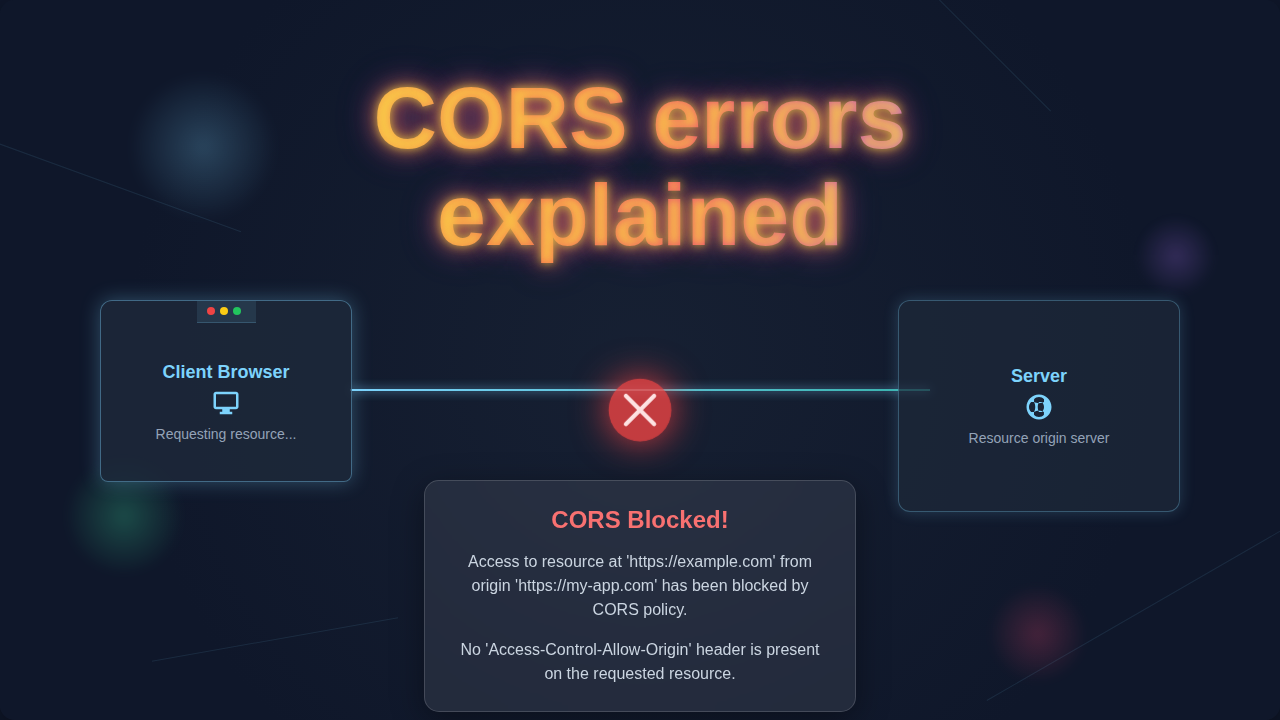
When your frontend sends that request, your browser steps in. It sees that the request is going to a different origin. So, it performs a check. It sends a "preflight request" first. This uses the HTTP OPTIONS method. It is like asking permission. The browser asks, "Hey, api.yourdomain.com, are you okay with localhost:3000 accessing your stuff?"
If the backend server doesn’t explicitly say "yes," the browser blocks the actual request. It never even sends your real data request. You get that dreaded CORS error in your console. It is important to remember this. The server itself didn’t reject your request. Your browser stopped it. It did so for your security.
For more on how requests travel, you might find this deep dive helpful: How Python Requests Works: Deep Dive & Visual Guide. Understanding that flow makes CORS click even faster.
The Lightbulb Moment: Solving CORS Errors Explained
So, how do you fix this? The solution lies on the server side. The server receiving the request needs to grant permission. It needs to tell the browser, "Yes, it’s okay for that specific origin to talk to me."
The server does this by sending special HTTP headers. The most important one is Access-Control-Allow-Origin. This header tells the browser which origins are permitted. It is like the bouncer getting an updated guest list from the party host.
If your frontend is on http://localhost:3000, your backend needs to send a header like this:
Access-Control-Allow-Origin: http://localhost:3000
That is the magic line. It explicitly allows your frontend. Your browser sees this header. It then happily allows the communication. No more error messages for you!
Sometimes, you might see Access-Control-Allow-Origin: *. The asterisk means "allow all origins." This is convenient for development. However, be very careful using it in production. It relaxes security quite a lot. It is usually better to specify exact origins. This keeps your application more secure. You are learning to control the browser’s bouncer. How cool is that?
Understanding how elements interact and arrange themselves is key in web dev, just like managing the flow of data. If you are ever wrestling with layout issues, you might like this post on tailwind flex child shrink, flexbox overflow, min-width 0. It shows how small settings impact big outcomes.
Common Scenarios and How to Troubleshoot Them
Let’s put this knowledge into practice. You are bound to run into different situations. Each one has a slightly different approach.
Scenario 1: You Control the Backend
This is the easiest situation. You are in charge! You can add the necessary CORS headers yourself. Most backend frameworks have middleware or libraries for this. For Node.js, you might use the cors package. In Python with Flask, you could use Flask-CORS. Similar options exist for almost every language and framework. You configure it to send the correct Access-Control-Allow-Origin header. This is often based on your frontend’s URL.
Always double-check your server logs. Ensure the headers are actually being sent. Your browser’s developer tools are your best friend here. Look at the "Network" tab. Click on the failed request. Check the "Headers" section. You should see the Access-Control-Allow-Origin header in the response. If it is missing, or incorrect, that is your problem area.
Pro-Tip: Always check your browser’s "Network" tab! Select the failed request, then look at the "Headers" for the
Access-Control-Allow-Originresponse header. If it’s not there, or not matching your origin, that’s your smoking gun.
For detailed information on configuring CORS, the MDN Web Docs on CORS are an excellent resource. You will find platform-specific examples there.
Scenario 2: You Don’t Control the Backend (Third-Party API)
This gets a bit trickier. You cannot change their server’s configuration. What do you do? First, check their API documentation. Many public APIs explicitly state if they support CORS. They might even tell you which origins they allow. If they don’t, you have a common workaround: a proxy server.
A proxy server sits between your frontend and the third-party API. Your frontend makes a request to your own backend (same origin!). Your backend then fetches data from the third-party API. It then sends that data back to your frontend. The browser is happy. It only saw a same-origin request. This method bypasses the CORS issue entirely for you. It is a very robust solution.
Scenario 3: During Local Development
You are probably working on localhost a lot. Sometimes, your dev server (e.g., Vite, Webpack Dev Server) runs on one port. Your API runs on another. This creates a cross-origin scenario. Many modern development setups offer a "proxy" feature. You configure your dev server. It transparently forwards certain requests. It sends them to your backend API. This makes your browser think all requests are same-origin. It is a fantastic tool for local development. Avoid using browser extensions to disable CORS. They teach you bad habits. They also don’t reflect real-world user experiences.
Remember This: CORS is browser security. Your server isn’t rejecting your request; your browser is stopping it because the server didn’t explicitly grant permission. The fix always involves the server sending the right headers.
Developing smart forms with React often means handling data interactions securely. If you are playing with AI integration, check out React AI Form Assistant: Build Smart Forms with React JSX Hooks for more ideas on creating robust client-side experiences.
Wrapping It Up: You’ve Got This!
Phew! You made it. You now understand the perplexing world of CORS errors explained. You know it is not some random glitch. It is a vital security mechanism. It keeps the web safer for everyone. You also know that fixing it involves the server. The server must explicitly allow your frontend’s origin.
Next time you see that "blocked by CORS policy" message, you will not panic. You will open your dev tools. You will check your network requests. You will know exactly where to look. You are now equipped with the knowledge to debug and resolve these issues. Keep building, keep learning, and keep creating awesome web applications!