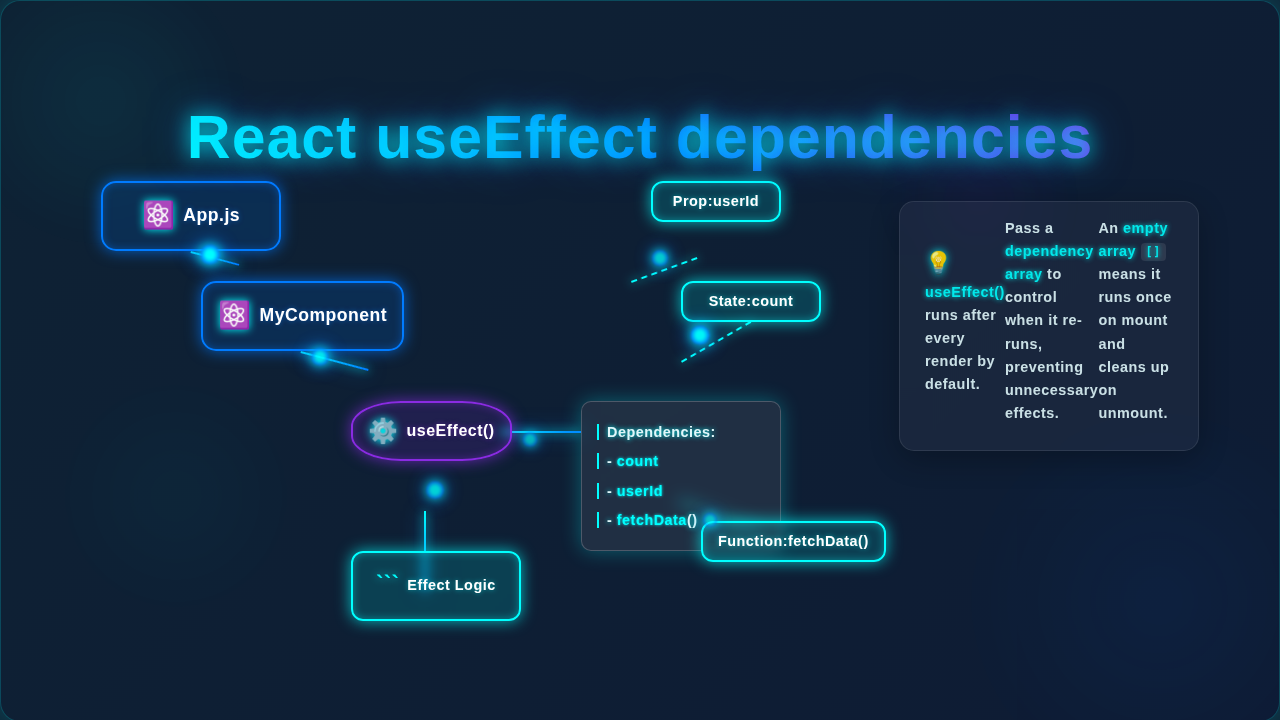
React useEffect Dependencies: Visual Guide
Okay, real talk — when you first met React’s useEffect hook, it probably felt like pure magic. You needed something to happen after your component rendered, and useEffect was there, making network requests or setting up subscriptions. It was beautiful. But then you tried to control that magic. You started playing with the second argument – the array of Mastering React useEffect: A Visual Guide – and suddenly, poof! Confusion everywhere. You’re not alone. Figuring out React useEffect dependencies often feels like solving a riddle wrapped in a mystery.
Here’s the thing: mastering this little array is key to writing reliable, bug-free React applications. It’s often the biggest hurdle for beginners. But don’t worry, we’re going to bust some common myths today. You’ll soon understand exactly why React needs these dependencies and how to use them like a pro.
Myth #1: The Dependency Array ONLY Triggers When Values Change
This is a super common misconception. You might think, “If I put something in the array, my effect will only run if that specific thing changes.” Sounds logical, right? But that’s only half the story.
The Truth: A useEffect hook always runs at least once. It fires right after your component renders for the very first time. Think of it like a new guest arriving at a party. They always make an entrance. After that initial grand entrance, React checks your dependency array. It compares the values from the previous render with the current values. If any value in that array has changed, then – and only then – does your effect run again.
Let’s use an analogy. Imagine you have a smart light bulb in your room. If you tell it, “Turn on when the sun rises” (that’s your effect, and “sun rise” is your dependency), it will first turn on when you plug it in (initial render). Then, every day after that, it only turns on when the sun actually rises again. If you gave it an empty array, [], you’re telling it: “Turn on once when plugged in, and never again based on any changing conditions.” This is perfect for setup tasks that only need to happen once!
Myth #2: You Only Need to List State and Props in React useEffect Dependencies
Many beginners believe the dependency array is just for your component’s state variables or props. You might only add count if you use it, or userId if it’s a prop. But that’s a dangerous oversight!
The Truth: The dependency array needs to include any and every value from your component’s scope that your effect uses. This means:
- State variables (like
countorusername) - Props (like
userIdoronSave) - Functions defined inside your component (even helper functions!)
- Variables or objects defined inside your component that might change
Why is this so important? It all boils down to something called JavaScript Closures. When your effect function is created, it “remembers” the values of the variables around it at that specific moment. If you don’t list a variable in your dependencies, React assumes it won’t change. So, your effect could end up using an “old” or “stale” value of that variable, even if it has updated elsewhere in your component!
Consider a chef preparing a special sauce. The recipe (React useEffect dependencies) calls for specific ingredients: a secret spice, fresh herbs, and a special vinegar. If the chef’s assistant changes the special vinegar to a different type, but the chef doesn’t re-check the recipe and taste, they’ll keep using the old vinegar amount for the new vinegar. The sauce will taste off! React needs to know if *any* ingredient that goes into the effect changes, so it can “re-cook” the effect with the fresh ingredients.
Pro Tip: The dependency array is not a suggestion. It’s React telling you: ‘Hey, if any of these ingredients change, I need to re-make the dish!’
Myth #3: Just Remove a Dependency if it Causes an Infinite Loop
You’ve been there. You add a dependency, and suddenly your component is re-rendering endlessly. Your browser freezes. “Aha!” you think. “I’ll just take that dependency out!” While it might stop the immediate loop, you’ve just kicked the can down the road. You haven’t solved the underlying problem.
The Truth: Removing a dependency that your effect *actually uses* is a big no-no. It’s like turning off the check engine light in your car because it’s annoying. The problem is still there, brewing. Instead, you’ll introduce a “stale closure” bug. Your effect will run, but it will be working with outdated information, leading to unpredictable behavior.
For example, imagine you have an effect that fetches data based on a user ID. If you accidentally put an object or a function that changes on every render into your dependency array, you might get an infinite loop. The solution isn’t to remove the user ID from the array! The solution is to make sure the *object* or *function* you put in the array is stable. Managing stable functions or objects in React is a common challenge that useCallback and useMemo were designed to solve.
An infinite loop usually means one of two things: either you’re updating a state variable inside the effect that then causes the component to re-render and re-run the effect, or one of your dependencies is *always* new on every render. The goal is to stabilize your dependencies, not ignore them.
Mastering React useEffect Dependencies: The Real Deal
So, what’s the actual secret? It’s surprisingly simple to state, but takes practice to implement: Your effect function should list every single value from its outer scope that it references and that could change over time. This includes state, props, and functions defined within your component.
React gives you helpful warnings if you miss a dependency. Pay attention to them! They are your friends. If React complains, it’s not trying to confuse you; it’s trying to prevent a bug.
Stabilizing Dependencies with Callbacks and Memos
Sometimes, your dependencies are functions or objects that get recreated on every single render. This makes them “new” every time, even if their content hasn’t logically changed. If you put these directly into the dependency array, your effect will run constantly. This is where useCallback and useMemo come in.
useCallback: Use this to memoize (remember) a function. It makes sure your function only gets redefined if its *own* dependencies change.useMemo: Use this to memoize a value or an object. It ensures your object or value only gets recomputed if its *own* dependencies change.
These hooks are not just for performance. They are essential tools for managing your React useEffect dependencies, especially for complex components. They help ensure that a function or an object you pass as a dependency remains the same between renders unless its *own* internal ingredients truly change. You can learn more about these powerful tools in this detailed guide on useCallback and useMemo.
For instance, if you’re building something like a step-by-step product tour in React, you might have functions that guide the user to the next step. If these functions are recreated every time, your effects watching them might fire too often. Using useCallback would make sure those functions are stable.
Golden Rule: When in doubt, add it to the dependency array. Let React tell you if you’re missing something crucial, and then fix the *source* of the dependency’s instability, not the dependency array itself.
Your New Superpower: Predictable Effects
It might feel like a lot to take in right now. But honestly, understanding useEffect dependencies is one of those “aha!” moments in your React journey. Once it clicks, you’ll stop fighting React and start working with it.
You’ll write cleaner code. You’ll squash bugs faster. Your applications will become more predictable and easier to maintain. You’re building solid React apps, and this knowledge is a huge step forward. Keep practicing, keep experimenting, and soon you’ll be teaching others about the magic (and logic!) of React useEffect dependencies!