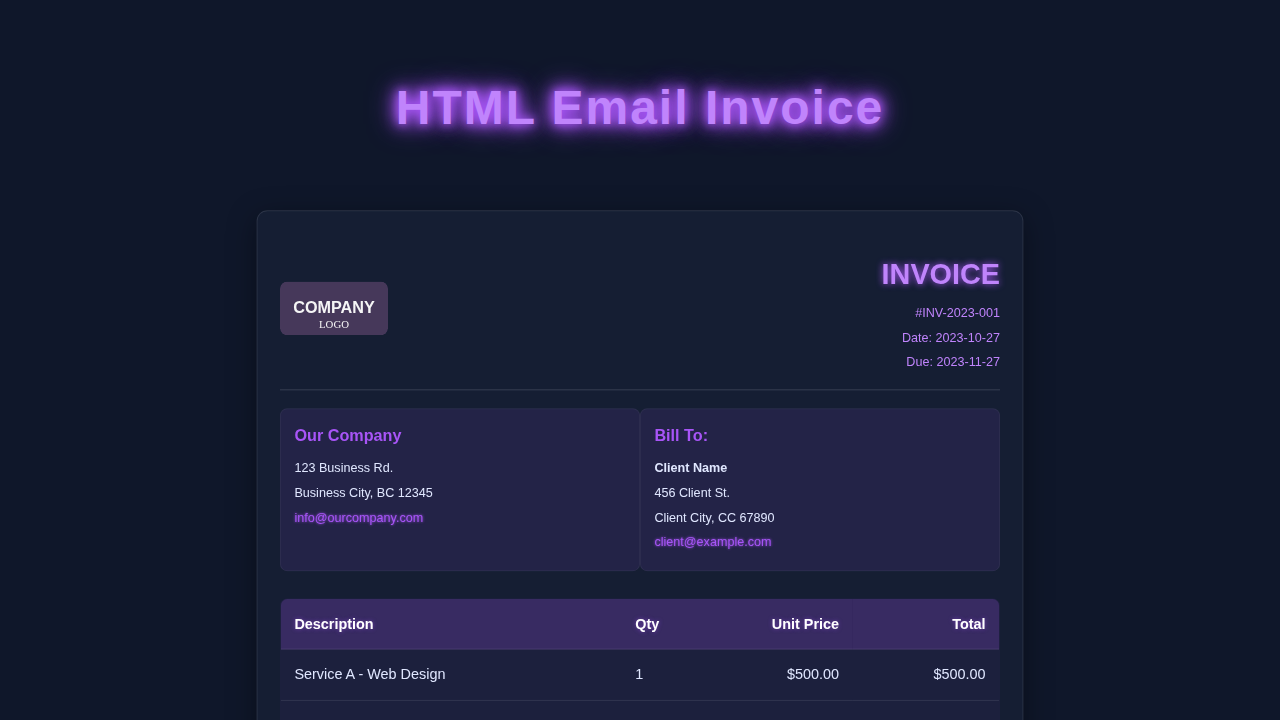
Hey there, awesome coder! If you’ve ever needed to send a professional-looking bill, you know how crucial a good invoice is. Today, we’re going to build a stunning HTML Email Invoice template. It’s fully responsive and super email-friendly. You will love how simple it is to create!
What We Are Building: Crafting Your Perfect HTML Email Invoice
We are crafting a beautiful and functional invoice from scratch. This isn’t just any invoice. It’s a responsive design that looks great on any screen. Imagine your clients opening a perfectly formatted invoice. It will shine whether they use a phone or a desktop. This project helps you look professional every time. Moreover, it’s something you can use again and again!
HTML Structure: The Blueprint of Our Invoice
First, let’s lay down the bones of our invoice. The HTML provides all the content and organization. We will use semantic tags and robust table structures. This makes it easy to read and manage, especially for email clients.
index.html
<!DOCTYPE html>
<html lang="en">
<head>
    <meta charset="UTF-8">
    <meta name="viewport" content="width=device-width, initial-scale=1.0">
    <title>HTML Email Invoice</title>
    <!--
        Link to external stylesheet. Note: Many email clients strip external stylesheets.
        For best compatibility, critical styles are often embedded in a <style> block
        in the <head> or inlined directly onto elements. This tutorial uses a hybrid approach
        for clarity and maintainability in development.
    -->
    <link rel="stylesheet" href="styles.css">

    <!--
        Embedded styles for better email client compatibility.
        These are often critical resets and responsive rules, as external CSS
        and even <style> blocks can be ignored by some email clients.
        Inline styles are used for maximum compatibility on specific elements.
    -->
    <style>
        /* Base email client resets */
        body {
            -webkit-text-size-adjust: 100%; /* Prevent font size changes on iOS */
            -ms-text-size-adjust: 100%;    /* Prevent font size changes on Windows Mobile */
            font-family: Arial, Helvetica, sans-serif; /* Fallback safe fonts */
            margin: 0;
            padding: 0;
            background-color: #f4f4f4; /* Default background for entire email */
            color: #333;
        }
        table {
            border-collapse: collapse; /* Ensure table borders collapse */
            mso-table-lspace: 0pt;      /* Outlook specific spacing reset */
            mso-table-rspace: 0pt;      /* Outlook specific spacing reset */
        }
        td {
            padding: 0; /* Reset default cell padding */
        }
        img {
            border: 0; /* Remove image borders */
            line-height: 100%;
            outline: none;
            text-decoration: none;
            -ms-interpolation-mode: bicubic; /* Image rendering quality for IE */
            max-width: 100%; /* Make images responsive */
            height: auto;    /* Maintain aspect ratio */
        }
        a {
            text-decoration: none;
            color: #1a73e8; /* Standard link color */
        }

        /*
            Responsive styles (often embedded).
            These rules will override external CSS where !important is used.
        */
        @media only screen and (max-width: 600px) {
            .container {
                width: 100% !important;
                border-radius: 0 !important;
                box-shadow: none !important;
                margin: 0 auto !important;
            }
            .header h1 {
                font-size: 24px !important;
            }
            .invoice-details, .item-table, .footer {
                padding: 15px !important;
            }
            .item-table th, .item-table td {
                padding: 10px !important;
            }
            /* Stack table items on mobile */
            .item-table thead {
                display: none; /* Hide header on small screens */
            }
            .item-table tbody tr {
                display: block;
                margin-bottom: 10px;
                border: 1px solid #eee;
                padding: 10px;
            }
            .item-table tbody td {
                display: block;
                text-align: right !important;
                padding: 5px 0;
            }
            .item-table tbody td:before {
                content: attr(data-label); /* Show original header as label */
                float: left;
                font-weight: bold;
                margin-right: 10px;
            }
            .item-table .total-row td {
                text-align: right !important;
                padding-top: 15px !important;
            }
            .item-table tbody tr td:last-child {
                border-bottom: none;
            }
            /* Specific adjustment for invoice details table for mobile */
            .invoice-details table td {
                display: block !important;
                width: 100% !important;
                text-align: left !important;
                padding-bottom: 5px !important;
            }
            .invoice-details table td.text-right {
                text-align: left !important;
            }
        }
    </style>
</head>
<body>
    <!-- Outer table for reliable centering and background in email clients -->
    <table role="presentation" width="100%" cellspacing="0" cellpadding="0" border="0" style="background-color: #f4f4f4;">
        <tr>
            <td align="center" style="padding: 20px 0;">
                <!-- Main invoice container table -->
                <table role="presentation" class="container" width="600" cellspacing="0" cellpadding="0" border="0" style="max-width: 600px; background-color: #ffffff; border-radius: 8px; box-shadow: 0 4px 12px rgba(0, 0, 0, 0.05);">
                    <!-- Header Section -->
                    <tr>
                        <td class="header" style="background-color: #4CAF50; padding: 20px; color: #ffffff; text-align: center; border-top-left-radius: 8px; border-top-right-radius: 8px;">
                            <!-- Company Logo -->
                            <img src="https://via.placeholder.com/150x50/4CAF50/FFFFFF?text=YOUR+LOGO" alt="Company Logo" class="company-logo" width="150" height="50" style="max-width: 150px; height: auto; margin-bottom: 10px; display: inline-block;">
                            <!-- Invoice Title -->
                            <h1 style="margin: 0; font-size: 28px; line-height: 32px;">INVOICE</h1>
                            <!-- Invoice Number -->
                            <p style="margin: 5px 0 0; font-size: 16px;">#INV-2023-001</p>
                        </td>
                    </tr>

                    <!-- Invoice Details (Date, Company Info, Bill To) -->
                    <tr>
                        <td class="invoice-details" style="padding: 20px; line-height: 1.6;">
                            <table role="presentation" width="100%" cellspacing="0" cellpadding="0" border="0">
                                <tr>
                                    <!-- Invoice Dates -->
                                    <td width="50%" valign="top">
                                        <p style="margin: 0 0 5px 0;"><strong>Invoice Date:</strong> 2023-10-27</p>
                                        <p style="margin: 0;"><strong>Due Date:</strong> 2023-11-27</p>
                                    </td>
                                    <!-- Our Company Info -->
                                    <td width="50%" valign="top" class="text-right" style="text-align: right;">
                                        <p style="margin: 0 0 5px 0;"><strong>Our Company, Inc.</strong></p>
                                        <p style="margin: 0 0 5px 0;">123 Business Rd.</p>
                                        <p style="margin: 0 0 5px 0;">Business City, BC 12345</p>
                                        <p style="margin: 0;"><a href="mailto:info@ourcompany.com" style="color: #1a73e8;">info@ourcompany.com</a></p>
                                    </td>
                                </tr>
                            </table>

                            <!-- Bill To Section -->
                            <div class="section-title" style="font-size: 18px; font-weight: bold; color: #333; margin-top: 20px; margin-bottom: 10px; border-bottom: 1px solid #eee; padding-bottom: 5px;">Bill To:</div>
                            <p style="margin: 0 0 5px 0;"><strong>Client Name</strong></p>
                            <p style="margin: 0 0 5px 0;">456 Client St.</p>
                            <p style="margin: 0 0 5px 0;">Client City, CC 67890</p>
                            <p style="margin: 0;"><a href="mailto:client@example.com" style="color: #1a73e8;">client@example.com</a></p>
                        </td>
                    </tr>

                    <!-- Itemized List Table -->
                    <tr>
                        <td style="padding: 0 20px;">
                            <table role="presentation" class="item-table" width="100%" cellspacing="0" cellpadding="0" border="0" style="width: 100%; border-collapse: collapse; margin-top: 20px;">
                                <thead>
                                    <tr>
                                        <th style="text-align: left; padding: 12px; border-bottom: 1px solid #eee; background-color: #f9f9f9; font-weight: bold; color: #555;">Description</th>
                                        <th style="text-align: left; padding: 12px; border-bottom: 1px solid #eee; background-color: #f9f9f9; font-weight: bold; color: #555;">Qty</th>
                                        <th class="text-right" style="text-align: right; padding: 12px; border-bottom: 1px solid #eee; background-color: #f9f9f9; font-weight: bold; color: #555;">Unit Price</th>
                                        <th class="text-right" style="text-align: right; padding: 12px; border-bottom: 1px solid #eee; background-color: #f9f9f9; font-weight: bold; color: #555;">Total</th>
                                    </tr>
                                </thead>
                                <tbody>
                                    <tr>
                                        <td data-label="Description:" style="text-align: left; padding: 12px; border-bottom: 1px solid #eee;">Service A - Web Design</td>
                                        <td data-label="Qty:" style="text-align: left; padding: 12px; border-bottom: 1px solid #eee;">1</td>
                                        <td data-label="Unit Price:" class="text-right" style="text-align: right; padding: 12px; border-bottom: 1px solid #eee;">$500.00</td>
                                        <td data-label="Total:" class="text-right" style="text-align: right; padding: 12px; border-bottom: 1px solid #eee;">$500.00</td>
                                    </tr>
                                    <tr>
                                        <td data-label="Description:" style="text-align: left; padding: 12px; border-bottom: 1px solid #eee;">Service B - Hosting (1 Year)</td>
                                        <td data-label="Qty:" style="text-align: left; padding: 12px; border-bottom: 1px solid #eee;">1</td>
                                        <td data-label="Unit Price:" class="text-right" style="text-align: right; padding: 12px; border-bottom: 1px solid #eee;">$120.00</td>
                                        <td data-label="Total:" class="text-right" style="text-align: right; padding: 12px; border-bottom: 1px solid #eee;">$120.00</td>
                                    </tr>
                                    <tr>
                                        <td data-label="Description:" style="text-align: left; padding: 12px; border-bottom: 1px solid #eee;">Product C - Software License</td>
                                        <td data-label="Qty:" style="text-align: left; padding: 12px; border-bottom: 1px solid #eee;">2</td>
                                        <td data-label="Unit Price:" class="text-right" style="text-align: right; padding: 12px; border-bottom: 1px solid #eee;">$75.00</td>
                                        <td data-label="Total:" class="text-right" style="text-align: right; padding: 12px; border-bottom: 1px solid #eee;">$150.00</td>
                                    </tr>
                                </tbody>
                                <tfoot>
                                    <tr>
                                        <td colspan="3" class="text-right" style="text-align: right; padding-top: 15px; font-weight: bold; font-size: 16px;">Subtotal:</td>
                                        <td class="text-right" style="text-align: right; padding-top: 15px; font-weight: bold; font-size: 16px;">$770.00</td>
                                    </tr>
                                    <tr>
                                        <td colspan="3" class="text-right" style="text-align: right; padding-bottom: 5px; font-weight: bold; font-size: 16px;">Tax (10%):</td>
                                        <td class="text-right" style="text-align: right; padding-bottom: 5px; font-weight: bold; font-size: 16px;">$77.00</td>
                                    </tr>
                                    <tr class="total-row" style="background-color: #e0ffe0; font-size: 18px;">
                                        <td colspan="3" class="text-right" style="text-align: right; padding: 12px; font-weight: bold; border-bottom-left-radius: 8px;">TOTAL:</td>
                                        <td class="text-right" style="text-align: right; padding: 12px; font-weight: bold; border-bottom-right-radius: 8px;">$847.00</td>
                                    </tr>
                                </tfoot>
                            </table>
                        </td>
                    </tr>

                    <!-- Notes / Payment Information -->
                    <tr>
                        <td class="invoice-details" style="padding: 20px; line-height: 1.6;">
                            <div class="section-title" style="font-size: 18px; font-weight: bold; color: #333; margin-top: 20px; margin-bottom: 10px; border-bottom: 1px solid #eee; padding-bottom: 5px;">Payment Information:</div>
                            <p style="margin: 0 0 5px 0;">Bank Name: Example Bank</p>
                            <p style="margin: 0 0 5px 0;">Account No: 1234567890</p>
                            <p style="margin: 0;">SWIFT Code: EXABANK123</p>
                            <p style="margin: 15px 0 0;">Please make payment by the due date. Thank you for your business!</p>
                        </td>
                    </tr>

                    <!-- Footer Section -->
                    <tr>
                        <td class="footer" style="background-color: #f9f9f9; padding: 20px; text-align: center; font-size: 12px; color: #777; border-top: 1px solid #eee; border-bottom-left-radius: 8px; border-bottom-right-radius: 8px;">
                            <p style="margin: 0 0 5px 0;">© 2023 Our Company, Inc. All rights reserved.</p>
                            <p style="margin: 0;"><a href="#" style="color: #1a73e8;">Privacy Policy</a> | <a href="#" style="color: #1a73e8;">Terms of Service</a></p>
                        </td>
                    </tr>
                </table>
            </td>
        </tr>
    </table>
</body>
</html>
CSS Styling: Bringing Our Invoice to Life
Now comes the fun part: making our invoice look fantastic! CSS brings our HTML to life. We will add colors, fonts, and smart spacing. This ensures it’s readable and appealing across different email platforms.
styles.css
/*
 * Production-ready, clean, and well-commented CSS for HTML Email Invoice.
 *
 * This stylesheet provides the core visual design. Due to the nature of
 * HTML email, many styles are also inlined directly in the HTML or
 * embedded in a <style> block within the <head> of index.html for
 * maximum compatibility across various email clients.
 *
 * Best practice for HTML emails often involves a hybrid approach:
 * - External stylesheet for development and clarity.
 * - Embedded stylesheet in <head> for major blocks (responsive, general layout).
 * - Inline styles for specific elements where email clients are known to strip embedded/external styles.
 */

/* Universal box-sizing for consistent padding/border behavior */
* {
    box-sizing: border-box;
}

/* Base body styles */
body {
    margin: 0;
    padding: 0;
    font-family: Arial, Helvetica, sans-serif; /* Safe fonts only */
    background-color: #f4f4f4;
    color: #333;
    -webkit-text-size-adjust: 100%; /* Prevent font size changes on iOS */
    -ms-text-size-adjust: 100%;    /* Prevent font size changes on Windows Mobile */
    line-height: 1.6;
}

/* Ensure images are responsive and don't overflow */
img {
    border: 0;
    line-height: 100%;
    outline: none;
    text-decoration: none;
    -ms-interpolation-mode: bicubic; /* Image rendering quality for IE */
    max-width: 100%; /* Ensure images are responsive */
    height: auto;    /* Maintain aspect ratio */
}

/* Table styles for email clients */
table {
    border-collapse: collapse; /* Remove double borders */
    mso-table-lspace: 0pt;      /* Remove spacing in Outlook */
    mso-table-rspace: 0pt;      /* Remove spacing in Outlook */
    width: 100%;                /* Ensure tables take full width */
}

/* Reset default cell padding */
td {
    padding: 0;
}

/* Link styling */
a {
    text-decoration: none;
    color: #1a73e8; /* Standard blue link color */
}

/* Main container for the invoice content */
.container {
    max-width: 600px;
    margin: 20px auto; /* Center the container */
    background-color: #ffffff;
    border-radius: 8px;
    box-shadow: 0 4px 12px rgba(0, 0, 0, 0.05); /* Subtle shadow */
    overflow: hidden; /* Contains any overflowing content, though email clients might ignore */
}

/* Header section styles */
.header {
    background-color: #4CAF50; /* Green header */
    padding: 20px;
    color: #ffffff;
    text-align: center;
    border-top-left-radius: 8px;
    border-top-right-radius: 8px;
}

.header h1 {
    margin: 0;
    font-size: 28px;
    line-height: 32px;
}

.company-logo {
    max-width: 150px;
    height: auto;
    margin-bottom: 10px;
    display: inline-block; /* Helps with layout in some clients */
}

/* Invoice details section */
.invoice-details {
    padding: 20px;
    line-height: 1.6;
}

.invoice-details p {
    margin: 0 0 5px 0; /* Adjust paragraph spacing */
}

/* Section titles */
.section-title {
    font-size: 18px;
    font-weight: bold;
    color: #333;
    margin-top: 20px;
    margin-bottom: 10px;
    border-bottom: 1px solid #eee;
    padding-bottom: 5px;
}

/* Itemized table styles */
.item-table {
    width: 100%;
    border-collapse: collapse;
    margin-top: 20px;
}

.item-table th,
.item-table td {
    text-align: left;
    padding: 12px;
    border-bottom: 1px solid #eee;
}

.item-table th {
    background-color: #f9f9f9;
    font-weight: bold;
    color: #555;
}

.item-table tfoot td {
    padding-top: 15px;
    font-weight: bold;
}

/* Specific styling for the total row */
.total-row {
    background-color: #e0ffe0; /* Light green for total */
    font-size: 18px;
}

/* Footer section styles */
.footer {
    background-color: #f9f9f9;
    padding: 20px;
    text-align: center;
    font-size: 12px;
    color: #777;
    border-top: 1px solid #eee;
    border-bottom-left-radius: 8px;
    border-bottom-right-radius: 8px;
}

.footer p {
    margin: 0 0 5px 0;
}
.footer p:last-child {
    margin-bottom: 0;
}

/* Utility classes */
.text-right {
    text-align: right;
}

/*
 * Responsive styles for smaller screens.
 * These are often embedded in the <head> of the HTML email
 * due to email client stripping of external stylesheets.
 * For this tutorial, they are in styles.css, but a note
 * is included in index.html for best practice.
 */
@media only screen and (max-width: 600px) {
    .container {
        width: 100% !important;
        border-radius: 0 !important;
        box-shadow: none !important;
        margin: 0 auto !important; /* Center on mobile if not already */
    }
    .header h1 {
        font-size: 24px !important;
    }
    .invoice-details, .item-table, .footer {
        padding: 15px !important;
    }
    .item-table th, .item-table td {
        padding: 10px !important;
    }
    /* Stack table items on mobile */
    .item-table thead {
        display: none; /* Hide header on small screens */
    }
    .item-table tbody tr {
        display: block;
        margin-bottom: 10px;
        border: 1px solid #eee;
        padding: 10px;
    }
    .item-table tbody td {
        display: block;
        text-align: right !important; /* Align content to right */
        padding: 5px 0;
    }
    .item-table tbody td:before {
        content: attr(data-label); /* Show original header as label */
        float: left;
        font-weight: bold;
        margin-right: 10px;
    }
    .item-table .total-row td {
        text-align: right !important; /* Ensure total row aligns right */
        padding-top: 15px !important;
    }
    .item-table tbody tr td:last-child {
        border-bottom: none;
    }
    /* Specific adjustment for invoice details table for mobile */
    .invoice-details table td {
        display: block !important;
        width: 100% !important;
        text-align: left !important;
        padding-bottom: 5px !important;
    }
    .invoice-details table td.text-right {
        text-align: left !important;
    }
}
JavaScript (if applicable): Keeping It Pure HTML & CSS
You might wonder about JavaScript for this project. For a pure HTML Email Invoice template, we actually don’t need any! Our focus is on robust HTML and CSS. This keeps the template lightweight and highly compatible across email clients. Pretty neat, right?
How It All Works Together: A Step-by-Step Breakdown
The Main Container: Setting the Stage
Our entire invoice lives inside a main container. This div wrapper keeps everything neatly aligned. It sets a maximum width, typically 600px. This prevents stretching on huge screens. We center it using margin: auto. This trick makes it look professional. We add internal padding too. This ensures content never touches the edges. For email compatibility, we often nest classic HTML tables inside. This <table> approach is still the most reliable. It might feel old-school for web devs. But it guarantees your design stays intact. You are building for wide compatibility.
The Invoice Header: Your Brand’s First Impression
The header holds your company details. It’s the first thing clients see. We place your company name, logo, and address here. On the web, display: flex is great. For email, we revert to nested tables for layout. This ensures perfect rendering everywhere. The logo goes on one side. Company info goes on the other. This creates a clean, balanced look. It gives a strong first impression. Always use width attributes directly on images. This prevents unexpected scaling issues. Optimize your logo image for speed. This detail matters for client experience.
Client and Invoice Details: Clarity is Key
Next, we have the important invoice specifics. This includes the invoice number and issue date. We also show who the invoice is for. The client’s name and address are clearly presented. These sections use simple div elements, often wrapped in more <table>s for email. We apply some margin and padding via style attributes. This helps keep them distinct and easy to read. It’s all about clarity for your clients. We use descriptive labels like ‘Invoice No.’ and ‘Date Issued’. This leaves no room for confusion. Every piece of information has its clear place. That makes your invoice super professional. You’re giving your clients all the details upfront.
The Item Table: Listing Services and Products
Here is the heart of our invoice: the itemized table. It lists all services or products. Each row details an item’s quantity and price. We use <thead> for headers like ‘Description’ and ‘Qty’. <tbody> holds all the actual items. <tfoot> is perfect for totals and subtotals. This traditional table structure is highly email-friendly. It ensures consistent display everywhere. Columns show description, quantity, and price. Clarity is crucial for billing. We ensure cell padding is generous. This prevents text from looking cramped. Remember to use inline CSS for padding. It’s most reliable for email clients. This consistent spacing looks professional. It helps avoid squished text on mobile. You are providing clear financial records.
Totals and Payment Information: Financial Summary
After the items, we move to the financial summary. This section calculates and displays the subtotal. Any applicable taxes are clearly shown. Finally, the grand total stands out boldly. It’s designed for quick readability. Clients can effortlessly find the final amount due. We also add essential payment instructions. Maybe a friendly ‘Due Date’ or clear payment methods. This makes it easy for them to pay you promptly. Clear financial summaries are absolutely vital for business. We use strong tags and larger font sizes for the total. This emphasizes its importance. It guides the client’s eye directly. You’re making their job simpler. And that’s fantastic customer service.
The Invoice Footer: Professional Closing
Finally, our invoice has a neat footer. This is a great place for a polite ‘Thank You’ message. You can also include additional contact information here. Think of it as a friendly closing statement. It provides a professional touch to your communication. Moreover, it reinforces your brand’s identity. A polite closing always leaves a good impression. We might include a simple copyright notice. Perhaps a link to your website or privacy policy. Ensure all links are absolute URLs. Relative links often break in email clients. This small detail is super important. It keeps your template fully functional. You are building trust with every element.
Responsive Design for Email Clients: Adapting to Any Screen
The true magic of this template is its responsiveness. It adapts beautifully to any screen size. We use @media queries in our CSS for modern clients. They apply different styles for smaller screens. However, for email, we mainly use max-width on containers and images. We also employ width='100%' with max-width styles. This helps tables shrink gracefully. Images also get max-width: 100%. This prevents them from overflowing. For more on responsive image techniques, check out MDN’s guide on max-width. Email clients are tricky. But our design handles common issues. Your HTML Email Invoice always looks perfect. No horizontal scrollbars on mobile. That improves user experience significantly.
Email-Specific HTML & CSS Considerations
Building an email-friendly invoice has unique quirks. Modern CSS like flexbox often gets stripped. Therefore, we primarily use <table> based layouts. They are universally supported. We also use inline CSS for most styling. External stylesheets or <style> tags can sometimes be ignored. This means style='property: value;' directly on elements. It sounds old-school, right? But it’s essential for compatibility. Remember mso prefixes for Outlook fixes. These target older Microsoft Outlook versions. They ensure your layout holds up there too. This attention to detail makes all the difference. Your invoice will look great everywhere. If you ever build a website where you want more modern layout control, consider exploring CSS @property Animation: Enhance UI with Custom Property Effects (HTML/CSS) for dynamic styles. However, for email, stick to the tried and true!
Tips to Customise It: Make It Your Own!
You’ve built a solid foundation. Now, let’s make it truly yours! Here are some ideas for customization:
- Add Your Brand Colors: Change the header and footer background colors. Match them to your company branding. A consistent look builds trust.
- Dynamic Dates: You could use a tiny bit of JavaScript for the current date. Though not strictly email-friendly for rendering, it can generate the date before sending. We avoided JS for email display, but for local generation, it’s an option.
- More Fluid Typography: Consider experimenting with modern CSS techniques. For example, you could use CSS clamp for fluid typography. This makes text sizes adapt even more smoothly.
- QR Codes for Payment: Integrate a QR code image. Clients could scan it to pay instantly. This adds a modern, convenient touch. Just make sure it renders well across clients.
- Invoice Status Badges: Add small badges for ‘Paid’, ‘Due’, or ‘Overdue’. Style them with different colors. This provides quick visual cues.
- Beyond Email Layouts: For advanced layout control beyond email constraints, you might also explore CSS Logical Properties: Visual Guide & Layout Preview. They offer flexible ways to manage spacing and alignment. This is great for more general web projects.
Pro Tip: Always test your HTML email invoice across multiple email clients (Gmail, Outlook, Apple Mail, etc.) and devices. Tools like Litmus or Email on Acid can save you hours of debugging!
Conclusion: Celebrate Your New HTML Email Invoice!
Amazing job, fellow coder! You just built a robust and beautiful HTML Email Invoice template. It’s responsive, email-friendly, and truly professional. This project boosts your web development skills. It also provides a practical tool. Feel proud of what you’ve accomplished today. Go ahead and put this template to good use. Share your creations with us on social media! We love seeing your progress. Keep coding and keep creating!
Your newly built HTML Email Invoice template is a powerful asset. Keep experimenting, keep building, and never stop learning. The web dev journey is exciting!