Python Requests Library: Master Web Interactions
Hey there, future web wizard! Have you ever wanted your Python programs to chat with websites? Perhaps you’ve dreamt of grabbing information automatically, sending data, or just seeing what’s happening online without lifting a finger. If that sounds like something out of a sci-fi movie, you are in the right place. We are diving into a superpower for your Python scripts: the Python Requests Library.
This amazing tool helps your programs talk to the internet. It makes web interactions super straightforward. You will discover how simple it is to get your code connected. Don’t worry if it all seems a bit much right now. We’ll break everything down. You’ll soon see how powerful this library truly is!
What You Need to Know First
If you are brand new to this topic, let’s cover a few quick ideas. These concepts are foundational. They will help everything else click into place. You don’t need to be an expert here. Just grasp the basics.
The Web’s Secret Language: HTTP
First up, you should know about HTTP. This stands for Hypertext Transfer Protocol. Think of it as the universal language for the internet. It’s how your web browser talks to a website. When you type a URL, you’re using HTTP. Your browser sends an HTTP request. The website sends back an HTTP response. That response often contains the webpage you want to see. This process happens countless times every day. It’s the silent workhorse of the web.
The Web’s Waiters: APIs
Next, let’s talk about APIs. API stands for Application Programming Interface. Imagine a restaurant. You don’t go into the kitchen yourself, right? Instead, you tell the waiter what you want. The waiter takes your order to the kitchen. They bring back your food. An API is just like that waiter for websites. It’s a set of rules. It lets different software talk to each other. Many websites offer APIs. You can use them to access their data or services. This is super helpful for automation. You ask an API for data. It serves you that data. No fuss, no mess.
Client and Server: The Two Sides of the Conversation
Finally, understand client and server. The client is your computer or program. It makes requests. The server is the computer that hosts the website or API. It listens for requests. It sends back responses. When you use the Python Requests Library, your Python script becomes the client. It asks the server for things. The server then gives you what you need. Make sense so far? You are initiating the conversation.
Your Web Browser’s Secret Agent: Understanding the Python Requests Library
Here’s the thing. Your regular web browser is great for humans. It shows you pictures and text. But what if your Python program needs to see that information? It cannot look at a picture. It needs raw data. That’s where the Master Python Requests Library: HTTP for Humans comes in. It’s like a mini web browser built for your code.
This library simplifies all the complicated web communication. You don’t need to worry about the nitty-gritty details. The Requests Library handles them for you. You just tell it what you want. It sends the message. It brings back the reply. It’s like having a personal assistant for web tasks. The cool part is how easy it makes things. This tool truly shines. You will love how much it simplifies web interactions.
Pro Tip: Think of the Requests Library as your Python script’s voice on the internet. It translates your code’s intentions into web language!
Making Basic Requests Happen
So, how do you actually use this amazing library? It’s straightforward. You typically perform different types of requests. Each type has a specific purpose. Let’s look at the two most common ones. You will use these all the time.
GET Requests: Asking for Information
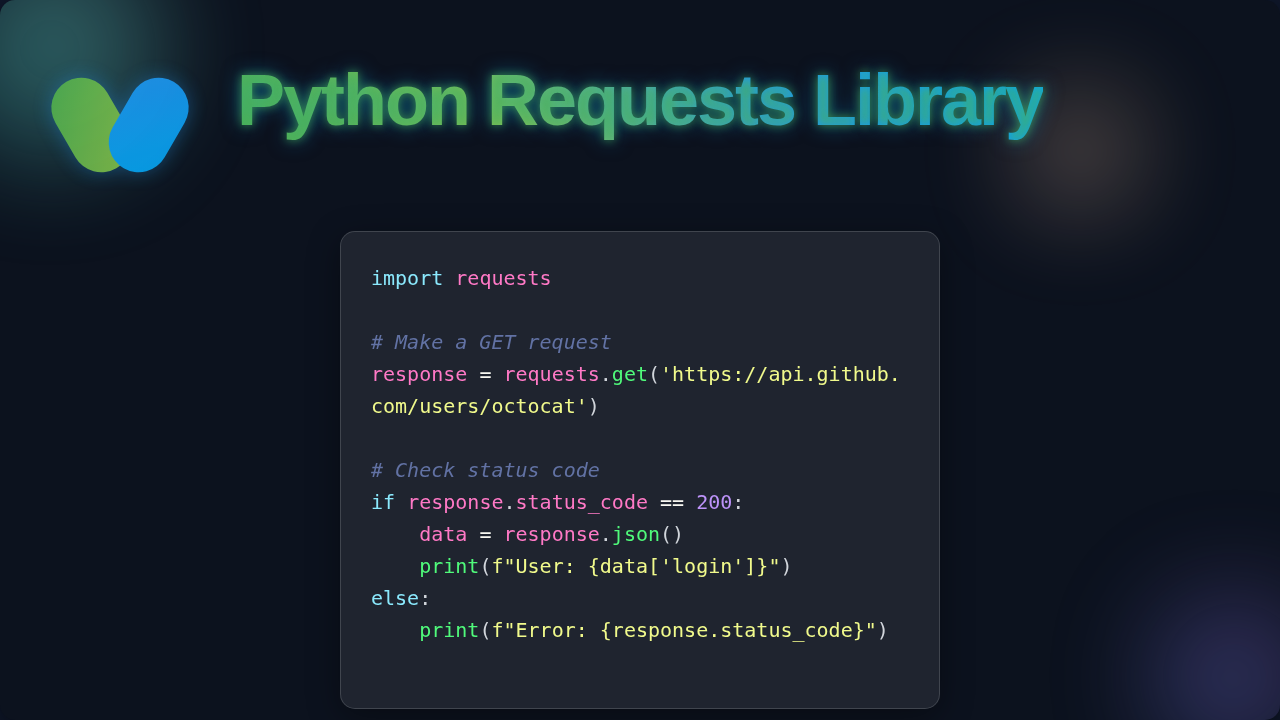
A GET request is like asking a question. You want to retrieve information. You are not sending new data. You are simply asking for what’s already there. Imagine you want to read a news article. Your browser sends a GET request. The news website sends back the article. In Python, you tell the library the web address. It goes and fetches the content for you. You get the whole page’s text back. It’s that simple. You are effectively ‘getting’ data from a server.
POST Requests: Sending New Data
Now, what if you want to send information? Maybe you’re filling out an online form. Perhaps you’re logging into a website. For these actions, you use a POST request. You are ‘posting’ new data to the server. Imagine signing up for a new service. You type your username and password. Your browser then sends a POST request. This request includes your login details. The website server receives them. It processes your information. The Requests Library handles this too. You simply provide the data you want to send. It takes care of packaging it up. You are updating or creating something new.
Handling Responses and Data
Once you make a request, you get a response back. This response contains important information. You need to know how to read it. Understanding the response is key. It tells you if your request was successful. It also gives you the data you asked for.
Status Codes: The Web’s Shorthand
Every response comes with a status code. This is a three-digit number. It tells you what happened to your request. For example, ‘200 OK’ means everything worked perfectly. You got what you asked for. ‘404 Not Found’ means the page doesn’t exist. You have probably seen that one before. ‘500 Internal Server Error’ means something went wrong on the website’s side. You can check these codes easily. They guide your program’s next steps. You can learn more about official HTTP status code definitions on MDN.
JSON Data: Organized Information
Many websites and APIs send data in a format called JSON. This stands for JavaScript Object Notation. It’s a way to organize data. Think of it like a carefully arranged list of items. It’s very easy for programs to read. You might see names, ages, or product descriptions. This data is structured. The Requests Library can automatically convert this JSON into Python dictionaries or lists. This makes working with web data incredibly simple for you. You can learn more about what JSON truly is on MDN.
Remember: A 200 OK status code is your green light! It means your request was processed successfully by the server.
Taking Control with the Python Requests Library
The Python Requests Library offers even more power. You can customize your requests. This gives you fine-tuned control. You can make your requests behave in very specific ways. This is where you really start to master web interactions.
Adding Parameters: Asking Specific Questions
Sometimes, you need to be more specific. You might want to search for something. Or filter results by a certain date. You use parameters for this. These are extra bits of information. You send them along with your GET request. The website then knows exactly what you’re looking for. You simply add a special argument. This argument contains all your search terms. The library builds the correct URL for you. This simplifies complex queries greatly. You just tell it what to look for.
Custom Headers: Changing Your Identity
Headers are like extra notes. Both you and the server send them. They contain information about the request or response. Sometimes, you might want to send custom headers. This can be for security reasons. Or perhaps to tell the server what type of content you prefer. You can even pretend to be a different web browser. This is done by changing your ‘User-Agent’ header. The library makes this easy. You just provide a dictionary of headers. It sends them with your request. You are now in charge of these details.
Timeouts: Not Waiting Forever
What if a website is slow? Or maybe it doesn’t respond at all? You don’t want your program to hang forever. This is where timeouts come in. You can set a maximum waiting time. If the server doesn’t respond within that time, your request will simply stop. This prevents your program from getting stuck. It keeps your applications responsive. You are telling the library, ‘don’t wait longer than this.’
Session Objects: Staying Logged In
Imagine you’re browsing an online store. You add items to your cart. You move between pages. The website remembers you. This is often thanks to ‘sessions.’ A session keeps track of your interaction. The Requests Library offers session objects. These are super useful. They allow you to persist certain parameters. They also remember cookies across multiple requests. This means you can stay ‘logged in’ for a series of actions. You don’t have to re-authenticate every time. This greatly simplifies complex workflows. You can learn more about Python Loops & Conditionals: Master Control Flow to handle iterative requests.
What to Learn Next
You’ve taken a huge step today! The Requests Library opens up a world of possibilities. To keep growing, you should explore a few more topics. You will find these ideas incredibly useful.
- Error Handling: Learn how to gracefully deal with network issues. What if a website is down? You can use try/except blocks to manage unexpected problems.
- Authentication: Discover how to securely access protected APIs. Many services require a username and password. Or special API keys.
- Web Scraping Ethics: Understand the rules and best practices. Not all websites want to be scraped. Always check a site’s terms of service and robots.txt file.
- Asynchronous Requests: Explore how to make many requests at once. This can speed up your programs. You might hear about libraries like
httpxoraiohttp. - Building Web Applications: Now that you can interact with APIs, you might want to build your own applications that use them. For instance, you could try Flask OpenAI Chatbot: Python API Tutorial with Flask.
Resources
Ready to dive deeper? These resources will help you on your journey. You’ll find a wealth of information. Keep learning, keep building!
- Official Requests Documentation: The most comprehensive guide for the Requests Library itself.
- MDN Web Docs: A fantastic source for understanding general web technologies. You can find detailed explanations of HTTP and web protocols.
You have taken a fantastic first step into the world of web interactions with Python! This library is a true game-changer. You’re now equipped with the knowledge to make your Python scripts communicate with virtually any website or API. Don’t be afraid to experiment. Try making requests to different public APIs. See what kind of data you can fetch. The web is now your playground, and you’ve got the tools to explore it. Keep coding, keep creating, and you’ll be building amazing things in no time!