Python Requests Library: Simplified HTTP & API Guide
Hey there, future web wizard! Ever felt like your Python scripts were talking to websites, but you had no idea how they were doing it? You are not alone. It’s like sending a letter without understanding the postal service. Today, we’re going to peek behind that curtain.
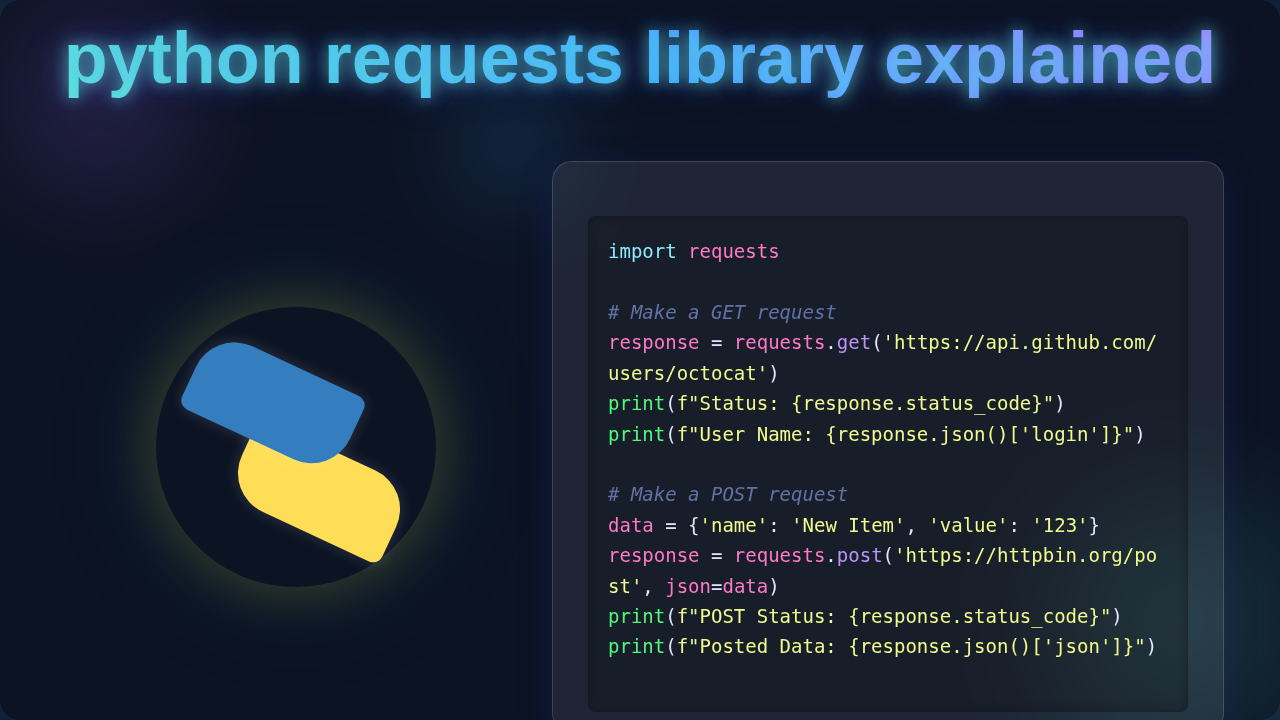
That’s where the awesome Python Requests library comes in. Think of it as your super friendly interpreter for the web. When you want your Python program to chat with a website or an API, this library handles all the complicated bits for you. It simplifies making HTTP requests. These are just messages computers send to each other over the internet. Essentially, the python requests library explained means turning complex web interactions into simple, readable lines of Python. You use it to retrieve information or send data.
Why the Python Requests Library Matters to YOU
So, why should you care about this fantastic tool? Because the internet runs on conversations. Every time you load a webpage, log into an app, or check the weather, your computer is having one of these chats. If you want your Python programs to build cool stuff – like custom tools, data scrapers, or even your own web services – you need to master this conversation. This library makes it incredibly easy. You don’t have to wrestle with low-level network details. Instead, you focus on what you want to do, not how to do it at a primitive level. You want to send data? It handles the wires. You want to get data? It brings it back. Furthermore, you can use it to connect your Python apps to exciting AI services. For instance, you could build a Python Telegram Bot with Gemini AI.
Python Requests Library Explained: The Basics of Web Talk
Okay, let’s pull back the curtain a little. How does the Requests library actually perform its magic? It all starts with something called HTTP, or Hypertext Transfer Protocol. This is the set of rules computers follow to talk on the web. Imagine it like the etiquette guide for internet conversations. When you use Requests, you’re essentially telling it to send a specific type of HTTP message. Consider this: your Python program wants to order pizza from a specific restaurant. Requests acts as your reliable delivery driver.
You tell Requests: ‘I want to GET some data from this website.’ (GET is an HTTP method, meaning you want to retrieve information.) Alternatively, you might say: ‘I want to POST some new data to this API.’ (POST means you’re sending new information, like submitting a form or adding a new item.) You can dive deeper into these fundamental methods on MDN Web Docs about HTTP Methods. Requests then takes your simple instruction. It constructs a proper, formatted HTTP request message. This message includes things like the website’s address (the URL), what kind of action you want (GET, POST), and any extra information you need. This extra information could be ‘headers’. Headers are like special notes. They tell the server what type of content you prefer, or your browser type. It might also include a ‘body’ if you’re sending data, such as a contact form input.
Once this request is perfectly crafted, Requests sends it out into the vast internet. It then patiently waits for a response from the designated web server. The web server processes your request carefully. It then sends its own HTTP response back to your Python program. What does this response contain? Crucially, it includes a ‘status code’. This code tells you the outcome. For example, ‘200 OK’ means everything went well. On the other hand, ‘404 Not Found’ means the requested page doesn’t exist. You can explore a comprehensive list of these codes on MDN Web Docs about HTTP Status Codes. The response also typically includes the data you asked for. This data often comes in a structured format, like JSON. JSON is a popular, lightweight way for APIs to send and receive data. Requests then takes this raw response. It neatly packages it up for you into a convenient Python object. This object has easy-to-access properties. You can quickly check the status code with a simple command. You can grab the data, perhaps as a dictionary if it was JSON. All the messy, low-level details are smartly hidden from you. Pretty neat, right? It makes your life so much easier.
Clearing Up Python Requests Library Explained Headaches
Sometimes, new folks get a bit tangled up. Let’s clear some common misconceptions.
Confusion 1: ‘Is Requests a web browser?’
No, not really! A web browser like Chrome or Firefox does a lot more than just send HTTP requests. It renders HTML. It runs JavaScript. It displays images. Furthermore, it manages your browsing sessions. Requests, however, just sends and receives the raw HTTP messages. It’s like the powerful engine of a car, not the whole car with comfortable seats and a radio. You can use it to fetch data that a browser would display. But it doesn’t display it for you. You have to parse and present that data yourself.
Confusion 2: ‘Why do I get weird characters back sometimes?’
This often comes down to character encoding. Websites use different ways to represent text characters. If your program expects one encoding (like UTF-8) and the website sends another, you get gibberish. Requests tries its best to guess the correct encoding. But sometimes, you need to explicitly tell it which one to use. You can easily set this property on the response object. This ensures your text is perfectly readable and meaningful.
Confusion 3: ‘My request seems to hang or take forever.’
This usually means the server isn’t responding, or it’s taking an unusually long time. You’re probably hitting a ‘timeout’ issue. Requests lets you set a maximum time to wait for a response. If the server doesn’t reply within that specified time, Requests will stop waiting. It will then raise an error. This prevents your program from freezing indefinitely. It’s a very good practice for building robust applications. For example, when you’re building a Flask REST API, you always want your API calls to external services to have timeouts. This makes your service more reliable.
Confusion 4: ‘Do I need to close connections?’
In most basic uses, no! Requests intelligently handles ‘connection pooling’ for you. This means it efficiently reuses open connections when possible. It’s far more efficient than opening a brand new connection for every single request. You don’t need to manually close things. Requests manages these network resources smartly behind the scenes. This is a crucial part of its ‘user-friendly’ design philosophy. You simply make your calls, and it handles the underlying network mechanics.
Pro Tip: Always set a
timeoutvalue in your Requests calls. This prevents your program from waiting forever if a server is slow or unresponsive. Robust code handles waiting gracefully, rather than just freezing.
Python Requests Library Explained: Deeper Dive into Features
Beyond the basics, Requests has some genuinely powerful features. These can elevate your web interactions.
Sessions: Imagine you’re browsing a shopping website. You add items to your cart, and the website magically remembers them. This continuity is often managed by ‘sessions’ and ‘cookies’. Requests allows you to use Session objects. A session object is special. It persists certain parameters across multiple requests. This means things like cookies, common headers, and even authentication information stay with your session. It makes interacting with ‘stateful’ APIs much smoother. You log in once, for example. Then all subsequent requests within that same session are automatically authenticated. You don’t need to re-authenticate each time.
Authentication: Many web APIs require you to prove who you are. Requests has superb, built-in support for various authentication schemes. You can easily pass in usernames and passwords for basic authentication. It also supports more complex methods. These include popular ones like OAuth. This simplifies access to protected resources tremendously. You don’t have to manually construct complex authentication headers yourself.
Redirects: What happens if a website resource moves to a new address? Its old address might send you to a new one. This automatic redirection is a common web pattern. By default, Requests follows these redirects automatically. It chases the new location until it finds the actual resource. However, you can also turn this automatic following off. This is useful if you need to inspect the redirect chain yourself. It gives you complete control over the navigation.
Error Handling: When things go wrong, and they sometimes do, Requests makes it easy to spot. The response object has a handy .raise_for_status() method. If the HTTP status code indicates an error (like a 4xx client error or a 5xx server error), this method will automatically raise an exception. It’s a very clean and Pythonic way to handle unexpected server issues. You can then catch these exceptions. This allows you to deal with them gracefully in your code.
Developer Insight: Libraries like Requests often leverage advanced Python features internally. Ever heard of Python Decorators? They might be used behind the scenes. They can add functionality or modify behavior without cluttering the main logic. This makes the library both powerful and remarkably clean in its design.
Your Key Takeaways on Python Requests Library Explained
Alright, let’s wrap up what we’ve learned and solidify your understanding.
- The Python Requests library is your absolute go-to for HTTP communication. It truly makes web interactions simple and elegant.
- It handles all the nitty-gritty details of HTTP requests and responses. This means you can focus entirely on your application’s unique logic.
- Understanding fundamental HTTP methods (GET, POST) and status codes is absolutely key. This knowledge helps you interpret server responses accurately.
- Powerful features like sessions, various authentication methods, and crucial timeouts are indispensable. They help you build robust, reliable, and real-world applications.
- Remember, Requests isn’t a web browser. Instead, it’s a powerful and precise tool for programmatically interacting with the vast web.
You now have a solid grasp of how this amazing library works. It’s truly a fundamental building block for so many exciting Python projects you’ll create.
Time to Go Build Something Awesome!
You’ve taken a big, important step today! Understanding the Python Requests library opens up a world of possibilities for your projects. You can now confidently build powerful tools that interact with countless web services and APIs. Keep experimenting, keep building, and don’t be afraid to dive even deeper into its capabilities. You’re well on your way to becoming a true web integration pro. Happy coding!