Hey, web wizards!
If you’ve ever wondered how websites check their own health, you’re in for a treat. We’re going to build something truly powerful today. Get ready to create a basic Python SEO Audit script. It will help us find broken links and check crucial meta tags. This is a super practical tool for any web developer!
What We Are Building: Your Python SEO Audit Tool
We are crafting a smart Python script. This script will visit a given website URL. Then, it will act like a digital detective. It will scan the page for two very important things. First, it looks for any broken links. These are links that point to nowhere, hurting user experience. Second, it will extract key meta tags. These tags tell search engines what your page is about. Our tool will give you a clear report of its findings. It’s a fantastic way to boost your site’s on-page SEO!
Pro Tip: Fixing broken links and optimizing meta tags are quick wins for SEO. Our script makes finding them a breeze!
Setting Up Your Environment for a Python SEO Audit
Before we code, we need to prepare our workspace. When you build Python projects, it’s smart to use virtual environments. They keep your project dependencies tidy. You can learn more about this essential practice in our post on Python Virtual Environments: Isolate Projects & Dependencies.
Next, we’ll install the libraries we need. We’ll use requests to fetch web pages. We also need BeautifulSoup4 to parse the HTML. Open your terminal or command prompt. Type these commands:
pip install requests beautifulsoup4That’s it for setup! Now we have all our tools ready. We can dive into the fun part: writing the script.
Crafting the Core of Your Python SEO Audit Script
Now, let’s break down the Python script’s logic. We’ll build this tool step-by-step. Each piece has an important job. This ensures a thorough audit.
Laying the Foundation with Imports
Every great Python script starts with imports. We need requests for fetching URLs. BeautifulSoup from bs4 helps us parse HTML. These are our essential building blocks. They give our script the power it needs.
Grabbing the Webpage’s Content
First, our script needs to get the website’s content. We will use the requests library for this. It sends a GET request to the target URL. This fetches the entire HTML of the page. We need this HTML to analyze it. It’s like asking the website for its source code. We’re polite, of course!
This part is similar to what you’d learn in a Python web scraper tutorial. We’re just grabbing specific data instead of all of it.
Hunting for Broken Links
Broken links are bad for SEO and user experience. Our script will find all <a> (anchor) tags. These tags contain links. We’ll extract the href attribute from each one. Then, we’ll send a separate request to each of these links. We check the HTTP status code. An HTTP status code like ‘200 OK’ means the link is good. A ‘404 Not Found’ or ‘500 Internal Server Error’ means it’s broken. This process ensures we catch all dead ends. HTTP status codes tell us if a page exists. You can learn more about these codes on MDN Web Docs.
Uncovering Meta Tag Secrets
Meta tags are hidden gems for SEO. They provide crucial information about a webpage. Our script will find all <meta> tags. We’ll focus on the name and content attributes. Common meta tags include ‘description’ and ‘keywords’. We will print these out clearly. This helps you see if your meta tags are optimized. It’s a quick way to check your on-page strategy. Meta tags give browsers and search engines information about a page. They are crucial for SEO. For instance, the <meta name='description'> tag provides a summary. Dive deeper into HTML meta elements on MDN.
Keep Learning: This script uses foundational web interaction. You can build even more complex tools with Python!
How Your Python SEO Audit Script Runs
Let’s put all the pieces together. Imagine running your script. It starts by asking for a URL. You provide one, say your personal blog. The script then fetches that page’s HTML. It parses it using BeautifulSoup. This turns raw HTML into an easy-to-navigate object.
The Execution Flow
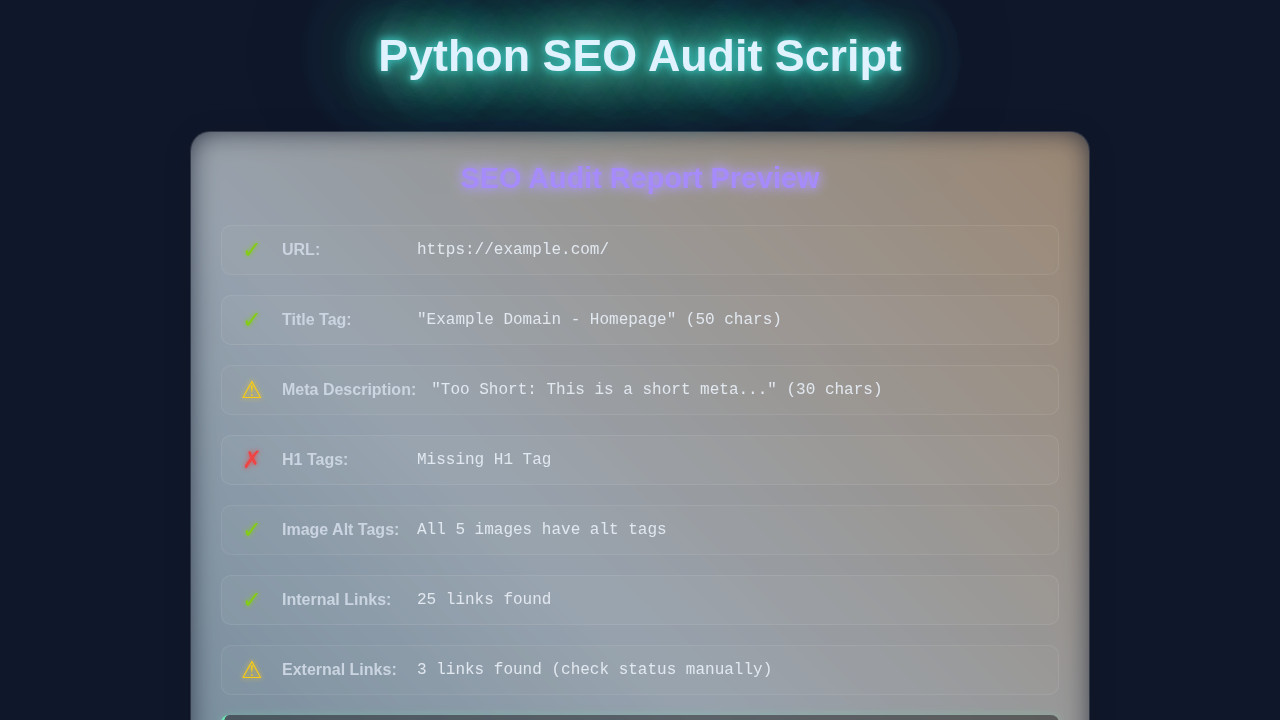
First, the script iterates through all links. It checks each one for errors. If a link returns a bad status code, it’s flagged. Next, it searches for all meta tags. It neatly extracts their names and content. Finally, it prints a summary. You get a clear report in your terminal. This shows broken links and found meta tags. It’s a complete, step-by-step audit process.
Interpreting the Results
The output tells you exactly what needs attention. Broken links need fixing. Missing or unoptimized meta descriptions need updating. This data helps you improve your website. It’s your personal SEO action plan. You can run this script any time you need an update.
Displaying Results: The HTML Structure (Optional Reporting)
Our Python script currently prints results to the console. But imagine a fancy report! We could extend our script to generate an HTML file. This file would display the audit results in a web browser. It would make sharing much easier. Think of a clean, structured report page. This HTML structure would define how our audit findings are presented. It’s all about making data user-friendly!
Styling Your Report: Basic CSS (For Visual Appeal)
If we generate an HTML report, we’ll want it to look good. CSS is perfect for this. We can add styles to make the results clear. Use colors to highlight broken links. Create clean sections for meta tag data. Basic CSS makes your report professional. It improves readability greatly. A good design helps you understand complex data quickly.
Adding Interactivity: JavaScript (If You Go Further)
For an even more advanced report, JavaScript comes in handy. You could add sortable tables for links. Or include search filters for meta tags. JavaScript brings dynamic features. It makes your report interactive. This is optional, but it adds a lot of power. Perhaps you want to integrate your audit findings into a web application, like a custom dashboard? You could even consider feeding data into something like a Python AI web app.
seo_auditor.py
import requests
from bs4 import BeautifulSoup
from urllib.parse import urljoin, urlparse
import csv

# Function to fetch page content from a given URL
def fetch_page(url):
    """
    Fetches the HTML content of a given URL.
    Handles basic HTTP errors and connection issues.
    """
    try:
        # Set a timeout to prevent the script from hanging indefinitely
        response = requests.get(url, timeout=10)
        response.raise_for_status() # Raise HTTPError for bad responses (4xx or 5xx)
        return response.text
    except requests.exceptions.RequestException as e:
        print(f"Error fetching {url}: {e}")
        return None

# Function to perform a basic SEO audit on a single page
def audit_page(url):
    """
    Audits a single web page for key on-page SEO elements:
    - Title Tag (presence, length)
    - Meta Description (presence, length)
    - H1 Tag (presence, count)
    - Image Alt Tags (missing count)
    - Internal/External Link counts
    Returns a dictionary of audit findings.
    """
    html_content = fetch_page(url)
    if not html_content:
        return None # Return None if page content could not be fetched

    soup = BeautifulSoup(html_content, 'html.parser')

    # 1. Title Tag Audit
    title = soup.find('title')
    title_text = title.get_text(strip=True) if title else "N/A"
    title_length = len(title_text)
    title_status = "OK" # Default status
    if title_text == "N/A":
        title_status = "Missing"
    elif not (30 <= title_length <= 60):
        title_status = f"{'Too Short' if title_length < 30 else 'Too Long'}"

    # 2. Meta Description Audit
    meta_description = soup.find('meta', attrs={'name': 'description'})
    description_text = meta_description.get('content', '').strip() if meta_description else "N/A"
    description_length = len(description_text)
    description_status = "OK" # Default status
    if description_text == "N/A":
        description_status = "Missing"
    elif not (70 <= description_length <= 160):
        description_status = f"{'Too Short' if description_length < 70 else 'Too Long'}"

    # 3. H1 Tag Audit
    h1_tags = soup.find_all('h1')
    h1_count = len(h1_tags)
    h1_text = h1_tags[0].get_text(strip=True) if h1_count > 0 else "N/A"
    h1_status = "OK" if h1_count == 1 else "Missing" if h1_count == 0 else "Multiple H1s"

    # 4. Image Alt Tags Audit
    images = soup.find_all('img')
    img_total = len(images)
    # Count images that either have no 'alt' attribute or an empty 'alt' attribute
    img_alt_missing = sum(1 for img in images if not img.get('alt', '').strip())
    img_alt_status = "OK" if img_alt_missing == 0 else f"{img_alt_missing}/{img_total} missing alt tags"

    # 5. Internal and External Links Count
    internal_links = []
    external_links = []
    parsed_url = urlparse(url)
    base_domain = parsed_url.netloc

    links = soup.find_all('a', href=True)
    for link in links:
        href = link.get('href')
        # Construct full URL to properly parse relative links
        full_url = urljoin(url, href)
        parsed_href = urlparse(full_url)

        # Check if the link's domain matches the base domain
        if parsed_href.netloc == base_domain:
            internal_links.append(full_url)
        else:
            external_links.append(full_url)

    # Return a dictionary of all collected audit data
    return {
        'url': url,
        'title': title_text,
        'title_length': title_length,
        'title_status': title_status,
        'meta_description': description_text,
        'meta_description_length': description_length,
        'meta_description_status': description_status,
        'h1_tag': h1_text,
        'h1_count': h1_count,
        'h1_status': h1_status,
        'img_total': img_total,
        'img_alt_missing': img_alt_missing,
        'img_alt_status': img_alt_status,
        'internal_links_count': len(internal_links),
        'external_links_count': len(external_links)
    }

# Main function to run the audit and save results to a CSV file
def main(start_url, output_csv='seo_audit_results.csv'):
    """
    Initiates the SEO audit for a specified URL and saves the results to a CSV file.
    """
    print(f"Starting SEO audit for: {start_url}")

    # Perform the audit for the given URL
    page_audit_results = audit_page(start_url)

    if not page_audit_results:
        print("Audit failed or page could not be accessed. Exiting.")
        return

    # Define the fieldnames for the CSV header based on the audit results dictionary keys
    fieldnames = list(page_audit_results.keys())

    try:
        # Open the CSV file in write mode, ensuring proper newline handling
        with open(output_csv, 'w', newline='', encoding='utf-8') as csvfile:
            writer = csv.DictWriter(csvfile, fieldnames=fieldnames)
            writer.writeheader() # Write the header row
            writer.writerow(page_audit_results) # Write the audit results as a single row
        print(f"\nAudit complete. Results saved to '{output_csv}'")
    except IOError as e:
        print(f"Error writing to CSV file: {e}")

# Entry point of the script
if __name__ == '__main__':
    # --- Configuration ---
    # Replace 'https://www.example.com' with the URL you want to audit.
    # Ensure the URL is complete (e.g., includes http:// or https://).
    TARGET_URL = 'https://www.example.com'

    print("\n--- Python SEO Audit Script ---")
    print("This script performs a basic on-page SEO audit for a single URL.")
    print("It checks for title, meta description, H1, image alt tags, and link counts.")
    print("\n--- Setup Instructions ---")
    print("1. Install required libraries if you haven't already:")
    print("   pip install requests beautifulsoup4")
    print(f"2. Ensure the TARGET_URL in the script is set to the page you want to audit ({TARGET_URL}).")
    print("3. Run the script: python seo_auditor.py")
    print(f"\nAuditing: {TARGET_URL}")

    main(TARGET_URL)
Tips to Customise Your Python SEO Audit Script
You’ve built a great tool! But don’t stop here. Here are some ideas to make it even better:
- Add more checks: Look for missing
<h1>tags. Check image alt attributes. Find internal vs. external links. - Generate fancy reports: Instead of console output, create a nice HTML report file. You could even use libraries like
Pandasfor data processing. - Scan multiple pages: Modify the script to crawl an entire website. Start from a sitemap or a single URL. Then follow all internal links.
- Schedule audits: Use task schedulers (like Cron jobs) to run your script regularly. Keep an eye on your site’s health automatically.
Conclusion
Wow, you did it! You just built a practical Python SEO Audit script. This tool gives you real insights into a website’s health. You can identify issues that impact search engine rankings. You’re now equipped to make websites better. Share your creation with friends. Show off your new Python skills! Keep experimenting and building. The web needs more pro coders like you!
seo_auditor.py
import requests
from bs4 import BeautifulSoup
from urllib.parse import urljoin, urlparse
import csv

# Function to fetch page content from a given URL
def fetch_page(url):
    """
    Fetches the HTML content of a given URL.
    Handles basic HTTP errors and connection issues.
    """
    try:
        # Set a timeout to prevent the script from hanging indefinitely
        response = requests.get(url, timeout=10)
        response.raise_for_status() # Raise HTTPError for bad responses (4xx or 5xx)
        return response.text
    except requests.exceptions.RequestException as e:
        print(f"Error fetching {url}: {e}")
        return None

# Function to perform a basic SEO audit on a single page
def audit_page(url):
    """
    Audits a single web page for key on-page SEO elements:
    - Title Tag (presence, length)
    - Meta Description (presence, length)
    - H1 Tag (presence, count)
    - Image Alt Tags (missing count)
    - Internal/External Link counts
    Returns a dictionary of audit findings.
    """
    html_content = fetch_page(url)
    if not html_content:
        return None # Return None if page content could not be fetched

    soup = BeautifulSoup(html_content, 'html.parser')

    # 1. Title Tag Audit
    title = soup.find('title')
    title_text = title.get_text(strip=True) if title else "N/A"
    title_length = len(title_text)
    title_status = "OK" # Default status
    if title_text == "N/A":
        title_status = "Missing"
    elif not (30 <= title_length <= 60):
        title_status = f"{'Too Short' if title_length < 30 else 'Too Long'}"

    # 2. Meta Description Audit
    meta_description = soup.find('meta', attrs={'name': 'description'})
    description_text = meta_description.get('content', '').strip() if meta_description else "N/A"
    description_length = len(description_text)
    description_status = "OK" # Default status
    if description_text == "N/A":
        description_status = "Missing"
    elif not (70 <= description_length <= 160):
        description_status = f"{'Too Short' if description_length < 70 else 'Too Long'}"

    # 3. H1 Tag Audit
    h1_tags = soup.find_all('h1')
    h1_count = len(h1_tags)
    h1_text = h1_tags[0].get_text(strip=True) if h1_count > 0 else "N/A"
    h1_status = "OK" if h1_count == 1 else "Missing" if h1_count == 0 else "Multiple H1s"

    # 4. Image Alt Tags Audit
    images = soup.find_all('img')
    img_total = len(images)
    # Count images that either have no 'alt' attribute or an empty 'alt' attribute
    img_alt_missing = sum(1 for img in images if not img.get('alt', '').strip())
    img_alt_status = "OK" if img_alt_missing == 0 else f"{img_alt_missing}/{img_total} missing alt tags"

    # 5. Internal and External Links Count
    internal_links = []
    external_links = []
    parsed_url = urlparse(url)
    base_domain = parsed_url.netloc

    links = soup.find_all('a', href=True)
    for link in links:
        href = link.get('href')
        # Construct full URL to properly parse relative links
        full_url = urljoin(url, href)
        parsed_href = urlparse(full_url)

        # Check if the link's domain matches the base domain
        if parsed_href.netloc == base_domain:
            internal_links.append(full_url)
        else:
            external_links.append(full_url)

    # Return a dictionary of all collected audit data
    return {
        'url': url,
        'title': title_text,
        'title_length': title_length,
        'title_status': title_status,
        'meta_description': description_text,
        'meta_description_length': description_length,
        'meta_description_status': description_status,
        'h1_tag': h1_text,
        'h1_count': h1_count,
        'h1_status': h1_status,
        'img_total': img_total,
        'img_alt_missing': img_alt_missing,
        'img_alt_status': img_alt_status,
        'internal_links_count': len(internal_links),
        'external_links_count': len(external_links)
    }

# Main function to run the audit and save results to a CSV file
def main(start_url, output_csv='seo_audit_results.csv'):
    """
    Initiates the SEO audit for a specified URL and saves the results to a CSV file.
    """
    print(f"Starting SEO audit for: {start_url}")

    # Perform the audit for the given URL
    page_audit_results = audit_page(start_url)

    if not page_audit_results:
        print("Audit failed or page could not be accessed. Exiting.")
        return

    # Define the fieldnames for the CSV header based on the audit results dictionary keys
    fieldnames = list(page_audit_results.keys())

    try:
        # Open the CSV file in write mode, ensuring proper newline handling
        with open(output_csv, 'w', newline='', encoding='utf-8') as csvfile:
            writer = csv.DictWriter(csvfile, fieldnames=fieldnames)
            writer.writeheader() # Write the header row
            writer.writerow(page_audit_results) # Write the audit results as a single row
        print(f"\nAudit complete. Results saved to '{output_csv}'")
    except IOError as e:
        print(f"Error writing to CSV file: {e}")

# Entry point of the script
if __name__ == '__main__':
    # --- Configuration ---
    # Replace 'https://www.example.com' with the URL you want to audit.
    # Ensure the URL is complete (e.g., includes http:// or https://).
    TARGET_URL = 'https://www.example.com'

    print("\n--- Python SEO Audit Script ---")
    print("This script performs a basic on-page SEO audit for a single URL.")
    print("It checks for title, meta description, H1, image alt tags, and link counts.")
    print("\n--- Setup Instructions ---")
    print("1. Install required libraries if you haven't already:")
    print("   pip install requests beautifulsoup4")
    print(f"2. Ensure the TARGET_URL in the script is set to the page you want to audit ({TARGET_URL}).")
    print("3. Run the script: python seo_auditor.py")
    print(f"\nAuditing: {TARGET_URL}")

    main(TARGET_URL)