Hey there, fellow coders! If you’ve ever wanted to build a powerful AI assistant that understands your own documents, but had no idea where to start, you are in the right place. Today, we’re diving into how to build your very first Local RAG Pipeline in Python. This means creating a personal AI chatbot. It can answer questions based only on the information you provide it. Imagine asking questions about your project notes or a favorite book! It’s super cool and completely private.
What We Are Building
We are going to craft a simple, yet powerful, web application. This app will let you upload your own documents. Then, you can chat with an AI that uses only those documents for its answers. This is fantastic for privacy! No data leaves your computer. It’s like having your own expert AI on demand. We’ll build a Local RAG Pipeline at its core. We’ll use Flask for our web server. This makes connecting our Python RAG core with a simple chat interface easy. You’ll have a functioning private chatbot by the end!
HTML Structure
First, let’s lay down the bones of our chat interface. We need a place for users to input their questions. We also need a spot to display the AI’s answers. This HTML provides a basic form. It also includes a container for our chat messages. It’s simple and clean, ready for some styling!
CSS Styling
Now, let’s make our chatbot look a little nicer! This CSS will give our interface a friendly appearance. We’ll add some spacing, colors, and make sure everything is easy to read. Good styling helps with user experience. You’ll see how a few lines of CSS can make a big difference. It’s all about making your chatbot inviting. Check out CSS-Tricks for great layout ideas.
JavaScript
Next, we’ll add some interactivity with JavaScript. Our script will handle sending your questions to our Python backend. It will then display the AI’s answers without refreshing the whole page. This makes the chat experience smooth and dynamic. We’ll use basic fetch API for this. It’s a key part of making our chatbot feel responsive and modern.
rag_pipeline.py
# rag_pipeline.py

import requests
from bs4 import BeautifulSoup
import nltk
from nltk.tokenize import sent_tokenize
from sentence_transformers import SentenceTransformer
import numpy as np
from sklearn.metrics.pairwise import cosine_similarity
from transformers import pipeline, set_seed
import os

# --- Configuration ---
TARGET_URL = "https://www.gutenberg.org/files/1342/1342-h/1342-h.htm" # Example: Pride and Prejudice by Jane Austen
CHUNK_SIZE = 500  # characters
CHUNK_OVERLAP = 50 # characters
TOP_K_RETRIEVAL = 3 # Number of top chunks to retrieve
EMBEDDING_MODEL_NAME = "all-MiniLM-L6-v2"
GENERATION_MODEL_NAME = "distilgpt2" # A small, fast model for demonstration
# For larger, more capable local LLMs, consider models like 'google/flan-t5-small' or using Ollama.
# Note: Initial download of these models can take time and storage.

# --- Setup Instructions ---
# 1. Install necessary libraries:
#    pip install requests beautifulsoup4 nltk sentence-transformers scikit-learn transformers numpy
# 2. Download NLTK 'punkt' tokenizer (run this once):
#    import nltk
#    nltk.download('punkt')

# Ensure NLTK data is downloaded
try:
    nltk.data.find('tokenizers/punkt')
except nltk.downloader.DownloadError:
    nltk.download('punkt')
    print("NLTK 'punkt' tokenizer downloaded.")

# --- 1. Data Ingestion (Web Scraping) ---
def scrape_text_from_url(url):
    """
    Scrapes text content from a given URL, stripping HTML tags and cleaning whitespace.
    """
    print(f"\nScraping data from: {url}")
    try:
        response = requests.get(url, timeout=10)
        response.raise_for_status() # Raise an HTTPError for bad responses (4xx or 5xx)
        soup = BeautifulSoup(response.text, 'html.parser')

        # Remove script and style elements as they are not part of the main content
        for script_or_style in soup(['script', 'style']):
            script_or_style.extract()

        # Get clean text, stripping extra whitespace and joining lines
        text = soup.get_text()
        lines = (line.strip() for line in text.splitlines())
        chunks = (phrase.strip() for line in lines for phrase in line.split("  "))
        text = '\n'.join(chunk for chunk in chunks if chunk)
        print("Data scraping complete.")
        return text
    except requests.exceptions.RequestException as e:
        print(f"Error scraping URL {url}: {e}")
        return None

# --- 2. Chunking ---
def chunk_text(text, chunk_size, chunk_overlap):
    """
    Splits text into smaller, overlapping chunks based on character count.
    Prioritizes splitting at sentence boundaries for better context preservation.
    """
    if not text:
        return []

    print(f"Chunking text into chunks of size {chunk_size} with overlap {chunk_overlap}...")
    sentences = sent_tokenize(text)
    chunks = []
    current_chunk_text = ""

    for sentence in sentences:
        # Check if adding the next sentence exceeds the chunk size
        if len(current_chunk_text) + len(sentence) + 1 > chunk_size:
            if current_chunk_text:
                chunks.append(current_chunk_text.strip())
                # Start new chunk with overlap from the end of the previous chunk
                start_index = max(0, len(current_chunk_text) - chunk_overlap)
                current_chunk_text = current_chunk_text[start_index:] + " " + sentence
            else: # Handle cases where a single sentence is larger than chunk_size
                # For simplicity, truncate the very long sentence and start a new chunk
                chunks.append(sentence[:chunk_size].strip())
                current_chunk_text = sentence[max(0, chunk_size - chunk_overlap):]
        else:
            current_chunk_text += (" " if current_chunk_text else "") + sentence

    if current_chunk_text:
        chunks.append(current_chunk_text.strip())

    print(f"Text chunking complete. Total chunks: {len(chunks)}")
    return chunks

# --- 3. Embedding ---
def get_embeddings(texts, model):
    """
    Generates embeddings for a list of texts using a SentenceTransformer model.
    """
    print(f"Generating embeddings for {len(texts)} texts...")
    # Encode texts to embeddings, convert to NumPy array on CPU
    embeddings = model.encode(texts, convert_to_tensor=True)
    print("Embeddings generation complete.")
    return embeddings.cpu().numpy()

# --- 4. Build Vector Store (in-memory) ---
def build_vector_store(chunks, embedding_model):
    """
    Creates an in-memory vector store as a list of dictionaries.
    Each dictionary contains the chunk text and its corresponding embedding.
    """
    if not chunks:
        return []

    print("Building in-memory vector store...")
    embeddings = get_embeddings(chunks, embedding_model)
    vector_store = [
        {"text": chunk, "embedding": embed}
        for chunk, embed in zip(chunks, embeddings)
    ]
    print(f"Vector store built with {len(vector_store)} entries.")
    return vector_store

# --- 5. Retrieval ---
def retrieve_chunks(query, vector_store, embedding_model, top_k):
    """
    Retrieves the most relevant chunks from the vector store based on a query.
    Uses cosine similarity for relevance scoring.
    """
    if not vector_store:
        print("Vector store is empty, cannot retrieve chunks.")
        return []

    print(f"Retrieving top {top_k} chunks for query: '{query}'...")
    # Generate embedding for the query
    query_embedding = embedding_model.encode(query, convert_to_tensor=True).cpu().numpy()

    # Extract all chunk embeddings from the vector store
    chunk_embeddings = np.array([item["embedding"] for item in vector_store])

    # Calculate cosine similarity between query and all chunk embeddings
    # Reshape query_embedding to (1, -1) as cosine_similarity expects 2D arrays
    similarities = cosine_similarity(query_embedding.reshape(1, -1), chunk_embeddings)[0]

    # Get indices of top_k most similar chunks
    top_k_indices = similarities.argsort()[-top_k:][::-1]

    retrieved_chunks_with_scores = []
    for idx in top_k_indices:
        retrieved_chunks_with_scores.append({
            "text": vector_store[idx]["text"],
            "score": similarities[idx]
        })

    print(f"Retrieved {len(retrieved_chunks_with_scores)} chunks.")
    return retrieved_chunks_with_scores

# --- 6. Generation ---
def generate_response(query, retrieved_chunks, llm_pipeline):
    """
    Generates a response using a local LLM, conditioned on the retrieved chunks.
    The LLM is prompted with the query and the relevant context.
    """
    if not retrieved_chunks:
        return "I couldn't find any relevant information in the provided context to answer your query."

    # Combine retrieved chunks into a single context string
    context = "\n".join([chunk["text"] for chunk in retrieved_chunks])

    # Construct a detailed prompt for the LLM
    prompt = f"""Based on the following context, answer the user's question concisely. If the answer cannot be found directly in the context, state that you don't know.

Context:
{context}

Question: {query}
Answer:"""

    print("Generating response with local LLM...")
    set_seed(42) # For reproducibility with distilgpt2
    try:
        response = llm_pipeline(
            prompt,
            max_new_tokens=150, # Limit the length of the generated answer
            num_return_sequences=1,
            truncation=True, # Truncate prompt if too long for model
            do_sample=True, # Enable sampling for more creative responses
            top_k=50,
            top_p=0.95,
            temperature=0.7
        )
        generated_text = response[0]['generated_text']

        # Post-process to extract just the answer part from the LLM's output
        answer_start_marker = "Answer:"
        if answer_start_marker in generated_text:
            final_answer = generated_text.split(answer_start_marker, 1)[1].strip()
        else:
            final_answer = generated_text.strip() # Fallback if marker not found

        # Further clean up any unwanted LLM artifacts or truncated prompts within the answer
        if "Context:" in final_answer:
            final_answer = final_answer.split("Context:", 1)[0].strip()
        if "Question:" in final_answer:
            final_answer = final_answer.split("Question:", 1)[0].strip()

        print("Response generation complete.")
        return final_answer
    except Exception as e:
        print(f"Error during LLM generation: {e}")
        return "Sorry, I encountered an error while trying to generate a response."


# --- Main Pipeline Execution ---
if __name__ == "__main__":
    print("\n--- Starting Local RAG Pipeline ---")

    # 1. Initialize Models
    print(f"Loading embedding model: {EMBEDDING_MODEL_NAME}...")
    embedding_model = SentenceTransformer(EMBEDDING_MODEL_NAME)
    print(f"Loading generation model: {GENERATION_MODEL_NAME}...")
    # Suppress transformers warnings about uninitialized weights or missing keys
    os.environ["TOKENIZERS_PARALLELISM"] = "false"
    llm_pipeline = pipeline("text-generation", model=GENERATION_MODEL_NAME)
    print("Models loaded successfully.")

    # 2. Data Ingestion & Processing
    raw_text = scrape_text_from_url(TARGET_URL)
    if raw_text:
        chunks = chunk_text(raw_text, CHUNK_SIZE, CHUNK_OVERLAP)
        vector_store = build_vector_store(chunks, embedding_model)

        print("\n--- RAG Pipeline Ready! Ask me a question about the scraped content. ---")
        while True:
            user_query = input("\nYour question (type 'exit' to quit): ")
            if user_query.lower() == 'exit':
                break

            # 3. Retrieval
            retrieved_chunks_info = retrieve_chunks(user_query, vector_store, embedding_model, TOP_K_RETRIEVAL)

            # Display retrieved chunks for transparency
            print("\n--- Retrieved Context ---")
            if retrieved_chunks_info:
                for i, chunk_info in enumerate(retrieved_chunks_info):
                    print(f"Chunk {i+1} (Score: {chunk_info['score']:.4f}): {chunk_info['text'][:150]}...") # Show first 150 chars
            else:
                print("No relevant chunks retrieved.")
            print("--------------------------")

            # 4. Generation
            final_answer = generate_response(user_query, retrieved_chunks_info, llm_pipeline)
            print(f"\nAI Answer: {final_answer}")
    else:
        print("Failed to scrape data. Exiting.")

    print("\n--- RAG Pipeline Finished ---")
How It All Works Together
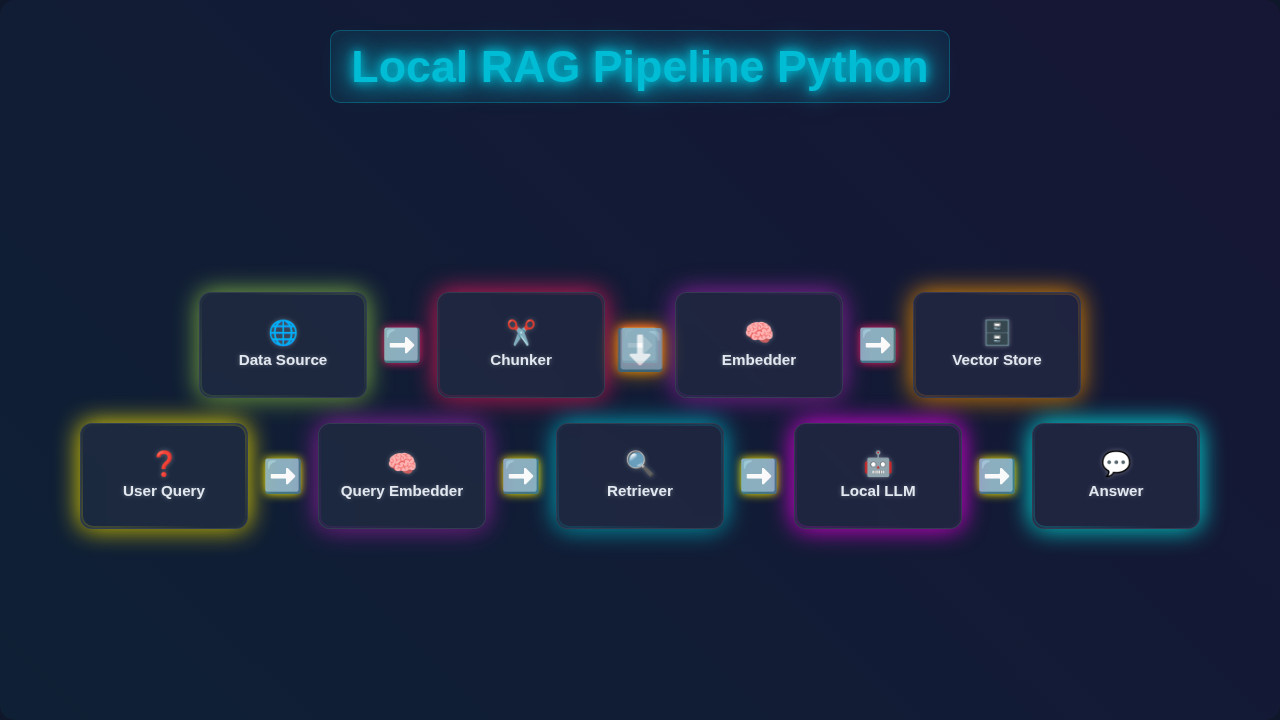
Alright, this is the core of our project! We’ve got our frontend ready. Now, let’s connect it to the brains: our Local RAG Pipeline built with Python. We’ll break down the process step-by-step. You’ll see how retrieval and generation combine. This gives us those smart, document-specific answers. Get ready to dive into the magic!
Setting Up Your Environment
Before we write any Python code, we need to set up our workspace. We’ll create a virtual environment first. This keeps our project dependencies separate and tidy. Type python -m venv venv in your terminal. Then activate it: source venv/bin/activate (Mac/Linux) or .\venv\Scripts\activate (Windows). Next, we need to install a few libraries. We’ll use Flask for our web server. Langchain is perfect for RAG orchestration. We also need Ollama to run a local language model. chromadb will be our local vector store. Install them with pip install Flask langchain ollama chromadb pypdf. This setup ensures everything runs smoothly for our project.
Why Local? Building a Local RAG Pipeline means your data stays on your machine. This boosts security and privacy significantly compared to cloud-based solutions. It’s a fundamental step towards ethical AI.
The Backend (Python/Flask)
Our Python backend will be a simple Flask application. This app will have two main routes. One route serves our index.html file. The other route will handle our chat questions. When a user asks a question, it will hit our /chat endpoint. This endpoint then takes the user’s query. It passes it to our RAG pipeline. The Flask app gets the answer back. Then, it sends the answer to our JavaScript frontend. This entire process happens seamlessly. It connects your browser to our powerful Python logic. Remember, Flask makes setting up web routes incredibly simple. It’s a great choice for this kind of project. You can learn more about building interactive web apps with Flask, like this React Task Manager with Local Storage – JSX & Hooks Tutorial example, which also shows how frontend and backend can interact, though with a different framework.
The RAG Core: Retrieval and Generation
This is where the magic of our Local RAG Pipeline truly happens. RAG stands for Retrieval-Augmented Generation. First, we ‘ingest’ our documents. This means breaking them into smaller chunks. Then, we create numerical representations called ’embeddings’. We store these embeddings in our chromadb vector store. This process is called ‘retrieval’. When you ask a question, we create an embedding for that question. We search our vector store to find relevant document chunks. These are the most relevant pieces of information. Next comes ‘generation’. We take your question and these relevant document chunks. We send them to our local large language model (LLM) via Ollama. The LLM then generates an answer. This answer is grounded only in the retrieved information. This prevents the LLM from ‘hallucinating’. It also keeps your data private!
Pro Tip: Running LLMs locally with Ollama is a game-changer for privacy! You have full control over your models and data, making your AI applications truly secure and personal. It’s perfect for sensitive information.
Connecting Frontend and Backend
Our JavaScript sends a POST request to the /chat endpoint of our Flask app. This request includes your question. The Flask app receives it. It then triggers our RAG pipeline logic. Once the RAG pipeline returns an answer, Flask sends this answer back to the browser. The JavaScript then updates the chat interface. It adds the AI’s response to your chat history. It’s a classic client-server interaction! For instance, if you’ve built a Responsive Navbar with Tailwind CSS & HTML – Complete Guide, you understand how HTML, CSS, and JS work together on the client side. Here, we extend that to interact with our Python server. This seamless communication makes our chatbot feel responsive. It also keeps our data flow efficient.
Tips to Customise It
You’ve built a fantastic foundation! Now, how can you make this Local RAG Pipeline even better?
- More Document Types: Expand document handling beyond PDFs. Add support for
.txt,.docx, or even web pages! Langchain makes this quite straightforward. - Persistent Chat History: Implement local storage to keep your chat conversations. This way, they don’t disappear after a refresh. This is similar to what you might do in a Kanban Board UI Design: HTML, CSS & JavaScript where you save tasks locally.
- Multiple Documents: Allow users to upload and manage several documents. Each could have its own dedicated RAG pipeline. This creates a more versatile assistant.
- Fine-Tune LLM: Experiment with different local LLMs on Ollama. Some models are better for specific tasks or languages. You can learn more about
fetchAPI for interaction at MDN Web Docs for advanced client-server communication.
Conclusion
Wow, you did it! You just built your very first Local RAG Pipeline! You created a private AI chatbot. This chatbot can answer questions based only on your own documents. That’s a huge achievement in modern AI development. You’ve learned about retrieval, embeddings, and large language models. You also saw how to integrate it all into a working application. This is a powerful skill. Go forth and experiment! Share what you’ve built. We are super excited to see what you create next on procoder09.com. Happy coding!
rag_pipeline.py
# rag_pipeline.py

import requests
from bs4 import BeautifulSoup
import nltk
from nltk.tokenize import sent_tokenize
from sentence_transformers import SentenceTransformer
import numpy as np
from sklearn.metrics.pairwise import cosine_similarity
from transformers import pipeline, set_seed
import os

# --- Configuration ---
TARGET_URL = "https://www.gutenberg.org/files/1342/1342-h/1342-h.htm" # Example: Pride and Prejudice by Jane Austen
CHUNK_SIZE = 500  # characters
CHUNK_OVERLAP = 50 # characters
TOP_K_RETRIEVAL = 3 # Number of top chunks to retrieve
EMBEDDING_MODEL_NAME = "all-MiniLM-L6-v2"
GENERATION_MODEL_NAME = "distilgpt2" # A small, fast model for demonstration
# For larger, more capable local LLMs, consider models like 'google/flan-t5-small' or using Ollama.
# Note: Initial download of these models can take time and storage.

# --- Setup Instructions ---
# 1. Install necessary libraries:
#    pip install requests beautifulsoup4 nltk sentence-transformers scikit-learn transformers numpy
# 2. Download NLTK 'punkt' tokenizer (run this once):
#    import nltk
#    nltk.download('punkt')

# Ensure NLTK data is downloaded
try:
    nltk.data.find('tokenizers/punkt')
except nltk.downloader.DownloadError:
    nltk.download('punkt')
    print("NLTK 'punkt' tokenizer downloaded.")

# --- 1. Data Ingestion (Web Scraping) ---
def scrape_text_from_url(url):
    """
    Scrapes text content from a given URL, stripping HTML tags and cleaning whitespace.
    """
    print(f"\nScraping data from: {url}")
    try:
        response = requests.get(url, timeout=10)
        response.raise_for_status() # Raise an HTTPError for bad responses (4xx or 5xx)
        soup = BeautifulSoup(response.text, 'html.parser')

        # Remove script and style elements as they are not part of the main content
        for script_or_style in soup(['script', 'style']):
            script_or_style.extract()

        # Get clean text, stripping extra whitespace and joining lines
        text = soup.get_text()
        lines = (line.strip() for line in text.splitlines())
        chunks = (phrase.strip() for line in lines for phrase in line.split("  "))
        text = '\n'.join(chunk for chunk in chunks if chunk)
        print("Data scraping complete.")
        return text
    except requests.exceptions.RequestException as e:
        print(f"Error scraping URL {url}: {e}")
        return None

# --- 2. Chunking ---
def chunk_text(text, chunk_size, chunk_overlap):
    """
    Splits text into smaller, overlapping chunks based on character count.
    Prioritizes splitting at sentence boundaries for better context preservation.
    """
    if not text:
        return []

    print(f"Chunking text into chunks of size {chunk_size} with overlap {chunk_overlap}...")
    sentences = sent_tokenize(text)
    chunks = []
    current_chunk_text = ""

    for sentence in sentences:
        # Check if adding the next sentence exceeds the chunk size
        if len(current_chunk_text) + len(sentence) + 1 > chunk_size:
            if current_chunk_text:
                chunks.append(current_chunk_text.strip())
                # Start new chunk with overlap from the end of the previous chunk
                start_index = max(0, len(current_chunk_text) - chunk_overlap)
                current_chunk_text = current_chunk_text[start_index:] + " " + sentence
            else: # Handle cases where a single sentence is larger than chunk_size
                # For simplicity, truncate the very long sentence and start a new chunk
                chunks.append(sentence[:chunk_size].strip())
                current_chunk_text = sentence[max(0, chunk_size - chunk_overlap):]
        else:
            current_chunk_text += (" " if current_chunk_text else "") + sentence

    if current_chunk_text:
        chunks.append(current_chunk_text.strip())

    print(f"Text chunking complete. Total chunks: {len(chunks)}")
    return chunks

# --- 3. Embedding ---
def get_embeddings(texts, model):
    """
    Generates embeddings for a list of texts using a SentenceTransformer model.
    """
    print(f"Generating embeddings for {len(texts)} texts...")
    # Encode texts to embeddings, convert to NumPy array on CPU
    embeddings = model.encode(texts, convert_to_tensor=True)
    print("Embeddings generation complete.")
    return embeddings.cpu().numpy()

# --- 4. Build Vector Store (in-memory) ---
def build_vector_store(chunks, embedding_model):
    """
    Creates an in-memory vector store as a list of dictionaries.
    Each dictionary contains the chunk text and its corresponding embedding.
    """
    if not chunks:
        return []

    print("Building in-memory vector store...")
    embeddings = get_embeddings(chunks, embedding_model)
    vector_store = [
        {"text": chunk, "embedding": embed}
        for chunk, embed in zip(chunks, embeddings)
    ]
    print(f"Vector store built with {len(vector_store)} entries.")
    return vector_store

# --- 5. Retrieval ---
def retrieve_chunks(query, vector_store, embedding_model, top_k):
    """
    Retrieves the most relevant chunks from the vector store based on a query.
    Uses cosine similarity for relevance scoring.
    """
    if not vector_store:
        print("Vector store is empty, cannot retrieve chunks.")
        return []

    print(f"Retrieving top {top_k} chunks for query: '{query}'...")
    # Generate embedding for the query
    query_embedding = embedding_model.encode(query, convert_to_tensor=True).cpu().numpy()

    # Extract all chunk embeddings from the vector store
    chunk_embeddings = np.array([item["embedding"] for item in vector_store])

    # Calculate cosine similarity between query and all chunk embeddings
    # Reshape query_embedding to (1, -1) as cosine_similarity expects 2D arrays
    similarities = cosine_similarity(query_embedding.reshape(1, -1), chunk_embeddings)[0]

    # Get indices of top_k most similar chunks
    top_k_indices = similarities.argsort()[-top_k:][::-1]

    retrieved_chunks_with_scores = []
    for idx in top_k_indices:
        retrieved_chunks_with_scores.append({
            "text": vector_store[idx]["text"],
            "score": similarities[idx]
        })

    print(f"Retrieved {len(retrieved_chunks_with_scores)} chunks.")
    return retrieved_chunks_with_scores

# --- 6. Generation ---
def generate_response(query, retrieved_chunks, llm_pipeline):
    """
    Generates a response using a local LLM, conditioned on the retrieved chunks.
    The LLM is prompted with the query and the relevant context.
    """
    if not retrieved_chunks:
        return "I couldn't find any relevant information in the provided context to answer your query."

    # Combine retrieved chunks into a single context string
    context = "\n".join([chunk["text"] for chunk in retrieved_chunks])

    # Construct a detailed prompt for the LLM
    prompt = f"""Based on the following context, answer the user's question concisely. If the answer cannot be found directly in the context, state that you don't know.

Context:
{context}

Question: {query}
Answer:"""

    print("Generating response with local LLM...")
    set_seed(42) # For reproducibility with distilgpt2
    try:
        response = llm_pipeline(
            prompt,
            max_new_tokens=150, # Limit the length of the generated answer
            num_return_sequences=1,
            truncation=True, # Truncate prompt if too long for model
            do_sample=True, # Enable sampling for more creative responses
            top_k=50,
            top_p=0.95,
            temperature=0.7
        )
        generated_text = response[0]['generated_text']

        # Post-process to extract just the answer part from the LLM's output
        answer_start_marker = "Answer:"
        if answer_start_marker in generated_text:
            final_answer = generated_text.split(answer_start_marker, 1)[1].strip()
        else:
            final_answer = generated_text.strip() # Fallback if marker not found

        # Further clean up any unwanted LLM artifacts or truncated prompts within the answer
        if "Context:" in final_answer:
            final_answer = final_answer.split("Context:", 1)[0].strip()
        if "Question:" in final_answer:
            final_answer = final_answer.split("Question:", 1)[0].strip()

        print("Response generation complete.")
        return final_answer
    except Exception as e:
        print(f"Error during LLM generation: {e}")
        return "Sorry, I encountered an error while trying to generate a response."


# --- Main Pipeline Execution ---
if __name__ == "__main__":
    print("\n--- Starting Local RAG Pipeline ---")

    # 1. Initialize Models
    print(f"Loading embedding model: {EMBEDDING_MODEL_NAME}...")
    embedding_model = SentenceTransformer(EMBEDDING_MODEL_NAME)
    print(f"Loading generation model: {GENERATION_MODEL_NAME}...")
    # Suppress transformers warnings about uninitialized weights or missing keys
    os.environ["TOKENIZERS_PARALLELISM"] = "false"
    llm_pipeline = pipeline("text-generation", model=GENERATION_MODEL_NAME)
    print("Models loaded successfully.")

    # 2. Data Ingestion & Processing
    raw_text = scrape_text_from_url(TARGET_URL)
    if raw_text:
        chunks = chunk_text(raw_text, CHUNK_SIZE, CHUNK_OVERLAP)
        vector_store = build_vector_store(chunks, embedding_model)

        print("\n--- RAG Pipeline Ready! Ask me a question about the scraped content. ---")
        while True:
            user_query = input("\nYour question (type 'exit' to quit): ")
            if user_query.lower() == 'exit':
                break

            # 3. Retrieval
            retrieved_chunks_info = retrieve_chunks(user_query, vector_store, embedding_model, TOP_K_RETRIEVAL)

            # Display retrieved chunks for transparency
            print("\n--- Retrieved Context ---")
            if retrieved_chunks_info:
                for i, chunk_info in enumerate(retrieved_chunks_info):
                    print(f"Chunk {i+1} (Score: {chunk_info['score']:.4f}): {chunk_info['text'][:150]}...") # Show first 150 chars
            else:
                print("No relevant chunks retrieved.")
            print("--------------------------")

            # 4. Generation
            final_answer = generate_response(user_query, retrieved_chunks_info, llm_pipeline)
            print(f"\nAI Answer: {final_answer}")
    else:
        print("Failed to scrape data. Exiting.")

    print("\n--- RAG Pipeline Finished ---")