Python Web Scraping Tutorial: Extract Data with Requests & BS4
Hey! If you have wanted to build a web scraper but had no idea where to start, you are in the right place. Today, we’re diving into the amazing world of Python Web Scraping. You’ll learn how to extract data from websites. We will use two powerful Python libraries: Requests and BeautifulSoup. Get ready to build something truly useful!
What We Are Building: Your First Data Extractor
Imagine needing to compare prices across different online stores. Or maybe you want to collect product details for a project. That’s exactly what we’ll build! Our project is a simple, yet powerful, web scraper. It will visit a mock e-commerce page. Then, it will grab specific details like product names and their prices. This data extraction is super valuable. It helps you automate tedious manual tasks. We are going to make your computer do the heavy lifting!
Understanding the Target HTML Structure
Every website has a fundamental skeleton, and that’s HTML. It defines the content and layout. Our Python Web Scraping script will carefully navigate this structure. It finds the exact pieces of data we want. Below is a simplified example of the kind of HTML structure we’ll pretend to scrape. This code helps us visualize our target. We will look for elements with specific class names.
The Role of CSS Styling (and why our scraper ignores it)
CSS is amazing! It makes websites beautiful and user-friendly. It controls fonts, colors, spacing, and layouts. While CSS is crucial for human readers, our simple Python Web Scraping script largely ignores it. For data extraction, we typically don’t care how the data looks. We just want the data itself! Thus, our scraper won’t process these styles. Let’s see some example CSS anyway, just to complete our mock page.
JavaScript and Dynamic Content (for later)
JavaScript brings websites to life with interactivity and dynamic content. Think of dropdown menus or content that loads after the page appears. For your first Python Web Scraping project, we will focus on static HTML. Pages that use heavy JavaScript to load content can be more challenging. They often require advanced tools like Selenium. Don’t worry about that for now! We’ll stick to content present directly in the initial HTML. Here’s a quick look at some sample JavaScript:
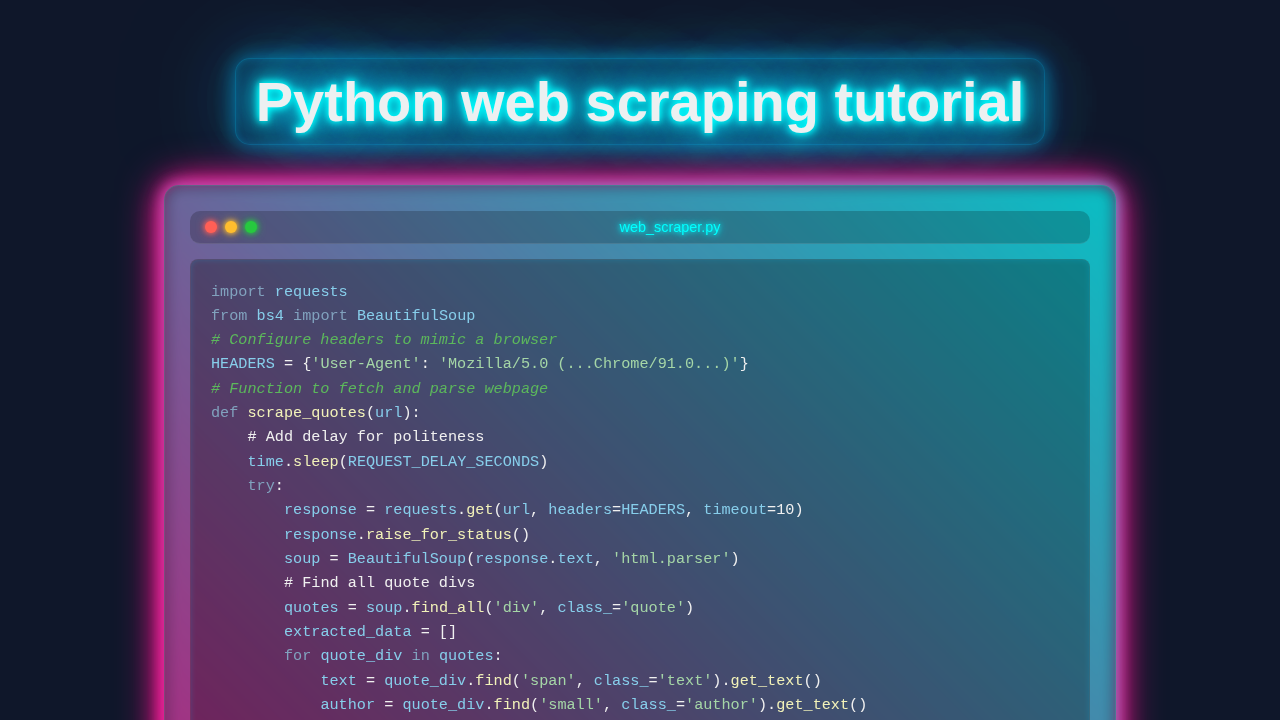
web_scraper.py
import requests
from bs4 import BeautifulSoup
import json
import time

# --- Configuration ---
# Recommended practice: always provide a User-Agent header to mimic a real browser.
# This helps prevent some basic blocking and identifies your scraper.
# You can find common User-Agents by searching online, or use the one below.
HEADERS = {
    'User-Agent': 'Mozilla/5.0 (Windows NT 10.0; Win64; x64) AppleWebKit/537.36 (KHTML, like Gecko) Chrome/91.0.4472.124 Safari/537.36',
    'Accept-Language': 'en-US,en;q=0.9',
    'Accept-Encoding': 'gzip, deflate, br',
    'Accept': 'text/html,application/xhtml+xml,application/xml;q=0.9,image/webp,*/*;q=0.8',
    'Connection': 'keep-alive',
}

# Add a small delay between requests to avoid overwhelming the server and
# to reduce the risk of being blocked. Be respectful of the target website's robots.txt.
REQUEST_DELAY_SECONDS = 1

# --- Core Scraping Function ---
def scrape_quotes(url):
    """
    Fetches the content of a given URL (specifically 'quotes.toscrape.com')
    and parses it to extract quote texts and their authors.

    Args:
        url (str): The URL of the webpage to scrape (e.g., "http://quotes.toscrape.com").

    Returns:
        list of dict: A list of dictionaries, where each dictionary contains
                      'quote' and 'author' for an extracted quote.
                      Returns an empty list if an error occurs.
    """
    print(f"Attempting to scrape: {url}")
    scraped_data = []

    try:
        # Introduce a delay before sending the request to be polite
        time.sleep(REQUEST_DELAY_SECONDS)

        # Send an HTTP GET request to the URL with custom headers and a timeout
        response = requests.get(url, headers=HEADERS, timeout=10)
        # Raise an HTTPError for bad responses (4xx or 5xx status codes)
        response.raise_for_status()

        # Parse the HTML content using BeautifulSoup
        soup = BeautifulSoup(response.text, 'html.parser')

        # Find all 'div' elements with class 'quote' which contain the individual quotes
        quotes = soup.find_all('div', class_='quote')

        if not quotes:
            print("No quotes found on the page with selector 'div.quote'. Check the website's HTML structure.")
            return []

        for quote_div in quotes:
            # Extract the quote text from the 'span' element with class 'text'
            quote_text_tag = quote_div.find('span', class_='text')
            quote_text = quote_text_tag.get_text(strip=True) if quote_text_tag else 'N/A'

            # Extract the author from the 'small' element with class 'author'
            author_tag = quote_div.find('small', class_='author')
            author = author_tag.get_text(strip=True) if author_tag else 'Unknown Author'

            scraped_data.append({
                'quote': quote_text,
                'author': author
            })

    except requests.exceptions.HTTPError as e:
        print(f"HTTP Error occurred: {e} - Status Code: {response.status_code}")
    except requests.exceptions.ConnectionError as e:
        print(f"Connection Error occurred: {e}")
    except requests.exceptions.Timeout as e:
        print(f"Request timed out: {e}")
    except requests.exceptions.RequestException as e:
        print(f"An unexpected Request error occurred: {e}")
    except Exception as e:
        print(f"An error occurred during parsing: {e}")

    return scraped_data

# --- Main Execution Block ---
if __name__ == "__main__":
    # IMPORTANT: Always check a website's `robots.txt` file (e.g., `https://example.com/robots.txt`)
    # and their Terms of Service before scraping. Scraping without permission can be illegal.
    # `quotes.toscrape.com` is a publicly available demo site specifically designed for scraping.
    TARGET_URL = "http://quotes.toscrape.com"

    print("Starting Python web scraping tutorial script...")

    results = scrape_quotes(TARGET_URL)

    if results:
        print("\n--- Scraped Data ---")
        for i, item in enumerate(results):
            print(f"Quote {i+1}:")
            print(f"  Quote: \"{item.get('quote', 'N/A')}\"")
            print(f"  Author: {item.get('author', 'N/A')}")
            print("-" * 20)

        # Optional: Save the data to a JSON file for further analysis or use
        output_filename = 'scraped_quotes.json'
        try:
            with open(output_filename, 'w', encoding='utf-8') as f:
                json.dump(results, f, indent=4, ensure_ascii=False)
            print(f"\nData successfully saved to '{output_filename}'")
        except IOError as e:
            print(f"Error saving data to file '{output_filename}': {e}")

    else:
        print("\nNo data was scraped or an error occurred. Please check the URL and your internet connection.")

    print("\nWeb scraping script finished.")
How Our Python Web Scraping Script Comes Alive
Now for the exciting part! Let’s build the Python script. We’ll break down the process step by step. This helps you understand each piece. Consequently, you will master the flow.
Step 1: Setting Up Your Environment
First, we need to install our tools. You’ll open your terminal or command prompt. Then, you will run a couple of simple commands. We need the requests library to download web pages. Also, we need beautifulsoup4 to parse the HTML. This parsing transforms raw text into a navigable object.
pip install requests beautifulsoup4Pro Tip: Always use a virtual environment for your Python projects! It keeps your project dependencies isolated and tidy. This prevents version conflicts.
The requests library handles making HTTP requests. It acts like a web browser. Dive deeper into the Requests library internals here! BeautifulSoup then helps us navigate the HTML tree. It finds exactly what we need.
Step 2: Fetching the Web Page
Our scraper’s first job is to get the web page’s content. The requests library makes this incredibly easy. We simply tell it the URL of the page we want. It then sends a GET request to that URL. The server responds with the HTML content. We capture this content as text. This text is the raw data we will process.
import requests

url = "http://www.example.com/products" # Replace with your target URL or a local file path for testing
response = requests.get(url)
html_content = response.text

print("Page fetched successfully!")
In a real scenario, you would put the actual URL of the website you want to scrape here. For testing, you could even save our sample HTML to a local file. Then you can read it from there. This ensures you can experiment safely.
Step 3: Parsing with BeautifulSoup
Raw HTML text is hard to work with directly. That’s where BeautifulSoup comes in! It takes the HTML string and transforms it. It creates a parse tree. This tree lets us navigate the HTML using Python objects. You can easily search for elements. You can filter them by tag name, class, or ID. It’s like turning a messy document into an organized filing system.
from bs4 import BeautifulSoup

soup = BeautifulSoup(html_content, 'html.parser')

print("HTML parsed with BeautifulSoup!")
The 'html.parser' argument tells BeautifulSoup how to interpret the HTML. It’s a robust and built-in parser. There are other options too, but this one works great for most cases. It makes our Python Web Scraping tasks much simpler.
Step 4: Extracting the Data
This is the core of our data extraction! We will use BeautifulSoup’s powerful methods to find specific elements. We want product titles and prices. Our sample HTML uses a div with class product-card. Inside each card, there is an h3 for the title and a span for the price. We can use find_all() to get all product cards. Then we can loop through them. Inside the loop, we use find() to get the specific title and price from each card.
products = []
product_cards = soup.find_all('div', class_='product-card')

for card in product_cards:
    title_element = card.find('h3', class_='product-title')
    price_element = card.find('span', class_='product-price')

    title = title_element.text.strip() if title_element else 'N/A'
    price = price_element.text.strip() if price_element else 'N/A'

    products.append({
        'title': title,
        'price': price
    })

print("Extracted Products:", products)
Notice how we use .text.strip()? This gets the text content of the element. It also removes any extra whitespace. We also added checks (if title_element else 'N/A') to prevent errors. This ensures robustness if an element is missing. If you want to learn more about iterating, check out our guide on Python Loops and Conditionals.
Step 5: Putting It All Together (Full Code)
Here’s the complete Python script combining all the steps. You can save this as a .py file. Then you can run it from your terminal. This script brings all the pieces into a cohesive unit. It downloads, parses, and extracts data. You’ve built a real tool!
import requests
from bs4 import BeautifulSoup

# Step 1: Define the URL (or use a local HTML string for testing)
# For a real scraper, replace this with the target website URL.
# For this tutorial, we'll use a local string simulating our example HTML.
html_content_to_scrape = """


        Amazing Widget Pro
        $29.99
        A high-quality widget for all your needs.


        Super Gadget Mini
        $12.50
        Compact and powerful gadget on a budget.


        Cool Tool X
        $45.00
        The ultimate tool for every pro coder.


"""

# In a real scenario, you'd fetch from a URL:
# url = "http://www.example.com/products"
# response = requests.get(url)
# html_content = response.text
# For this example, we'll use our predefined string:
html_content = html_content_to_scrape

# Step 2: Parse the HTML content
soup = BeautifulSoup(html_content, 'html.parser')

# Step 3: Extract the data
products = []
product_cards = soup.find_all('div', class_='product-card')

print("\n--- Starting Data Extraction ---")
for card in product_cards:
    title_element = card.find('h3', class_='product-title')
    price_element = card.find('span', class_='product-price')

    title = title_element.text.strip() if title_element else 'N/A'
    price = price_element.text.strip() if price_element else 'N/A'

    products.append({
        'title': title,
        'price': price
    })
    print(f"Found: {title} at {price}")

print("--- Data Extraction Complete ---\n")

# Step 4: Display the extracted data
print("All Extracted Products:")
for product in products:
    print(f"  Title: {product['title']}, Price: {product['price']}")

print("\nYour first web scraper ran successfully!")
Tips to Customise Your Web Scraper
Congratulations, you’ve built your first web scraper! But the journey doesn’t end here. There are many ways to make your scraper even more powerful and useful. You can start by trying these ideas.
- Scrape More Data: Try extracting product descriptions. Or maybe gather links to product images. Look for different elements on the page.
- Save to a File: Instead of just printing to the console, save your data! You could store it in a CSV file or a JSON file. This makes your data portable.
- Handle Pagination: Many websites spread content across multiple pages. Learn how to loop through pages. This lets your scraper collect all the available data.
- Ethical Scraping: Always check a website’s
robots.txtfile. This file tells you what areas are allowed for scraping. Respect the website’s policies. Too many requests can also get your IP blocked. Always add delays (e.g.,time.sleep()) between requests. - Build a Frontend: Want to display your scraped data beautifully? You could use a framework like Flask. Learn how to serve your data via an API with our Flask Blog API Tutorial.
Remember: Practice is key! Try scraping simple pages first. Gradually work your way up to more complex sites. Each new challenge builds your skills.
Conclusion: You Built Your First Web Scraper!
Wow, you just built your very own data extraction tool! You successfully navigated HTML, fetched content with Requests, and parsed it with BeautifulSoup. That’s a huge achievement in Python Web Scraping. This project opens up so many possibilities. Think about all the data waiting to be explored. Keep experimenting, keep coding, and keep learning. We can’t wait to see what you build next. Share your creations with us on social media!
web_scraper.py
import requests
from bs4 import BeautifulSoup
import json
import time

# --- Configuration ---
# Recommended practice: always provide a User-Agent header to mimic a real browser.
# This helps prevent some basic blocking and identifies your scraper.
# You can find common User-Agents by searching online, or use the one below.
HEADERS = {
    'User-Agent': 'Mozilla/5.0 (Windows NT 10.0; Win64; x64) AppleWebKit/537.36 (KHTML, like Gecko) Chrome/91.0.4472.124 Safari/537.36',
    'Accept-Language': 'en-US,en;q=0.9',
    'Accept-Encoding': 'gzip, deflate, br',
    'Accept': 'text/html,application/xhtml+xml,application/xml;q=0.9,image/webp,*/*;q=0.8',
    'Connection': 'keep-alive',
}

# Add a small delay between requests to avoid overwhelming the server and
# to reduce the risk of being blocked. Be respectful of the target website's robots.txt.
REQUEST_DELAY_SECONDS = 1

# --- Core Scraping Function ---
def scrape_quotes(url):
    """
    Fetches the content of a given URL (specifically 'quotes.toscrape.com')
    and parses it to extract quote texts and their authors.

    Args:
        url (str): The URL of the webpage to scrape (e.g., "http://quotes.toscrape.com").

    Returns:
        list of dict: A list of dictionaries, where each dictionary contains
                      'quote' and 'author' for an extracted quote.
                      Returns an empty list if an error occurs.
    """
    print(f"Attempting to scrape: {url}")
    scraped_data = []

    try:
        # Introduce a delay before sending the request to be polite
        time.sleep(REQUEST_DELAY_SECONDS)

        # Send an HTTP GET request to the URL with custom headers and a timeout
        response = requests.get(url, headers=HEADERS, timeout=10)
        # Raise an HTTPError for bad responses (4xx or 5xx status codes)
        response.raise_for_status()

        # Parse the HTML content using BeautifulSoup
        soup = BeautifulSoup(response.text, 'html.parser')

        # Find all 'div' elements with class 'quote' which contain the individual quotes
        quotes = soup.find_all('div', class_='quote')

        if not quotes:
            print("No quotes found on the page with selector 'div.quote'. Check the website's HTML structure.")
            return []

        for quote_div in quotes:
            # Extract the quote text from the 'span' element with class 'text'
            quote_text_tag = quote_div.find('span', class_='text')
            quote_text = quote_text_tag.get_text(strip=True) if quote_text_tag else 'N/A'

            # Extract the author from the 'small' element with class 'author'
            author_tag = quote_div.find('small', class_='author')
            author = author_tag.get_text(strip=True) if author_tag else 'Unknown Author'

            scraped_data.append({
                'quote': quote_text,
                'author': author
            })

    except requests.exceptions.HTTPError as e:
        print(f"HTTP Error occurred: {e} - Status Code: {response.status_code}")
    except requests.exceptions.ConnectionError as e:
        print(f"Connection Error occurred: {e}")
    except requests.exceptions.Timeout as e:
        print(f"Request timed out: {e}")
    except requests.exceptions.RequestException as e:
        print(f"An unexpected Request error occurred: {e}")
    except Exception as e:
        print(f"An error occurred during parsing: {e}")

    return scraped_data

# --- Main Execution Block ---
if __name__ == "__main__":
    # IMPORTANT: Always check a website's `robots.txt` file (e.g., `https://example.com/robots.txt`)
    # and their Terms of Service before scraping. Scraping without permission can be illegal.
    # `quotes.toscrape.com` is a publicly available demo site specifically designed for scraping.
    TARGET_URL = "http://quotes.toscrape.com"

    print("Starting Python web scraping tutorial script...")

    results = scrape_quotes(TARGET_URL)

    if results:
        print("\n--- Scraped Data ---")
        for i, item in enumerate(results):
            print(f"Quote {i+1}:")
            print(f"  Quote: \"{item.get('quote', 'N/A')}\"")
            print(f"  Author: {item.get('author', 'N/A')}")
            print("-" * 20)

        # Optional: Save the data to a JSON file for further analysis or use
        output_filename = 'scraped_quotes.json'
        try:
            with open(output_filename, 'w', encoding='utf-8') as f:
                json.dump(results, f, indent=4, ensure_ascii=False)
            print(f"\nData successfully saved to '{output_filename}'")
        except IOError as e:
            print(f"Error saving data to file '{output_filename}': {e}")

    else:
        print("\nNo data was scraped or an error occurred. Please check the URL and your internet connection.")

    print("\nWeb scraping script finished.")