Python Requests Library: Master Web API Interaction
Hey there, future web wizard! If the idea of making your Python programs talk to websites sounds like science fiction right now, you are absolutely not alone. Many of us start exactly there. You might have heard whispers about APIs, or maybe you have just wanted to grab some information from a web page automatically. That is where our hero, the Python Requests Library, comes into play.
If you are brand new to this topic, buckle up. We are going to break down how this incredible tool makes interacting with the internet incredibly simple. You do not need to be a networking guru. You just need a curious mind and a desire to make your code do cool things!
Think of it like this: your web browser sends messages to websites all the time. It asks for pictures, text, and videos. It is how you see this very blog post! But what if your Python program wants to send those same messages? Or maybe you want it to receive answers? The Python Requests Library helps your program do just that. It is your program’s passport to the world wide web.
Why You Need the Python Requests Library
First, let’s talk about what’s happening behind the scenes. When your browser talks to a website, it uses something called HTTP. HTTP stands for Hypertext Transfer Protocol. It is the language web servers and clients (like your browser or Python script) use to communicate. Think of HTTP as the universal set of rules for ordering food at a very busy restaurant.
You, the customer, want a meal. The server, the restaurant’s website, has the food. You send an order. The server sends back your meal. Sometimes it is successful, sometimes there is a problem. Managing all these communication steps manually in Python used to be a real headache. You had to worry about intricate network details. You had to handle every tiny piece of the conversation.
Here’s the thing: you probably do not want to become an expert in the exact wiring of the internet. You want to focus on what your program does. The Python Requests Library steps in here. It takes care of all those complex details for you. It simplifies the process of sending and receiving data over the web. You can focus on what you want to request, not how to construct the perfect network packet.
Pro Tip: Imagine the Python Requests Library as your personal concierge for the internet. You tell it what you want, and it handles all the complex arrangements to get it for you.
Getting Started with the Python Requests Library
So, how does this magic work? The most common thing you will do is ask a website for some information. This is called a GET request. It is like telling the restaurant, “Just show me your menu!” You are not changing anything; you are just looking.
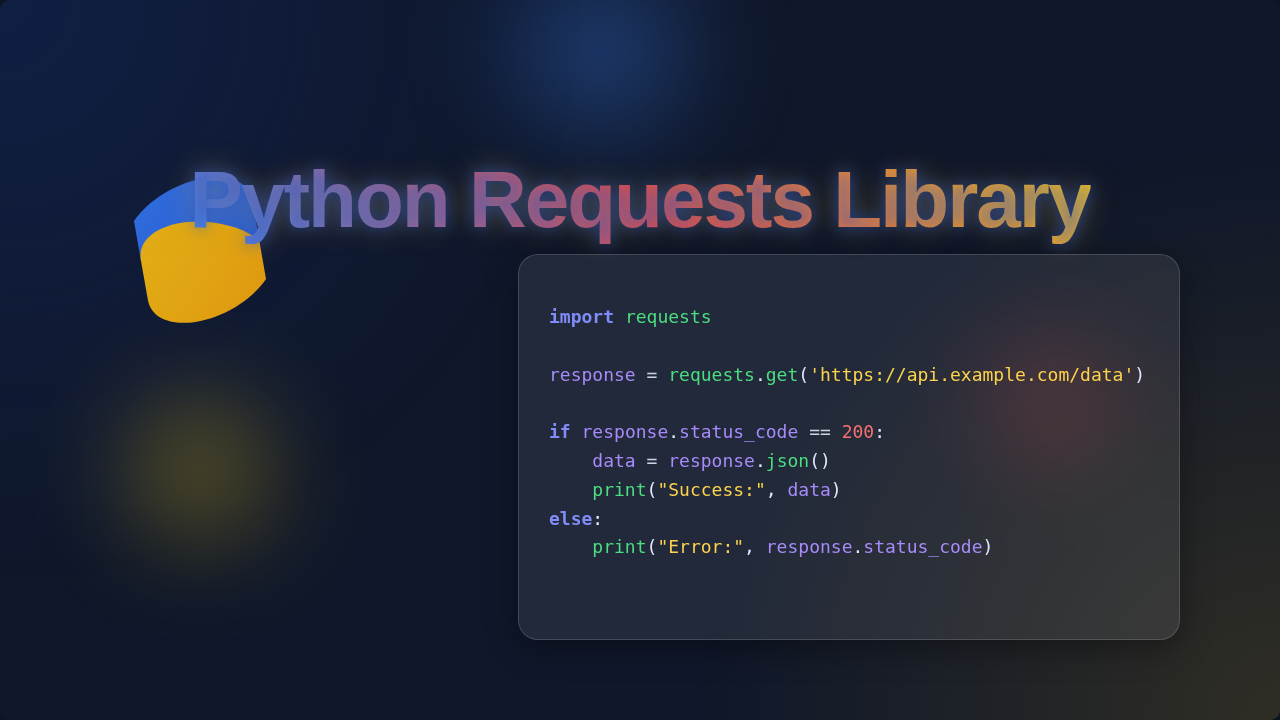
With the Python Requests Library, performing a GET request is incredibly straightforward. You tell the library which web address (URL) you want to visit. Then, you send your request. The library then fetches the content from that URL. It grabs everything just like your web browser would.
After you send a request, you get something back called a ‘response’. A response is what the website sends back to your program. It contains the data you asked for, like text, images, or structured information. It also tells you if the request was successful. Did the restaurant have your item in stock? Or was the kitchen closed?
You can easily check the status of your request. A common successful status is ‘200 OK’. This means everything went perfectly. You requested the menu, and the menu arrived. Other numbers, like ‘404 Not Found’, mean something went wrong. This is incredibly helpful for understanding why your program might not be getting the data it expects.
Common HTTP Actions with the Python Requests Library
Beyond just looking at menus (GET requests), you can do much more. The internet is interactive! You can also place orders, update items, or even remove them. These actions correspond to other HTTP methods, and the Python Requests Library handles them all with similar ease.
- POST requests: This is like placing an order at the restaurant. You are sending new information to the website. Perhaps you are submitting a form, creating a new user account, or adding a new blog post. You send data along with your request, and the server processes it.
- PUT requests: Think of this as updating an existing order. Maybe you called the restaurant to change your side dish. With a PUT request, you are telling the server to modify an existing resource. You provide the updated information, and the server changes what it has.
- DELETE requests: This one is simple: you want to remove something. Maybe you canceled an order. A DELETE request tells the server to remove a specific resource. Be careful with this one!
The cool part is that the Python Requests Library makes these different actions feel very similar. You use slightly different functions, but the overall process remains consistent. You tell it the URL, you provide any necessary data, and you get a response back. Mastering these core HTTP methods with this library is a huge step in building interactive web applications. If you want to dive deeper into making your API calls truly shine, explore more about Python Requests Library: Master API Calls Easily.
Handling Data: JSON and Beyond
When you make a request to an API, the information you get back often comes in a special format. One of the most common and friendly formats is JSON. JSON stands for JavaScript Object Notation. It is a way to organize data in a very readable, structured format. Think of it like a neatly organized shopping list. Each item has a name and a value, making it easy to understand.
The Python Requests Library has built-in features to handle JSON. When you get a response, the library can often automatically parse, or understand, the JSON data for you. It converts that structured text into Python dictionaries and lists. This means you can access parts of the response using familiar Python methods. You can pull out specific details, just like finding a particular item on your shopping list.
For example, if an API sends you information about a weather forecast, it might be in JSON. The library lets you easily grab the temperature or the chance of rain from that JSON. You do not have to write complicated code to sift through plain text. It makes working with web data much more intuitive and Pythonic. For more insights on how Python simplifies data interactions, check out our guide on Python Requests.
Key Takeaway: The Requests Library handles JSON like a pro, turning web data into usable Python objects. This saves you tons of time and effort!
What to Learn Next for Web Development Success
You have now got a solid grasp of the basics with the Python Requests Library! That is a huge accomplishment. But the journey does not stop here. There are always more exciting things to explore as you continue building your web development skills. Here are a few paths you might consider next:
First, look into API authentication. Many websites require you to prove who you are before they give you data or let you make changes. This involves sending special keys or tokens with your requests. It is like showing your ID to get into a restricted area.
Next, dive into error handling. What happens if a website does not respond? Or if your internet connection drops? Learning to gracefully handle these situations makes your programs much more robust. You want your code to be resilient, not to crash unexpectedly. For instance, sometimes you want to automate tasks, and handling errors in those scripts is vital. Discover how Python can help you with Python File Organizer: Automate Your Desktop Cleanup Script.
You could also explore asynchronous requests. Sometimes, you need to make many requests at once. Waiting for each one to finish can slow down your program. Asynchronous programming lets your program do other things while it waits for a response. It is like ordering multiple dishes at the restaurant and letting the kitchen cook them all at the same time, instead of one by one.
Finally, understand RESTful APIs. Many web APIs follow a pattern called REST. Learning about REST principles will help you interact with almost any modern web service effectively. It is a common design philosophy for building web services. You can learn more about HTTP methods, which are central to REST, by exploring HTTP request methods on MDN Web Docs.
Resources to Keep You Going
- Official Requests Documentation: The best place to find detailed information and advanced usage examples for the Python Requests Library.
- MDN Web Docs: A fantastic resource for understanding web technologies like HTTP, APIs, and JSON in general. Specifically, you might find MDN’s API glossary entry very helpful.
- Online Python Courses: Platforms like Codecademy, freeCodeCamp, or Coursera offer excellent beginner-friendly courses on Python and web development.
Your Journey Just Began!
You have taken a significant step today. Understanding the Python Requests Library opens up a whole new world for your Python programs. You can now fetch data, interact with services, and build powerful web-connected applications.
It might feel like a lot right now. But remember, every expert started as a beginner. Keep experimenting. Keep building small projects. Each success, no matter how tiny, builds your confidence. You have the ability to master this, and we are here to cheer you on every step of the way. Happy coding!