When we talk about crafting incredibly fast and dynamic websites, a revolutionary concept called Astro Islands often takes center stage. This innovative architecture, powered by JavaScript, is fundamentally changing how we approach web performance and interactivity. It’s a game-changer for developers aiming to deliver lightning-fast experiences without sacrificing the richness of modern web applications. If you’ve ever battled with slow page loads or excessive JavaScript bundles, then understanding this pattern is truly essential.
What We Are Building
As web developers, we constantly strive for that elusive balance: rich, interactive experiences coupled with blazingly fast load times. Historically, achieving this meant tough compromises. Traditional Single Page Applications (SPAs) often ship massive JavaScript bundles upfront, leading to slow Time To Interactive (TTI) scores. Conversely, purely static sites are incredibly fast but lack dynamic capabilities.
Astro Islands represent a brilliant hybrid approach. We’re not building a fully interactive SPA that loads everything at once, nor are we creating a completely inert static page. Instead, we’re crafting a predominantly static HTML page, then selectively “hydrating” only the small, isolated, interactive UI components with JavaScript. Think of your webpage as a static beach, and the interactive parts like a few vibrant, self-contained islands. This method allows us to deliver an incredible user experience by prioritizing content and making interactivity an opt-in feature, rather than the default.
This pattern is rapidly trending because it directly addresses core web vitals and user experience. It’s ideal for content-heavy sites like blogs, news portals, e-commerce product pages, and marketing sites where initial load performance is paramount. However, even complex dashboards or applications can benefit by isolating less critical, interactive elements into islands, ensuring the main content loads immediately.
HTML Structure
The beauty of Astro’s approach lies in its default-static nature. Our HTML is rendered on the server (or at build time), completely free of client-side JavaScript unless we explicitly say so. Interactive components, our ‘islands,’ are designated within this static markup.
For example, you might have a static blog post. Then, a comment section component or an interactive image carousel would be marked as an island. Astro provides special client directives (like client:load or client:visible) that tell it when and how to load and hydrate the necessary JavaScript for these specific components.
index.html
<!DOCTYPE html>
<html lang="en">
<head>
    <meta charset="UTF-8">
    <meta name="viewport" content="width=device-width, initial-scale=1.0">
    <title>Astro Island Counter Component</title>
    <link rel="stylesheet" href="styles.css">
</head>
<body>
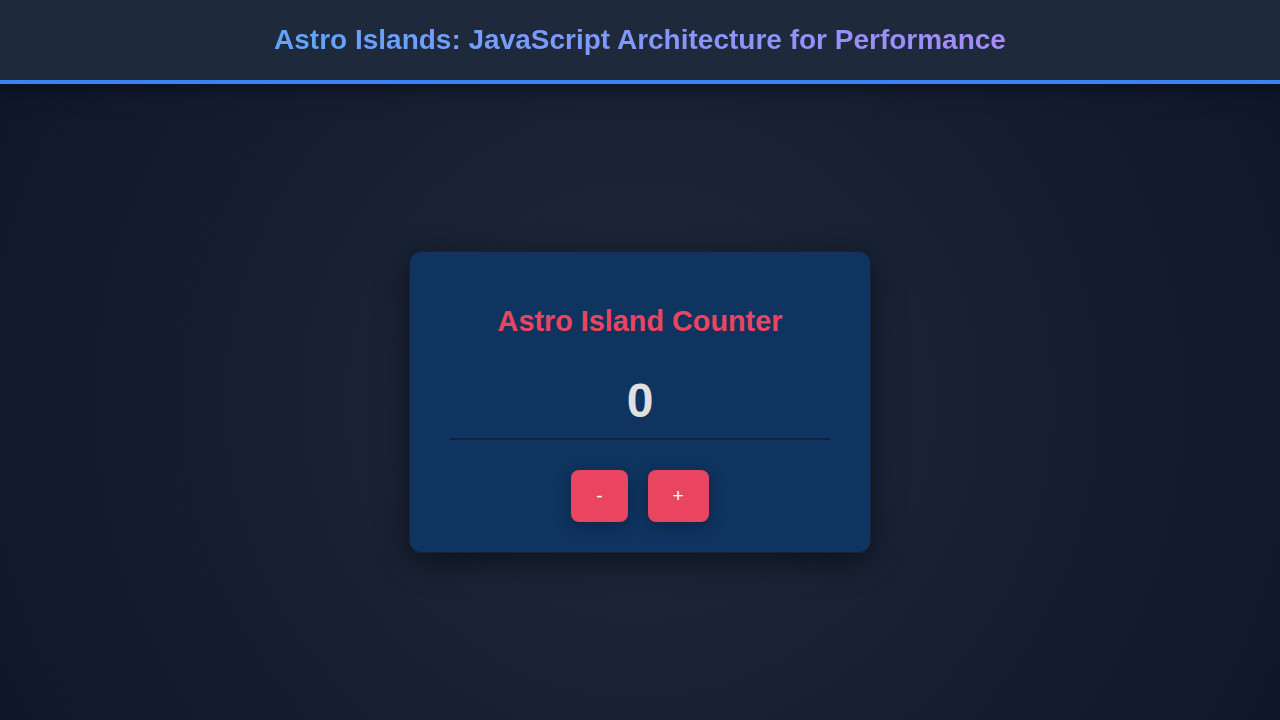
    <div class="island-component">
        <h2>Astro Island Counter</h2>
        <p class="description">
            This component simulates an "island" of interactivity in Astro.
            It's a client-side hydrated JavaScript component running independently.
        </p>
        <div class="counter-display" id="counterValue">0</div>
        <div class="counter-controls">
            <button class="counter-button" id="decrementBtn">-</button>
            <button class="counter-button" id="incrementBtn">+</button>
        </div>
    </div>
    <script src="script.js" defer></script>
</body>
</html>
script.js
// Self-executing function to encapsulate scope
(function() {
    let count = 0;
    const counterValueElement = document.getElementById('counterValue');
    const incrementBtn = document.getElementById('incrementBtn');
    const decrementBtn = document.getElementById('decrementBtn');

    if (!counterValueElement || !incrementBtn || !decrementBtn) {
        console.error("One or more counter elements not found. Island not hydrated.");
        return; // Exit if essential elements are missing
    }

    function updateCounter() {
        counterValueElement.textContent = count;
    }

    // Event listeners
    incrementBtn.addEventListener('click', () => {
        count++;
        updateCounter();
    });

    decrementBtn.addEventListener('click', () => {
        count--;
        updateCounter();
    });

    // Initial update when the script loads
    updateCounter();

    // Example of how Astro might hydrate or initialize:
    // In a real Astro app, this script would likely be imported or managed by Astro,
    // and would only run on the client when specified (e.g., client:load, client:visible).
    console.log("Astro-like Island component script loaded and initialized.");
})();
CSS Styling
Styling with Astro follows a similarly efficient path. CSS for your entire page can be global, or you can opt for component-scoped styles. When you define a component that becomes an ‘island,’ its associated CSS (if not global) will often be bundled and loaded with that specific component.
This approach ensures that only the CSS necessary for visible components is delivered, further reducing initial page weight. Astro encourages a modular approach, making your styles maintainable and performant. You can use any CSS framework or preprocessor you prefer, like Tailwind CSS, SCSS, or vanilla CSS, directly within your components.
styles.css
/* General Body Styles */
body {
    margin: 0;
    padding: 0;
    font-family: Arial, Helvetica, sans-serif;
    background-color: #1a1a2e; /* Dark background */
    color: #e0e0e0; /* Light text */
    display: flex;
    justify-content: center;
    align-items: center;
    min-height: 100vh;
    box-sizing: border-box;
    overflow: hidden; /* Ensure no scrollbars */
}

/* Island Component Container */
.island-component {
    background-color: #0f3460; /* Slightly lighter dark blue */
    border-radius: 12px;
    padding: 30px 40px;
    box-shadow: 0 8px 30px rgba(0, 0, 0, 0.5); /* Deep shadow */
    text-align: center;
    max-width: 380px;
    width: 90%; /* Responsive width */
    border: 1px solid #16213e; /* Subtle border */
    box-sizing: border-box; /* Include padding and border in the element's total width and height */
    overflow: hidden; /* Prevent content from spilling out */
}

.island-component h2 {
    color: #e94560; /* Accent color for title */
    margin-bottom: 15px;
    font-size: 1.8em;
}

.island-component .description {
    font-size: 0.9em;
    color: #a0a0a0;
    margin-bottom: 25px;
    line-height: 1.5;
}

/* Counter Display */
.counter-display {
    font-size: 3em;
    font-weight: bold;
    color: #e0e0e0;
    margin-bottom: 30px;
    padding: 10px 0;
    border-bottom: 2px solid #16213e;
}

/* Counter Controls (Buttons) */
.counter-controls {
    display: flex;
    justify-content: center;
    gap: 20px;
}

.counter-button {
    background-color: #e94560; /* Accent button color */
    color: #ffffff;
    border: none;
    padding: 15px 25px;
    border-radius: 8px;
    font-size: 1.2em;
    cursor: pointer;
    transition: background-color 0.3s ease, transform 0.2s ease;
    box-shadow: 0 4px 15px rgba(0, 0, 0, 0.3);
    box-sizing: border-box;
}

.counter-button:hover {
    background-color: #ff6a80; /* Lighter on hover */
    transform: translateY(-2px);
}

.counter-button:active {
    transform: translateY(0);
    box-shadow: 0 2px 10px rgba(0, 0, 0, 0.3);
}
Step-by-Step Breakdown
The Core Idea: Static HTML First
At its heart, the Astro Islands architecture champions the idea of shipping static HTML to the browser as fast as possible. When a user requests a page, Astro generates the full HTML on the server during the build process. This means the browser receives a complete, renderable page instantly. There’s no waiting for JavaScript to download, parse, and execute just to see content. Users get a meaningful first paint extremely quickly, a critical factor for perceived performance and SEO rankings. This initial load experience is incredibly smooth and responsive by default.
The Magic of Hydration: When JavaScript Awakens
The real cleverness of Astro Islands emerges with hydration. When a component needs to be interactive, Astro uses client directives to determine *when* its JavaScript should load and run. Consider this: do you really need a complex photo gallery’s JavaScript to load if it’s far down the page and the user hasn’t scrolled yet? Probably not! Astro offers several powerful strategies:
client:load: Loads and hydrates the component’s JavaScript immediately when the page loads. Use sparingly for critical, above-the-fold interactivity.client:idle: Loads and hydrates the component’s JavaScript after the initial page load has completed and the browser is idle. This is great for less critical but still important interactive elements.client:visible: Loads and hydrates the component’s JavaScript only when the component enters the viewport. This is incredibly efficient for components further down the page. You can read more about how this works behind the scenes with concepts like the Intersection Observer API on MDN.client:media="(min-width: 768px)": Loads and hydrates only when a specific media query is met. Perfect for mobile-specific or desktop-specific interactivity.
This granular control ensures you only ship and execute JavaScript when and where it’s absolutely necessary. This dramatically reduces your Total Blocking Time (TBT) and improves your Time To Interactive (TTI) scores.
Component Isolation and Reusability
Each Astro Island is an isolated unit, bringing its own JavaScript and state. This makes components highly reusable across your site. An interactive carousel built for one page can be dropped into another without concern for global JavaScript conflicts or unnecessary overhead. This approach also fosters a robust development experience. Developers can build components using their favorite UI frameworks like React, Vue, Svelte, or Preact, and Astro gracefully integrates them. Moreover, learning about Modular JavaScript Components: Architecture Tutorial can provide further insights into designing these self-contained, reusable pieces of UI.
“The beauty of Astro Islands isn’t just about speed; it’s about empowering developers to intentionally design for performance, making interactivity a conscious decision rather than an accidental overhead.”
Managing State and Interactivity
Within their individual boundaries, Astro Islands manage their own state and interactivity using the client-side JavaScript of their chosen framework. For instance, a React component island will use React’s state management, while a Vue island will use Vuex or Pinia. Astro acts as the orchestrator, ensuring these islands hydrate correctly without interfering with each other. This clear separation makes debugging easier and prevents unnecessary re-renders across the entire page. For example, building an interactive component like a Password Strength Indicator: HTML, CSS & JavaScript Design would benefit immensely from this isolated hydration model.
Optimizing Development Workflow
Astro’s developer experience is truly top-notch. It offers features like Hot Module Replacement (HMR) and a fast development server. This means you can make changes to your components and see them reflected in the browser almost instantly without a full page reload. Understanding HMR JavaScript: Hot Module Replacement Explained truly helps appreciate this efficiency. This rapid feedback loop makes the development of interactive islands a joy, allowing you to iterate quickly and maintain flow.
Making It Responsive
Responsiveness in an Astro Islands context is inherently efficient. Since the majority of your content is static HTML and CSS, it adapts gracefully to different screen sizes by default. For interactive elements, you can use responsive media queries within your CSS as usual. Crucially, Astro allows for conditional loading of islands based on media queries using directives like client:media. This means a complex interactive map island might only load its JavaScript on desktop viewports, while a simplified button takes its place on mobile. This significantly reduces the JavaScript payload for mobile users, enhancing performance where it matters most. It’s a mobile-first philosophy that applies to behavior, not just visuals.
“Prioritizing mobile performance isn’t just a best practice; with Astro Islands, it’s a built-in advantage, ensuring lighter, faster experiences for every user, on any device.”
Final Output
The ultimate goal of using Astro Islands is a web experience that feels incredibly fast and smooth. When a user lands on your page, the content is there, instantly. The initial render is quick, and interactive elements gracefully appear and become usable precisely when needed. This architecture consistently leads to excellent Lighthouse scores, especially for performance metrics like First Contentful Paint (FCP) and Time To Interactive (TTI). Your users perceive a snappier, more reliable website, leading to higher engagement and satisfaction. It’s a paradigm shift that puts the user experience first by default, not as an afterthought.
Conclusion
The Astro Islands architecture provides a powerful, pragmatic solution to the long-standing challenge of delivering high-performance, interactive websites. By defaulting to static HTML and strategically hydrating only the necessary JavaScript for interactive components, we can achieve exceptional load times and superior user experiences. This approach is not just about micro-optimizations; it’s a fundamental rethinking of how web pages are constructed and delivered.
Whether you’re building a content-heavy blog, an e-commerce platform, or a complex application, adopting Astro Islands can dramatically improve your site’s speed, accessibility, and overall user satisfaction. Embrace this architecture to build the next generation of fast, dynamic, and delightful web experiences. It truly represents a significant leap forward in frontend development.