When you embark on building robust web applications, understanding strong API Design is absolutely paramount. It determines how your components communicate, how third-party services integrate, and ultimately, how maintainable and scalable your codebase becomes. As JavaScript developers, we’re often consuming APIs, but what happens when we need to design our own? Let’s dive deep into the core principles using practical JavaScript examples to make these abstract concepts concrete.
What We Are Building: A "Developer Tasks" API
To truly grasp effective API Design, we need a practical scenario. We’re going to build a simple client-side application that manages a list of "Developer Tasks." Think of it as a mini-project management tool right in your browser. This isn’t just about making a pretty UI; it’s about designing the underlying JavaScript "API" that our UI will interact with. This approach helps us focus on the principles of clear communication, predictability, and ease of use, even without a backend server.
Why this project? Task management applications are evergreen; they teach fundamental data operations (create, read, update, delete – CRUD) in a relatable context. By simulating an API purely in JavaScript, we gain full control over the design choices, allowing us to highlight how good principles lead to a more intuitive and resilient system. This knowledge is invaluable, whether you’re building a new component library, structuring a complex frontend application, or even preparing to design a full-fledged backend API in the future.
HTML Structure
Our HTML will be straightforward, providing the basic layout for our task list. We’ll have an input field for new tasks, a button to add them, and a container to display our tasks.
index.html
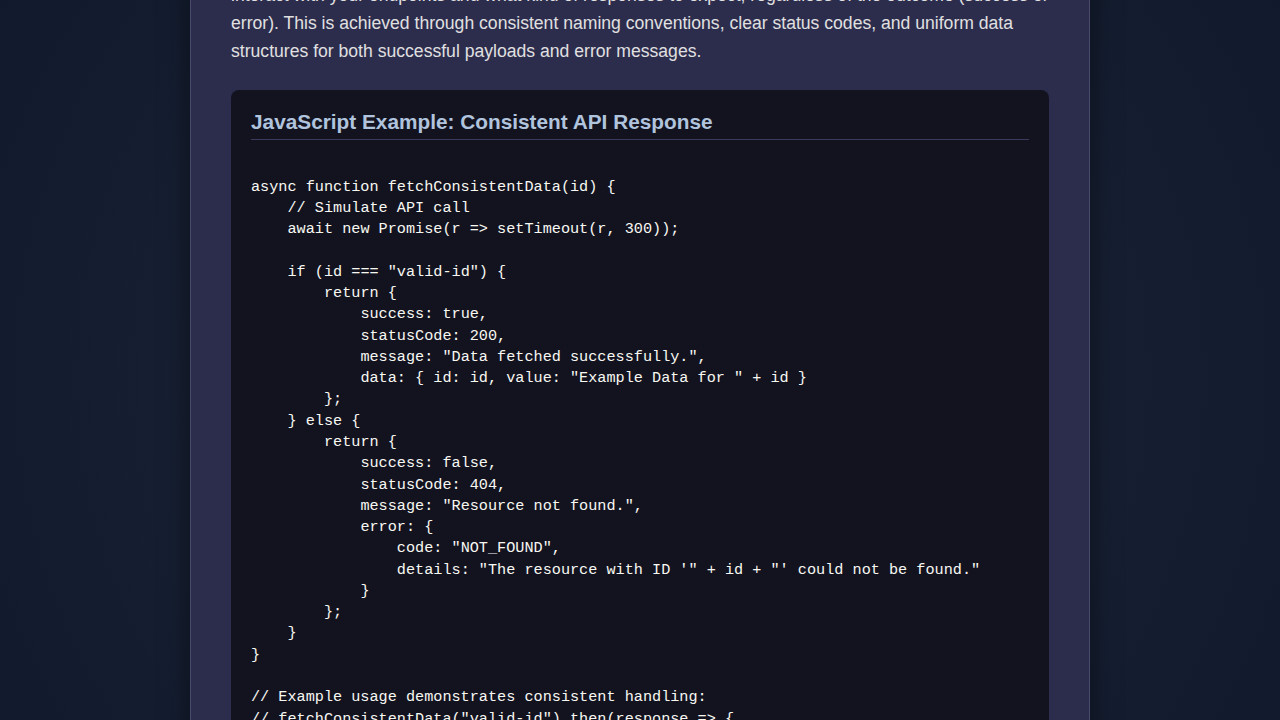
<!DOCTYPE html> <html lang="en"> <head> <meta charset="UTF-8"> <meta name="viewport" content="width=device-width, initial-scale=1.0"> <title>API Design Principles with JavaScript</title> <link rel="stylesheet" href="styles.css"> </head> <body> <div class="api-design-tutorial"> <h1 class="tutorial-title">API Design Principle: Predictability</h1> <p class="tutorial-description"> Predictability is key for a good API. Users should intuitively understand how to interact with your API and what to expect from its responses. Consistent naming, clear error messages, and well-defined data structures contribute to a predictable and user-friendly experience. </p> <div class="code-example"> <h2 class="code-title">Example: Consistent API Response Structure</h2> <pre><code class="language-js"> // The JavaScript code demonstrating predictability // is linked via script.js and logs output to the browser console. // Open your browser's developer console (F12) to see example API calls and responses. </code></pre> </div> </div> <script src="script.js"></script> </body> </html>script.js
/** * API Design Principle: Predictability * * This JavaScript function demonstrates a consistent and predictable API response structure. * Regardless of success or failure, the API always returns an object with 'success', * 'statusCode', 'message', and either 'data' or 'error' properties. This consistency * makes it easier for consumers to integrate and handle responses. */ async function getResourceData(resourceId) { console.log(`Attempting to fetch data for resource: ${resourceId}`); try { // Simulate an asynchronous operation (e.g., fetching from a server) await new Promise(resolve => setTimeout(resolve, 800)); // 0.8 second delay // Simulate random success/failure for demonstration const isSuccess = Math.random() > 0.3; // 70% chance of success if (isSuccess) { // Predictable success response structure return { success: true, statusCode: 200, message: `Resource '${resourceId}' fetched successfully.`, data: { id: resourceId, name: `Example Resource ${resourceId}`, type: 'tutorial', createdAt: new Date().toISOString() } }; } else { // Predictable error response structure return { success: false, statusCode: 404, message: `Resource '${resourceId}' not found.`, error: { code: 'RESOURCE_NOT_FOUND', details: `The resource with ID '${resourceId}' does not exist.` } }; } } catch (error) { // Predictable unexpected error response structure return { success: false, statusCode: 500, message: 'An unexpected server error occurred.', error: { code: 'INTERNAL_SERVER_ERROR', details: error.message || 'Unknown error.' } }; } } // --- How to use this predictable API function (check browser console) --- // Example 1: Successful fetch getResourceData('user-123') .then(response => { console.log("\n--- API Call 1 (Success) ---"); console.log(response); if (response.success) { console.log("Data received:", response.data); } }); // Example 2: Potentially failed fetch (due to random chance) getResourceData('product-456') .then(response => { console.log("\n--- API Call 2 (Potential Failure) ---"); console.log(response); if (!response.success) { console.error("Error received:", response.error.details); } }); // Example 3: Another fetch getResourceData('post-789') .then(response => { console.log("\n--- API Call 3 ---"); console.log(response); });CSS Styling
We’ll apply some minimal CSS to make our task manager visually appealing and readable. The focus here isn’t intricate design, but rather clear presentation to support our JavaScript logic.
styles.css
body { margin: 0; padding: 0; box-sizing: border-box; font-family: Arial, Helvetica, sans-serif; background-color: #1a1a2e; color: #e0e0e0; display: flex; justify-content: center; align-items: flex-start; /* Align to start for more natural scroll */ min-height: 100vh; padding: 20px; } .api-design-tutorial { max-width: 800px; width: 100%; background-color: #2c2c4d; border-radius: 12px; box-shadow: 0 4px 15px rgba(0, 0, 0, 0.4); padding: 30px; text-align: left; border: 1px solid #4a4a6b; box-sizing: border-box; overflow: hidden; /* Ensure content fits */ } .tutorial-title { color: #90d8e8; font-size: 2em; margin-top: 0; margin-bottom: 15px; border-bottom: 2px solid #5a5a8a; padding-bottom: 10px; } .tutorial-description { font-size: 1.05em; line-height: 1.6; margin-bottom: 25px; } .code-example { background-color: #131320; padding: 20px; border-radius: 8px; overflow: hidden; max-width: 100%; box-sizing: border-box; } .code-title { color: #b0c4de; font-size: 1.2em; margin-top: 0; margin-bottom: 15px; padding-bottom: 5px; border-bottom: 1px solid #3a3a5a; } pre { margin: 0; padding: 0; overflow-x: auto; } code { font-family: 'Courier New', Courier, monospace; font-size: 0.9em; color: #f8f8f2; line-height: 1.4; display: block; white-space: pre-wrap; /* Allows line wrapping */ }Step-by-Step Breakdown: Crafting Our JavaScript API
Now, let’s get to the heart of the matter: designing our JavaScript API for managing tasks. We’ll cover several key principles that make an API great.
Consistency and Predictability: The Foundation
A well-designed API is consistent. This means using similar naming conventions, predictable return types, and uniform error structures across all its methods. Our
DeveloperTasksAPIobject will encapsulate all task-related operations, ensuring a single source of truth and a consistent interface.Consider this: if one method returns an array of objects and another returns a single object, it can become confusing. Therefore, we’ll aim for consistent data structures. Furthermore, our methods will consistently return Promises, even for synchronous operations, to provide a unified asynchronous interface. This makes future integration with actual backend APIs much smoother.
We’re starting with a simple in-memory store for our tasks. This helps us focus purely on the API interface itself, abstracting away the data persistence for now. Observe how we immediately set up a `_tasks` array and a `_nextId` for internal state management.
class DeveloperTasksAPI { constructor() { this._tasks = []; this._nextId = 1; // Simulate some initial data this.addTask('Learn API Design Principles', true); this.addTask('Implement a JavaScript API'); this.addTask('Write detailed documentation'); } // ... API methods will go here ... }Usability and Simplicity: Intuitive Operations
An API should be easy to understand and use. Its methods should clearly indicate their purpose, and the number of arguments should be minimal yet sufficient. Our API will expose methods for CRUD operations:
getAllTasks(): Fetches all tasks.getTaskById(id): Retrieves a specific task.addTask(description, isCompleted = false): Adds a new task.updateTask(id, updates): Modifies an existing task.deleteTask(id): Removes a task.
Notice the self-explanatory names. We’re keeping the arguments simple, like just a description for adding a task. The isCompleted flag has a sensible default. This reduces friction for developers using our API.
A great API feels like a natural extension of the language itself, not an obstacle to be overcome.
Here’s how we might implement our first set of methods:
class DeveloperTasksAPI {
    // ... constructor ...

    getAllTasks() {
        return Promise.resolve([...this._tasks]); // Return a copy to prevent external modification
    }

    getTaskById(id) {
        const task = this._tasks.find(task => task.id === id);
        return Promise.resolve(task || null);
    }

    addTask(description, isCompleted = false) {
        if (!description || typeof description !== 'string') {
            return Promise.reject(new Error('Task description is required and must be a string.'));
        }
        const newTask = {
            id: this._nextId++,
            description: description,
            isCompleted: isCompleted,
            createdAt: new Date().toISOString()
        };
        this._tasks.push(newTask);
        return Promise.resolve(newTask);
    }

    updateTask(id, updates) {
        const taskIndex = this._tasks.findIndex(task => task.id === id);
        if (taskIndex === -1) {
            return Promise.reject(new Error(`Task with ID ${id} not found.`));
        }
        const task = this._tasks[taskIndex];
        const updatedTask = { ...task, ...updates, updatedAt: new Date().toISOString() };
        this._tasks[taskIndex] = updatedTask;
        return Promise.resolve(updatedTask);
    }

    deleteTask(id) {
        const initialLength = this._tasks.length;
        this._tasks = this._tasks.filter(task => task.id !== id);
        if (this._tasks.length === initialLength) {
            return Promise.reject(new Error(`Task with ID ${id} not found.`));
        }
        return Promise.resolve({ success: true, message: `Task ${id} deleted.` });
    }
}
Error Handling: Graceful Failure
A robust API anticipates failures and communicates them clearly. Instead of silent failures or generic errors, our API methods will return rejected Promises with meaningful error messages. This allows consumers to understand what went wrong and react accordingly. We’re using standard Error objects, making them easy to catch and inspect.
For example, in addTask, we check for a valid description. If it’s missing, we reject the Promise with a specific error. Similarly, for updateTask and deleteTask, we check if the task actually exists before attempting an operation. These checks are crucial for reliable data management. Good error messages save countless debugging hours.
This principle extends beyond just validation. Think about network requests: what happens if the server is down? A well-designed API (or the wrapper around it) would provide a clear error stating this. You might find resources on MDN Web Docs about Promises helpful for further reading on handling asynchronous operations and errors.
Integrating Our API with the UI
Now that our DeveloperTasksAPI is defined, let’s connect it to our HTML. This is where the principles of usability and consistency really shine. Our UI code becomes simpler and more readable because the API abstracts away the complexity of data manipulation. We’ll create an instance of our API and then use its methods to render, add, and manage tasks.
First, we need to grab our DOM elements. Then, we can set up event listeners. When the "Add Task" button is clicked, we call addTask(). When a task needs to be toggled or deleted, we leverage our API’s updateTask() and deleteTask() methods. The UI simply calls these methods and then re-renders the list based on the new API state.
For rendering the list efficiently, especially with many items, consider techniques like Image Lazy Loading with JavaScript for Performance to defer expensive operations or even architectural patterns like those found in Astro Islands: JavaScript Architecture for Performance for highly performant UIs. While our task list is small, keeping performance in mind is always a good practice.
// Initialize our API
const tasksAPI = new DeveloperTasksAPI();
// Get DOM elements
const taskInput = document.getElementById('taskInput');
const addTaskBtn = document.getElementById('addTaskBtn');
const taskList = document.getElementById('taskList');
// Function to render tasks
async function renderTasks() {
taskList.innerHTML = ''; // Clear existing tasks
const tasks = await tasksAPI.getAllTasks();
if (tasks.length === 0) {
taskList.innerHTML = 'No tasks yet. Add one! ';
return;
}
tasks.forEach(task => {
const li = document.createElement('li');
li.className = task.isCompleted ? 'task-item completed' : 'task-item';
li.dataset.id = task.id;
li.innerHTML = `
<span class="task-description">${task.description}</span>
<div class="task-actions">
<button class="toggle-btn">${task.isCompleted ? 'Undo' : 'Complete'}</button>
<button class="delete-btn">Delete</button>
</div>
`;
taskList.appendChild(li);
});
}
// Event Listeners
addTaskBtn.addEventListener('click', async () => {
const description = taskInput.value.trim();
if (description) {
try {
await tasksAPI.addTask(description);
taskInput.value = '';
await renderTasks();
} catch (error) {
console.error('Error adding task:', error.message);
alert(error.message); // User-friendly alert
}
} else {
alert('Task description cannot be empty.');
}
});
taskList.addEventListener('click', async (event) => {
const li = event.target.closest('.task-item');
if (!li) return;
const taskId = parseInt(li.dataset.id);
if (event.target.classList.contains('toggle-btn')) {
const task = await tasksAPI.getTaskById(taskId);
if (task) {
try {
await tasksAPI.updateTask(taskId, { isCompleted: !task.isCompleted });
await renderTasks();
} catch (error) {
console.error('Error updating task:', error.message);
alert(error.message);
}
}
} else if (event.target.classList.contains('delete-btn')) {
if (confirm('Are you sure you want to delete this task?')) {
try {
await tasksAPI.deleteTask(taskId);
await renderTasks();
} catch (error) {
console.error('Error deleting task:', error.message);
alert(error.message);
}
}
}
});
// Initial render
renderTasks();
This integration clearly demonstrates the power of a well-defined API. The UI logic is minimal; it mostly calls API methods and updates the display. The complexity of data manipulation is neatly tucked away.
API design is less about writing code and more about designing contracts. Make those contracts clear and consistent.
Making It Responsive
While our focus is primarily on API design, ensuring the user interface is responsive is always a good practice. For this simple task manager, we’ll use a basic media query to adjust the layout for smaller screens. This ensures the input and task list remain usable on mobile devices, enhancing the overall user experience.
A mobile-first approach is generally recommended. We design for the smallest screen first, then progressively enhance for larger displays. This typically involves setting flexible widths, using `flexbox` or `grid` for layout, and then introducing `min-width` media queries to add more complex layouts as screen size increases. Explore more about responsive design on CSS-Tricks to deepen your understanding.
Final Output: A Functional Task Manager
After bringing all these pieces together, our application will present a clean, functional task manager. You’ll see an input field at the top, allowing you to add new tasks. Below, the list dynamically updates, displaying each task with options to mark it complete or delete it. This seemingly simple application elegantly demonstrates the profound impact of thoughtful API design on both development efficiency and user interaction. Furthermore, a robust Password Strength Indicator: HTML, CSS & JavaScript Design follows similar principles of clear feedback and user guidance.
Conclusion: Mastering Your API Design Journey
We’ve walked through the essential principles of API Design, using a practical JavaScript task manager as our guide. By focusing on consistency, predictability, usability, and robust error handling, we created an internal API that’s a joy to work with. These principles aren’t just for external REST APIs; they’re fundamental to structuring any module or component that exposes an interface for others (or your future self) to use.
Implementing these design choices upfront saves immense time down the line. It leads to more maintainable code, fewer bugs, and a more pleasant development experience for anyone interacting with your system. Keep practicing these principles in your projects, and you’ll find yourself building more resilient and elegant JavaScript applications. Happy coding!